
This post implements a previous post that explains how to convert 32-bit floating point numbers to binary numbers in the IEEE 754 format. What we have is some C++ / Java / Python routines that will allows us to convert a floating point value into it’s equivalent binary counterpart, using the standard IEEE 754 representation consisting of the sign bit, exponent and mantissa (fractional part).
Conversely, there is also a function that converts a string encoding of the IEEE 754 binary number and converts it back to a floating point value. I had been meaning to implement something like this for some time, as there are one or two applications I have in mind for which these conversions would be useful: Genetic Algorithms operating on floating point numbers for example.
Without further ado, please find code snippets and example outputs below:
C++ source code
#include <limits.h>
#include <iostream>
#include <math.h>
#include <bitset>

// Convert the 32-bit binary encoding into hexadecimal
int Binary2Hex( std::string Binary )
{
	std::bitset<32> set(Binary);
	int hex = set.to_ulong();

	return hex;
}

// Convert the 32-bit binary into the decimal
float GetFloat32( std::string Binary )
{
	int HexNumber = Binary2Hex( Binary );

	bool negative  = !!(HexNumber & 0x80000000);
	int  exponent  =   (HexNumber & 0x7f800000) >> 23;
	int sign = negative ? -1 : 1;

	// Subtract 127 from the exponent
	exponent -= 127;

	// Convert the mantissa into decimal using the
	// last 23 bits
	int power = -1;
	float total = 0.0;
	for ( int i = 0; i < 23; i++ )
	{
		int c = Binary[ i + 9 ] - '0';
		total += (float) c * (float) pow( 2.0, power );
		power--;
	}
	total += 1.0;

	float value = sign * (float) pow( 2.0, exponent ) * total;

	return value;
}

// Get 32-bit IEEE 754 format of the decimal value
std::string GetBinary32( float value )
{
	union
    {
         float input;   // assumes sizeof(float) == sizeof(int)
         int   output;
    }    data;

	data.input = value;

	std::bitset<sizeof(float) * CHAR_BIT>   bits(data.output);

	std::string mystring = bits.to_string<char,
		                                  std::char_traits<char>,
										  std::allocator<char> >();

	return mystring;
}


int main()
{
	// Convert 19.5 into IEEE 754 binary format..
	std::string str = GetBinary32( (float) 19.5 );
	std::cout << "Binary equivalent of 19.5:" << std::endl;
	std::cout << str << std::endl << std::endl;

	// .. and back again
    float f = GetFloat32( str );
	std::cout << "Decimal equivalent of " << str << ":" << std::endl;
	std::cout << f << std::endl;

	return 0;
}
Giving us the following output:
When float data types are unavailable
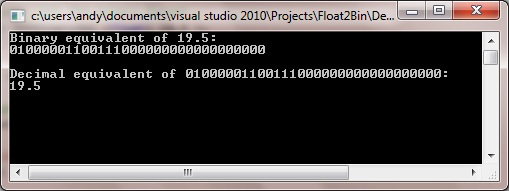
As pointed out by ‘johnsmithx’ in the comments below, what if you don’t have floats available, such as when using Meta Trader 4? Here is how to emulate it using doubles and ints, which I’ve posted here using the nice formatting that is as yet unavailable in the comments boxes:
int DoubleToBinary32(double value)
{
  int minus = 0, integer, exponent = 127, fraction = 0, i, result;

  if(value < 0) { minus = 0x80000000; value = -value; }
  integer = floor(value);
  value -= integer;
  for(i = 22; i >= 0; i--)
    {
    value += value;
    fraction += floor(value) * pow(2, i);
    value -= floor(value);
    }
  while((integer != 1) && (exponent > 0) && (exponent < 255))
    {
    if(integer > 1)
      {
      fraction = (integer&1)<<22 + fraction>>1;
      integer = integer>>1;
      exponent++;
      }
    else
      {
      integer = (fraction&0x400000)>>22;
      fraction = (fraction&0x3FFFFF)<<1;
      value += value;
      fraction += floor(value);
      value -= floor(value);
      exponent--;
      }
    }
  result = minus + exponent<<23 + fraction;
  return(result);
}

double Binary32ToDouble(int value)
{
  int minus = -1, exponent;
  double fraction, result;

  if(value&0x80000000 == 0) minus = 1;
  exponent = ((value&0x7F800000)>>23) - 127;
  fraction = value&0x7FFFFF + 0x800000;
  fraction = fraction / 0x800000;
  result = minus * fraction * pow(2, exponent);
  return(result);
}
Java source code
Of course, with Java this is all a lot simpler, since the conversions are already pretty much done for us:
public class main {

	// Convert the 32-bit binary into the decimal
	private static float GetFloat32( String Binary )
	{
		int intBits = Integer.parseInt(Binary, 2);
		float myFloat = Float.intBitsToFloat(intBits);
	    return myFloat;
	}

	// Get 32-bit IEEE 754 format of the decimal value
	private static String GetBinary32( float value )
	{
		int intBits = Float.floatToIntBits(value);
		String binary = Integer.toBinaryString(intBits);
		return binary;
	}

	/**
	 * @param args
	 */
	public static void main(String[] args)
	{
		// Convert 19.5 into IEEE 754 binary format..
	    String str = GetBinary32( (float) 19.5 );
	    System.out.println( "Binary equivalent of 19.5:" );
	    System.out.println( str );

	    // .. and back again
	    float f = GetFloat32( str );
	    System.out.println( "Decimal equivalent of " + str + ":");
	    System.out.println( f );
	}
}
Giving the following output:
Binary equivalent of 19.5:

1000001100111000000000000000000

Decimal equivalent of 1000001100111000000000000000000:

19.5
Python source code
Remember that in Python floats are represented by IEEE 754 floating-point format which are 64 bits long – not 32 bits.
import struct

getBin = lambda x: x > 0 and str(bin(x))[2:] or "-" + str(bin(x))[3:]

def floatToBinary64(value):
    val = struct.unpack('Q', struct.pack('d', value))[0]
    return getBin(val)

def binaryToFloat(value):
    hx = hex(int(value, 2))
    return struct.unpack("d", struct.pack("q", int(hx, 16)))[0]

# floats are represented by IEEE 754 floating-point format which are
# 64 bits long (not 32 bits)

# float to binary
binstr = floatToBinary64(19.5)
print('Binary equivalent of 19.5:')
print(binstr + '\n')

# binary to float
fl = binaryToFloat(binstr)
print('Decimal equivalent of ' + binstr)
print(fl)
This gives the following console output:
Binary equivalent of 19.5:

100000000110011100000000000000000000000000000000000000000000000
Decimal equivalent of 100000000110011100000000000000000000000000000000000000000000000
19.5
For more number system conversions in C++, see this post.

