
Listing1: Serialization of STL containers: a std::vector example using text archives
Your intuition may tell you to iterate through the STL container in order to serialize it, but it’s actually a lot simpler. First of all, be sure to include the necessary vector.hpp include file:
#include <boost/serialization/vector.hpp>;
And then simply serialize the std::vector data member(s):
template<class Archive>
void serialize(Archive & ar, const unsigned int version)
{
  ar & filenames;
}
#include <iostream>
#include <vector>;
#include <fstream>;
#include <boost/serialization/vector.hpp>
#include <boost/archive/text_oarchive.hpp>
#include <boost/archive/text_iarchive.hpp>

class Info
{
private:
    // Allow serialization to access non-public data members.
    friend class boost::serialization::access;

    // Serialize the std::vector member of Info
    template<class Archive>
    void serialize(Archive & ar, const unsigned int version)
    {
      ar & filenames;
    }

    std::vector<std::string> filenames;

public:
    void AddFilename( const std::string& filename );
    void Print() const;
};

void Info::Print() const
{
    std::copy(filenames.begin(),
              filenames.end(),
              std::ostream_iterator<std::string>(std::cout, "\n"));
}

void Info::AddFilename( const std::string& filename )
{
    filenames.push_back( filename );
}

int main(int argc, char** argv)
{
    Info info;
    info.AddFilename( "ThisFile.txt" );
    info.AddFilename( "ThatFile.txt" );
    info.AddFilename( "OtherFile.txt" );

    // Save filename data contained in Info object
    {
      // Create an output archive
      std::ofstream ofs( "store.dat" );
      boost::archive::text_oarchive ar(ofs);

      // Save the data
      ar & info;
    }

    // Restore from saved data and print to verify contents
    Info restored_info;
    {
        // Create and input archive
        std::ifstream ifs( "store.dat" );
        boost::archive::text_iarchive ar(ifs);

        // Load the data
        ar & restored_info;
    }

    restored_info.Print();

    return 0;
}
Giving you the following output from the restored Info data:
ThisFile.txt
ThatFile.txt
OtherFile.txt
Listing 2: Explicitly defining save and load functions
You may need to explicitly define the save and load functions whenever there is asymmetry, such as when versioning is involved. In other words when you don’t want to use the same serialize method to store and restore objects.
The is easily achieved by use of the BOOST_SERIALIZATION_SPLIT_MEMBER() macro, along with splitting the serialize method into separate save and load methods.
Full code listing as follows, which serializes the same Info object:
#include <iostream>
#include <vector>
#include <fstream>
#include <boost/serialization/vector.hpp>
#include <boost/archive/text_oarchive.hpp>
#include <boost/archive/text_iarchive.hpp>;
#include <boost/serialization/split_member.hpp>
class Info
{
private:
// Allow serialization to access non-public data members.
friend class boost::serialization::access;
template<class Archive>
void save(Archive & ar, const unsigned int version) const
{
ar & filenames;
}
template<class Archive>
void load(Archive & ar, const unsigned int version)
{
ar & filenames;
}
BOOST_SERIALIZATION_SPLIT_MEMBER()
std::vector<std::string> filenames;
public:
void AddFilename( const std::string& filename );
void Print() const;
};
void Info::Print() const
{
std::copy(filenames.begin(),
filenames.end(),
std::ostream_iterator<std::string>(std::cout, "\n"));
}
void Info::AddFilename( const std::string& filename )
{
filenames.push_back( filename );
}
int main(int argc, char** argv)
{
Info info;
info.AddFilename( "ThisFile.txt" );
info.AddFilename( "ThatFile.txt" );
info.AddFilename( "OtherFile.txt" );
// Save filename data contained in Info object
{
// Create an output archive
std::ofstream ofs( "store.dat" );
boost::archive::text_oarchive ar(ofs);
// Save the data
ar & info;
}
// Restore from saved data and print to verify contents
Info restored_info;
{
// Create and input archive
std::ifstream ifs( "store.dat" );
boost::archive::text_iarchive ar( ifs );
// Load the data
ar & restored_info;
}
restored_info.Print();
return 0;
}
Giving you the following output from the restored Info data:
ThisFile.txt

ThatFile.txt

OtherFile.txt
Listing 3: Saving and loading multiple objects
The same as listing 2, but what if we wish to save multiple versions of the Info object. This shows you how:
#include <iostream>
#include <vector>
#include <fstream>
#include <boost/serialization/vector.hpp>
#include <boost/archive/text_oarchive.hpp>
#include <boost/archive/text_iarchive.hpp>
#include <boost/serialization/split_member.hpp>

class Info
{
private:
    // Allow serialization to access non-public data members.
    friend class boost::serialization::access;

    template<class Archive>
    void save(Archive & ar, const unsigned int version) const
    {
      ar & filenames;
    }

    template<class Archive>
    void load(Archive & ar, const unsigned int version)
    {
      ar & filenames;
    }

    BOOST_SERIALIZATION_SPLIT_MEMBER()

    std::vector<std::string> filenames;

public:
    void AddFilename( const std::string& filename );
    void Print() const;
};

void Info::Print() const
{
    std::copy(filenames.begin(),
              filenames.end(),
              std::ostream_iterator<std::string>(std::cout, "\n"));
}

void Info::AddFilename( const std::string& filename )
{
    filenames.push_back( filename );
}

int main(int argc, char** argv)
{
	std::vector<Info> infs;

    Info info1, info2;
    info1.AddFilename( "ThisFile.txt" );
    info2.AddFilename( "ThatFile.txt" );
    info2.AddFilename( "OtherFile.txt" );

	info2.AddFilename( "ABC" );
	info2.AddFilename( "123" );
	info2.AddFilename( "XYZ" );

	infs.push_back( info1 );
	infs.push_back( info2 );

    // Save filename data contained in Info object
    {
      // Create an output archive
      std::ofstream ofs( "store.dat" );
      boost::archive::text_oarchive ar(ofs);

      // Save the data
      ar & infs;
    }

    // Restore from saved data and print to verify contents
    std::vector<Info> restored_info;
    {
        // Create and input archive
        std::ifstream ifs( "store.dat" );
        boost::archive::text_iarchive ar( ifs );

        // Load the data
        ar & restored_info;
   }

        std::vector<Info>::const_iterator it = restored_info.begin();
	for (; it != restored_info.end(); ++it)
	{
		Info info = *it;
		info.Print();
	}

    return 0;
}
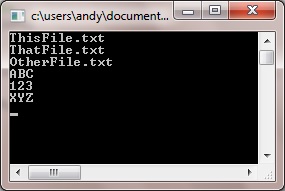
Giving the following output:
Related post:

