
Step 1: Download and install TinyXML
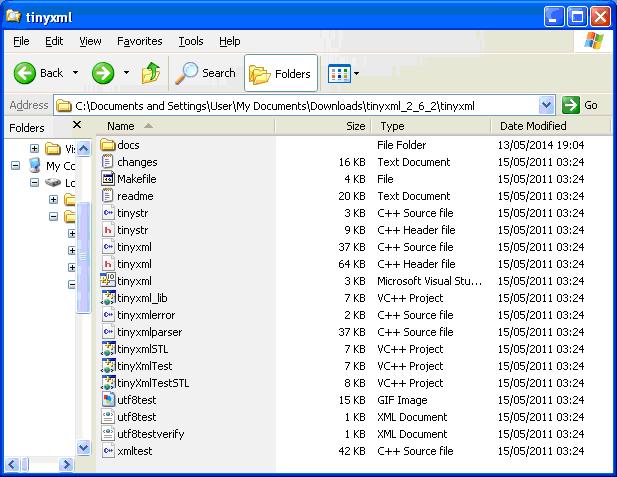
Download and extract the library from
http://www.grinninglizard.com/tinyxml/
TinyXML source files as shown:
Step 2: Configure Visual Studio
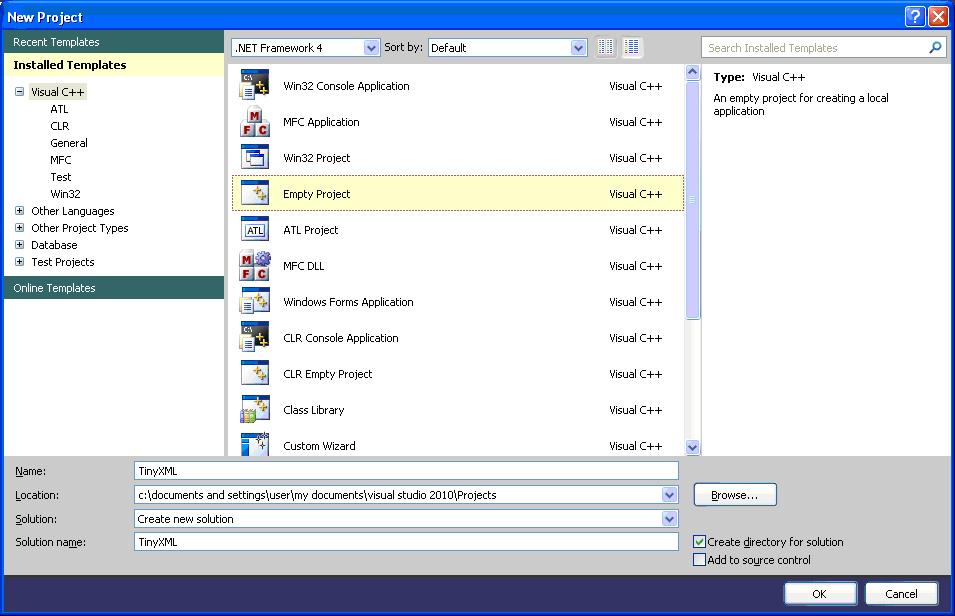
In Visual Studio select File > New > Project. Select Empty Project:
Then copy the following files to your project folder
•	tinystr.h

•	tinyxml.h

•	tinyxmlparser.cpp

•	tinystr.cpp

•	tinyxml.cpp

•	tinyxmlerror.cpp
From solution explorer you can then add these file to your project.
Right-click the project folder and select Add > Existing Item…
Step 3: Try it!
That is all there is to it.
You should now be in a position to try some examples.
For example, consider the following example XML:
<?xml version="1.0" ?>
<file>
  <people>
    <person>
      <forename>Andrew</forename>
      <surname>Jones</surname>
    </person>
    <person>
      <forename>David</forename>
      <surname>Matthews</surname>
    </person>
    <person>
      <forename>Jason</forename>
      <surname>Perkins</surname>
    </person>
  </people>
</file>
We may wish to interrogate the XML and read the values inside the
This can be a straightforward matter of using calls to the the FirstChildElement method. Notice the use of checking for NULL values when using every method call, for additional robustness:
TiXmlDocument doc( "test1.xml" );
doc.LoadFile();

TiXmlElement *l_pRootElement = doc.RootElement();

if( NULL != l_pRootElement )
{
	// set of <person> tags
	TiXmlElement *l_pPeople = l_pRootElement->FirstChildElement( "people" );

	if ( NULL != l_pPeople )
	{
		TiXmlElement *l_pPerson = l_pPeople->FirstChildElement( "person" );

		while( l_pPerson )
		{
			TiXmlElement *l_pForename = l_pPerson->FirstChildElement( "forename" );

			if ( NULL != l_pForename )
			{
				std::cout << l_pForename->GetText();
			}

			TiXmlElement *l_pSurname = l_pPerson->FirstChildElement( "surname" );

			if ( NULL != l_pSurname )
			{
				std::cout << " " << l_pSurname->GetText();
			}

			std::cout << std::endl;

			l_pPerson = l_pPerson->NextSiblingElement( "person" );
		}
	}
}
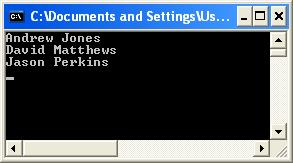
Giving the following output:
As an alternative, handles have been introduced to make the reading of XML values little cleaner.
Thus our code for reading the set of persons reduces to:
TiXmlDocument doc( "test1.xml" );
doc.LoadFile();

TiXmlHandle docHandle( &doc );

TiXmlElement* l_pPerson = docHandle.FirstChild( "file" ).FirstChild( "people" ).Child( "person", 0 ).ToElement();

while( l_pPerson )
{
	TiXmlElement *l_pForename = l_pPerson->FirstChildElement( "forename" );

	if ( NULL != l_pForename )
	{
		std::cout << l_pForename->GetText();
	}

	TiXmlElement *l_pSurname = l_pPerson->FirstChildElement( "surname" );

	if ( NULL != l_pSurname )
	{
		std::cout << " " << l_pSurname->GetText();
	}

	std::cout << std::endl;

	l_pPerson = l_pPerson->NextSiblingElement( "person" );
}
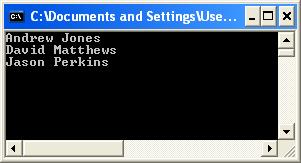
That gives us exactly the same result but with using less code:
Download the Visual Studio 2010 project from here.
Programmatically create and save an XML
Same example as given at the Grinning Lizard site, “Writing a document to a file”:
#include "tinyxml.h"

int main(void)
{
	TiXmlDocument doc;
	TiXmlElement* msg;
 	TiXmlDeclaration* decl = new TiXmlDeclaration( "1.0", "", "" );
	doc.LinkEndChild( decl );

	TiXmlElement * root = new TiXmlElement( "MyApp" );
	doc.LinkEndChild( root );

	TiXmlComment * comment = new TiXmlComment();
	comment->SetValue(" Settings for MyApp " );
	root->LinkEndChild( comment );

	TiXmlElement * msgs = new TiXmlElement( "Messages" );
	root->LinkEndChild( msgs );

	msg = new TiXmlElement( "Welcome" );
	msg->LinkEndChild( new TiXmlText( "Welcome to MyApp" ));
	msgs->LinkEndChild( msg );

	msg = new TiXmlElement( "Farewell" );
	msg->LinkEndChild( new TiXmlText( "Thank you for using MyApp" ));
	msgs->LinkEndChild( msg );

	TiXmlElement * windows = new TiXmlElement( "Windows" );
	root->LinkEndChild( windows );

	TiXmlElement * window;
	window = new TiXmlElement( "Window" );
	windows->LinkEndChild( window );
	window->SetAttribute("name", "MainFrame");
	window->SetAttribute("x", 5);
	window->SetAttribute("y", 15);
	window->SetAttribute("w", 400);
	window->SetAttribute("h", 250);

	TiXmlElement * cxn = new TiXmlElement( "Connection" );
	root->LinkEndChild( cxn );
	cxn->SetAttribute("ip", "192.168.0.1");
	cxn->SetDoubleAttribute("timeout", 123.456); // floating point attrib

	doc.SaveFile( "appsettings.xml" );

	return 0;
}
Which will generate the “appsettings.xml” file:
<?xml version="1.0" ?>
<MyApp>
    <!-- Settings for MyApp -->
    <Messages>
        <Welcome>Welcome to MyApp</Welcome>
        <Farewell>Thank you for using MyApp</Farewell>
    </Messages>
    <Windows>
        <Window name="MainFrame" x="5" y="15" w="400" h="250" />
    </Windows>
    <Connection ip="192.168.0.1" timeout="123.456" />
</MyApp>
Setting the attribute can be applied anywhere, as in this similar example:
#include "tinyxml.h"

int main(void)
{
	TiXmlDocument doc;
	TiXmlElement* msg;
 	TiXmlDeclaration* decl = new TiXmlDeclaration( "1.0", "", "" );
	doc.LinkEndChild( decl );

	TiXmlElement * root = new TiXmlElement( "MyApp" );

	root->SetAttribute("name", "MainFrame");
	root->SetAttribute("x", 5);
	root->SetAttribute("y", 15);
	root->SetAttribute("w", 400);
	root->SetAttribute("h", 250);

	doc.LinkEndChild( root );

	TiXmlComment * comment = new TiXmlComment();
	comment->SetValue(" Settings for MyApp " );
	root->LinkEndChild( comment );

	TiXmlElement * msgs = new TiXmlElement( "Messages" );
	root->LinkEndChild( msgs );

	msg = new TiXmlElement( "Welcome" );
	msg->LinkEndChild( new TiXmlText( "Welcome to MyApp" ));
	msgs->LinkEndChild( msg );

	msg = new TiXmlElement( "Farewell" );
	msg->LinkEndChild( new TiXmlText( "Thank you for using MyApp" ));
	msgs->LinkEndChild( msg );

	doc.SaveFile( "appsettings.xml" );

	return 0;
}
Which produces the xml file as shown:
<?xml version="1.0" ?>
<MyApp name="MainFrame" x="5" y="15" w="400" h="250">
    <!-- Settings for MyApp -->
    <Messages>
        <Welcome>Welcome to MyApp</Welcome>
        <Farewell>Thank you for using MyApp</Farewell>
    </Messages>
</MyApp>

