Antmicro Migrant is available from here:
https://github.com/antmicro/Migrant
To get started do the following steps:
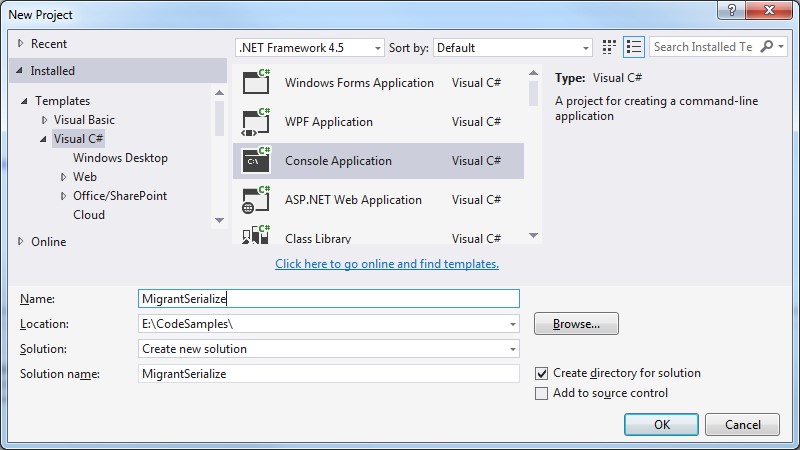
1. Create a new console application in Visual Studio:
2. Install the ‘Migrant’ NuGet package
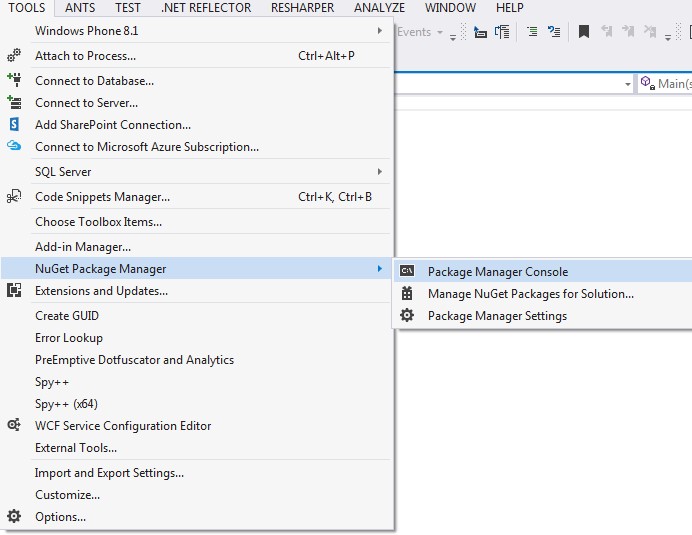
Select Tools > NuGet Package Manager > Package Manager Console:
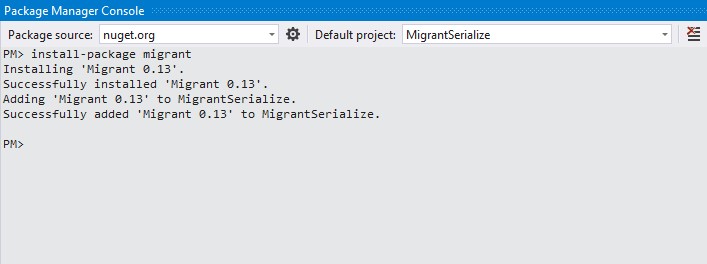
Install Migrant by typing ‘install-package migrant’
3. A simple serialization example.
Modify your Program.cs to perform a basic serialize / deserialize example as shown:
using System;
using System.IO;
using Antmicro.Migrant;

namespace MigrantSerialize
{
   internal class Program
   {
      private static void Main(string[] args)
      {
         var serializer = new Serializer();
         var stream = new MemoryStream();

         var obj = new MyClass
         {
            Name = "XYZ", Value = 111
         };

         serializer.Serialize(obj, stream);
         stream.Seek(0, SeekOrigin.Begin);

         var deserializedObj = serializer.Deserialize<MyClass>(stream);
         Console.WriteLine("De-serialised object: \n");
         Console.WriteLine("Name: " + deserializedObj.Name + "\nValue: " + deserializedObj.Value);
      }

      #region Nested type: MyClass

      public class MyClass
      {
         public string Name { get; set; }
         public int Value { get; set; }
      }

      #endregion
   }
}
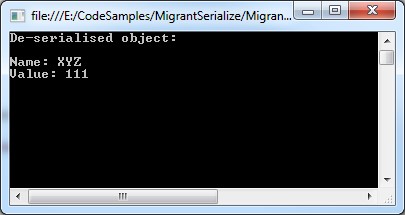
Giving the following output:
4. An example using FileStream to serialize/de-serialize a collection of objects
using System;
using System.Collections.Generic;
using System.IO;
using Antmicro.Migrant;

namespace MigrantSerialize
{
   internal class Program
   {
      private static void Main(string[] args)
      {
         var serializer = new Serializer();
         const string FilePath = @"C:\temp\text.txt";

         if (File.Exists(FilePath))
         {
            File.Delete(FilePath);
         }

         var stream = File.Create(FilePath);

         var objects = new List<MyClass>
         {
            new MyClass
            {
               Name = "ABC", Value = 321
            },
            new MyClass
            {
               Name = "XYZ", Value = 222
            },
            new MyClass
            {
               Name = "IJK", Value = 101
            }
         };

         serializer.Serialize(objects, stream);
         stream.Seek(0, SeekOrigin.Begin);

         var deserializedObj = serializer.Deserialize<IEnumerable<MyClass>>(stream);
         Console.WriteLine("De-serialised objects: \n");

         foreach (var deserializedObject in objects)
         {
            Console.WriteLine("Name: " + deserializedObject.Name + "\tValue: " + deserializedObject.Value);
         }
      }

      #region Nested type: MyClass

      public class MyClass
      {
         public string Name { get; set; }
         public int Value { get; set; }
      }

      #endregion
   }
}
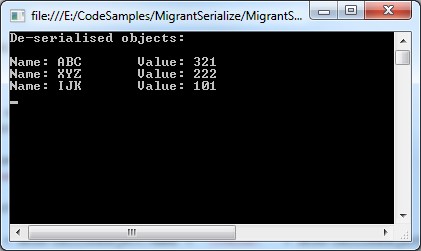
Giving the following output:
5. Serializing and de-serializing a tree-like data structure
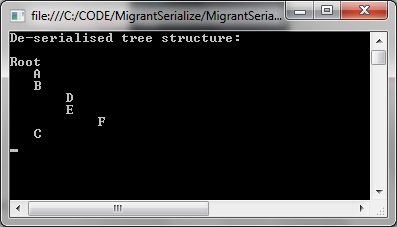
Migrant does the job on tree structures too. In this example a ‘TreeNode’ data structure that contains a list of ‘TreeNode’ structures. TreeNode also contains a method to recursively print its contents as well, indenting the node names by the level of recursion:
using Antmicro.Migrant;
using System;
using System.Collections.Generic;
using System.IO;
using System.Linq;
using System.Text;
using System.Threading.Tasks;

namespace MigrantSerialize
{
    public class TreeNode
    {
        public string Name { get; set; }
        public List<TreeNode> Children = new List<TreeNode>();

        public void Print(TreeNode node, int level)
        {
            if (level == 1)
            {
                Console.WriteLine(node.Name);
            }

            if (node.Children == null)
                return;

            foreach (var childNode in node.Children)
            {
                var textWithPadding = childNode.Name.PadLeft(level * 4, ' ');
                Console.WriteLine(textWithPadding);
                Print(childNode, level + 1);
            }
        }
    }

    internal class Program
    {
        private static void Main(string[] args)
        {
            var serializer = new Serializer();
            const string FilePath = @"C:\temp\text.txt";

            if (File.Exists(FilePath))
            {
                File.Delete(FilePath);
            }

            var stream = File.Create(FilePath);

            var node1 = new TreeNode { Name = "A" };
            var node2 = new TreeNode { Name = "B" };
            var node3 = new TreeNode { Name = "C" };
            var node4 = new TreeNode { Name = "D" };
            var node5 = new TreeNode { Name = "E" };
            var node6 = new TreeNode { Name = "F" };

            var children1 = new List<TreeNode>() { node1, node2, node3 };
            var children2 = new List<TreeNode>() { node4, node5 };
            var children3 = new List<TreeNode>() { node6 };

            var root = new TreeNode { Name = "Root" };
            node5.Children = children3;
            node2.Children = children2;
            root.Children = children1;

            serializer.Serialize(root, stream);
            stream.Seek(0, SeekOrigin.Begin);

            var deserializedObj = serializer.Deserialize<TreeNode>(stream);
            Console.WriteLine("De-serialised tree structure: \n");

            deserializedObj.Print(deserializedObj, 1);
        }
    }
}
Giving the following output:
6. Customising the settings
As an example, you may want to allow for differences in GUID -that can result from different compilations of the same library.
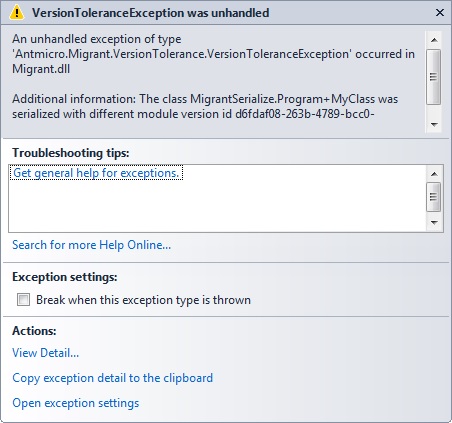
Without setting the version tolerance level your program will probably throw an exception when you re-compile the same code and try to de-serialize the same data file again, precisely because of the mismatch in GUIDs:
Antmicro.Migrant.VersionTolerance.VersionToleranceException was unhandled
HResult=-2146233088
Message=The class MigrantSerialize.Program+MyClass was serialized with different module version id d6fdaf08-263b-4789-bcc0-372b532d05f6, current one is b1e6b693-a4f4-4a2d-9aad-738eb43cc831.
Source=Migrant
To overcome this you can set the VersionToleranceLevel enum to allow for GUID changes:
const VersionToleranceLevel VersionToleranceLevel = VersionToleranceLevel.AllowGuidChange;
and use this when creating your custom settings for serialization/deserialization and version tolerance levels:
var customSettings = new Settings(Method.Generated, Method.Generated, VersionToleranceLevel);
Full code listing shown, that uses the version tolerance. Using this you can re-compile and re-run without the exception:
using System;
using System.IO;
using Antmicro.Migrant;
using Antmicro.Migrant.Customization;

namespace MigrantSerialize
{
    internal class Program
    {
        public const string FilePath = @"E:\temp\datafile.dat";

        private static void Main(string[] args)
        {
            var obj = new MyClass
            {
                Key = "XYZ", Value = 111,

            };

            Serialize(obj);
            Deserialize();
        }

        private static Settings CustomSettings { get; set; }

        #region Nested type: MyClass

        public class MyClass
        {
            public string Key { get; set; }
            public int Value { get; set; }
        }

        #endregion

        public static void Serialize(object obj)
        {
            if (File.Exists(FilePath))
            {
                return;
            }

            var serializer = new Serializer();

            using (var stream = File.Create(FilePath))
            {
                serializer.Serialize(obj, stream);
                stream.Seek(0, SeekOrigin.Begin);
            }
        }

        public static void Deserialize()
        {
            const Method SerializationMethod = Method.Generated;
            const Method DeserializationMethod = Method.Generated;
            const VersionToleranceLevel VersionToleranceLevel = VersionToleranceLevel.AllowGuidChange;

            var settings = new Settings(SerializationMethod, DeserializationMethod, VersionToleranceLevel);
            var deserializer = new Serializer(settings);

            using (var stream = File.OpenRead(FilePath))
            {
                var deserializedObj = deserializer.Deserialize<MyClass>(stream);
                Console.WriteLine("De-serialised object: \n");
                Console.WriteLine("Key: " + deserializedObj.Key + "\nValue: " + deserializedObj.Value);
            }
        }
    }
}