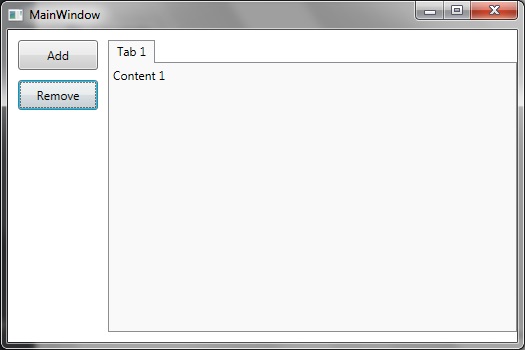
Some instructions on how to add/remove tab items within a WPF / MVVM setting.
Step 1: Create a new WPF application
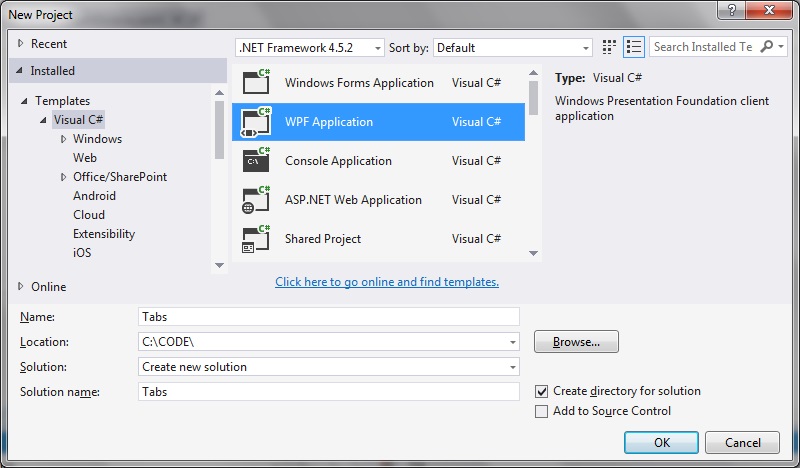
Step 2: Add classes to implement ICommand
RelayCommand.cs
using System;
using System.Windows.Input;

namespace Tabs
{
   public class RelayCommand<T> : ICommand
   {
      private readonly Predicate<T> _canExecute;
      private readonly Action<T> _execute;

      public RelayCommand(Action<T> execute)
         : this(execute, null)
      {
         _execute = execute;
      }

      public RelayCommand(Action<T> execute, Predicate<T> canExecute)
      {
         if (execute == null)
         {
            throw new ArgumentNullException("execute");
         }
         _execute = execute;
         _canExecute = canExecute;
      }

      public bool CanExecute(object parameter)
      {
         return _canExecute == null || _canExecute((T)parameter);
      }

      public void Execute(object parameter)
      {
         _execute((T)parameter);
      }

      public event EventHandler CanExecuteChanged
      {
         add { CommandManager.RequerySuggested += value; }
         remove { CommandManager.RequerySuggested -= value; }
      }
   }

   public class RelayCommand : ICommand
   {
      private readonly Predicate<object> _canExecute;
      private readonly Action<object> _execute;

      public RelayCommand(Action<object> execute)
         : this(execute, null)
      {
         _execute = execute;
      }

      public RelayCommand(Action<object> execute, Predicate<object> canExecute)
      {
         if (execute == null)
         {
            throw new ArgumentNullException("execute");
         }
         _execute = execute;
         _canExecute = canExecute;
      }

      public bool CanExecute(object parameter)
      {
         return _canExecute == null || _canExecute(parameter);
      }

      public void Execute(object parameter)
      {
         _execute(parameter);
      }

      // Ensures WPF commanding infrastructure asks all RelayCommand objects whether their
      // associated views should be enabled whenever a command is invoked
      public event EventHandler CanExecuteChanged
      {
         add
         {
            CommandManager.RequerySuggested += value;
            CanExecuteChangedInternal += value;
         }
         remove
         {
            CommandManager.RequerySuggested -= value;
            CanExecuteChangedInternal -= value;
         }
      }

      private event EventHandler CanExecuteChangedInternal;

      public void RaiseCanExecuteChanged()
      {
         CanExecuteChangedInternal.Raise(this);
      }
   }
}
EventRaiser.cs
using System;
using System.Collections.Generic;
using System.Linq;
using System.Text;
using System.Threading.Tasks;

namespace Tabs
{
   public static class EventRaiser
   {
      public static void Raise(this EventHandler handler, object sender)
      {
         handler?.Invoke(sender, EventArgs.Empty);
      }

      public static void Raise<T>(this EventHandler<EventArgs<T>> handler, object sender, T value)
      {
         handler?.Invoke(sender, new EventArgs<T>(value));
      }

      public static void Raise<T>(this EventHandler<T> handler, object sender, T value) where T : EventArgs
      {
         handler?.Invoke(sender, value);
      }

      public static void Raise<T>(this EventHandler<EventArgs<T>> handler, object sender, EventArgs<T> value)
      {
         handler?.Invoke(sender, value);
      }
   }
}
EventArgs.cs
using System;

namespace Tabs
{
   public class EventArgs<T> : EventArgs
   {
      public EventArgs(T value)
      {
         Value = value;
      }

      public T Value { get; private set; }
   }
}
Step 3: Add the ViewModel class
We need a class to implement the button click events, as well contain data for tab-related information.
MainWindowViewModel.cs
using System;
using System.ComponentModel;
using System.Windows.Input;
using System.Diagnostics;
using System.Collections.ObjectModel;
using System.Linq;

namespace Tabs
{
   public class MainWindowViewModel : INotifyPropertyChanged
   {
      static int tabs = 1;

      public MainWindowViewModel()
      {
         Titles = new ObservableCollection<Item>();
      }

      public ObservableCollection<Item> Titles
      {
         get { return _titles; }
         set
         {
            _titles = value;
            OnPropertyChanged("Titles");
         }
      }

      public class Item
      {
         public string Header { get; set; }
         public string Content { get; set; }
      }

      private ICommand _addTab;
      private ICommand _removeTab;
      private ObservableCollection<Item> _titles;

      public ICommand AddTab
      {
         get
         {
            return _addTab ?? (_addTab = new RelayCommand(
               x =>
               {
                  AddTabItem();
               }));
         }
      }

      public ICommand RemoveTab
      {
         get
         {
            return _removeTab ?? (_removeTab = new RelayCommand(
               x =>
               {
                  RemoveTabItem();
               }));
         }
      }

      private void RemoveTabItem()
      {
         Titles.Remove(Titles.Last());
         tabs--;
      }

      private void AddTabItem()
      {
         var header = "Tab " + tabs;
         var content = "Content " + tabs;
         var item = new Item { Header = header, Content = content };

         Titles.Add(item);
         tabs++;
         OnPropertyChanged("Titles");
      }

      public event PropertyChangedEventHandler PropertyChanged;

      private void OnPropertyChanged(string propertyName)
      {
         VerifyPropertyName(propertyName);
         var handler = PropertyChanged;
         handler?.Invoke(this, new PropertyChangedEventArgs(propertyName));
      }

      [Conditional("DEBUG")]
      private void VerifyPropertyName(string propertyName)
      {
         if (TypeDescriptor.GetProperties(this)[propertyName] == null)
            throw new ArgumentNullException(GetType().Name + " does not contain property: " + propertyName);
      }
   }
}
Step 4: Create the XAML view
MainWindow.xaml
<Window x:Class="Tabs.MainWindow"
        xmlns="http://schemas.microsoft.com/winfx/2006/xaml/presentation"
        xmlns:x="http://schemas.microsoft.com/winfx/2006/xaml"
        xmlns:d="http://schemas.microsoft.com/expression/blend/2008"
        xmlns:mc="http://schemas.openxmlformats.org/markup-compatibility/2006"
        xmlns:local="clr-namespace:Tabs"
        mc:Ignorable="d"
        Title="MainWindow" Height="350" Width="525">

    <Window.DataContext>
        <local:MainWindowViewModel/>
    </Window.DataContext>

    <Grid>
        <Grid.ColumnDefinitions>
            <ColumnDefinition Width="100" />
            <ColumnDefinition Width="*" />
        </Grid.ColumnDefinitions>

        <Grid.RowDefinitions>
            <RowDefinition Height="10" />
            <RowDefinition Height="*" />
            <RowDefinition Height="10" />
        </Grid.RowDefinitions>

        <Grid
            Grid.Column="0" Grid.Row="1">
            <StackPanel>
                <Button
                    Margin="0,0,0,10"
                    Content="Add"
                    Command="{Binding AddTab}"
                    Height="30" Width="80"
                    VerticalAlignment="Top" />

                <Button
                    Content="Remove"
                    Command="{Binding RemoveTab}"
                    Height="30" Width="80"
                    VerticalAlignment="Top" />
            </StackPanel>

        </Grid>

        <TabControl
            TabStripPlacement="Top"
            ItemsSource="{Binding Titles, Mode=TwoWay}"
            Grid.Column="1" Grid.Row="1">

            <TabControl.ItemTemplate>
                <DataTemplate>
                    <TextBlock
                    Text="{Binding Header}" />
                </DataTemplate>
            </TabControl.ItemTemplate>

            <TabControl.ContentTemplate>
                <DataTemplate>
                    <TextBlock
                    Text="{Binding Content}" />
                </DataTemplate>
            </TabControl.ContentTemplate>
        </TabControl>
    </Grid>
</Window>
So that when the code is run and the ‘Add’ button is pressed new tab items are added dynamically:
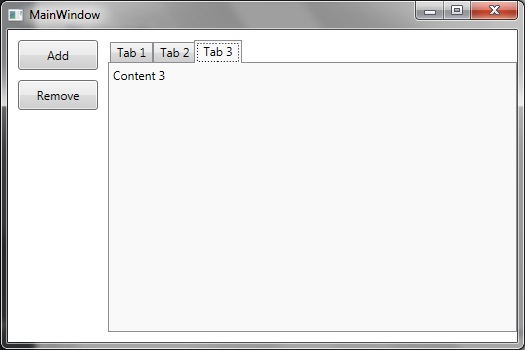
And that on pressing the ‘Remove’ button a few times tab item data is deleted from the list and the view is updated accordingly: