Useful StackOverflow link
https://stackoverflow.com/questions/36221118/how-to-make-mouseover-event-in-mvvm
Step 1: Create a new WPF project
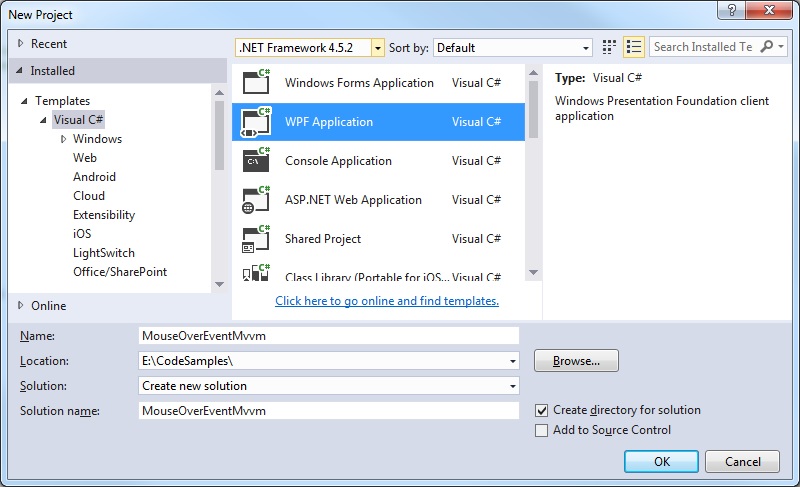
Step 2: Create an example WPF window
MainWindow.xaml
<Window x:Class="MouseOverEventMvvm.MainWindow"
        xmlns="http://schemas.microsoft.com/winfx/2006/xaml/presentation"
        xmlns:x="http://schemas.microsoft.com/winfx/2006/xaml"
        xmlns:d="http://schemas.microsoft.com/expression/blend/2008"
        xmlns:mc="http://schemas.openxmlformats.org/markup-compatibility/2006"
        xmlns:local="clr-namespace:MouseOverEventMvvm"
        xmlns:i="http://schemas.microsoft.com/expression/2010/interactivity"
        mc:Ignorable="d"
        Title="MainWindow" Height="350" Width="525">

    <Window.DataContext>
        <local:MainWindowViewModel />
    </Window.DataContext>

    <Grid>
        <Button Width="200" Height="100" Content="Navigate">
            <i:Interaction.Triggers>
                <i:EventTrigger EventName="MouseEnter">
                    <i:InvokeCommandAction Command="{Binding NavigateCommand}" CommandParameter="ViewImportProgress" />
                </i:EventTrigger>
            </i:Interaction.Triggers>
        </Button>
    </Grid>
</Window>
Step 3: Create the MVVM View Model class
MainWindowViewModel.cs
using System.Windows;
using System.Windows.Input;

namespace MouseOverEventMvvm
{
   public class MainWindowViewModel
   {
      private ICommand _navigateCommand;

      public ICommand NavigateCommand
      {
         get
         {
            return _navigateCommand ?? (_navigateCommand = new RelayCommand(
                      x => { DoStuff(); }));
         }
      }

      public void DoStuff()
      {
         MessageBox.Show("Mouse Over Button Event");
      }
   }
}
Step 4: Add Event handling infrastructure
RelayCommand.cs
using System;
using System.Windows.Input;

namespace MouseOverEventMvvm
{
   public class RelayCommand<T> : ICommand
   {
      private readonly Predicate<T> _canExecute;
      private readonly Action<T> _execute;

      public RelayCommand(Action<T> execute)
         : this(execute, null)
      {
         _execute = execute;
      }

      public RelayCommand(Action<T> execute, Predicate<T> canExecute)
      {
         if (execute == null)
            throw new ArgumentNullException(nameof(execute));
         _execute = execute;
         _canExecute = canExecute;
      }

      public bool CanExecute(object parameter)
      {
         return (_canExecute == null) || _canExecute((T) parameter);
      }

      public void Execute(object parameter)
      {
         _execute((T) parameter);
      }

      public event EventHandler CanExecuteChanged
      {
         add { CommandManager.RequerySuggested += value; }
         remove { CommandManager.RequerySuggested -= value; }
      }
   }

   public class RelayCommand : ICommand
   {
      private readonly Predicate<object> _canExecute;
      private readonly Action<object> _execute;

      public RelayCommand(Action<object> execute)
         : this(execute, null)
      {
         _execute = execute;
      }

      public RelayCommand(Action<object> execute, Predicate<object> canExecute)
      {
         if (execute == null)
            throw new ArgumentNullException(nameof(execute));
         _execute = execute;
         _canExecute = canExecute;
      }

      public bool CanExecute(object parameter)
      {
         return (_canExecute == null) || _canExecute(parameter);
      }

      public void Execute(object parameter)
      {
         _execute(parameter);
      }

      // Ensures WPF commanding infrastructure asks all RelayCommand objects whether their
      // associated views should be enabled whenever a command is invoked
      public event EventHandler CanExecuteChanged
      {
         add
         {
            CommandManager.RequerySuggested += value;
            CanExecuteChangedInternal += value;
         }
         remove
         {
            CommandManager.RequerySuggested -= value;
            CanExecuteChangedInternal -= value;
         }
      }

      private event EventHandler CanExecuteChangedInternal;

      public void RaiseCanExecuteChanged()
      {
         CanExecuteChangedInternal.Raise(this);
      }
   }
}
EventRaiser.cs
using System;

namespace MouseOverEventMvvm
{
   public static class EventRaiser
   {
      public static void Raise(this EventHandler handler, object sender)
      {
         handler?.Invoke(sender, EventArgs.Empty);
      }

      public static void Raise<T>(this EventHandler<EventArgs<T>> handler, object sender, T value)
      {
         handler?.Invoke(sender, new EventArgs<T>(value));
      }

      public static void Raise<T>(this EventHandler<T> handler, object sender, T value) where T : EventArgs
      {
         handler?.Invoke(sender, value);
      }

      public static void Raise<T>(this EventHandler<EventArgs<T>> handler, object sender, EventArgs<T> value)
      {
         handler?.Invoke(sender, value);
      }
   }
}
EventArgs.cs
using System;

namespace MouseOverEventMvvm
{
   public class EventArgs<T> : EventArgs
   {
      public EventArgs(T value)
      {
         Value = value;
      }

      public T Value { get; private set; }
   }
}
Step 5: Add necessary reference to Interactivity
Right click the References folder and select Add Reference…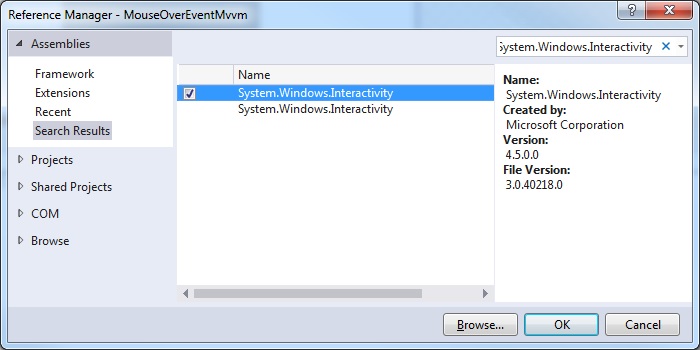
Step 6: Try it.
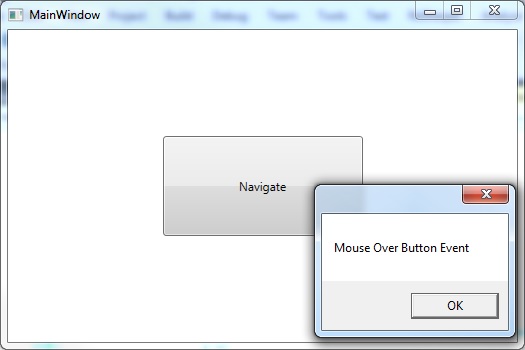
Notice that as soon as the mouse cursor enters the Button control the event is fired and the dialog message is shown: