This post shows you how to handle encrypted user credentials in a Web Api application and offer further security
by enforcing https for all REST api calls.
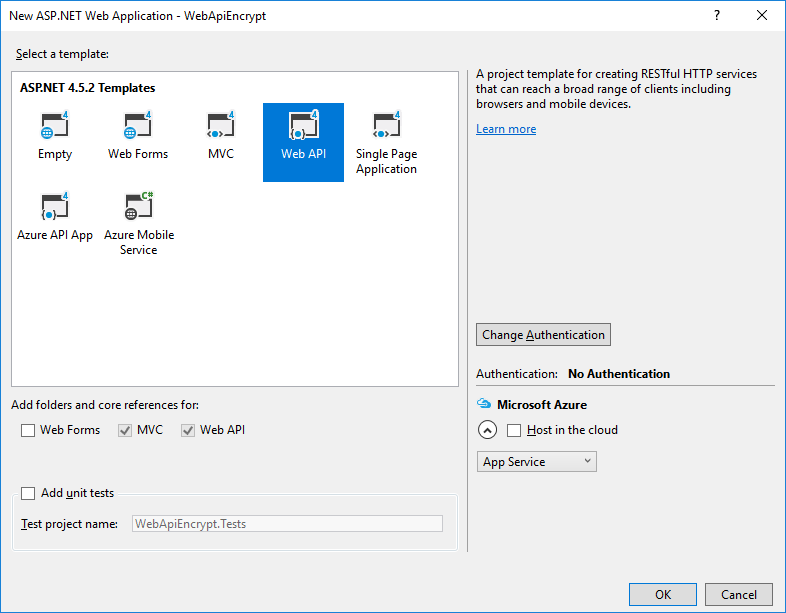
Step 1: Create a new Web Api application:
This is our web service that will need to authenticate encrypted user credentials.

Step 2: Add a class for handling encryption and decryption
Crypto.cs
using System;
using System.Linq;
using System.Security.Cryptography;
using System.Text;

namespace WebApiEncrypt.Models
{
   public static class Crypto
   {
      private const string PrivateKey =
            "<RSAKeyValue><Modulus>s6lpjspk+3o2GOK5TM7JySARhhxE5gB96e9XLSSRuWY2W9F951MfistKRzVtg0cjJTdSk5mnWAVHLfKOEqp8PszpJx9z4IaRCwQ937KJmn2/2VyjcUsCsor+fdbIHOiJpaxBlsuI9N++4MgF/jb0tOVudiUutDqqDut7rhrB/oc=</Modulus><Exponent>AQAB</Exponent><P>3J2+VWMVWcuLjjnLULe5TmSN7ts0n/TPJqe+bg9avuewu1rDsz+OBfP66/+rpYMs5+JolDceZSiOT+ACW2Neuw==</P><Q>0HogL5BnWjj9BlfpILQt8ajJnBHYrCiPaJ4npghdD5n/JYV8BNOiOP1T7u1xmvtr2U4mMObE17rZjNOTa1rQpQ==</Q><DP>jbXh2dVQlKJznUMwf0PUiy96IDC8R/cnzQu4/ddtEe2fj2lJBe3QG7DRwCA1sJZnFPhQ9svFAXOgnlwlB3D4Gw==</DP><DQ>evrP6b8BeNONTySkvUoMoDW1WH+elVAH6OsC8IqWexGY1YV8t0wwsfWegZ9IGOifojzbgpVfIPN0SgK1P+r+kQ==</DQ><InverseQ>LeEoFGI+IOY/J+9SjCPKAKduP280epOTeSKxs115gW1b9CP4glavkUcfQTzkTPe2t21kl1OrnvXEe5Wrzkk8rA==</InverseQ><D>HD0rn0sGtlROPnkcgQsbwmYs+vRki/ZV1DhPboQJ96cuMh5qeLqjAZDUev7V2MWMq6PXceW73OTvfDRcymhLoNvobE4Ekiwc87+TwzS3811mOmt5DJya9SliqU/ro+iEicjO4v3nC+HujdpDh9CVXfUAWebKnd7Vo5p6LwC9nIk=</D></RSAKeyValue>"
         ;

      private const string PublicKey =
            "<RSAKeyValue><Modulus>s6lpjspk+3o2GOK5TM7JySARhhxE5gB96e9XLSSRuWY2W9F951MfistKRzVtg0cjJTdSk5mnWAVHLfKOEqp8PszpJx9z4IaRCwQ937KJmn2/2VyjcUsCsor+fdbIHOiJpaxBlsuI9N++4MgF/jb0tOVudiUutDqqDut7rhrB/oc=</Modulus><Exponent>AQAB</Exponent></RSAKeyValue>"
         ;

      private static readonly UnicodeEncoding Encoder = new UnicodeEncoding();

      public static string Decrypt(string data)
      {
         var rsa = new RSACryptoServiceProvider();
         var dataArray = data.Split(',');
         var dataByte = new byte[dataArray.Length];
         for (var i = 0; i < dataArray.Length; i++)
            dataByte[i] = Convert.ToByte(dataArray[i]);

         rsa.FromXmlString(PrivateKey);
         var decryptedByte = rsa.Decrypt(dataByte, false);
         return Encoder.GetString(decryptedByte);
      }

      public static string Encrypt(string data)
      {
         var rsa = new RSACryptoServiceProvider();
         rsa.FromXmlString(PublicKey);
         var dataToEncrypt = Encoder.GetBytes(data);
         var encryptedByteArray = rsa.Encrypt(dataToEncrypt, false).ToArray();
         var length = encryptedByteArray.Length;
         var item = 0;
         var sb = new StringBuilder();
         foreach (var x in encryptedByteArray)
         {
            item++;
            sb.Append(x);

            if (item < length)
               sb.Append(",");
         }

         return sb.ToString();
      }
   }
}
Step 3: Create a new Authentication filter
I have created a new folder with which to put any new filter classes:
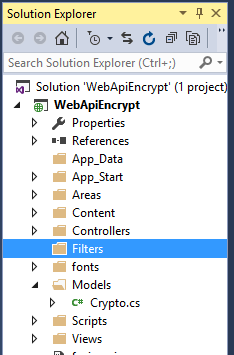
Into this new Filters folder create a new class called BasicAuthenticationAttribute. This needs to inherit from AuthorizationFilterAttribute.
BasicAuthenticationAttribute.cs
using System;
using System.Net;
using System.Net.Http;
using System.Security.Principal;
using System.Text;
using System.Threading;
using System.Web.Http.Controllers;
using System.Web.Http.Filters;

namespace WebApiEncrypt.Filters
{
   public class BasicAuthenticationAttribute : AuthorizationFilterAttribute
   {
      public override void OnAuthorization(HttpActionContext actionContext)
      {
         var authHeader = actionContext.Request.Headers.Authorization;

         if (authHeader != null)
         {
            var authenticationToken = actionContext.Request.Headers.Authorization.Parameter;
            var decodedAuthenticationToken = Encoding.UTF8.GetString(Convert.FromBase64String(authenticationToken));
            var decryptedAuthenticationToken = Crypto.Crypto.Decrypt(decodedAuthenticationToken);
            var usernamePasswordArray = decryptedAuthenticationToken.Split(':');
            var userName = usernamePasswordArray[0];
            var password = usernamePasswordArray[1];

            // Replace this with your own system of security / means of validating credentials
            var isValid = userName == "andy" && password == "password";

            if (isValid)
            {
               var principal = new GenericPrincipal(new GenericIdentity(userName), null);
               Thread.CurrentPrincipal = principal;

               //actionContext.Response =
               //   actionContext.Request.CreateResponse(HttpStatusCode.OK,
               //      "User " + userName + " successfully authenticated");

               return;
            }
         }

         HandleUnathorized(actionContext);
      }

      private static void HandleUnathorized(HttpActionContext actionContext)
      {
         actionContext.Response = actionContext.Request.CreateResponse(HttpStatusCode.Unauthorized);
         actionContext.Response.Headers.Add("WWW-Authenticate", "Basic Scheme='Data' location = 'http://localhost:");
      }
   }
}
Step 4: Ensure basic authentication filter is applied in Values controller
Insert wherever you need this authentication to be enforced – globally or per function.
ValuesController.cs
using System.Collections.Generic;
using System.Web.Http;
using WebApiEncrypt.Filters;

namespace WebApiEncrypt.Controllers
{
   [BasicAuthentication]
   public class ValuesController : ApiController
   {
      // GET api/values
      public IEnumerable<string> Get()
      {
         return new[] {"value1", "value2"};
      }

      // GET api/values/5
      public string Get(int id)
      {
         return "value";
      }

      // POST api/values
      public void Post([FromBody] string value)
      {
      }

      // PUT api/values/5
      public void Put(int id, [FromBody] string value)
      {
      }

      // DELETE api/values/5
      public void Delete(int id)
      {
      }
   }
}
Step 5: Add a require https authorization filter attribute
First add a new Add a require https authorization filter attribute class:
RequireHttpsAttribute.cs
using System;
using System.Net;
using System.Net.Http;
using System.Text;
using System.Web.Http.Controllers;
using System.Web.Http.Filters;

namespace WebApiEncrypt.Filters
{
   public class RequireHttpsAttribute : AuthorizationFilterAttribute
   {
      public override void OnAuthorization(HttpActionContext actionContext)
      {
         var req = actionContext.Request;

         if (req.RequestUri.Scheme == Uri.UriSchemeHttps) return;

         var html = "<p>Https required.</p>";

         if (req.Method.Method == "GET")
         {
            actionContext.Response = req.CreateResponse(HttpStatusCode.Found);
            actionContext.Response.Content = new StringContent(html, Encoding.UTF8, "text/html");

            var uriBuilder = new UriBuilder(req.RequestUri)
            {
               Scheme = Uri.UriSchemeHttps,
               Port = 443
            };

            actionContext.Response.Headers.Location = uriBuilder.Uri;
         }
         else
         {
            actionContext.Response = req.CreateResponse(HttpStatusCode.NotFound);
            actionContext.Response.Content = new StringContent(html, Encoding.UTF8, "text/html");
         }
      }
   }
}
Then update WebApiConfig.cs to ensure the require https is enforced globally:
WebApiConfig.cs
using System.Web.Http;
using WebApiEncrypt.Filters;

namespace WebApiEncrypt
{
   public static class WebApiConfig
   {
      public static void Register(HttpConfiguration config)
      {
         config.MapHttpAttributeRoutes();

         config.Routes.MapHttpRoute(
             name: "DefaultApi",
             routeTemplate: "api/{controller}/{id}",
             defaults: new { id = RouteParameter.Optional }
         );

         config.Filters.Add(new RequireHttpsAttribute());
      }
   }
}
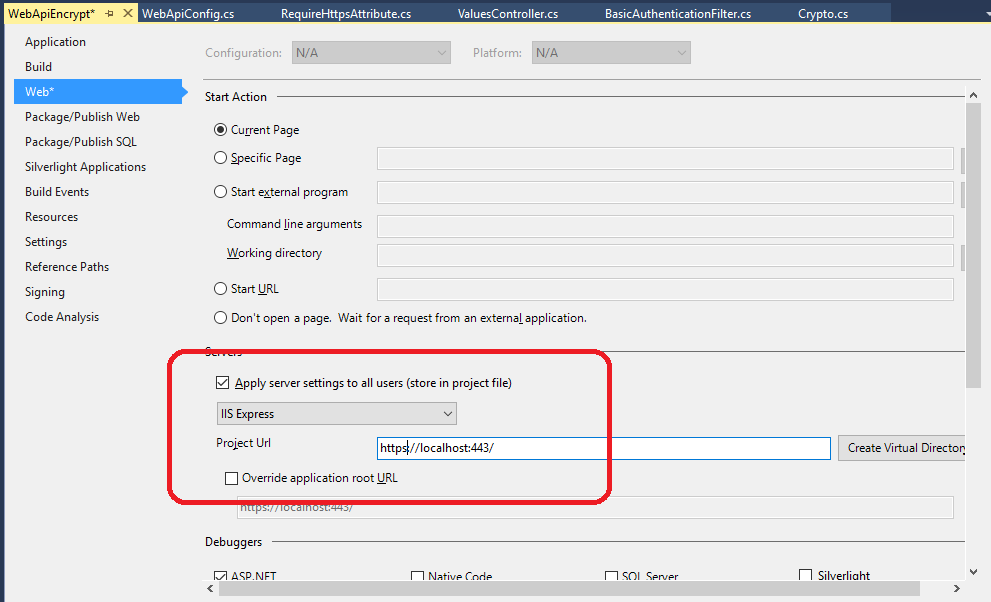
Step 6: Set the project properties
Step 7: Test
So in this example, the username:password combination I want to test is “andy:password”
Using the ‘Crypto’ facility, this would encrypt to:
63,127,47,68,12,186,31,83,59,235,103,58,43,65,231,137,16,139,161,134,225,181,241,74,187,20,159,69,37,132,133,181,162,61,251,86,107,5,133,121,228,3,226,112,249,134,85,253,131,103,218,145,237,174,238,89,175,95,220,36,177,7,173,170,208,199,43,243,125,58,164,235,143,139,180,42,142,240,36,167,164,164,191,147,242,145,234,120,159,66,61,76,40,21,88,68,167,42,24,4,20,115,130,141,63,145,82,154,171,193,247,214,183,2,147,236,25,123,6,71,96,112,207,91,89,152,29,168
And the Base 64 encoding of the encrypted text is :
MTEyLDUsNjYsOTYsMTMsNjksMjI4LDEzLDE2OSwyNDIsMjIyLDQ0LDIwNywyNDcsMTk4LDY1LDEyMiwxNTMsMjM4LDE1NSw2MCwxMiw1MCwxMzcsMTM3LDQ1LDE2MSwxODQsMzIsNzIsMjAsMjMxLDIxMSw5OSwxMzMsMTYxLDE2LDE0Myw1MCwxMjgsNjQsMTgzLDEzMyw2NCw4NiwyMDEsMjUwLDIzOCw0MywxNTAsNzYsOTIsMTIzLDAsMjA5LDE1MiwzNywxNywyMTIsMTE0LDExNiw1OSwxNCwxMTQsMCwyMzgsNzAsMTcyLDI0NiwxODcsMTU3LDEzMiw2MywyNDksNjEsMjAxLDg3LDI1MSwxOTMsMjM2LDIyNCwxOTUsMjI2LDEyLDExNSwxOTEsMzAsODEsMjM0LDIyMiwxMjIsMTI1LDYsNCwyMTUsMTg1LDYsMyw5OCwxODYsMTM3LDEzNywxNjUsMjUsMTIyLDg4LDI0NCw2NywxMjksMjEzLDgsMTQ5LDcyLDMsMTA3LDI0LDIxNCwyNywyMTIsMjEyLDc3LDIxNCwyOSwxNTksMjksMjExLDQ4LDcw
Example link for doing Base 64 encoding: https://www.base64encode.org/
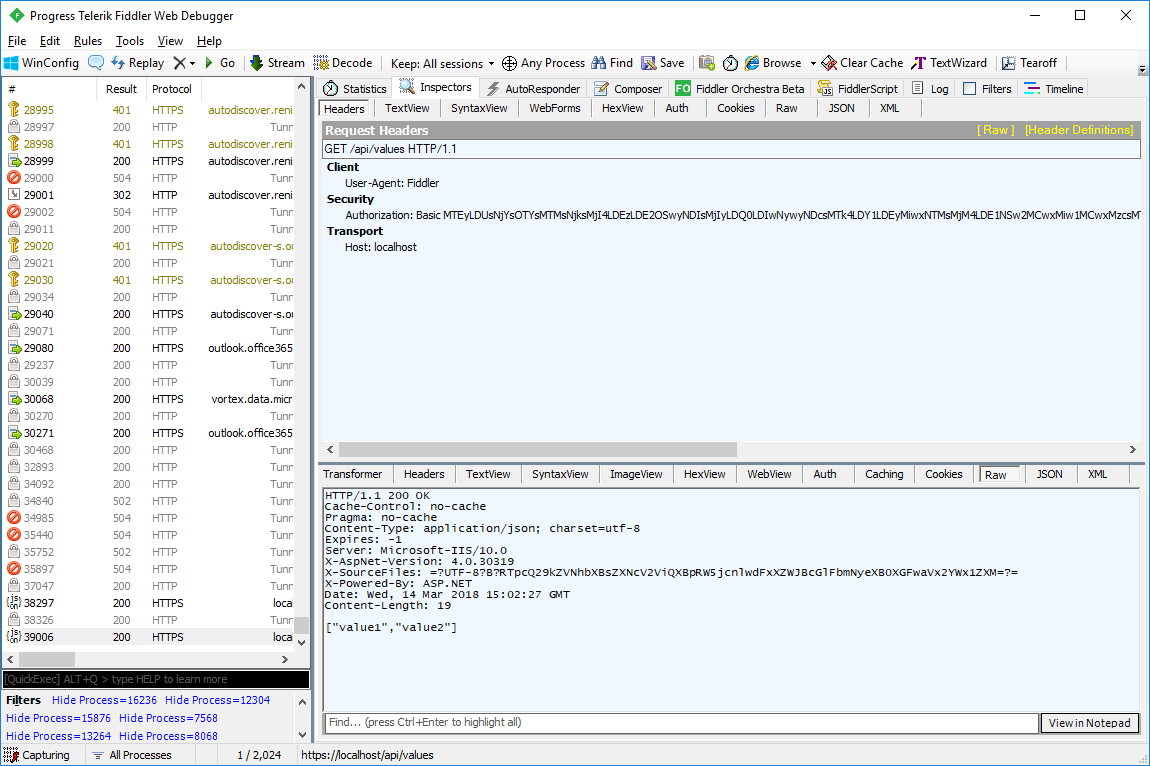
I use this encoding as part of the basic authentication header used in the example GET command in Fiddler:
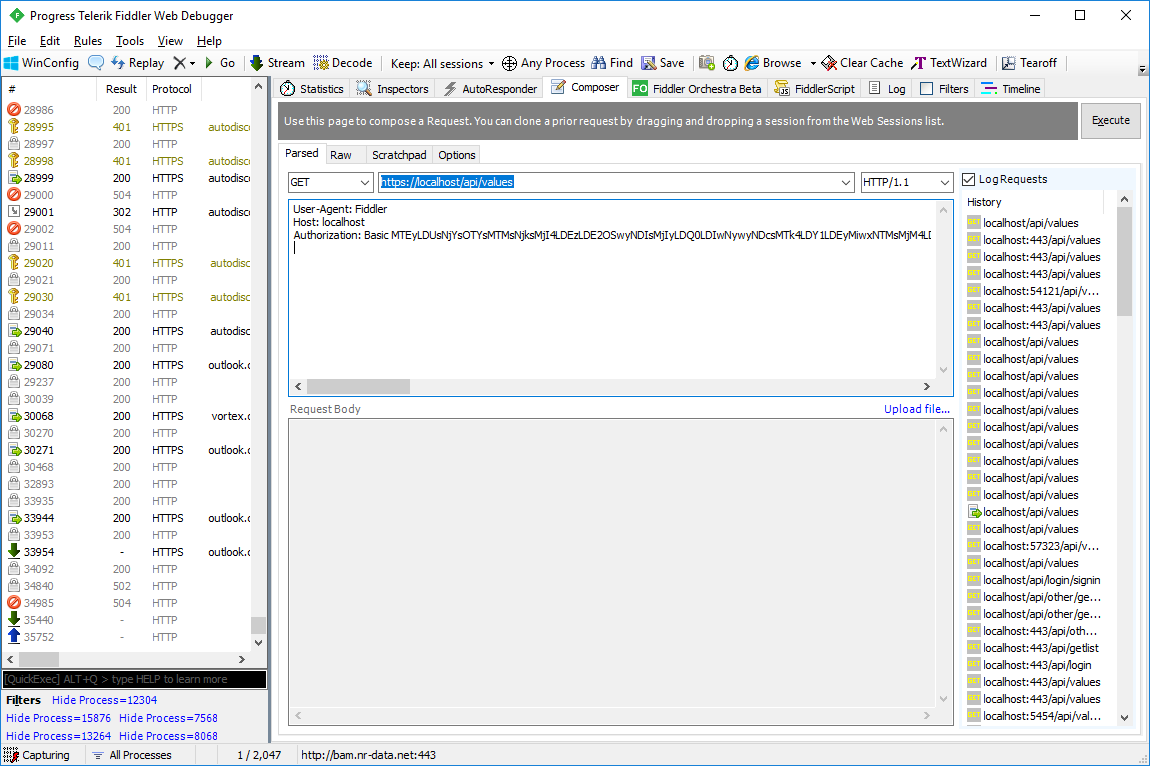
On inspecting the raw output in Fiddler see that the command has satisfied both the authentication and https requirements and the GET command has returned the values as shown:
Also shown is an example console app with which to test the web service:
using System;
using System.Net;
using System.Text;

namespace WebAppConsumer
{
   internal static class Program
   {
      private static void Main()
      {
         var path = "https://localhost/api/values";

         // Update your local service port no. / service APIs etc in the following line
         var encrypted = Crypto.Encrypt("andy:password");
         var encoded = Convert.ToBase64String(Encoding.UTF8.GetBytes(encrypted));

         try
         {
            var webClient = new WebClient();
            webClient.Headers.Add(HttpRequestHeader.Authorization,
               "Basic " + encoded);

            // Sometimes when you get security certificate trouble but you still need to debug
            //ServicePointManager.ServerCertificateValidationCallback +=
            //   (sender, certificate, chain, sslPolicyErrors) => true;

            var result = webClient.DownloadString(path);
            Console.WriteLine(result);
         }
         catch (Exception e)
         {
            Console.WriteLine(e.Message);
         }

         Console.ReadLine();
      }
   }
}