Some C# / .NET techniques as I encounter them. More to follow…
Arrays and Strings
Using an array of strings in a foreach loop:
using System.IO;
using System;

class Program
{
    static void Main()
    {
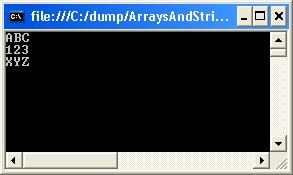
        string[] values = new string[]{ "abc", "xyz", "123" };

        foreach( string s in values )
        {
            Console.WriteLine( s );
        }
    }
}
Console output:
Indexers
Providing array-like access to classes, using the [] array access operator.
using System.IO;
using System;

class StringIndexer
{
    private static int limit = 5;
    private string[] values = new string[limit];

    public int Limit()
    {
        return limit;
    }

    public string this[int index]
    {
        get
        {
            if (index < limit && index >= 0)
            {
                return values[index];
            }
            else
            {
                return "";
            }

        }
        set
        {
            if (index < limit && index >= 0)
            {
                values[index] = value;
            }
        }
    }
}

class MainProgram
{
    public static void Main()
    {
        StringIndexer stringIndexer = new StringIndexer();

        stringIndexer[0] = "The";
        stringIndexer[1] = "cat";
        stringIndexer[2] = "sat";
        stringIndexer[3] = "on";
        stringIndexer[4] = "the";
        stringIndexer[5] = "mat";

        for (int i = 0; i <= 10; i++)
        {
            Console.WriteLine("String Element #{0} = {1}", i, stringIndexer[i]);
        }
    }
}
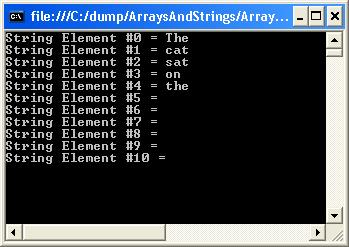
Console output:
IEnumerable
An interface specifying that the underlying type implements GetEnumerator(). It allows iteration of non-generic collections, and is returned returned from query expressions
using System;
using System.Collections.Generic;
using System.Linq;

class Program
{
    static void Main()
    {
        IEnumerable<int> result = from value in Enumerable.Range(0, 5)
                                  select value;

        // Loop.
        foreach (int value in result)
        {
            Console.WriteLine(value);
        }

        // We can use extension methods on IEnumerable<int>
        double average = result.Average();

        // Extension methods to convert IEnumerable<int> into int array
        List<int> list = result.ToList();
        int[] array = result.ToArray();
    }
}
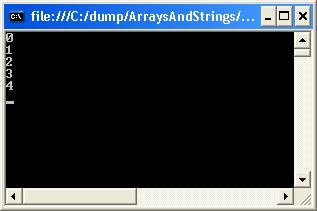
Console output:
Properties
Example usage of instance, static and read-only properties:
using System.IO;
using System;

class Employee
{
    // static properties
    public static int numberOfEmployees;
    private static int counter;
    private static string name;

    // Read-write properties
    public string Name
    {
        get
        {
           return name;
        }
        set
        {
          name = value;
        }
    }

    // Read-only property
    public int Counter
    {
        get
        {
          return counter;
        }
    }

    // Constructor
    public Employee()
    {
        counter = ++counter + numberOfEmployees;
    }
}

class MainProgram
{
    public static void Main()
    {
        Employee.numberOfEmployees = 100;
        Employee employee = new Employee();
        employee.Name = "Jones";
        Console.WriteLine( "Employee number: {0}", employee.Counter);
        Console.WriteLine( "Employee name: {0}", employee.Name);
    }
}
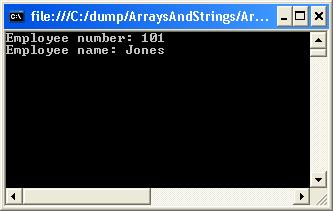
Console output:
Attributes
Lambda Expressions
Use the => token, called the lambda operator, to separate the input variables on the left from the lambda body on the right.
using System;
using System.Linq;

namespace LambdaExpression
{
   public delegate TResult Func<TArg0, TResult>(TArg0 arg0);

    class Program
    {
        static void Main(string[] args)
        {
            // Using Count to obtain total even numbers
            int[] numbers = { 5, 4, 1, 3, 9, 8, 6, 7, 2, 0 };
            int oddNumbers = numbers.Count(n => n % 2 == 1);
            Console.WriteLine("Number of odd numbers = ", oddNumbers);

            // Using delegate to determin if number is a multiple of 5
            Func<int, bool> myFunc = x => x % 5 == 0;
            bool result = myFunc(15);
            Console.WriteLine("result = {0}", result);

            // Lambda to get the longest length string
            var strings = new string[] { "1", "02", "003", "0004", "00005" };
            string longest = strings.OrderByDescending(s => s.Length).First();
            Console.WriteLine("Longest string = {0}", longest);
        }
    }
}
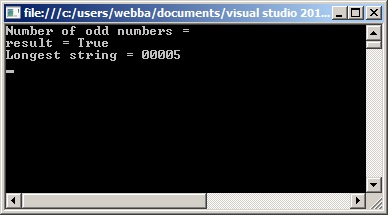
Console output:
Connect to a SQL Server Database
A simple example whereby we connect to the SQL Server database on clicking the WinForms button and setting the SQL connection string:
using System;
using System.Collections.Generic;
using System.ComponentModel;
using System.Data;
using System.Drawing;
using System.Linq;
using System.Text;
using System.Threading.Tasks;
using System.Windows.Forms;
using System.Data.SqlClient;

namespace WinForm1
{
    public partial class Form1 : Form
    {
        public Form1()
        {
            InitializeComponent();
        }

        private void button1_Click(object sender, EventArgs e)
        {
            SqlConnectionStringBuilder sqlConnBuilder = new SqlConnectionStringBuilder();

            sqlConnBuilder.DataSource = "L011035\\DIRDEV";
            sqlConnBuilder.InitialCatalog = "IRDB";
            sqlConnBuilder.IntegratedSecurity = true;
            sqlConnBuilder.UserID = "webba";
            sqlConnBuilder.Password = "";

            string connectionString = sqlConnBuilder.ConnectionString;
            SqlConnection cnn = new SqlConnection(connectionString);

            try
            {
                cnn.Open();
                MessageBox.Show ("Connection Open ! ");
                cnn.Close();
            }
            catch (Exception ex)
            {
                MessageBox.Show("Can not open connection ! ");
            }
        }
    }
}
Read an XML attribute
For example, read the “checksum” (SHA-256) and media file name from the following XML:
<?xml version="1.0" encoding="utf-8" ?>
<file name="ZOO.mp4" source="">
    <Request Type="AddSegmentable">
        <Key CompositeID="53_Ev_CC_10_15" />
        <Attachment Name="ZOO.mp4" Update="Y" LocalPath="C:\Symphony\File Drop" Description="MFM" Type=".Supporting File" FileSize="3526921" />
    </Request>
    <checksum>
        <type>SHA 256</type>
        <value>8584149da444979c794281007369964d89079b5263972850be05b66354a980e2</value>
    </checksum>
    <RepositoryPath>2015\03\20\53_Ev_CC_10_15</RepositoryPath>
</file>
Use the XDocument object to obtain attributes:
using System;
using System.Linq;
using System.Text;
using System.Xml.Linq;

class Program
{
    static void Main(string[] args)
    {
        // Using Count to obtain total even numbers
        try
        {
            XDocument xmlDoc = XDocument.Load("C:\\Backup\\xml.xml");
            string SHA256 = xmlDoc.Root.Element("checksum").Element("value").Value.ToString();
            string mediaFileName = xmlDoc.Root.Attribute("name").Value.ToString();

            Console.WriteLine("SHA-256 value = {0}", SHA256);
            Console.WriteLine("Media file = {0}", mediaFileName);
        }
        catch (Exception ex)
        {
            Console.WriteLine("XML file not found");
        }
    }
}
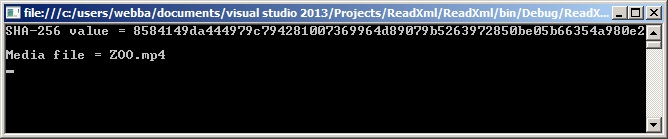
Giving the following output:
Use linq to query lists of objects
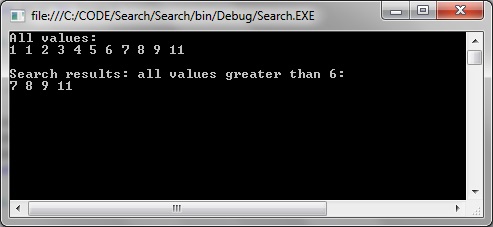
How to return all items that match a given criteria, in this case return a list of all integers greater than 6:
using System;
using System.Collections.Generic;
using System.Linq;

namespace Search
{
    class Program
    {
        static void Main(string[] args)
        {
            List<int> items = new List<int>{ 1, 1, 2, 3, 4, 5, 6, 7, 8, 9, 11  };

            Console.WriteLine("All values:");
            foreach (int item in items)
            {
                Console.Write(item + " ");
            }

            var search = items.Where(s => s > 6);

            Console.WriteLine();
            Console.WriteLine();
            Console.WriteLine("Search results: all values greater than 6:");
            foreach (int value in search)
            {
                Console.Write(value + " ");
            }
        }
    }
}
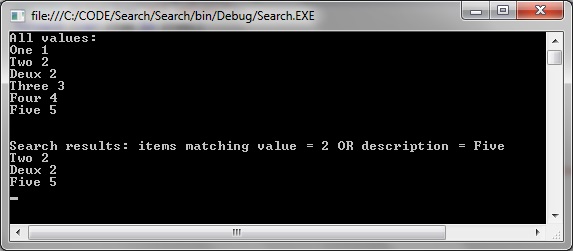
Another example, this time searching on a list of objects and searching on object attribute values:
using System;
using System.Collections.Generic;
using System.Linq;

namespace Search
{
    class Data
    {
        public Data(string title, string description)
        {
            Description = title;
            Value = description;
        }

        public string Description
        { get; set; }

        public string Value
        { get; set; }
    }

    class Program
    {
        static void Main(string[] args)
        {
            List<Data> items = new List<Data>
            {
                new Data("One", "1"),
                new Data("Two", "2"),
                new Data("Deux", "2"),
                new Data("Three", "3"),
                new Data("Four", "4"),
                new Data("Five", "5")
            };

            Console.WriteLine("All values:");
            foreach (var item in items)
            {
                Console.WriteLine(item.Description + " " + item.Value);
            }

            var search = items.Where(s => s.Value == "2" || s.Description == "Five");

            Console.WriteLine();
            Console.WriteLine();
            Console.WriteLine("Search results: items matching value = 2 OR description = Five");
            foreach (var value in search)
            {
                Console.WriteLine(value.Description + " " + value.Value);
            }
        }
    }
}
Giving the following search result:
Delegates
A data structure that can be used to refer to a static method or to a class instance and an instance method of that class.
Example:
using System;

namespace Delegate
{
   // Declares a delegate for a method that takes in an int and returns a String.
   public delegate string MethodDelegate(int val);

   // Defines some methods to which the delegate can point.
   public class SampleClass
   {
      // Defines an instance method.
      public static string GetPolarityString(int val)
      {
         if (val > 0)
            return "positive";

         return val < 0 ? "negative" : "zero";
      }

      // Defines a static method.
      public static string GetSignString(int val)
      {
         if (val > 0)
            return "+";

         return val < 0 ? "-" : "";
      }

      public string GetValueString(int val)
      {
         return val.ToString();
      }
   }

   internal static class Program
   {
      private static void Main()
      {
         // For the instance method, an instance (sampleClass) must be supplied.
         var sampleClass = new SampleClass();

         // Creates one delegate for each method.
         // For the static method, use the class name.
         var delegate1 = new MethodDelegate(SampleClass.GetPolarityString);
         var delegate2 = new MethodDelegate(SampleClass.GetSignString);

         // Invokes the delegates.
         const int val = 5;
         Console.WriteLine("{0} is {1}; use the sign \"{2}\".", sampleClass.GetValueString(val), delegate1(val), delegate2(val));
      }
   }
}
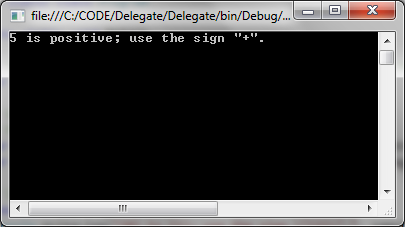
Giving the following output: