Programming Tip:
Now you can load your essential programming tools such as emulators and IDE`s into the cloud with high performance citrix vdi from CloudDesktopOnline and access it remotely at your convenience on your preferred device(PC/Mac/android/iOS). If you prefer a gpu dedicated server, Try dedicated gpu hosting from Apps4Rent with 24*7*365 days top-notch tech-support and migration assistance.
Priority Queues
A priority queue is just like a normal queue data structure except that each element inserted is associated with a ”priority”. It supports the usual push(), pop(), top() etc operations, but is specifically designed so that its first element is always the greatest of the elements it contains, according to some strict weak ordering condition.
STL Usage
In STL, priority queues take three template parameters:
template < class T,
           class Container = vector<T>,
           class Compare = less<typename Container::value_type>
         >
class priority_queue;
T is the element type, eg an integer;
Container is the container type, eg a vector.
Compare is the comparison class which can be a function call operator or function pointer used to compare container elements. Its default is the less-than operator, less<T>.
Example 1: Max Priority Queues
As can be seen in the following example, using a priority queue in its default format gives you a max priority queue:
#include <iostream>
#include <queue>
using namespace std;

int main()
{
    priority_queue<int> pq;

    pq.push(3);
    pq.push(5);
    pq.push(1);
    pq.push(8);
    while ( !pq.empty() )
    {
        cout << pq.top() << endl;
        pq.pop();
    }
    cin.get();
}
Giving you the following output:

Example 2: Min Priority Queues
Supposing you wish to get a min priority queue out of it. A posting of this subject appears over at Cprogramming.com, showing how to implement this, which I have borrowed here. A possible solution could be to define a suitable comparator with which to operator on the ordinary priority queue, such that the priority is reversed, as shown:
#include <iostream>
#include <queue>
using namespace std;

struct compare
{
  bool operator()(const int& l, const int& r)
  {
      return l < r;
  }
};

int main()
{
    priority_queue<int,vector<int>, compare > pq;

    pq.push(3);
    pq.push(5);
    pq.push(1);
    pq.push(8);
    while ( !pq.empty() )
    {
        cout << pq.top() << endl;
        pq.pop();
    }
    cin.get();
}
Giving the following output:

Example 3: Priority Queues of Pointers
Suppose you wish to implement a priority queue of pointers which point to some class object. In this example I wish to implement a priority queue of Node pointers, where Node is a class that I have defined myself.
Having a priority queue of pointers will result in the pointers themselves being sorted, rather than (say) some value that the class object holds. Unless sorting by pointer value is what you actually want, that is.
The solution is to specify how to sort the Node objects in the priority queue using a function object (functor), similar to that implemented in the previous section, by using a class or a struct that contains a function that takes two class objects as arguments and returns the desired comparison.
#include <iostream>
#include <queue>
using namespace std;

class Node
{
private:
	int value;

public:
	Node( int v )  : value( v ) {}
	int Val() const { return value; }
};

struct CompareNode : public std::binary_function<Node*, Node*, bool>
{
  bool operator()(const Node* lhs, const Node* rhs) const
  {
	 return lhs->Val() < rhs->Val();
  }
};

int main()
{
	priority_queue<Node*,vector<Node*>, CompareNode > pq;

	pq.push( new Node( 111 ) );
	pq.push( new Node( 1111 ) );
	pq.push( new Node( 1011 ) );
	pq.push( new Node( 100 ) );
	pq.push( new Node( 1110 ) );
	pq.push( new Node( 101 ) );

	while ( !pq.empty() )
    {
		Node* n = pq.top();
		cout << n->Val() << endl;
        pq.pop();

		// Delete pointer that vector contains
		delete n;
    }
    cin.get();
}
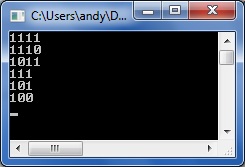
Resulting in the following output:
Example 4: Sedgewick’s Implementation of Priority Queues
And here is a non-STL example of a priority queue, as implemented by Robert Sedgewick. Full code listing as follows:
#include <iostream>

using namespace std;

template <class Item>
void exch(Item &A, Item &B)
{
	Item t = A;
	A = B;
	B = t;
}

template <class Item>
class PQ
{
private:

    Item *pq;
    int N;
public:

    PQ(int maxN)
    {
	pq = new Item[maxN];
	N = 0;
    }

    int empty() const
    { return N == 0; }

    void insert(Item item)
    {
		pq[N++] = item;
	}

    Item getmax()
    {
		int max = 0;
        for (int j = 1; j < N; j++)
			if (pq[max] < pq[j])
				max = j;
        exch(pq[max], pq[N-1]);
        return pq[--N];
    }
};


int main()
{
	PQ<int> pq( 8 );

	pq.insert( 101 );
	pq.insert( 111 );
	pq.insert( 1111 );
	pq.insert( 1001 );
	pq.insert( 1011 );
	pq.insert( 1010 );
	pq.insert( 100 );
	pq.insert( 1000 );

	while ( !pq.empty() )
	{
		cout << pq.getmax() << "\n";
	}

	return 0;
}
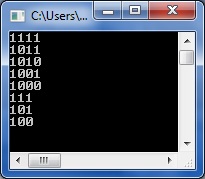
The queue members being output in order of importance: