Basic threading can quite easily be accomplished in C# by employing just a few lines of code.
For this situation it is simply a matter of defining the function you wish to be run as a thread, starting that thread and using ‘join’ as a means of waiting for that thread to finish before continuing with the rest of your code.
The following example show how to launch a function/task as a thread that operates independently of your main control loop:
using System;
using System.Threading;

namespace Threads
{
   class Program
   {
      public static void Main(string[] args)
      {
         // Create and start the thread
         Thread thread = new Thread(new ThreadStart(SomeTaskThatNeedsToFinish));
         thread.Start();

         // Does not proceed beyond here until thread function has finished
         thread.Join();

         // Once finished your program is free to continue...
         Console.WriteLine("Task completed.  Press a key to exit.");
         Console.ReadKey();
      }

      private static void SomeTaskThatNeedsToFinish()
      {
         // Simulate some task that is going to take ~5sec to finish
         Console.WriteLine("Waiting for task to complete...");
         Thread.Sleep(5000);
      }
   }
}
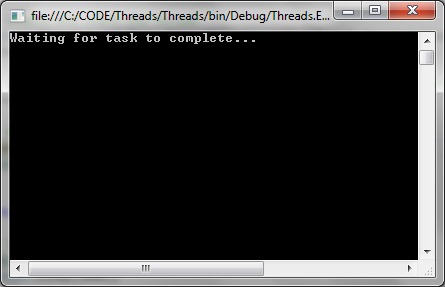
When the programs is started the program is still ‘busy’ doing stuff:
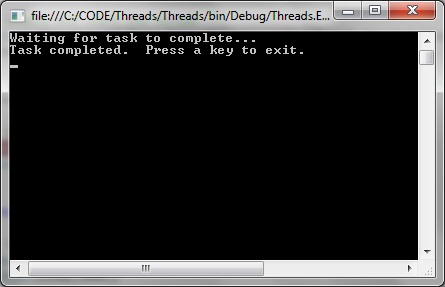
And only continues with the rest of the code when finished:
Using async and await
Async is very useful for tasks that will take an indeterminate length of time, or even fail, such as when accessing a web service. Using the async will enable us to perform other tasks while the asynchronous task is still being carried out.
using System;
using System.Net.Http;
using System.Threading.Tasks;

namespace Threads
{
   class Program
   {
      public static void Main(string[] args)
      {
         var url = AccessTheWebAsync();
         Console.WriteLine("Asynchronous task completed.");
      }

      // Any function that implements await has to be an async
      async static Task<int> AccessTheWebAsync()
      {
         // GetStringAsync returns Task<string>. When you await the task you'll get a string (urlContents).
         // (Can you imagine a world without Microsoft?)
         HttpClient client = new HttpClient();
         Task<string> getStringTask = client.GetStringAsync("http://www.microsoft.com");

         // If GetStringAsync gets completed quickly all well and good.
         // If GetStringAsync takes a long time it still won't stop us from executing DoOtherWork
         DoOtherWork();

         // Resumes when GetStringAsynch complete
         string urlContents = await getStringTask;
         return urlContents.Length;
      }

      private static void DoOtherWork()
      {
         Console.WriteLine("Performing other tasks while still obtaining website string...");
      }
   }
}
using System;
using System.ComponentModel;
using System.Diagnostics;

namespace ProgressThread
{
    public abstract class BaseViewModel : INotifyPropertyChanged
    {
        #region INotifyPropertyChanged Members

        public event PropertyChangedEventHandler PropertyChanged;

        #endregion

        protected void OnPropertyChanged(string propertyName)
        {
            VerifyPropertyName(propertyName);
            PropertyChangedEventHandler handler = PropertyChanged;
            if (handler != null)
            {
                handler(this, new PropertyChangedEventArgs(propertyName));
            }
        }

        protected void OnPropertyChanged(int propertyValue)
        {
            VerifyPropertyName(propertyValue);
            PropertyChangedEventHandler handler = PropertyChanged;
            if (handler != null)
            {
                handler(this, new PropertyChangedEventArgs(propertyValue.ToString()));
            }
        }

        [Conditional("DEBUG")]
        private void VerifyPropertyName(string propertyName)
        {
            if (TypeDescriptor.GetProperties(this)[propertyName] == null)
                throw new ArgumentNullException(GetType().Name + " does not contain property: " + propertyName);
        }

        [Conditional("DEBUG")]
        private void VerifyPropertyName(int propertyValue)
        {
            if (TypeDescriptor.GetProperties(this)[propertyValue] == null)
                throw new ArgumentNullException(GetType().Name + " does not contain property: " + propertyValue.ToString());
        }
    }
}
MainWindowViewModel.cs
using System.ComponentModel;
using System.Threading;
using System.Windows;
using System.Windows.Input;

namespace ProgressThread
{
    public class MainWindowViewModel : BaseViewModel
    {
        private static bool _isRunning;
        private string _buttonLabel;
        private int currentProgress;
        private ICommand _command;
        private BackgroundWorker worker = new BackgroundWorker();

        public MainWindowViewModel()
        {
            worker.DoWork += DoWork;
            worker.ProgressChanged += ProgressChanged;
            worker.WorkerReportsProgress = true;
            worker.WorkerSupportsCancellation = true;
            CurrentProgress = 0;
            _isRunning = true;
            ButtonLabel = "GO";
        }

        private void ProgressChanged(object sender, ProgressChangedEventArgs e)
        {
            CurrentProgress = e.ProgressPercentage;
        }

        private void DoWork(object sender, DoWorkEventArgs e)
        {
            if (CurrentProgress >= 100)
            {
                CurrentProgress = 0;
            }

            while (CurrentProgress < 100 && !_isRunning)
            {
                worker.ReportProgress(CurrentProgress);
                Thread.Sleep(100);
                CurrentProgress++;
            }

            _isRunning = true;
        }

        public ICommand Command
        {
            get
            {
                return _command ?? (_command = new RelayCommand(x =>
                {
                    _isRunning = !_isRunning;

                    if (!_isRunning)
                    {
                        DoStuff();
                    }
                    else
                    {
                        ButtonLabel = "PAUSED";
                    }
                }));
            }
        }

        public int CurrentProgress
        {
            get { return currentProgress; }
            private set
            {
                if (currentProgress != value)
                {
                    currentProgress = value;
                    OnPropertyChanged("CurrentProgress");
                }
            }
        }

        public string ButtonLabel
        {
            get { return _buttonLabel; }
            private set
            {
                if (_buttonLabel != value)
                {
                    _buttonLabel = value;
                    OnPropertyChanged("ButtonLabel");
                }
            }
        }

        private void DoStuff()
        {
            ButtonLabel = "GO";
            worker.RunWorkerAsync();
        }
    }
}
Step 3: Add the event handling infratructure
EventArgs.cs
using System;

namespace ProgressThread
{
    public class EventArgs<T> : EventArgs
    {
        public EventArgs(T value)
        {
            Value = value;
        }

        public T Value { get; private set; }
    }
}
EventRaiser.cs
using System;
using System.Collections.Generic;
using System.Linq;
using System.Text;
using System.Threading.Tasks;

namespace ProgressThread
{
    public static class EventRaiser
    {
        public static void Raise(this EventHandler handler, object sender)
        {
            if (handler != null)
            {
                handler(sender, EventArgs.Empty);
            }
        }

        public static void Raise<T>(this EventHandler<EventArgs<T>> handler, object sender, T value)
        {
            if (handler != null)
            {
                handler(sender, new EventArgs<T>(value));
            }
        }

        public static void Raise<T>(this EventHandler<T> handler, object sender, T value) where T : EventArgs
        {
            if (handler != null)
            {
                handler(sender, value);
            }
        }

        public static void Raise<T>(this EventHandler<EventArgs<T>> handler, object sender, EventArgs<T> value)
        {
            if (handler != null)
            {
                handler(sender, value);
            }
        }
    }
}
RelayCommand.cs
using System;
using System.Windows.Input;

namespace ProgressThread
{
    public class RelayCommand<T> : ICommand
    {
        private readonly Predicate<T> _canExecute;
        private readonly Action<T> _execute;

        public RelayCommand(Action<T> execute)
            : this(execute, null)
        {
            _execute = execute;
        }

        public RelayCommand(Action<T> execute, Predicate<T> canExecute)
        {
            if (execute == null)
            {
                throw new ArgumentNullException("execute");
            }
            _execute = execute;
            _canExecute = canExecute;
        }

        public bool CanExecute(object parameter)
        {
            return _canExecute == null || _canExecute((T)parameter);
        }

        public void Execute(object parameter)
        {
            _execute((T)parameter);
        }

        public event EventHandler CanExecuteChanged
        {
            add { CommandManager.RequerySuggested += value; }
            remove { CommandManager.RequerySuggested -= value; }
        }
    }

    public class RelayCommand : ICommand
    {
        private readonly Predicate<object> _canExecute;
        private readonly Action<object> _execute;

        public RelayCommand(Action<object> execute)
            : this(execute, null)
        {
            _execute = execute;
        }

        public RelayCommand(Action<object> execute, Predicate<object> canExecute)
        {
            if (execute == null)
            {
                throw new ArgumentNullException("execute");
            }
            _execute = execute;
            _canExecute = canExecute;
        }

        public bool CanExecute(object parameter)
        {
            return _canExecute == null || _canExecute(parameter);
        }

        public void Execute(object parameter)
        {
            _execute(parameter);
        }

        // Ensures WPF commanding infrastructure asks all RelayCommand objects whether their
        // associated views should be enabled whenever a command is invoked
        public event EventHandler CanExecuteChanged
        {
            add
            {
                CommandManager.RequerySuggested += value;
                CanExecuteChangedInternal += value;
            }
            remove
            {
                CommandManager.RequerySuggested -= value;
                CanExecuteChangedInternal -= value;
            }
        }

        private event EventHandler CanExecuteChangedInternal;

        public void RaiseCanExecuteChanged()
        {
            CanExecuteChangedInternal.Raise(this);
        }
    }
}
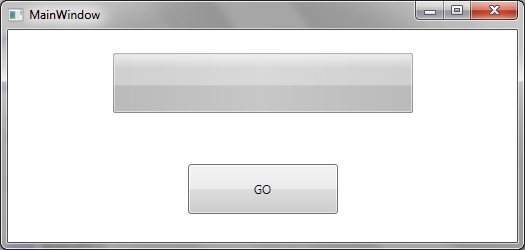
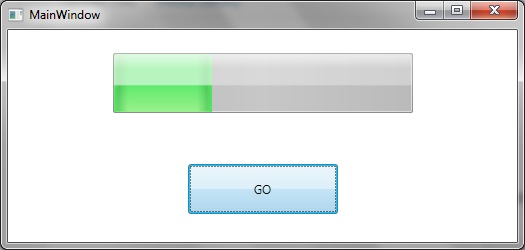
So that when running we initially have the zero-progress as shown:
Clicking on the “GO” button initiates the progress bar thread as shown:
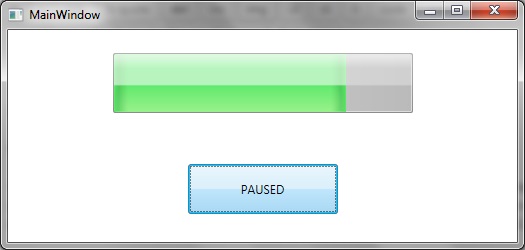
We can interrupt the progress by clicking on the “GO” button, which stops the background thread and switches the button label to “PAUSED”:
Method 1: Write a class that implements the Runnable interface
(i) Put the thread code in the run() method.
(ii) Create a thread object by passing a Runnable object as an argument to the Thread constructor. The Thread object now has a Runnable object that implements the run() method. Like this: (new Thread(new MyThread())).start();
Simple code sample as follows:
package javathread1;

class MyThread implements Runnable
{
    public void run()
    {
        //Display info about thread
	System.out.println(Thread.currentThread());
    }
}

public class JavaThread1
{
    public static void main(String[] args)
    {
        // Create the thread
        Thread thread1 = new Thread(new MyThread(), "thread 1");

        // Start the thread
        thread1.start();
    }
}
Method 2: Declare the class to be a Subclass of the Thread class
(i) Override the run() method from the Thread class to define the code executed by the thread.
(ii) Invoke the start() method inherited from the Thread class to make the thread eligible for running.
Code sample as follows:
package javathread1;

class MyThread extends Thread
{
    public void run()
    {
	//Display info about this particular thread
	System.out.println(Thread.currentThread().getName());
    }
}

public class JavaThread1
{
    public static void main(String[] args)
    {
        Thread thread1 = new MyThread();
        thread1.start();
    }
}
This post aims to be an accessible introduction to getting set up with the Boost threads in Visual Studio environments for the first time. Like with many technical subjects, there is a great deal of information out on the internet, that tells you a lot without actually showing you anything! (more…)
Right now I am just starting with a very simple example – no fancy stuff – just a single thread to demonstrate a sequence that updates a counter 20 times per second. (more…)
Manage Consent
To provide the best experiences, we use technologies like cookies to store and/or access device information. Consenting to these technologies will allow us to process data such as browsing behavior or unique IDs on this site. Not consenting or withdrawing consent, may adversely affect certain features and functions.
Functional
Always active
The technical storage or access is strictly necessary for the legitimate purpose of enabling the use of a specific service explicitly requested by the subscriber or user, or for the sole purpose of carrying out the transmission of a communication over an electronic communications network.
Preferences
The technical storage or access is necessary for the legitimate purpose of storing preferences that are not requested by the subscriber or user.
Statistics
The technical storage or access that is used exclusively for statistical purposes.The technical storage or access that is used exclusively for anonymous statistical purposes. Without a subpoena, voluntary compliance on the part of your Internet Service Provider, or additional records from a third party, information stored or retrieved for this purpose alone cannot usually be used to identify you.
Marketing
The technical storage or access is required to create user profiles to send advertising, or to track the user on a website or across several websites for similar marketing purposes.