A short recipe outlining how to output a SYSTEMTIME value as a std::string.
The example format will be “YYYY-MM-DD HH:MM:SS.MMM”
I specifically wanted to include milliseconds.
In this example I employ three possible techniques:
1. MFC CString
2. std::ostringstream
3. sprintf
Example code listing shown:
#include <windows.h>
#include <atlstr.h>
#include <iostream>
#include <sstream>
#include <iomanip>

int main()
{
	SYSTEMTIME st, lt;

    GetSystemTime(&st);
    std::string strMessage;

	// Output a given SYSTEMTIME in the format "

	// 1. Using CString
	CString cstrMessage;

	cstrMessage.Format( "%d-%02d-%02d %02d:%02d:%02d.%03d",
					    st.wYear,
		                st.wMonth,
					    st.wDay,
					    st.wHour,
					    st.wMinute,
					    st.wSecond,
					    st.wMilliseconds );

	strMessage = cstrMessage;
	std::cout << "System time = " << strMessage << std::endl;

	// 2. Formating using ostringstream
	std::ostringstream ossMessage;

	ossMessage << st.wYear   << "-"
		       << std::setw( 2 ) << std::setfill( '0' ) << st.wMonth  << "-"
			   << std::setw( 2 ) << std::setfill( '0' ) << st.wDay    << " "
			   << std::setw( 2 ) << std::setfill( '0' ) << st.wHour   << ":"
			   << std::setw( 2 ) << std::setfill( '0' ) << st.wMinute << ":"
			   << std::setw( 2 ) << std::setfill( '0' ) << st.wSecond << "."
			   << std::setw( 3 ) << std::setfill( '0' ) << st.wMilliseconds;

	strMessage = ossMessage.str();
	std::cout << "System time = " << strMessage << std::endl;

	// 3. sprintf
	char buffer[ 256 ];
	sprintf( buffer,
		     "%d-%02d-%02d %02d:%02d:%02d.%03d",
			 st.wYear,
			 st.wMonth,
			 st.wDay,
			 st.wHour,
			 st.wMinute,
			 st.wSecond,
			 st.wMilliseconds );

	strMessage = buffer;
	std::cout << "System time = " << strMessage << std::endl;

	return 0;
}
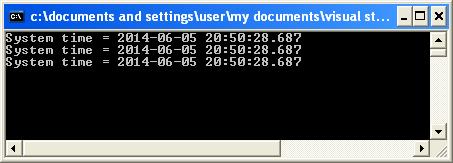
All three techniques giving exactly the same output as shown:
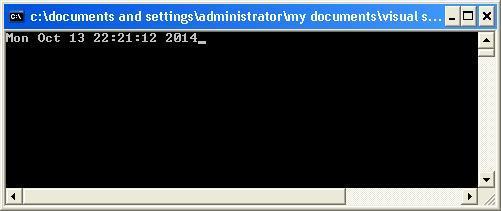
Here is another example whereby I take a SYSTEMTIME as input and output it to a stream in a given date/time format such as “Mon Oct 13 22:21:12 2014”. I create a class called TimeFormat which is constructed from the format string and SYSTEMTIME, and outputs the desired output time format via an overloaded insertion () operator that can recognize an so it can access the private data within the ostream object on the left and a TimeFormat object on the right. The overloaded TimeFormatTimeFormatobject:
friend std::ostream& operator <<( std::ostream&, TimeFormat const & );
Full code listing as follows:
#include <iostream>
#include <iterator>
#include <string>
#include <ctime>
#include <locale>
#include <Windows.h>

const std::string TIME_PATTERN = "%a %b %d %H:%M:%S %Y";

class TimeFormat
{
public:

    TimeFormat(const std::string& strFormat, const SYSTEMTIME& stSystemDate) :
         m_strFormat( strFormat ),
         m_stSystemDate( stSystemDate ) {}

    friend std::ostream& operator <<( std::ostream&, TimeFormat const & );

private:
    std::string m_strFormat;
	SYSTEMTIME m_stSystemDate;
};

std::ostream& operator <<( std::ostream& os, TimeFormat const& format )
{
	std::ostream::sentry s(os);

    if ( s )
    {
		std::tm tmSystemDate;
		tmSystemDate.tm_sec  = format.m_stSystemDate.wSecond;
		tmSystemDate.tm_min  = format.m_stSystemDate.wMinute;
		tmSystemDate.tm_hour = format.m_stSystemDate.wHour;
		tmSystemDate.tm_mday = format.m_stSystemDate.wDay;
		tmSystemDate.tm_mon  = format.m_stSystemDate.wMonth - 1;
		tmSystemDate.tm_year = format.m_stSystemDate.wYear - 1900;
		tmSystemDate.tm_isdst = -1;

		std::time_t t = std::mktime( &tmSystemDate );
        std::tm const* tm = std::localtime(&t);
        std::ostreambuf_iterator<char> output( os );
        std::use_facet<std::time_put<char>>(os.getloc()).put( output,
														      os,
															  os.fill(),
															  tm,
															  &format.m_strFormat[0],
															  &format.m_strFormat[0] + format.m_strFormat.size() );

    }

    os.width( 0 );
    return os;
}

int main()
{
	SYSTEMTIME stSystemDate;
	GetSystemTime( &stSystemDate );
	std::cout << TimeFormat( TIME_PATTERN, stSystemDate );
}
Which will give the following output: