
Some instructions on how to use Newtonsoft JSON to serialize and deserialize your objects in C#
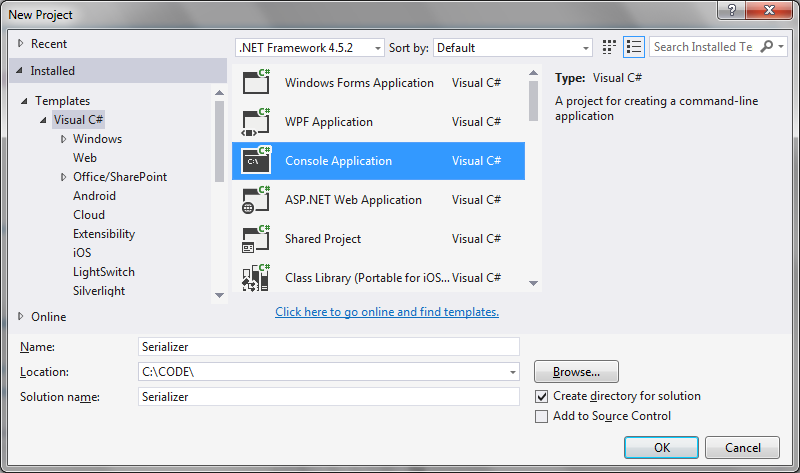
Step 1: Create a new Visual Studio project
Just a simple console application will do:
Step 2: Install Newtonsoft Json using Nuget
Available at the NuGet site:
https://www.nuget.org/packages/newtonsoft.json/
Enter the command to install Newtonsoft Json in the Visual Studio package manager console:
Install-Package Newtonsoft.Json -Version 11.0.2
Step 3. Create an example class to serialize/deserialize
public class DataStructure
   {
      public string Name { get; set; }
      public List<int> Identifiers { get; set; }
   }
Step 4. Create methods to serialize and deserialize
public static void Serialize(object obj)
      {
         var serializer = new JsonSerializer();

         using (var sw = new StreamWriter(filePath))
         using (JsonWriter writer = new JsonTextWriter(sw))
         {
            serializer.Serialize(writer, obj);
         }
      }

      public static object Deserialize(string path)
      {
         var serializer = new JsonSerializer();

         using (var sw = new StreamReader(path))
         using (var reader = new JsonTextReader(sw))
         {
            return serializer.Deserialize(reader);
         }
      }
Step 5: Try it
Putting this all together in the main program loop:
using Newtonsoft.Json;
using System;
using System.Collections.Generic;
using System.IO;

namespace Serializer
{
   public class DataStructure
   {
      public string Name { get; set; }
      public List<int> Identifiers { get; set; }

      public void Print()
      {
         Console.WriteLine("Name: " + Name);
         Console.WriteLine("Identifiers: " + string.Join<int>(",", Identifiers));
         Console.WriteLine();
         Console.WriteLine();
      }
   }

   class Program
   {
      const string filePath = @"c:\dump\json.txt";

      public static void Serialize(object obj)
      {
         var serializer = new JsonSerializer();

         using (var sw = new StreamWriter(filePath))
         using (JsonWriter writer = new JsonTextWriter(sw))
         {
            serializer.Serialize(writer, obj);
         }
      }

      public static object Deserialize(string path)
      {
         var serializer = new JsonSerializer();

         using (var sw = new StreamReader(path))
         using (var reader = new JsonTextReader(sw))
         {
            return serializer.Deserialize(reader);
         }
      }

      static void Main(string[] args)
      {
         var data = new DataStructure
         {
            Name = "Henry",
            Identifiers = new List<int> { 1, 2, 3, 4 }
         };

         Console.WriteLine("Object before serialization:");
         Console.WriteLine("----------------------------");
         Console.WriteLine();
         data.Print();

         Serialize(data);

         var deserialized = Deserialize(filePath);

         Console.WriteLine("Deserialized (json) string:");
         Console.WriteLine("---------------------------");
         Console.WriteLine();
         Console.WriteLine(deserialized);
      }
   }
}
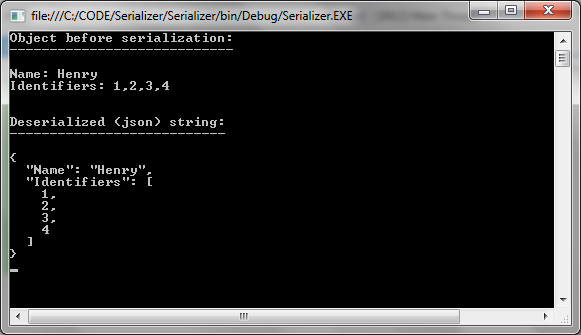
Giving the following output showing the object details before serialization, and the json string of the deserialized DataStructure object:



Thank you for this! Concise and lovely coded. Helped me build a super simple (but robust and scalable, because JSON) save/load system for my video game project.
You rock!