Some recipes for using flex to reliably align items in your html files.
The collection of recipes can also be found as a collection my CodePen site.
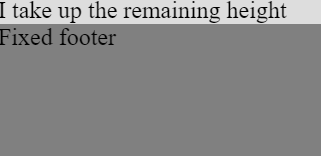
1. Make a div box occupy available height, fixed footer
HTML
<div class="outer">
  <div class="inner_remaining">
    I take up the remaining height
  </div>
  <div class="footer">
    Fixed footer
  </div>
</div>
CSS
html,
body {
  height: 100%;
  width: 100%;
  margin: 0;
}

.outer {
  display: flex;
  flex-flow: column;
  height: 100%;
}

.footer {
  height: 100px;
  background-color: grey;
}

.inner_remaining {
  background-color: #DDDDDD;
  flex-grow : 1;
}
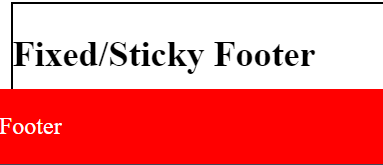
2. Fixed / sticky footer example
HTML
<div class="box">
  <h2>Fixed/Sticky Footer</h2>
  <p>The footer is placed at the bottom of the page.</p>
    <div class="footer">
      <p>Footer</p>
    </div>
</div>
CSS
.footer {
   position: fixed;
   left: 0;
   bottom: 0;
   width: 100%;
   background-color: red;
   color: white;
   text-align: left;
}

.box {
  border: solid black 1px;
  width: 400px;
}
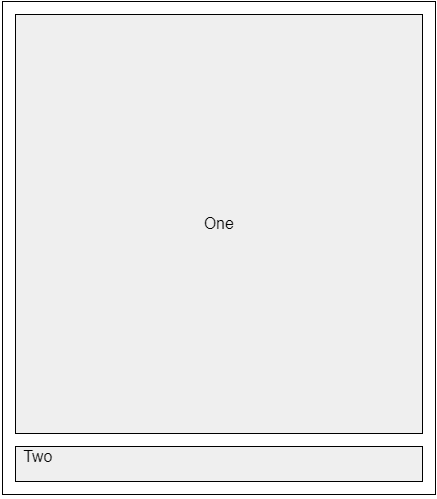
3. Aligning Last Item to the Bottom, fixed box height
HTML
<div class="box">
   <button class="body">One</button>
  <button class="footer">Two</button>
</div>
CSS
.box {
  padding: 5px;
  display:flex;
  border: 1px solid black;
  height: 400px;
  width:350px;
  flex-direction:column;
  flex: 1 0 auto; // Grow, don't shrink
}

.body {
  border: 1px solid black;
  margin: 5px;
  flex: 1 0 auto; // Grow, don't shrink
  overflow: auto
}

.footer {
  border: 1px solid black;
  height: 30px;
  display: flex;
  margin: 5px;
}
4. Using flex to fill the remaining space horizontally
HTML
<div class="box">
  <button class="button1">One</button>
  <button class="button2">Two</button>
</div>
CSS
.box {
  padding: 5px;
  display: flex;
  border: 1px solid black;
  width: 400px;
  flex-direction:row;
}

.button1 {
  border: 1px solid black;
  height: 30px;
  justify-content: center;
  margin: 5px;
  flex: 1 0 auto; // Grow, don't shrink
}

.button2 {
  border: 1px solid black;
  height: 30px;
  width: 80px;
  justify-content: center;
  margin: 5px;
}

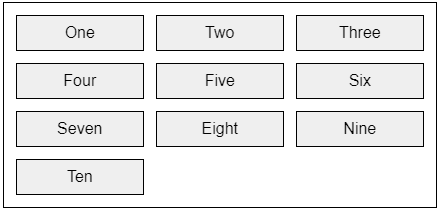
HTML
<div class="box">
  <button class="button">One</button>
  <button class="button">Two</button>
  <button class="button">Three</button>
  <button class="button">Four</button>
  <button class="button">Five</button>
  <button class="button">Six</button>
  <button class="button">Seven</button>
  <button class="button">Eight</button>
  <button class="button">Nine</button>
  <button class="button">Ten</button>
</div>
CSS
.box {
  padding: 5px;
  display: grid;
  border: 1px solid black;
  width: 350px;
  grid-template-columns: repeat(auto-fill,minmax(100px, 1fr));
}

.button {
  border: 1px solid black;
  height: 30px;
  display: flex;
  justify-content: center;
  align-items: center;
  margin: 5px;
}
6. Achieving gutters between flexbox items
HTML
<div class="wrapper">
  <div class="box">
    <button>One</button>
    <button>Two</button>
    <button>Three</button>
    <button>Four</button>
    <button>Five</button>
    <button>Six</button>
    <button>Seven</button>
    <button>Eight</button>
    <button>Nine</button>
  </div>
 </div>
CSS
.wrapper {
        border: 1px solid black;
        width: 500px;
        height: 80px;
        padding: 5px;
      }
    .box {

        display: flex;
        flex-wrap: wrap;
        margin:-5px;
      }
      .box>* {
        flex: 0 1 160px;
        margin: 5px;
      }

7. Controlling flexbox layouts using percentages
HTML
 <div class="box">
   <button>One</button>
   <button>Two</button>
   <button>Three</button>
   <button>Four</button>
   <button>Five</button>
   <button>Six</button>
   <button>Seven</button>
   <button>Eight</button>
   <button>Nine</button>
   <button>Ten</button>
 </div>
CSS
.box {
        width: 500px;
        display: flex;
        flex-wrap: wrap;
        border: 1px solid black;
        padding: 5px;

      }
      .box >* {
          flex: 0 0 25%;
      }

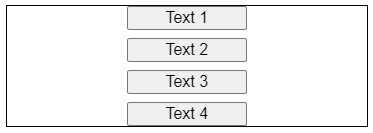
8. Vertically and evenly distribute items using flex and justify-content
HTML
<div class="outer">
  <button class="button">Text 1</button>
  <button class="button">Text 2</button>
  <button class="button">Text 3</button>
  <button class="button">Text 4</button>
</div>
CSS
.outer {
  height: 100px;
  width: 300px;
  border: 1px solid black;
  display: flex;
  flex-direction: column;
  justify-content: space-between;
  align-items: center;
}

.button {
  height: 20px;
  width: 100px;
}
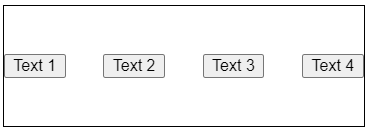
9. Horizontally and evenly distribute items using flex and justify-content
HTML
<div class="outer">
  <button class="button">Text 1</button>
  <button class="button">Text 2</button>
  <button class="button">Text 3</button>
  <button class="button">Text 4</button>
</div>
CSS
.outer {
  height: 100px;
  width: 300px;
  border: 1px solid black;
  display: flex;
  align-items:center;
  justify-content: space-between;
}

.button {
  height: 20px;
}
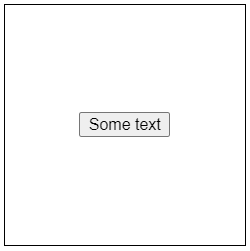
10. Using flex to center html content horizontally and vertically
HTML
<div class="outer">
  <button>Some text</button>
</div>
CSS
.outer {
  height: 200px;
  width: 200px;
  border: 1px solid black;
  display: flex;
  align-items:center;
  justify-content: center;
}