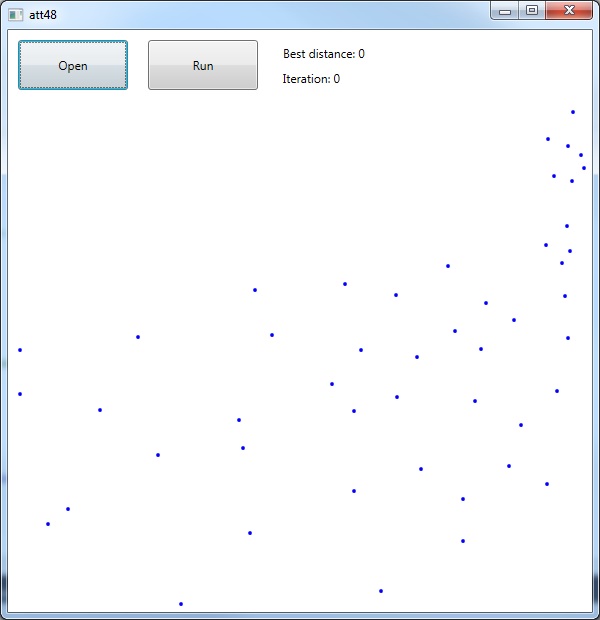
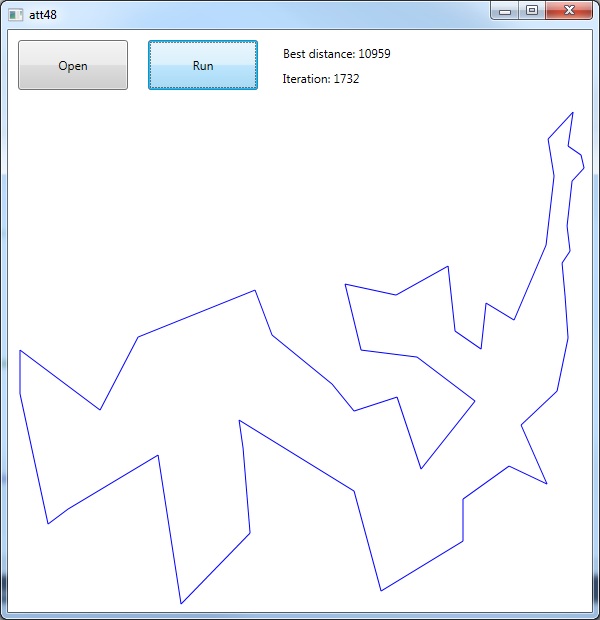
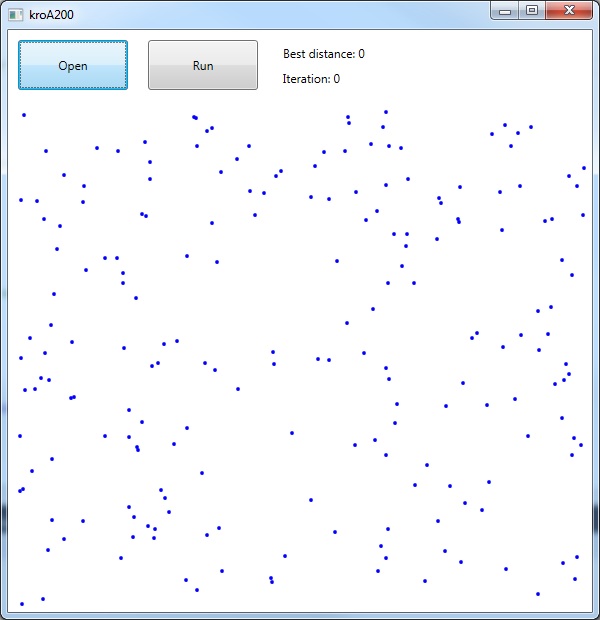
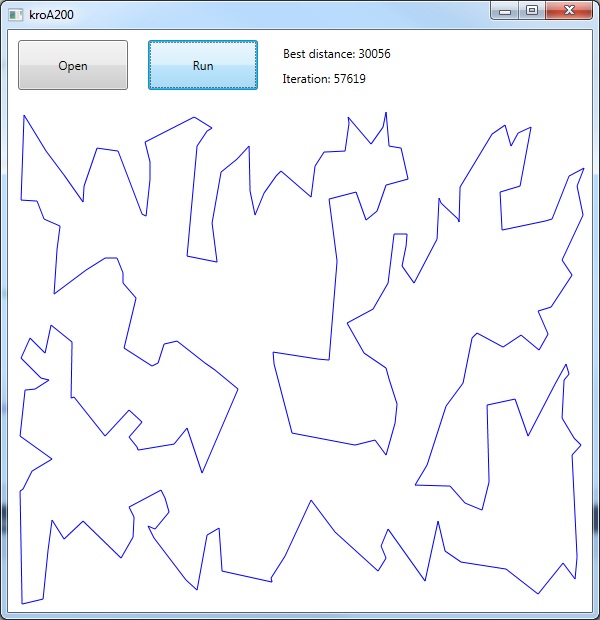
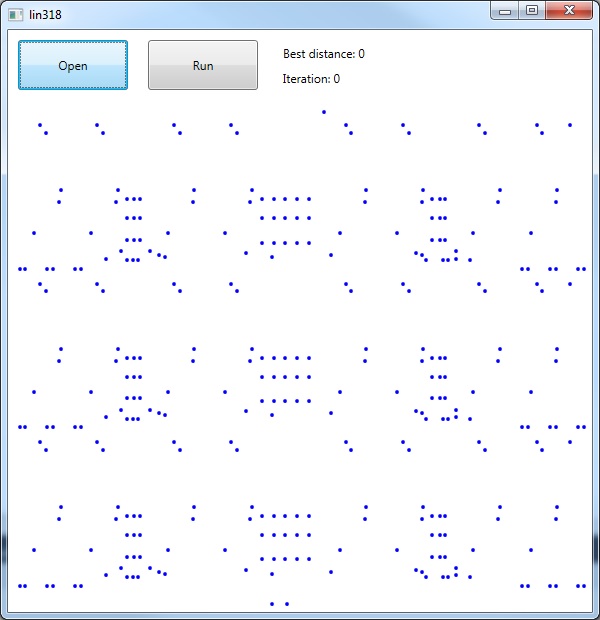
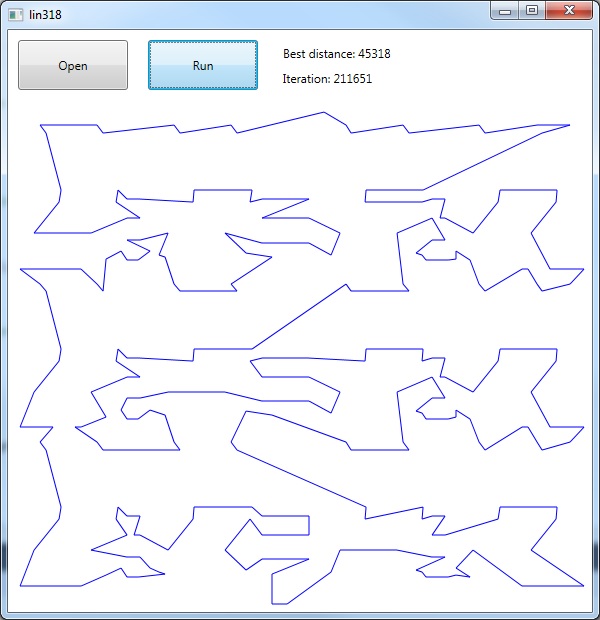
This post demonstrates how to apply the 2-opt algorithm to a number of standard test problems in C# while displaying the
results in a WPF style window, while using the MVVM design pattern.
See this link for an overview of the two opt algorithm.
But essentially the 2-opt link swapping heuristic can be summarised by the following steps:
The actual 2-opt heuristic can be summarised by the following pseudocode steps, repeating for all feasible combinations of I and k:
1. take route[1] to route[i-1] and add them in order to new_route
2. take route[i] to route[k] and add them in reverse order to new_route
3. take route[k+1] to end and add them in order to new_route
4. return the new_route;
Architecture
This application is designed around the Model View ViewModel architecture (MVVM). I find that MVVM allows for a nice clean separation between the graphical
display, the business logic and data handling.
As with the Java and C++ versions, the user interface is a simple window with buttons for opening the test problem (*.tsp file) and a run button to execute the algorithm(which causes the
display to get updated and re-draw the tour links each time a better tour is found)
Building the User Interface in XAML
I use standard WPF / XAML for the user interface components and the canvas in which to draw the city nodes, tour links etc:
This class I use for handling the business logic and the responding to the button press events from the main user interface.
MainWindowViewModel.cs
using System;
using System.Collections.Generic;
using System.IO;
using System.Text;
using System.Windows.Forms;
using System.Windows.Input;

namespace TwoOpt
{
   public class MainWindowViewModel : BaseViewModel
   {
      private readonly Model _model;
      private ICommand _openCommand;
      private ICommand _runCommand;

      public MainWindowViewModel()
      {
         _model = new Model();
         _model.TourUpdated += ModelOnTourUpdated;
      }

      public IMainWindow MainWindow { get; set; }

      public string Title
      {
         get { return _model.Title; }
         set
         {
            _model.Title = value;
            OnPropertyChanged("Title");
         }
      }

      public ICommand OpenCommand
      {
         get
         {
            return _openCommand ?? (_openCommand = new RelayCommand(
                      x =>
                      {
                         var openFileDialog1 = new OpenFileDialog
                         {
                            InitialDirectory = "c:\\",
                            Filter = @"txt files (*.tsp)|*.tsp|All files (*.*)|*.*",
                            FilterIndex = 2,
                            RestoreDirectory = true
                         };

                         if (openFileDialog1.ShowDialog() != DialogResult.OK) return;

                         try
                         {
                            Stream stream;
                            // ReSharper disable once ConditionIsAlwaysTrueOrFalse
                            if ((stream = openFileDialog1.OpenFile()) == null) return;

                            var height = MainWindow.GridHeight();
                            var width = MainWindow.GridWidth();

                            _model.CancelJobs();
                            _model.InitMatrix(stream, height, width);
                            Title = _model.Title;
                            DisplayNodes();
                            MainWindow.UpdateIteration(0, 0, null);
                         }
                         catch (Exception ex)
                         {
                            MessageBox.Show(@"Error: Could not read file from disk. Original error: " + ex.Message);
                         }
                      }));
         }
      }

      public ICommand RunCommand
      {
         get
         {
            return _runCommand ?? (_runCommand = new RelayCommand(
                      x => { _model.Run(); }));
         }
      }

      public List<Pair> Lines => _model.TourCoords;

      private void ModelOnTourUpdated(object sender, EventArgs<Tuple<double, int>> eventArgs)
      {
         var iter = eventArgs.Value.Item2;
         var best = eventArgs.Value.Item1;

         Update(best, iter);
      }

      public IEnumerable<string> ReadLines(Func<Stream> streamProvider,
         Encoding encoding)
      {
         using (var stream = streamProvider())
         {
            using (var reader = new StreamReader(stream, encoding))
            {
               string line;
               while ((line = reader.ReadLine()) != null)
                  yield return line;
            }
         }
      }

      private void DisplayNodes()
      {
         MainWindow?.PlotNodes(_model.DisplayCoords);
      }

      private void Update(double best, int iter)
      {
         MainWindow.UpdateIteration(best, iter, _model.TourCoords);
      }
   }
}
Within this code I also make use of the Supervisor Controlling Pattern as means of accessing the View controls from within the ViewModel class.
It does this by allowing MainWindow.xaml.cs to inherits from the IMainWindow interface, which provide the functions to plot the nodes and draw the links:
IMainWindow.cs
using System.Collections.Generic;

namespace TwoOpt
{
   public interface IMainWindow
   {
      void UpdateIteration(double best, int iter, List<Pair> tourCoords);
      void PlotNodes(List<Pair> displayCoords);

      double GridHeight();
      double GridWidth();
   }
}
MainWindow.xaml.cs
using System.Collections.Generic;
using System.Windows.Controls;
using System.Windows.Media;
using System.Windows.Shapes;

namespace TwoOpt
{
   /// <summary>
   ///    Interaction logic for MainWindow.xaml
   /// </summary>
   public partial class MainWindow : IMainWindow
   {
      public MainWindow()
      {
         InitializeComponent();

         var mainWindowViewModel = DataContext as MainWindowViewModel;

         if (mainWindowViewModel != null)
            mainWindowViewModel.MainWindow = this;
      }

      public void PlotNodes(List<Pair> displayCoords)
      {
         CanvasGrid.Children.Clear();

         InvalidateVisual();

         foreach (var coord in displayCoords)
         {
            var ellipse = new Ellipse
            {
               Width = 4,
               Height = 4,
               Fill = Brushes.Blue
            };

            Canvas.SetLeft(ellipse, coord.X());
            Canvas.SetTop(ellipse, coord.Y());

            CanvasGrid.Children.Add(ellipse);
         }
      }

      public double GridHeight()
      {
         return DisplayGrid.ActualHeight;
      }

      public double GridWidth()
      {
         return DisplayGrid.ActualWidth;
      }

      public void UpdateIteration(double best, int iter, List<Pair> tourCoords)
      {
         Dispatcher.Invoke(() =>
         {
            IterationLabel.Content = "Iteration: " + iter;
            BestLabel.Content = "Best distance: " + (int)best;

            if (tourCoords == null) return;

            var size = tourCoords.Count;
            var startCoord = tourCoords[0];
            CanvasGrid.Children.Clear();

            for (var i = 1; i < size; ++i)
            {
               var endCoord = tourCoords[i];

               var link = new Line
               {
                  X1 = startCoord.X() + 2,
                  Y1 = startCoord.Y() + 2,
                  X2 = endCoord.X() + 2,
                  Y2 = endCoord.Y() + 2,

                  Stroke = Brushes.Blue
               };

               CanvasGrid.Children.Add(link);
               startCoord = tourCoords[i];
            }

            var finalLink = new Line
            {
               X1 = tourCoords[0].X() + 2,
               Y1 = tourCoords[0].Y() + 2,
               X2 = tourCoords[size - 1].X() + 2,
               Y2 = tourCoords[size - 1].Y() + 2,
               Stroke = Brushes.Blue
            };

            CanvasGrid.Children.Add(finalLink);
         });
      }
   }
}
C# implementation of the 2-opt algorithm
// Do all 2-opt combinations
      private void TwoOpt()
      {
         // Get tour size
         var size = _tour.TourSize();

         //CHECK THIS!!
         for (var i = 0; i < size; i++)
         {
            _newTour.SetCity(i, _tour.GetCity(i));
         }

         // repeat until no improvement is made
         var improve = 0;
         var iteration = 0;

         while (improve < 500)
         {
            var bestDistance = _tour.TourDistance();

            for (var i = 1; i < size - 1; i++)
            {
               for (var k = i + 1; k < size; k++)
               {
                  TwoOptSwap(i, k);
                  iteration++;

                  var newDistance = _newTour.TourDistance();

                  if (!(newDistance < bestDistance)) continue;

                  // Improvement found so reset
                  improve = 0;

                  for (var j = 0; j < size; j++)
                  {
                     _tour.SetCity(j, _newTour.GetCity(j));
                  }

                  bestDistance = newDistance;

                  // Update the display
                  SetTourCoords();

                  TourUpdated.Raise(this, new Tuple<double, int>( bestDistance, iteration));
               }
            }

            improve++;
         }
      }
And this is how the swap is done:
private void TwoOptSwap(int i, int k)
      {
         var size = _tour.TourSize();

         // 1. take route[0] to route[i-1] and add them in order to new_route
         for (var c = 0; c <= i - 1; ++c)
         {
            _newTour.SetCity(c, _tour.GetCity(c));
         }

         // 2. take route[i] to route[k] and add them in reverse order to new_route
         var dec = 0;
         for (var c = i; c <= k; ++c)
         {
            _newTour.SetCity(c, _tour.GetCity(k - dec));
            dec++;
         }

         // 3. take route[k+1] to end and add them in order to new_route
         for (var c = k + 1; c < size; ++c)
         {
            _newTour.SetCity(c, _tour.GetCity(c));
         }
      }
Trying out the program
Att48.tsp
I tend to always start out on a reasonably small test problem such as att48.tsp, available from here:
E-iceblue Ltd. is a vendor of powerful components for .NET, Silverlight and WPF development. These products enable the user to easily read and write different formats of office files.
A quick an easy guide to setting up Spire.XLS for use in Visual Studio .NET projects is presented here.
For the purpose of clarity and helping the user get started as soon as possible, a simple ‘HelloWorld’ example is presented. (more…)
C++/CLI (Common Language Infrastructure) was designed to bring C++ to .NET as a means of developing managed code applications. Specifically it helps simplify writing managed code when using C++.
Suppose you are writing a WinForms application in Microsoft Visual Studio with a view to using C++ to write managed code. You may prefer to reuse existing libraries and headers written in C and C++ but are a little unsure as to how this is achieved exactly. (more…)
This post is essentially a blatant lifting of Omar Gamil’s CodeProject article on the same subject. I have been using the project as means of getting into C# programming and using things like Windows Forms etc in Visual Studio environments for the first time. (more…)
Manage Consent
To provide the best experiences, we use technologies like cookies to store and/or access device information. Consenting to these technologies will allow us to process data such as browsing behavior or unique IDs on this site. Not consenting or withdrawing consent, may adversely affect certain features and functions.
Functional
Always active
The technical storage or access is strictly necessary for the legitimate purpose of enabling the use of a specific service explicitly requested by the subscriber or user, or for the sole purpose of carrying out the transmission of a communication over an electronic communications network.
Preferences
The technical storage or access is necessary for the legitimate purpose of storing preferences that are not requested by the subscriber or user.
Statistics
The technical storage or access that is used exclusively for statistical purposes.The technical storage or access that is used exclusively for anonymous statistical purposes. Without a subpoena, voluntary compliance on the part of your Internet Service Provider, or additional records from a third party, information stored or retrieved for this purpose alone cannot usually be used to identify you.
Marketing
The technical storage or access is required to create user profiles to send advertising, or to track the user on a website or across several websites for similar marketing purposes.