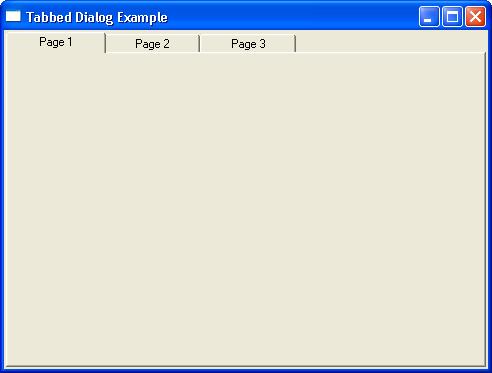
An example demonstrating how to create and display a tab common control using WinAPI (Win32) C++ programming.
Much credit needs to go to Ken Fitlike’s excellent WinAPI site, from which I orginally learned how to do stuff like this. I don’t think the site has been updated for a number of years but it contains a ton of useful material on showing you how to create various things using the WinAPI.
All that is required to create a Tabbed Dialog is some small modifications to the Simple Window example: the WndProc function handles WM_CREATE and WM_SIZE messages in addition to WM_DESTROY:
LRESULT CALLBACK WndProc(HWND hwnd,UINT uMsg,WPARAM wParam,LPARAM lParam)
{
	switch (uMsg)
	{
		case WM_CREATE:
		{
			return OnCreate(hwnd,reinterpret_cast<CREATESTRUCT*>(lParam));
		}
		case WM_DESTROY:
		{
			OnDestroy(hwnd);
			return 0;
		}
		case WM_SIZE:
		{
			OnSize(hwnd,LOWORD(lParam),HIWORD(lParam),static_cast<UINT>(wParam));
			return 0;
		}
		default:
			return DefWindowProc(hwnd,uMsg,wParam,lParam);
	}
}
This example does nothing but demonstrate the creation and display of controls of the WC_TABCONTROL class. Tab controls are created with the CreateWindowEx API function by varying the window styles. The API function CreateWindow can also be used:
HWND hwnd=CreateWindowEx(0,							// extended styles
							 classname.c_str(),			// name: wnd 'class'
							 _T("Tabbed Dialog Example"), // wnd title
							 WS_OVERLAPPEDWINDOW,		// wnd style
							 desktopwidth / 4,			// position:left
							 desktopheight / 4,			// position: top
							 desktopwidth / 2,			// width
							 desktopheight / 2,			// height
							 0,							// parent wnd handle
							 0,							// menu handle/wnd id
							 hInst,						// app instance
							 0);						// user defined info
To get started with this tabbed dialog example first create an empty project in Visual Studio:
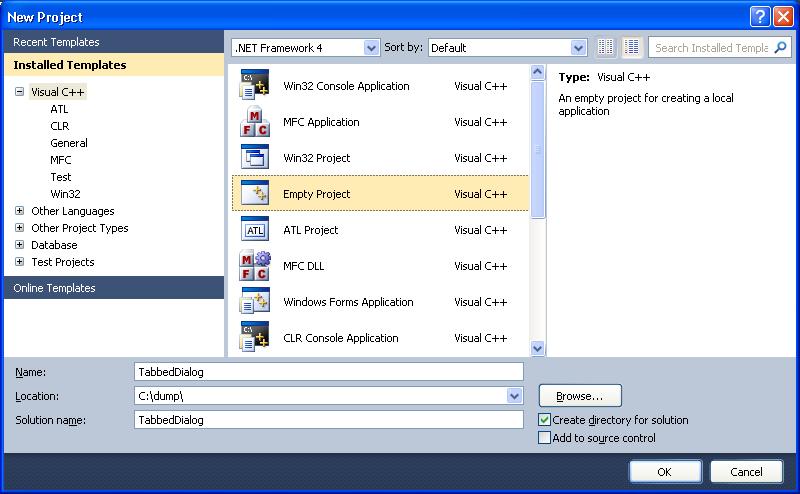
Create a new cpp file ‘main.cpp’, and the full code listing for main.cpp is as follows:
#include <windows.h>
#include <tchar.h>
#include <commctrl.h>
#include <string>
#include <vector>

#pragma comment(lib, "comctl32.lib")

#if defined __MINGW_H
#define _WIN32_IE 0x0400
#endif

typedef std::basic_string<TCHAR> ustring;

enum {
  IDC_TAB=200,
};

inline int ErrMsg(const ustring& s)
{
	return MessageBox(0,s.c_str(),_T("ERROR"),MB_OK|MB_ICONEXCLAMATION);
}

void StartCommonControls(DWORD flags)
{
	INITCOMMONCONTROLSEX iccx;
	iccx.dwSize=sizeof(INITCOMMONCONTROLSEX);
	iccx.dwICC=flags;
	InitCommonControlsEx(&iccx);
}

HWND CreateTab(const HWND hParent,const HINSTANCE hInst,DWORD dwStyle,
               const RECT& rc,const int id)
{
	dwStyle |= WS_CHILD | WS_VISIBLE;

	return CreateWindowEx(0,                  //extended styles
						  WC_TABCONTROL,     //control 'class' name
						  0,                  //control caption
						  dwStyle,            //wnd style
						  rc.left,            //position: left
						  rc.top,             //position: top
						  rc.right,           //width
						  rc.bottom,          //height
						  hParent,            //parent window handle
						  //control's ID
						  reinterpret_cast<HMENU>(static_cast<INT_PTR>(id)),
						  hInst,              //instance
						  0);                 //user defined info
}

int InsertItem(HWND hTc,const ustring& txt,int item_index,int image_index,
               UINT mask = TCIF_TEXT|TCIF_IMAGE)
{
	std::vector<TCHAR> tmp(txt.begin(),txt.end());
	tmp.push_back(_T('\0'));

	TCITEM tabPage={0};

	tabPage.mask=mask;
	tabPage.pszText=&tmp[0];
	tabPage.cchTextMax=static_cast<int>(txt.length());
	tabPage.iImage=image_index;
	return static_cast<int>(SendMessage(hTc,TCM_INSERTITEM,item_index,
							reinterpret_cast<LPARAM>(&tabPage)));
}

int OnCreate(const HWND hwnd,CREATESTRUCT *cs)
{
	RECT rc={0,0,0,0};
	StartCommonControls(ICC_TAB_CLASSES);

	HWND hTabCntrl=CreateTab(hwnd,cs->hInstance,TCS_FIXEDWIDTH,rc,IDC_TAB);

	// Store the tab control handle as the user data associated with the
	// parent window so that it can be retrieved for later use
	SetWindowLongPtr(hwnd,GWLP_USERDATA,reinterpret_cast<LONG_PTR>(hTabCntrl));

	InsertItem(hTabCntrl,_T("Page 1"),0,0);
	InsertItem(hTabCntrl,_T("Page 2"),1,1);
	InsertItem(hTabCntrl,_T("Page 3"),2,2);

	//set the font of the tabs to a more typical system GUI font
	SendMessage(hTabCntrl,WM_SETFONT,
				reinterpret_cast<WPARAM>(GetStockObject(DEFAULT_GUI_FONT)),0);
	return 0;
}

void OnDestroy(const HWND hwnd)
{
	HWND hTabCntrl=reinterpret_cast<HWND>(static_cast<LONG_PTR>
									   (GetWindowLongPtr(hwnd,GWLP_USERDATA)));

	HIMAGELIST hImages=reinterpret_cast<HIMAGELIST>(SendMessage(hTabCntrl,
													TCM_GETIMAGELIST,0,0));

	ImageList_Destroy(hImages);
	PostQuitMessage(0);
}

void OnSize(const HWND hwnd,int cx,int cy,UINT flags)
{
	// Get the header control handle which has been previously stored in the user
	// data associated with the parent window.
	HWND hTabCntrl=reinterpret_cast<HWND>(static_cast<LONG_PTR>
									   (GetWindowLongPtr(hwnd,GWLP_USERDATA)));

	MoveWindow(hTabCntrl, 2, 2, cx - 4, cy - 4, TRUE);
}

LRESULT CALLBACK WndProc(HWND hwnd,UINT uMsg,WPARAM wParam,LPARAM lParam)
{
	switch (uMsg)
	{
		case WM_CREATE:
		{
			return OnCreate(hwnd,reinterpret_cast<CREATESTRUCT*>(lParam));
		}
		case WM_DESTROY:
		{
			OnDestroy(hwnd);
			return 0;
		}
		case WM_SIZE:
		{
			OnSize(hwnd,LOWORD(lParam),HIWORD(lParam),static_cast<UINT>(wParam));
			return 0;
		}
		default:
			return DefWindowProc(hwnd,uMsg,wParam,lParam);
	}
}

int WINAPI WinMain(HINSTANCE hInst,HINSTANCE,LPSTR pStr,int nCmd)
{
	ustring classname=_T("SIMPLEWND");
	WNDCLASSEX wcx={0};  //stores information about the wnd 'class'

	wcx.cbSize        = sizeof(WNDCLASSEX);
	wcx.lpfnWndProc   = WndProc;
	wcx.hInstance     = hInst;
	wcx.hIcon         = reinterpret_cast<HICON>(LoadImage(0,IDI_APPLICATION,
												IMAGE_ICON,0,0,LR_SHARED));
	wcx.hCursor       = reinterpret_cast<HCURSOR>(LoadImage(0,IDC_ARROW,
												  IMAGE_CURSOR,0,0,LR_SHARED));
	wcx.hbrBackground = reinterpret_cast<HBRUSH>(COLOR_BTNFACE+1);
	wcx.lpszClassName = classname.c_str();
	// first register the window 'class' (not c++ class) with the system
	// before doing anything else
	if (!RegisterClassEx(&wcx))
	{
		ErrMsg( _T("Failed to register wnd class") );
		return -1;
	}

	int desktopwidth=GetSystemMetrics(SM_CXSCREEN);
	int desktopheight=GetSystemMetrics(SM_CYSCREEN);

	HWND hwnd=CreateWindowEx(0,							// extended styles
							 classname.c_str(),			// name: wnd 'class'
							 _T("Tabbed Dialog Example"), // wnd title
							 WS_OVERLAPPEDWINDOW,		// wnd style
							 desktopwidth / 4,			// position:left
							 desktopheight / 4,			// position: top
							 desktopwidth / 2,			// width
							 desktopheight / 2,			// height
							 0,							// parent wnd handle
							 0,							// menu handle/wnd id
							 hInst,						// app instance
							 0);						// user defined info
	if (!hwnd)
	{
		ErrMsg(_T("Failed to create wnd"));
		return -1;
	}

	ShowWindow(hwnd,nCmd);
	UpdateWindow(hwnd);
	MSG msg;
	while (GetMessage(&msg,0,0,0)>0)
	{
		TranslateMessage(&msg);
		DispatchMessage(&msg);
	}
	return static_cast<int>(msg.wParam);
}
Upon building and compiling a dialog containing three tabs is show like so: