The results of some experimentation with and comparison between raw OpenCV functions and the cvBlobsLib library to detect darker coloured spots against lighter backgrounds.
For guidance on how to set up OpenCV / cvBlobsLIb for use in Visual Studio Environments, take a look at this post or this one.
Main program loop:
// DetectBlobs.cpp : Defines the entry point for the console application.
//
#include "stdafx.h"
#include "BlobResult.h"
#include <cv.h>
#include <cxcore.h>
#include <highgui.h>
int _tmain(int argc, _TCHAR* argv[])
{
// Initialise
//std::string filepath = "spots.bmp";
std::string filepath = "spots2.bmp";
CBlobResult blobs;
int num_blobs = 0;
// Load grayscale version of coloured input image
IplImage* original = cvLoadImage( filepath.c_str() );
IplImage* grayscale = cvLoadImage( filepath.c_str(),
CV_LOAD_IMAGE_GRAYSCALE );
// Check bitmap image exists
assert( grayscale );
// Create IplImage struct for a black and
// white (binary) image
IplImage* img_bw = cvCreateImage( cvGetSize( grayscale ),
IPL_DEPTH_8U,
1 );
// Use thresholding to convert grayscale image
// into binary
cvThreshold( grayscale, // source image
img_bw, // destination image
40, // threhold val.
255, // max. val
CV_THRESH_BINARY ); // binary
// Create IplImage struct for inverted black
// and white image
IplImage* img_bw_inv = cvCloneImage( img_bw );
IplImage* img_bw_cpy = cvCloneImage( img_bw );
// Find connected components using cvBlobsLib
blobs = CBlobResult( img_bw, 0, 255 );
// Exclude all blobs smaller than the given value
// The bigger the last parameter, the bigger the
// blobs need to be for inclusion
blobs.Filter( blobs,
B_EXCLUDE,
CBlobGetArea(),
B_GREATER,
3 );
num_blobs = blobs.GetNumBlobs();
// Find connected components using OpenCV
CvSeq* seq;
CvMemStorage* storage = cvCreateMemStorage( 0 );
cvClearMemStorage( storage );
// cvFindContours the 12 + 1 extra object for
// white backgrounds and black spots, hence
// subtract 1
num_blobs = cvFindContours( img_bw,
storage,
&seq,
sizeof( CvContour ),
CV_RETR_LIST,
CV_CHAIN_APPROX_NONE,
cvPoint( 0, 0 ) ) - 1;
// Display the input / output windows and images
cvNamedWindow( "original" );
cvShowImage( "original", original );
cvNamedWindow( "grayscale" );
cvShowImage( "grayscale", grayscale );
cvNamedWindow( "black_and_white" );
cvShowImage( "black_and_white",
img_bw_cpy );
// Wait for user key press and then tidy up
cvWaitKey(0);
cvReleaseImage( &original );
cvReleaseImage( &grayscale );
cvReleaseImage( &img_bw );
cvReleaseImage( &img_bw_inv );
cvReleaseImage( &img_bw_cpy );
cvDestroyWindow( "greyscale" );
cvDestroyWindow( "black_and_white" );
cvDestroyWindow( "inverted" );
return 0;
}
Output windows obtained for the original, grayscale and binary images respectively were as follows:
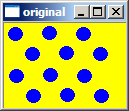
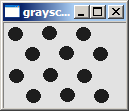
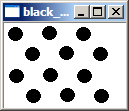
Spot detection using cvBlobsLib
Object detection using the cvBlobsLib is a straightforward matter of creating a CBlobResult object, by giving it the input black and white image and background colour (255); and detecting the blobs themselves by means of the filter method, which in this example is fairly self-explanatory: exclude any blobs whose area is less than 3; output the number of blobs detected:
// Find connected components using cvBlobsLib
blobs = CBlobResult( img_bw, 0, 255 );

// Exclude all blobs smaller than the given value
// The bigger the last parameter, the bigger the blobs need
// to be for inclusion
blobs.Filter( blobs,
              B_EXCLUDE,
              CBlobGetArea(),
              B_GREATER,
              3 );

num_blobs = blobs.GetNumBlobs();
Spot detection using OpenCV
Using raw OpenCV calls to detect and count the objects is achieved with the cvFindContours function as shown in the following code section:
// Find connected components using OpenCV
CvSeq* seq;
CvMemStorage* storage = cvCreateMemStorage( 0 );

cvClearMemStorage( storage );

// cvFindContours the 12 + 1 extra object
// for white backgrounds and black spots, hence
// subtract 1
num_blobs = cvFindContours( img_bw,
			    storage,
			    &seq,
			    sizeof( CvContour ),
			    CV_RETR_LIST,
			    CV_CHAIN_APPROX_NONE,
			    cvPoint( 0, 0 ) ) - 1;
For some reason as yet unclear to me, the cvFindContours returns a count of 13 objects: 12 + one extra, so I have subtracted one in this instance to give the true count. For images with black backgrounds and white objects this seems to be unnecessary.
Downloadable Visual Studio 2008 Project here.
Other posts related to image detection
Tracking Coloured Objects in Video using OpenCV
Displaying AVI Video using OpenCV
Analyzing FlyCapture2 Images obtained from Flea2 Cameras
Integrating the FlyCapture SDK for use with OpenCV
Getting Started with OpenCV in Visual Studio
Object Detection Using the OpenCV / cvBlobsLib Libraries
Comments
4 responses to “OpenCV Detection of Dark Objects Against Light Backgrounds”
THANK YOU VERY MUCH ..
THIS POST IS REALLY HELPFUL AND SIMPLE TO UNDERSTAND.. 🙂
You’re welcome. Any comments and feedback always appreciated.
it showing project name.lib is cannot start… can yu help me with this … plz…
Could you please supply more information? Has the OpenCV / cvBlobsLib libraries been successfully installed in your Visual Studio?
https://technical-recipes.com/?p=238
https://technical-recipes.com/?p=125